Endpoint - Powerful Insurtech Landing Page Template
Endpoint is a single-page hub-and-spoke landing page template built for insurtech API platforms. It combines a live cost-simulator header, an anchor-nav feature matrix, and a lead-capture form into one dark-themed, developer-focused layout. Designed for CTOs, integration leads, and solo developers, it turns a documentation hub into a high-converting API product page.
by Rocket studio
Quick summary
Endpoint is a hub-and-spoke landing page template purpose-built for insurtech API platforms. The layout opens with an interactive API cost simulator, then guides engineers through a five-domain feature matrix covering quoting, binding, claims, payments, and compliance. Every section is designed to build technical trust and move qualified visitors toward requesting API keys.
Who this template is for
This template is built for technical teams and founders who need to present an insurance API platform to developer audiences. It speaks directly to the people who evaluate integrations before anyone else in the buying process.
- CTOs at mid-market carriers migrating off legacy mainframe infrastructure
- Integration leads at managing general agents (MGAs) building quote-bind-issue workflows
- Solo developers at insurtechs who need latency benchmarks and a sandbox before reading documentation
What problem this template solves
Most API product pages are either too marketing-heavy for engineers or too sparse to drive signups. Endpoint bridges that gap. It gives technical visitors the reference-grade detail they need while keeping lead capture integrated at every scroll point.
- Developer audiences abandon pages that lead with sales copy instead of technical proof
- Integration teams need side-by-side schema and rate-limit comparisons before they'll commit to a stack
- Founders lose qualified leads when there is no low-friction sandbox path for engineers who won't fill out a form cold
What you get with this template
You get a fully structured, single-page layout with every component pre-built and positioned for a developer-first audience. The design system, copy structure, and interaction patterns are all defined out of the box.
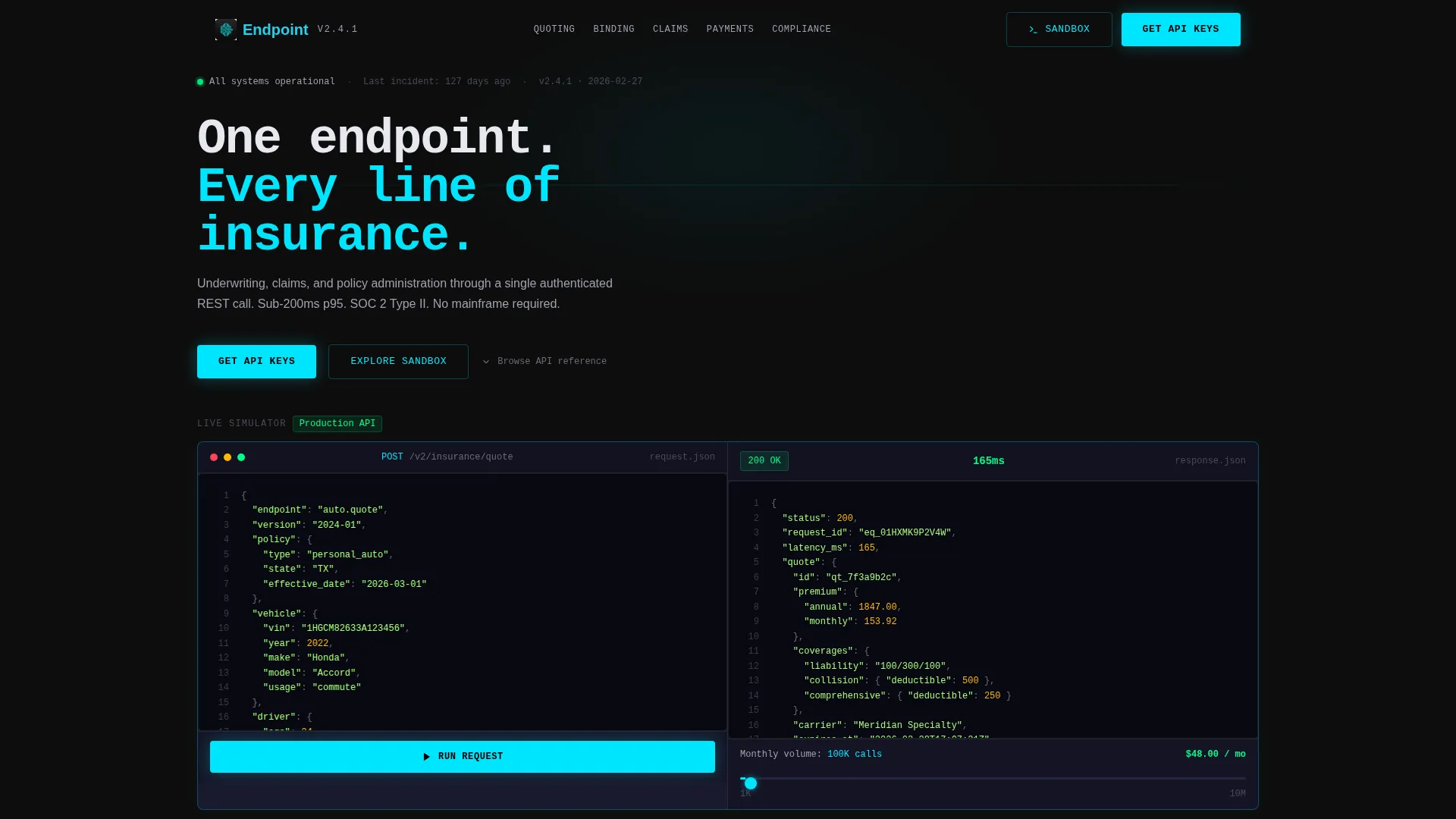
- An interactive header simulator with a JSON request panel, a mock response stream, a latency timer, and a call-volume slider
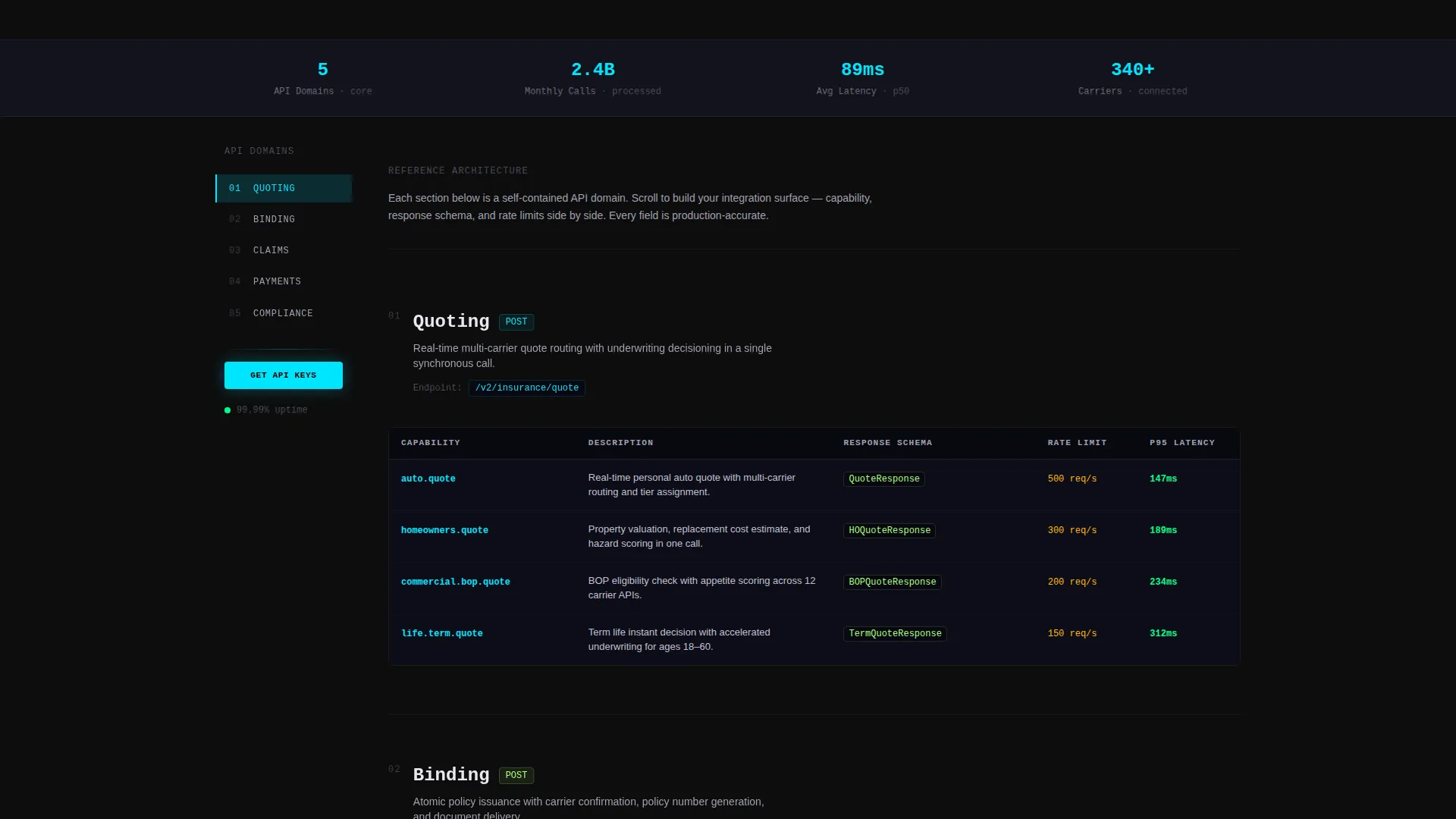
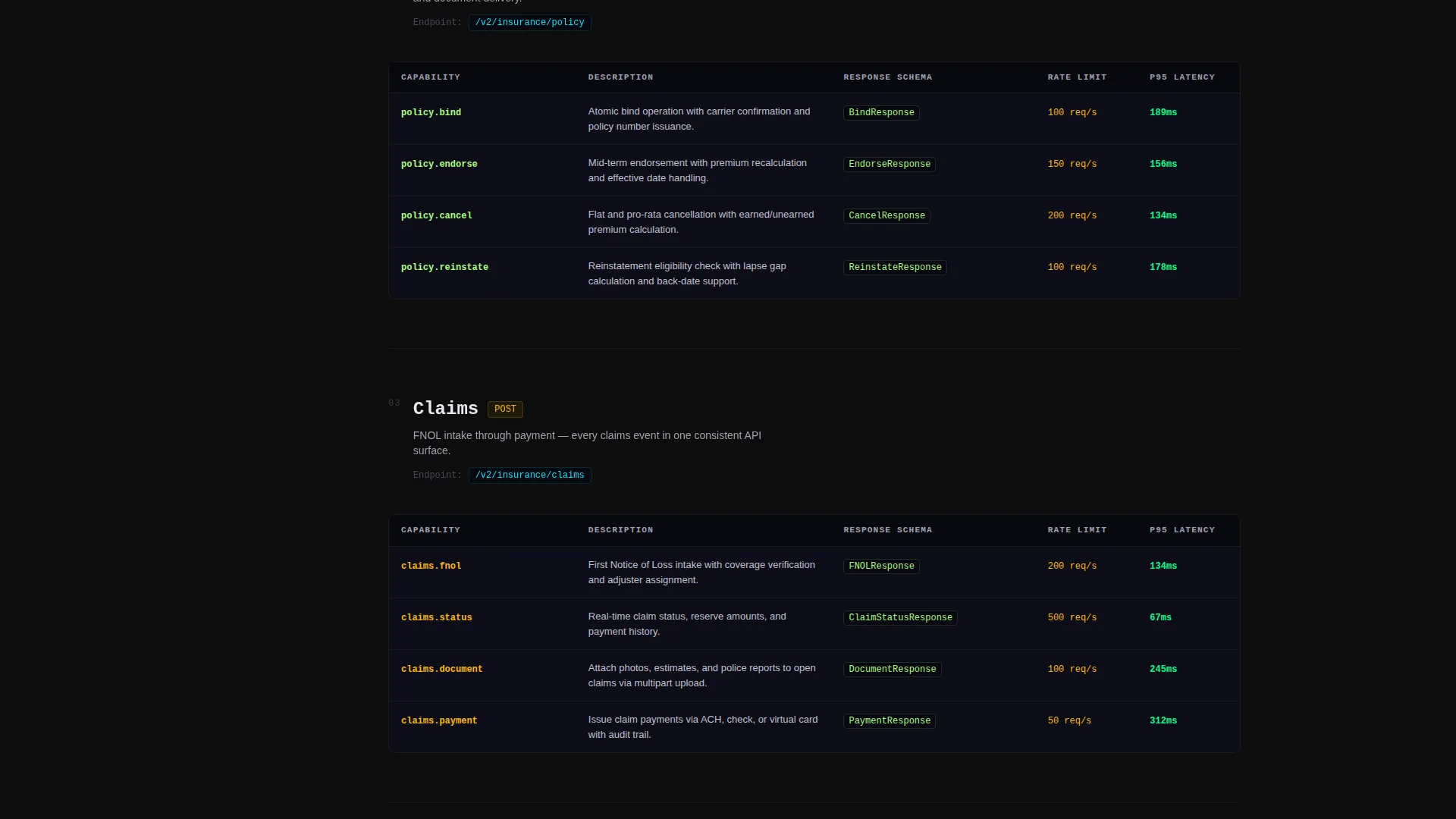
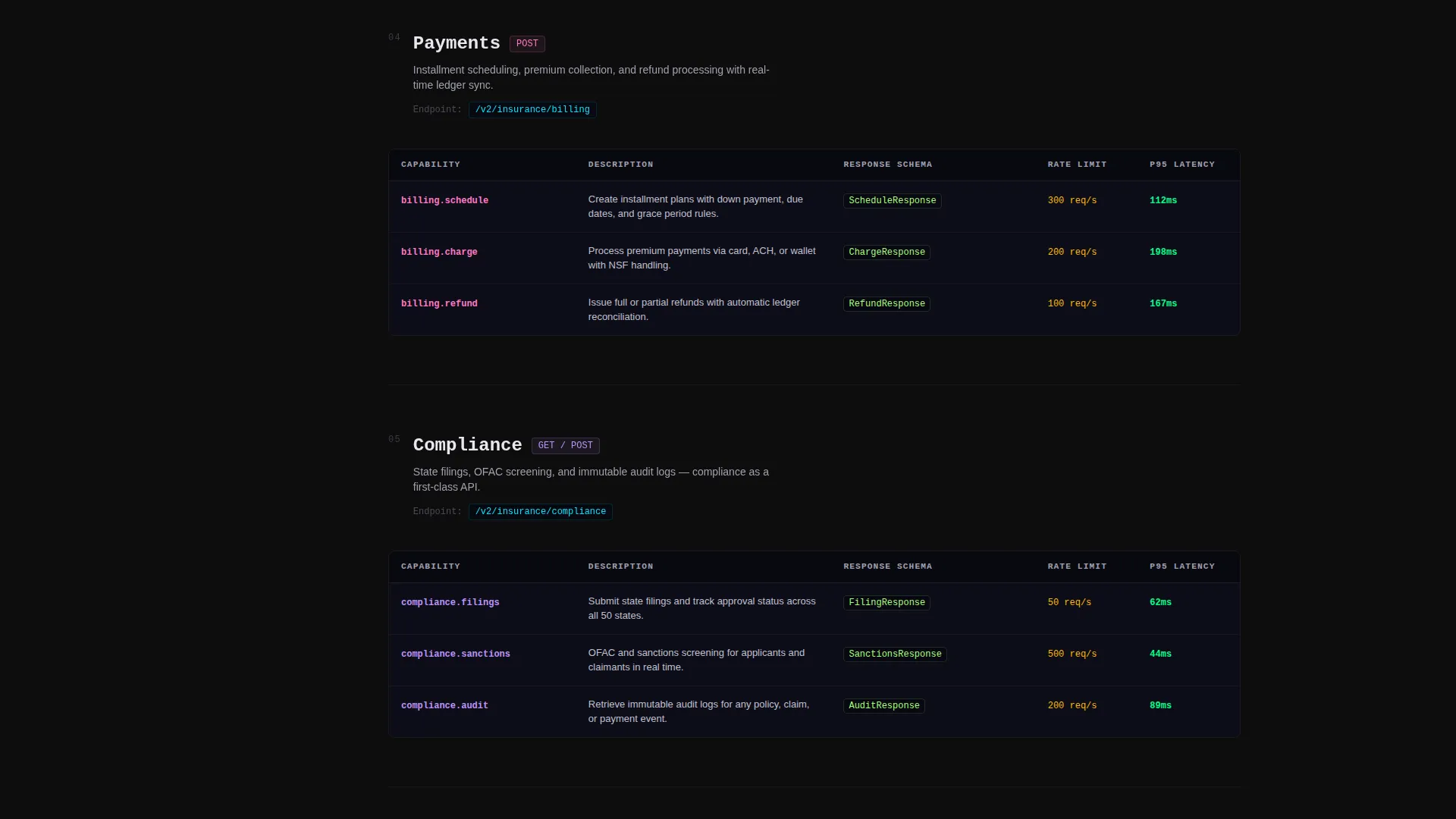
- A left-rail anchor navigation system linking to five dedicated API domain sections, each with a three-column capability matrix
- A lead-generation form capturing work email, company name, estimated monthly call volume, and a SOC 2 compliance checkbox, plus a secondary sandbox path
Feature list
This template ships with six core components that work together to convert technical visitors into qualified leads.
Live API Cost Simulator
The header embeds a working cost estimator directly in the viewport. Visitors edit a pre-filled JSON request body for a sample auto policy quote, watch a mock response stream with a live latency timer, and adjust monthly call volume from 1,000 to 10 million using a slider. The estimated cost updates in real time beneath the response payload.
Anchor Navigation Rail
A persistent left-rail navigation pins to the page as visitors scroll. Each anchor link corresponds to one of five API domains: Quoting, Binding, Claims, Payments, and Compliance. The nav keeps engineers oriented inside a long reference-style page without losing their place.
Five-Domain Feature Matrix
Each API domain section presents a three-column matrix comparing capability, response schema, and rate limits side by side. This format lets integration leads and CTOs evaluate the API against their existing stack without leaving the page.
Persistent "Get Your API Keys" call to action
The primary call-to-action button appears both inside the header simulator and as a fixed element in the anchor nav. This dual placement ensures the conversion path is always one click away regardless of scroll position.
Lead Capture Form with Pre-fill
The signup form captures four fields: work email, company name, estimated monthly call volume, and a SOC 2 compliance checkbox. The call-volume field pre-fills from the visitor's calculator interaction, reducing friction and increasing form completion.
Sandbox Exploration Path
A secondary call-to-action labeled "Explore Sandbox" offers engineers a no-commitment route to test a live API call. This path captures the technical visitor who needs proof of concept before filling out any form.
Page sections overview
| Section | Purpose |
|---|---|
| Header Simulator | Showcases API cost and response in real time |
| Anchor Nav Rail | Keeps visitors oriented across all domains |
| Quoting API Matrix | Compares quoting capability, schema, and limits |
| Binding API Matrix | Details bind workflow specs and rate limits |
| Claims API Matrix | Outlines claims handling and response schema |
| Payments API Matrix | Covers payment capability and schema detail |
| Compliance API Matrix | Presents compliance checks and rule limits |
| Lead Capture Form | Converts interest into qualified API key requests |
Design & branding system
The template uses a Carbon Fiber color system built around a server-rack aesthetic. Every color choice is engineered to reduce visual noise so technical content reads clearly at a glance.
- Primary background in deep carbon black (#0D0D0D), card surfaces and code blocks in graphite weave (#1A1A2E), and secondary text with divider lines in brushed aluminum (#A0A0B0)
- Electric cyan (#00E5FF) applied to every interactive element, active navigation state, and syntax-highlighted keyword, creating a single consistent visual signal for anything clickable
- Monospace typography in the headline and code panels reinforces the terminal-style aesthetic and signals developer credibility immediately
Mobile & speed optimization
The layout is structured to stay usable on smaller viewports without losing its technical density. The anchor nav and matrix tables are the two components most affected by screen size, and both are handled within the template structure.
- The left-rail anchor navigation adapts to narrower screens so engineers on tablets and phones can still jump between API domain sections
- Code block panels and the JSON simulator are contained within scrollable regions, preventing horizontal overflow on mobile viewports
How this template helps you convert
Endpoint is built around the insight that developer leads convert through proof, not persuasion. Every layout decision supports that principle.
- The live simulator lets visitors calculate real costs and see mock responses before reading a single line of marketing copy, building technical credibility in the first five seconds.
- The pre-filled call-volume field on the lead form removes a friction point that typically causes high drop-off on API signup pages, using data the visitor already entered in the calculator.
- The sandbox path captures engineers who won't submit a form cold, giving them a conversion route that matches their evaluation behavior and brings them back to the form after a successful test call.
Other information about this template
This template is categorized under Startup and Launch, specifically within the InsurTech Startup subcategory and the InsurTech API Documentation niche. It is built on a Dashboard Pro theme with a Hub and Spoke (Anchor Nav) template style, a Feature Matrix creative direction, and a Calculator/Estimator header concept, all matched to a Lead Generation landing page direction.
- The Carbon Fiber color system is designed to feel like the inside of a server rack: matte black panels with single lines of electric cyan light
- The template is optimized for an intersection match score of 13, meaning every design and layout decision is tightly aligned to the InsurTech API Documentation use case
- This is a single-page layout, not a multi-page site, making it fast to deploy as a standalone API product landing page or as a hero page within a larger developer portal
Theme
Dashboard Pro
Creative direction
Feature Matrix
Color system
Carbon Fiber
Style
Hub & Spoke (Anchor Nav)
Direction
Lead Generation
Page Sections
Live API Cost Simulator Header
Left-rail Anchor Navigation
Three-column Feature Matrix
Pre-filled Lead Capture Form
Dual Persistent Call to Action Placement
Sandbox Exploration Secondary Path
Related questions
Who is this template built for?
Can I customize the API domain sections in the feature matrix?
How does the lead form connect to the cost calculator?
What is the Explore Sandbox path and who is it for?
Is this a single-page layout or a multi-page site?



