DNA Data Storage Technology Reviews Website Template
Encode is a hub-and-spoke landing page template built for a DNA data storage newsletter and community. It combines an atmospheric dashboard preview, anchor navigation, filterable company directories, sortable benchmark tables, and a freemium unlock flow. The design runs a bioinformatics terminal aesthetic, deep teal, phosphor green, and slate, built to earn trust from researchers, analysts, and enterprise decision-makers.
by Rocket studio
Quick summary
Encode is a single-page community intelligence template designed for a DNA data storage newsletter. It uses hub-and-spoke anchor navigation to guide visitors through a landscape map, synthesis tracker, read/write benchmarks, funding radar, and a community forum. The freemium conversion model shows real data first, then surfaces contextual unlock prompts at every depth point.
Who this template is for
This template is built for technically demanding audiences who need more than a basic newsletter signup page. It works best when the product itself is an intelligence platform with layered depth.
- Biotech postdocs and researchers who need a credible, data-dense community hub for oligonucleotide synthesis and DNA storage breakthroughs
- Enterprise CTOs and infrastructure decision-makers evaluating synthetic DNA as a cold storage alternative to magnetic tape
- Venture capital analysts building thesis decks on the nucleotide economy who need a single source for deal flow and benchmark data
What problem this template solves
Most newsletter landing pages undersell the depth of their product. They ask for an email before showing any real value. Encode flips that dynamic entirely.
- Visitors arrive to a working dashboard preview, not a static hero image, which establishes immediate credibility
- The grayed-out data layer makes the free tier feel generous while making the paid tier feel genuinely essential
- A generic page cannot segment researchers, investors, and enterprise buyers at the point of conversion; Encode's inline role-selection form does
What you get with this template
The template delivers a fully structured, single-page intelligence hub with persistent navigation and multiple conversion entry points built into the scroll experience.
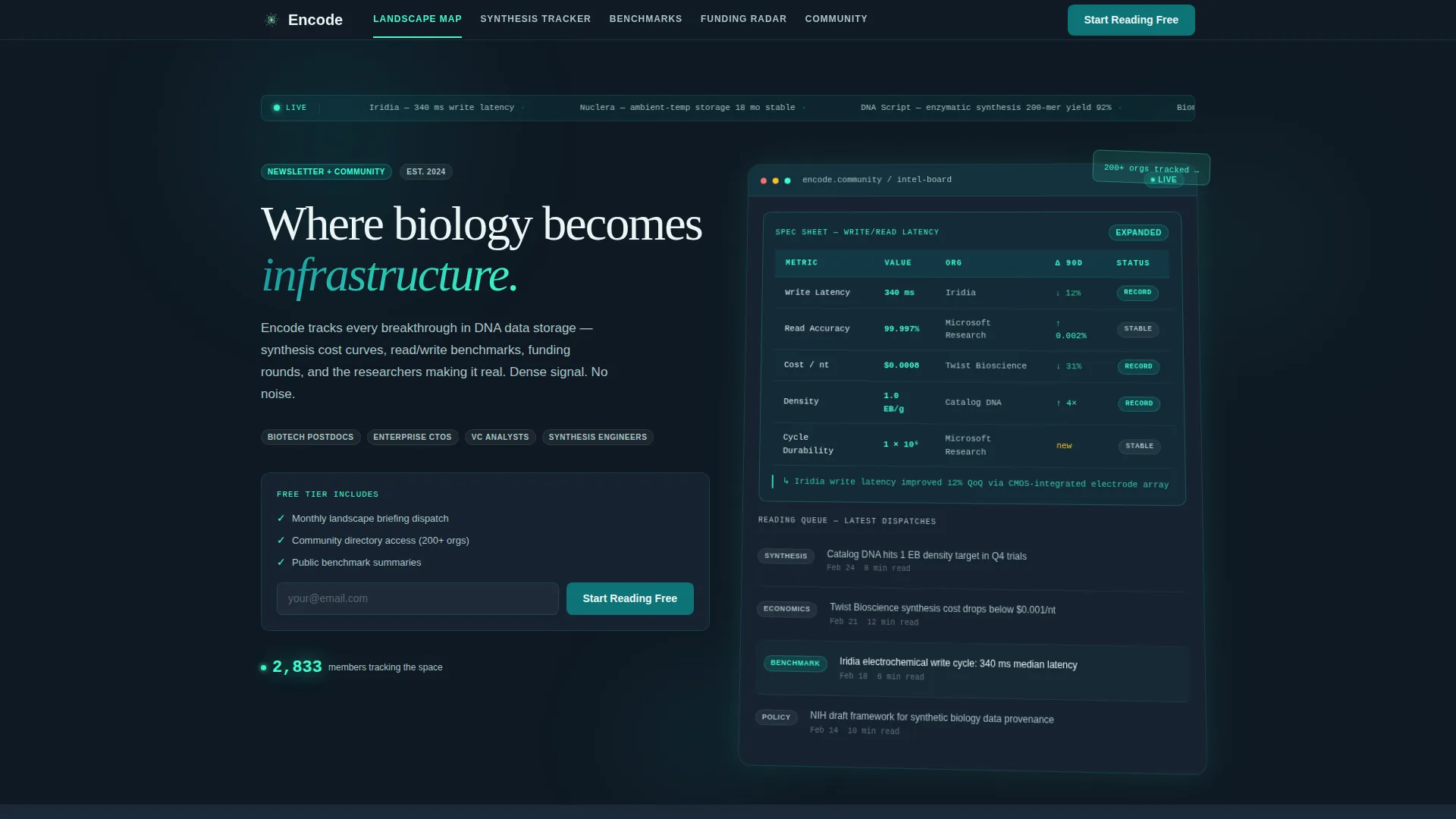
- A hero section with an angled, mid-scroll dashboard preview showing a live member count ticker, a reading queue, and an expanded spec sheet card
- Five anchor-linked spoke sections, Landscape Map, Synthesis Tracker, Read/Write Benchmarks, Funding Radar, and Community Forum, each with sortable tables, comparison matrices, and annotated chart layouts
- Two distinct conversion paths: a pinned "Start Reading Free" call to action in the nav bar and a contextual "Unlock Full Benchmarks" inline form that surfaces after any grayed-out module interaction
Feature list
This template is built around precision content modules that escalate in technical density as the visitor scrolls deeper.
Anchor Navigation Bar
A persistent top navigation bar links to every spoke section by name. The primary call to action is pinned inside the bar so it is always visible. Teal headers and phosphor green hover states keep orientation sharp across the full page length.
Atmospheric Dashboard Preview
The hero features a stylized intel board displayed mid-scroll at a slight angle. It shows a timeline of recent breakthroughs, a live member count ticker, a filterable company directory grid, and a reading queue. One card is expanded to display a full spec sheet on write/read cycle latency.
Sortable Data Tables and Comparison Matrices
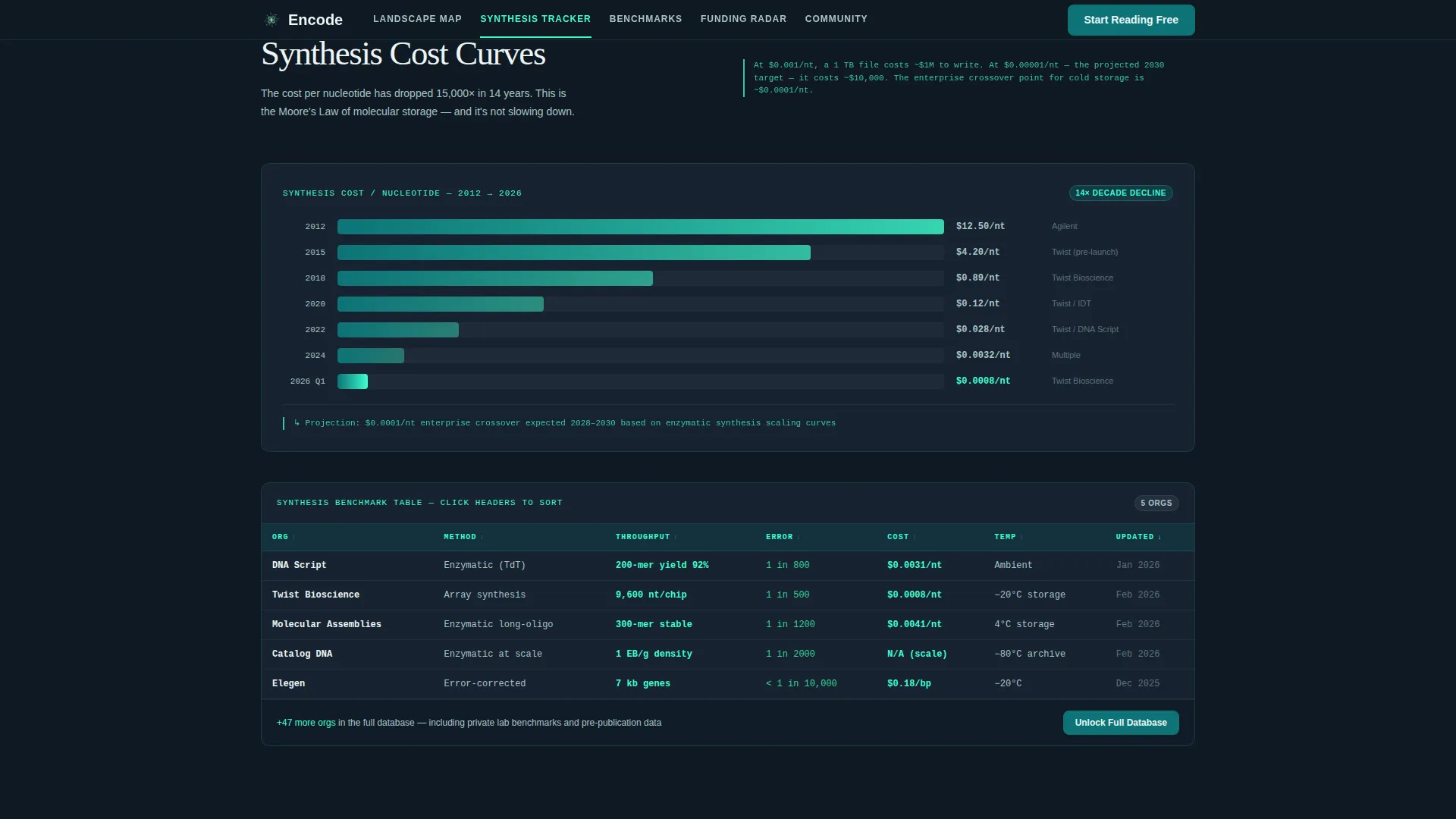
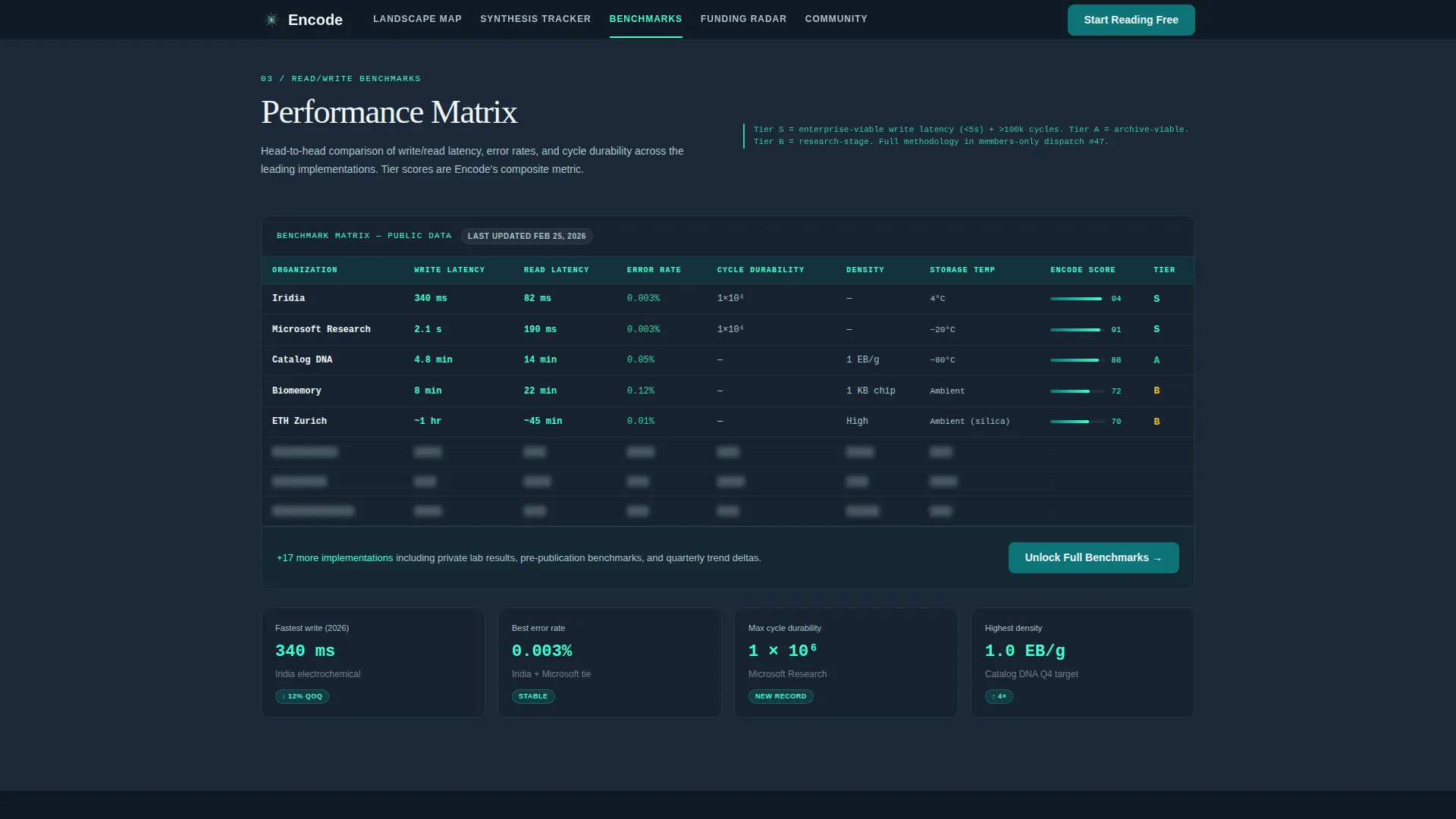
Each spoke section opens as a detailed module with sortable benchmark tables and side-by-side comparison matrices. The layout escalates from broad market orientation at the top to granular technical specifications deeper in the page.
Grayed Unlock Layer with Contextual Forms
Every data-heavy section ends with a partially visible, grayed-out data layer. Interacting with any locked module expands a contextual inline form asking for email, role, and primary interest area, creating a soft but effective upgrade prompt.
Freemium Conversion Architecture
The page supports two membership tiers by design. Free access covers the monthly landscape briefing and community directory. Full membership unlocks real-time benchmark tracking, synthesis cost databases, and private researcher channels. Both tiers have dedicated calls to action.
Directory and Discovery Grid
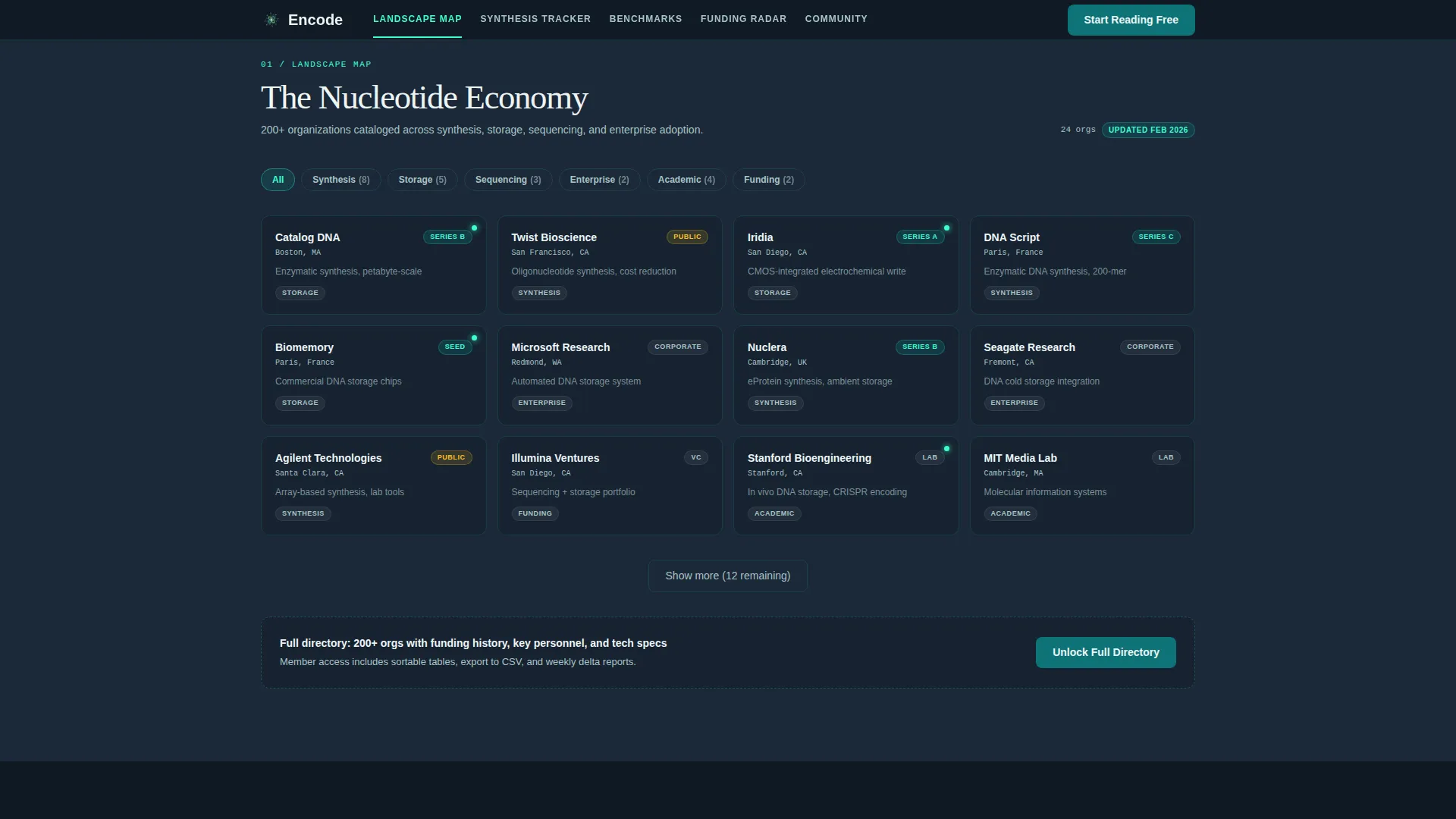
The Landscape Map section includes a filterable grid of 200-plus companies operating in the DNA data storage space. Filter tabs and scroll-reveal animations make it interactive and scannable without requiring a page reload.
Page sections overview
| Section | Purpose |
|---|---|
| Hero Dashboard Preview | Establishes credibility with an animated intel board and live member ticker |
| Landscape Map | Filterable 200-plus company directory with category tabs |
| Synthesis Tracker | Cost curves and sortable synthesis benchmark table |
| Read/Write Benchmarks | Comparison matrix with grayed unlock layer |
| Funding Radar | Deal flow table with contextual inline unlock form |
| Community Forum | Member engagement module and private channel access prompt |
| Footer | Horizontal flow footer with nav links and membership options |
Design & branding system
The visual identity uses the Teal Catalyst color system, which pulls its reference from bioinformatics terminal displays and dark laboratory environments. The result is clinical but alive with signal.
- Color palette: deep sequencing teal (#0D7377) for headers and navigation, phosphor screen green (#3CFFD0) for live data points and hover states, cold storage slate (#1B2838) as the primary background, and nucleotide white (#EDF5F5) for spec-heavy reading surfaces
- Typography pairing: Fraunces for display headlines to bring editorial weight, and DM Sans for body text and user interface elements to keep reading surfaces clean and fast
- The aesthetic reads like a bioinformatics terminal at 2 a.m., phosphor glow over a dark lab background, annotated and dense, with enough white-space on content blocks so the eye can breathe
Mobile & speed optimization
The template is built desktop-first to serve postdocs and analysts working on workstations, while remaining fully responsive for mobile visitors.
- Static sections use Server Components to keep initial load light; interactive tables, filters, and unlock overlays use Client Components for snappy in-page behavior
- Scroll-reveal animations, ticker animations, and table sort interactions are layered progressively so they do not block the visible content from rendering first
How this template helps you convert
The conversion strategy is built into the structure of the page itself. Visitors earn trust at every section before any gate appears.
- The hero dashboard preview shows real, specific data points immediately, making the community feel active and worth joining before any email is requested
- The pinned "Start Reading Free" call to action in the anchor nav reduces friction for top-of-funnel visitors who are ready to join after the first scroll
- The grayed unlock layer surfaces the "Unlock Full Benchmarks" inline form only after a visitor interacts with locked data, capturing self-qualified leads at the highest-intent moment in the session
Other information about this template
This template is purpose-built for the intersection of biotech research publishing and data infrastructure intelligence platforms. A few additional details are worth noting.
- The template style is Hub and Spoke with Anchor Navigation, suited for long-form single-page products with multiple distinct content modules
- The creative direction follows a Spec Sheet approach, meaning the page reads like a reference document rather than a marketing brochure
- The header concept is Dashboard Preview, which distinguishes this template from standard hero-image layouts and sets a working-tool tone from the first second on page
- The theme is Directory and Discovery, which means the filterable grid and sortable tables are first-class design elements, not secondary features
- Animation intensity is high: scroll-reveal transitions, ticker animations, table sort interactions, and unlock overlay effects are all specified in the build
Theme
Directory & Discovery
Creative direction
Spec Sheet
Color system
Teal Catalyst
Style
Hub & Spoke (Anchor Nav)
Direction
Freemium/Trial
Page Sections
Persistent Anchor Navigation Bar
Atmospheric Dashboard Hero Preview
Filterable Company Directory Grid
Sortable Benchmark Tables and Matrices
Grayed Unlock Layer with Inline Forms
Two-tier Freemium Conversion Architecture
Related questions
Who is this landing page template designed for?
What does the freemium conversion model look like in practice?
How does the grayed unlock layer work?
Can I customize the color palette and typography?
Does this template support both desktop and mobile layouts?



