Duplex & Multi-Family Real Estate Cost Estimator Website Template
Duplex is a split-screen landing page template built for multifamily development firms. It leads with a live ROI calculator, then guides visitors through escalating project case studies and a two-step consultation form. The design uses boardroom navy, ivory linen, and decisive gold to deliver a private-wealth aesthetic that speaks directly to equity-rich professionals ready to invest in duplexes and fourplexes.
by Rocket studio
Quick summary
Duplex is a single-page, split-screen template designed for development firms converting single-family lots into income-producing duplexes and fourplexes. A live ROI calculator anchors the top fold. Scrolling reveals real project case studies with actual financial figures. The page closes with a two-step consultation form and a secondary lead magnet for email capture.
Who this template is for
This template is built for multifamily development firms that need to attract qualified investors and landowners rather than casual browsers. It suits teams handling end-to-end projects, from zoning analysis through certificate of occupancy, who want their page to feel as credible as their deal memos.
- Development firms marketing duplex and fourplex conversion services to high-net-worth clients
- Boutique real estate developers presenting completed project portfolios alongside financial outcomes
- Firms offering lot-to-certificate-of-occupancy services who want a premium, data-led first impression
What problem this template solves
Most real estate development pages lead with photography and taglines. They look polished but tell a prospective investor nothing useful in the first ten seconds. The visitor who arrives at midnight comparing ADU versus duplex return on investment needs numbers, not mood. This template solves that mismatch by replacing the hero image with a working financial calculator.
- Visitors receive a personalized cash flow estimate before they read a single line of copy
- The page builds trust through real project financials rather than stock photography and generic claims
- Two conversion paths capture both decision-ready leads and early-stage prospects researching their options
What you get with this template
You get a complete single-page layout structured around proof and conversion. Every section is designed to move a skeptical, numbers-driven audience from curiosity to commitment.
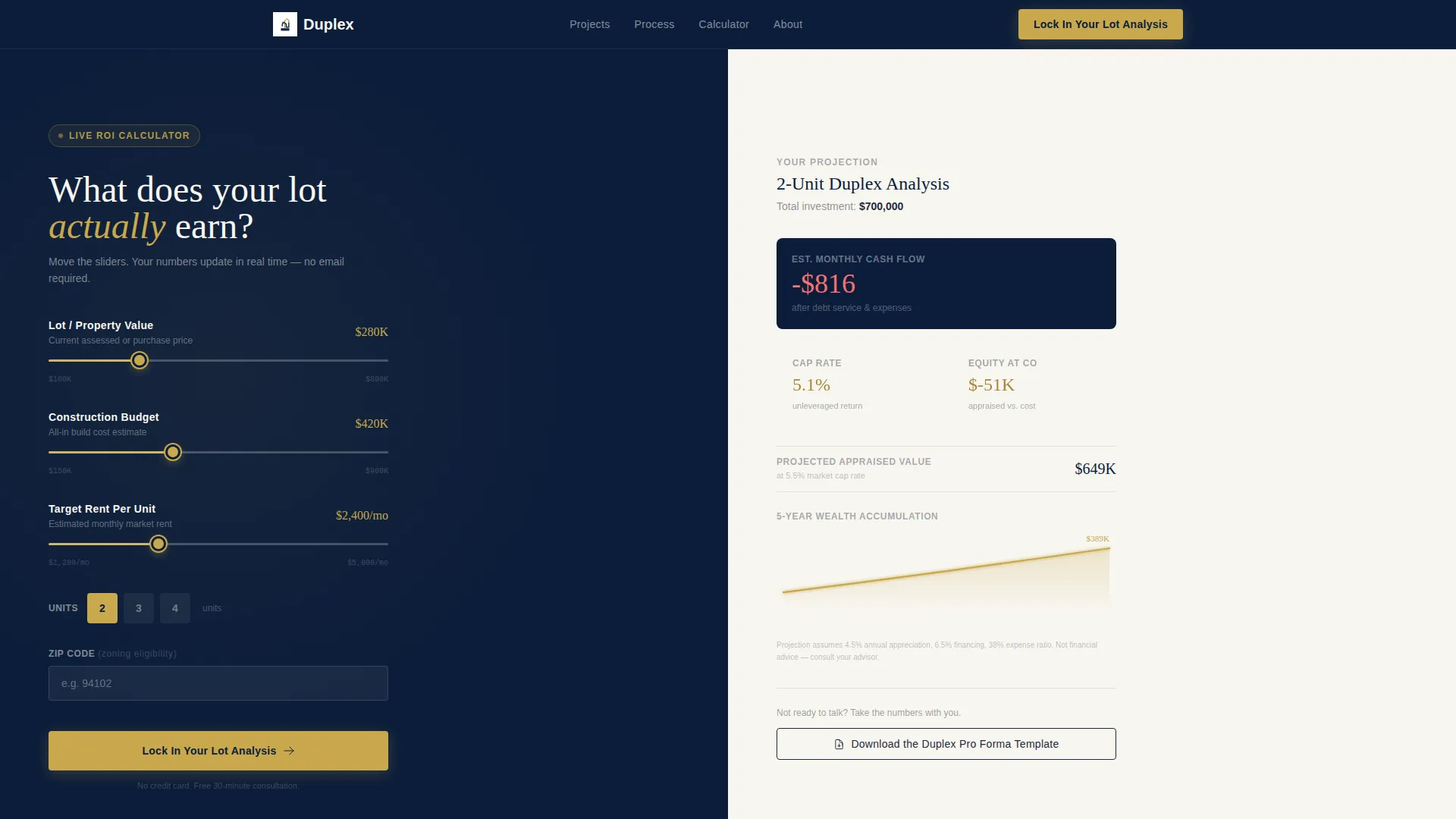
- A top-fold ROI calculator with sliders for lot value, construction budget, and target rent per unit
- A scrolling case study section with completed project photographs paired with actual financial tables
- A two-step consultation form and a secondary email-capture path for the pro forma download
Feature list
This template includes a focused set of components built specifically for a financially sophisticated real estate audience.
Interactive ROI Calculator Panel
The calculator occupies the full left half of the top fold against deep navy. Three sliders cover lot value, construction budget, and target rent per unit. A zip code field handles zoning eligibility input. Results display instantly on the right panel in ivory, showing projected monthly cash flow, cap rate, equity on completion, and a five-year wealth accumulation curve rendered in gold.
Scrolling Project Case Studies
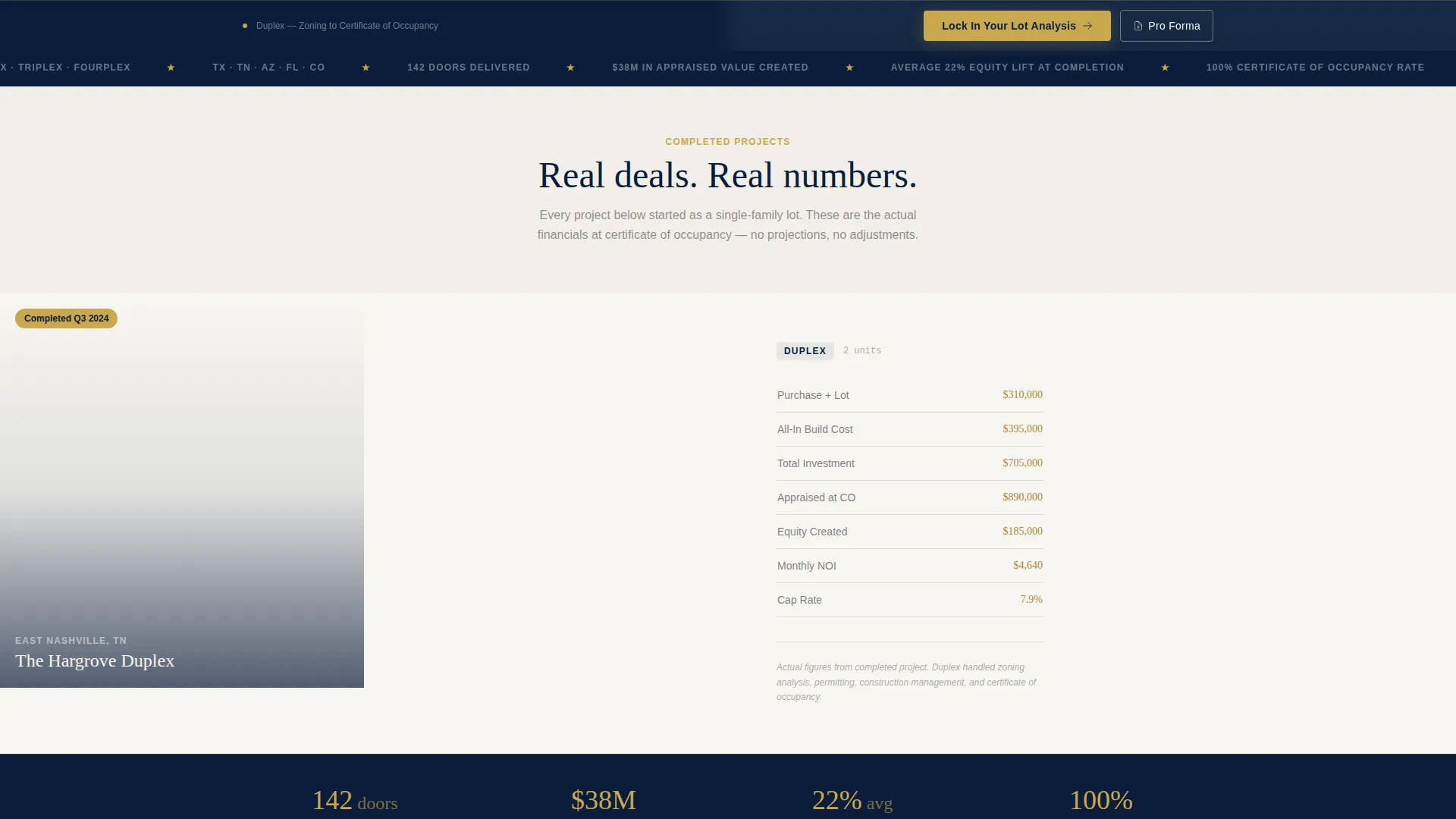
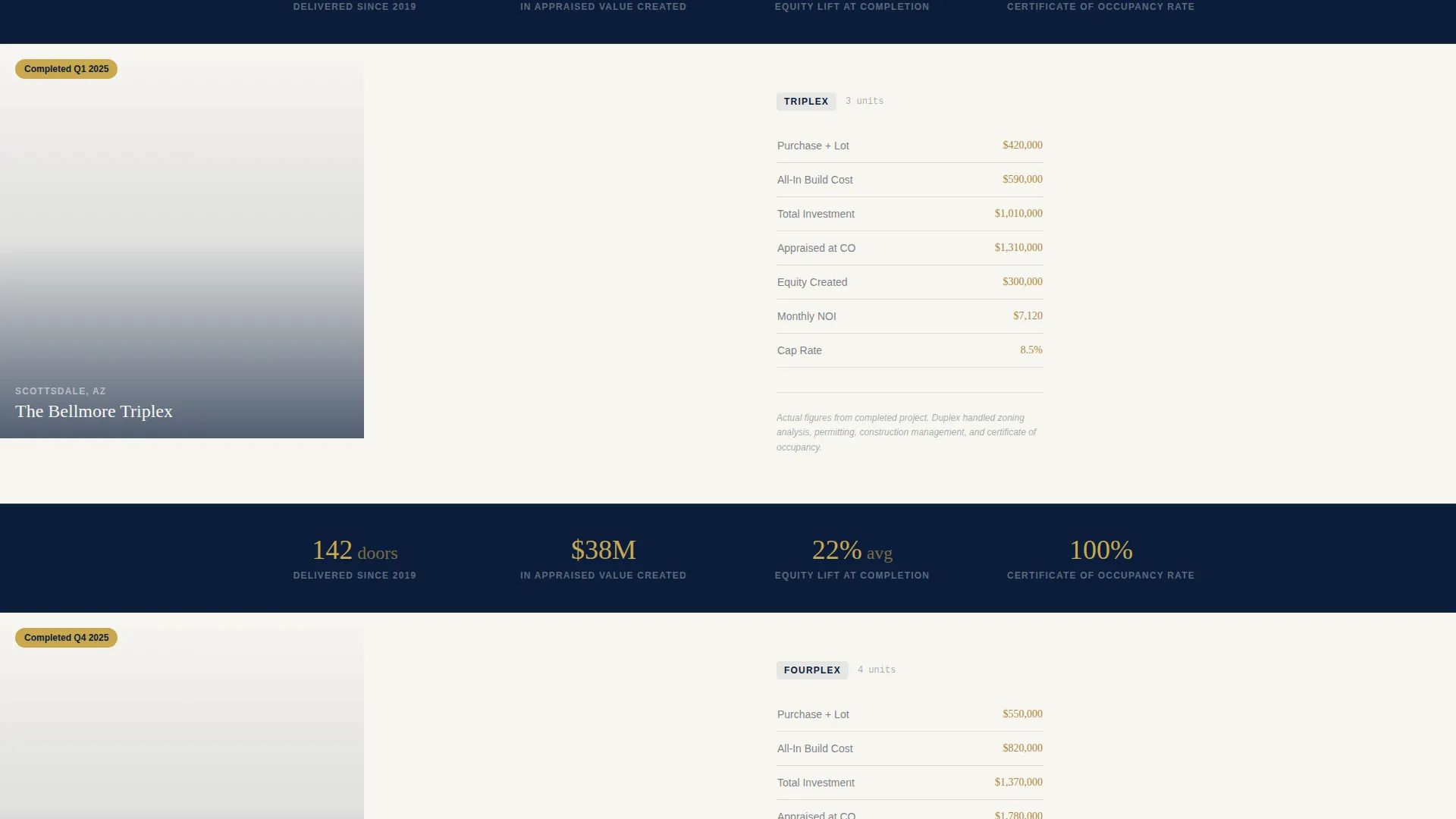
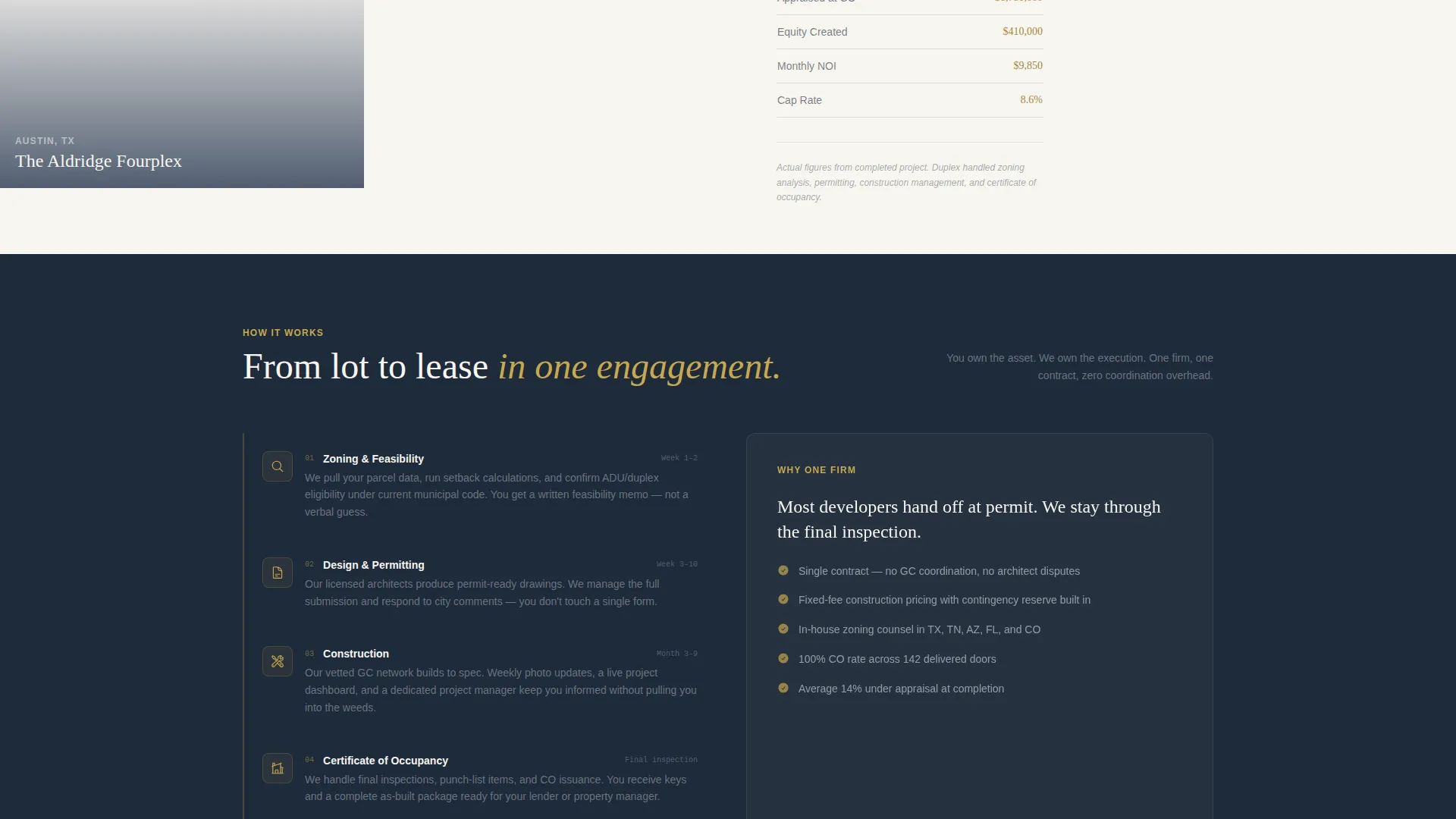
Below the fold, alternating split-screen panels each pair a completed duplex or fourplex exterior photograph on the left with a clean financial table on the right. Projects scale from two-unit to three-unit to fourplex as the visitor scrolls. Each case study shows purchase price, build cost, appraised value, and monthly net operating income.
Portfolio Stat Callout Bars
Between case study panels, full-width navy bars display single portfolio-wide statistics. Examples built into the layout include total doors delivered, aggregate appraised value created, and average equity lift at completion. These bars reinforce credibility with hard numbers at the exact moment a visitor is considering the project evidence they just scrolled past.
Two-Step Consultation Form
The primary call to action, labeled "Lock In Your Lot Analysis," opens a two-step form. Step one collects lot address, property type (vacant lot, teardown, or existing single-family residence), and estimated budget range. Step two captures full name, phone number, and preferred consultation window. The form flow is designed to reduce friction by asking for property details before personal contact information.
Secondary Lead Magnet Path
Below the primary form, a charcoal outline button offers a downloadable duplex pro forma template in exchange for an email address. This captures prospects who are still running numbers and are not yet ready for a consultation call. Both conversion paths are visible on the same page without competing visually.
Fixed Bottom Call-to-Action Bar
After the calculator renders results, a gold "Lock In Your Lot Analysis" button appears fixed in the bottom bar during the entire scroll session. This persistent element keeps the primary conversion action accessible without interrupting the case study reading experience.
Page sections overview
| Section | Purpose |
|---|---|
| ROI Calculator (Left) | Lets visitors estimate cash flow, cap rate, and equity using their own lot and budget inputs |
| Calculator Results (Right) | Displays personalized financial projections including a five-year wealth curve in gold |
| Case Study: Duplex | Pairs a completed two-unit exterior photo with its actual purchase, build, and appraisal figures |
| Case Study: Three-Unit | Raises the stakes with a larger completed project and its corresponding financial table |
| Case Study: Fourplex | Shows the largest project scale alongside net operating income and appraised value data |
| Portfolio Stat Bars | Announces portfolio-wide proof points in navy between each project case study |
| Primary call to action Form | Two-step form capturing lot details then contact information for a consultation booking |
| Secondary Lead Magnet | Email-only capture offering a downloadable pro forma for prospects still researching |
| Fixed Bottom Bar | Persistent gold call to action button keeping the consultation action visible throughout the scroll |
Design & branding system
The visual identity follows an Executive Suite theme. Every color choice is intentional and carries a specific role in the hierarchy of the page. The palette feels like a private wealth manager's office: dark surfaces, brass accents, and clean ivory for data.
- Boardroom navy (#0B1D3A) dominates the top fold and section dividers; polished charcoal (#1E2A3A) carries body text
- Ivory linen (#F8F6F1) provides breathing room in data-heavy sections, keeping financial figures easy to scan
- Decisive gold (#C9A84C) appears exclusively on buttons, calculator outputs, and key financial figures to signal where money is being discussed
Mobile & speed optimization
The split-screen layout is structured to adapt cleanly across screen sizes. Financial figures and calculator outputs remain legible and scannable on smaller viewports without losing the premium feel of the desktop design.
- Calculator sliders and the zip code input field are sized for comfortable thumb interaction on touch screens
- Case study financial tables reflow into a single-column stacked layout on mobile so numbers stay readable
- The fixed bottom call-to-action bar remains accessible on mobile without obscuring content during scroll
How this template helps you convert
The conversion architecture is built on a simple principle: give the visitor their number first, then prove that real clients hit theirs.
- The calculator delivers a personalized financial projection before any sales copy appears, establishing immediate relevance and reducing skepticism in an audience that already knows the questions to ask
- Escalating case studies build a pattern of proof, each project slightly larger and the financial outcome slightly more impressive, so trust compounds with every scroll
- Two distinct conversion paths, a direct consultation booking and an email-only pro forma download, capture leads at different stages of readiness without sending either group to a dead end
Other information about this template
This template is designed as a standalone single-page experience. It does not require additional pages or navigation menus. The layout suits firms in the duplex and multifamily real estate space who want a direct sales and lead generation page that reflects the seriousness of a high-value investment conversation.
- The template fits use cases including duplex development marketing, multifamily lot conversion firms, and real estate investment landing pages targeting equity-rich professionals
- The pro forma download secondary path makes this template useful for content-led lead generation alongside the direct consultation flow
- The design system is built on the Executive Suite theme with a navy authority color palette, making it straightforward to apply consistent firm branding across buttons, headings, and financial callouts
- The page type is a single-page landing page with no internal navigation, keeping visitor attention focused on one decision
Theme
Executive Suite
Creative direction
Spatial & Architectural
Color system
Midnight Blue
Style
Full-Width Immersive
Direction
Lead Generation
Page Sections
Interactive ROI Calculator with Live Results
Scrolling Project Case Studies
Portfolio Stat Callout Bars
Two-step Consultation Form
Email Lead Magnet for Pro Forma Download
Fixed Bottom Call-to-action Bar
Related questions
Who is this landing page template designed for?
Can I customize the calculator inputs and result fields?
What are the two conversion paths included in the template?
Does the template include real project case studies?
What is the color system used in this template?



