Drift - Immersive Adventure Landing Page Template
Drift is a horizontal scroll landing page built for Bali adventure tour operators. It moves visitors east across the island through full-viewport destination cards, each with looping video, live pricing, and star ratings. A coral itinerary tray builds as visitors explore, pulling them toward a single confident booking action before they close the tab.
by Rocket studio
Quick summary
Drift is a horizontal scroll landing page designed for Bali adventure tour marketplaces. Visitors swipe through full-viewport destination cards spanning Uluwatu to Amed, building a custom itinerary tray as they go. The Marine and Coastal visual identity, anchored in deep greens and living coral, makes the page feel as alive as the experiences it sells.
Who this template is for
This template suits tour operators and adventure travel businesses that sell multiple Bali experiences in one place. It works well for operators who need to showcase distinct destinations without collapsing everything into a single list.
- Bali-based tour operators running speedboat, trekking, and snorkel experiences
- Adventure travel marketplaces offering multi-destination itinerary building
- Independent guides or agencies targeting honeymooners, digital nomads, and family groups
What problem this template solves
Most travel pages force visitors to scroll endlessly through a flat list of tours. That kills the mood before anyone reaches the booking button. Drift solves this by making the browsing experience feel like the adventure itself.
- Visitors lose interest when a travel page feels like a product catalogue
- Tour operators struggle to communicate the geographic range of their offerings
- Browsers who are not ready to pay still leave without sharing contact details
What you get with this template
You get a single, fully designed horizontal scroll landing page structured around an interactive destination explorer. Every major booking touchpoint is built in, from individual tour cards to the full itinerary tray.
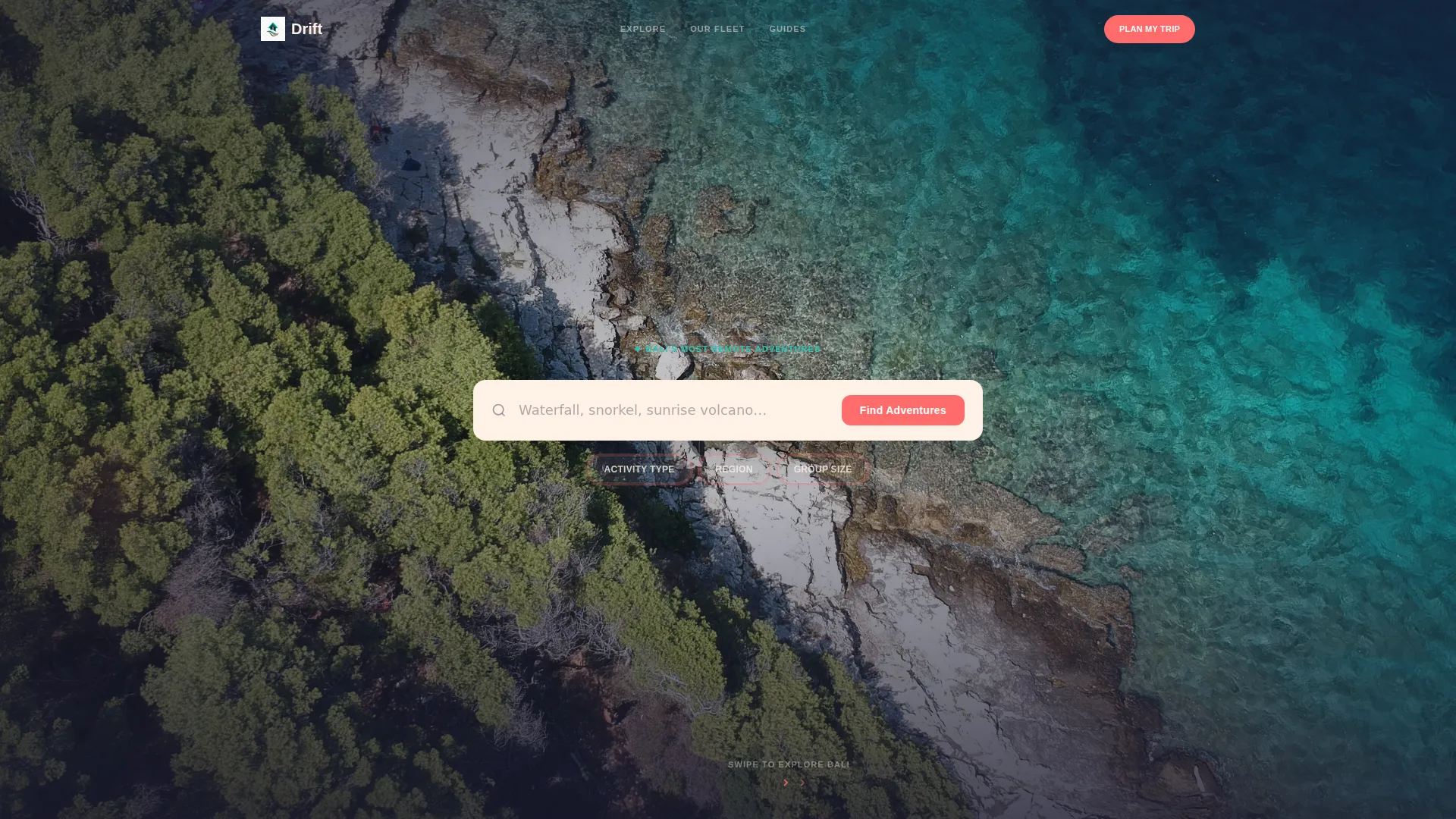
- A full-width drone-footage header with an oversized search box and three pill filters
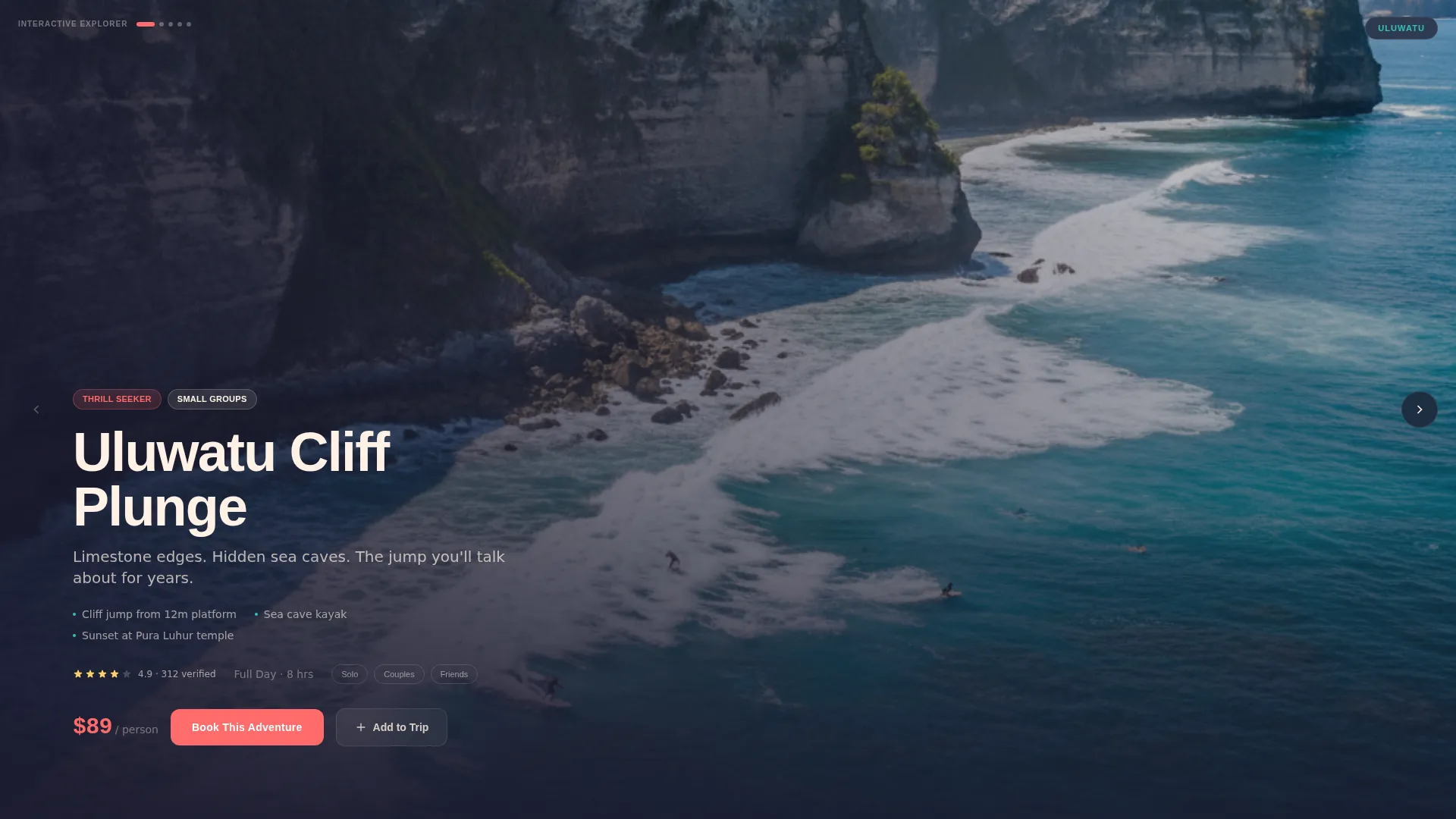
- Horizontal destination panels for Uluwatu, Ubud, Mount Batur, and Amed, each with looping video, pricing, and star ratings
- A dual-path conversion system with per-card booking buttons and an itinerary tray that closes with a departure picker, headcount stepper, and hotel pickup field
Feature list
This template includes a focused set of interactive components designed around how adventure travelers actually browse and book.
Horizontal Scroll Destination Explorer
Swiping right moves visitors geographically east across Bali. Each panel is a full-viewport destination card with a looping five-second video background, so the page builds a sense of forward motion and discovery rather than passive browsing.
Oversized Search Header
The header is a full-width slow-panning drone shot with a warm cream search field centered on top. Ghost text reads "Waterfall, snorkel, sunrise volcano..." and three coral pill filters sit beneath it for Activity Type, Region, and Group Size. The search box acts as the primary invitation rather than a competing headline.
Interactive Itinerary Tray
A sticky tray at the bottom of the screen grows each time a visitor taps "Add to Trip" on a destination card. The tray builds visibly, creating a satisfaction loop that makes visitors more committed the longer they explore. It culminates in a "Lock In My Trip" button that reveals the full booking form.
Dual Conversion Paths
Every tour card carries its own "Book This Adventure" button for direct purchase. The itinerary tray's "Lock In My Trip" button serves visitors who want to bundle multiple experiences. A third path, "Send My Itinerary," captures email leads from browsers who are not yet ready to pay.
Tour Card Components
Each destination card layers looping video, a star rating from verified travelers, tiered pricing, and an availability badge in living coral. The "Add to Trip" button is sticky within each card, so it remains accessible while visitors read the experience details.
Full Booking Form Overlay
The "Lock In My Trip" action slides up to reveal a compact booking form. It includes a departure date picker, a headcount stepper, a WhatsApp or email toggle for confirmation, and a single field for hotel pickup address. This keeps the commitment step friction-low and personal.
Page sections overview
| Section | Purpose |
|---|---|
| Drone footage header | Anchors brand mood and invites search input |
| Pill filter bar | Narrows results by activity, region, and group size |
| Uluwatu destination card | Showcases cliff jump and coastal experiences |
| Ubud destination card | Features river rafting and jungle activities |
| Mount Batur card | Highlights sunrise trek experience |
| Amed destination card | Presents freediving and reef experiences |
| Itinerary tray | Accumulates selected tours and drives final booking |
| Booking form overlay | Collects departure date, group size, and pickup details |
| Lead capture path | Sends itinerary to email for undecided browsers |
Design & branding system
The Rainforest color system sits beneath a Marine and Coastal theme to create a palette that feels like snorkeling over a reef drop-off. Rich darkness below, electric color darting through the middle, and warm light filtering from above.
- Deep canopy green (#1B4332) and black volcanic sand (#1A1A2E) form the base layers, giving cards visual depth
- Shallow-reef turquoise (#2EC4B6) handles interactive highlights, while frangipani cream (#FFF1E6) keeps text and card surfaces readable
- Living coral (#FF6B6B) drives all action-oriented elements including price tags, booking buttons, availability badges, and the pulsing pill filters
Mobile & speed optimization
The horizontal scroll mechanic is designed to feel natural on touch devices, where a swipe gesture matches the motion of browsing through destination panels. The full-viewport video cards and sticky tray are structured for smooth performance on mobile screens.
- Full-viewport panels adapt to portrait orientation without losing the geographic east-to-west narrative
- The sticky itinerary tray and coral action buttons remain accessible without overlap on smaller screen sizes
- Looping five-second video backgrounds are contained within individual panels, keeping each card self-sufficient
How this template helps you convert
Drift is built around two ideas: make browsing feel like the experience itself, and never let a visitor leave completely empty-handed.
- The itinerary tray creates a commitment loop. Each tour added increases the visitor's emotional investment, making it harder to abandon the page before completing a booking.
- The "Send My Itinerary" lead capture path gives undecided browsers a frictionless exit that still hands you a qualified contact. A visitor who emails themselves a trip plan is already thinking about going.
Other information about this template
Drift is suited to operators who want a strong visual identity rooted in the Bali adventure travel space. It works as a standalone landing page for direct booking campaigns or as a primary destination for social traffic from Instagram and travel content.
- The Interactive Explorer creative direction is built for audiences who browse with intent, like digital nomads and honeymooners comparing weekend options
- The Marketplace and Multi conversion direction means the page handles both single-tour buyers and multi-experience bundle builders from one layout
- The template style is Horizontal Scroll, which differentiates it visually from standard vertical travel pages and reinforces the east-to-west geographic journey concept
- The Search Box header concept keeps the primary call to action above the fold without competing copy, letting the drone footage do the emotional heavy lifting
Theme
Marine & Coastal
Creative direction
Interactive Explorer
Color system
Rainforest
Style
Horizontal Scroll
Direction
Marketplace/Multi
Page Sections
Horizontal Scroll Destination Explorer
Oversized Drone-footage Header
Interactive Itinerary Tray
Dual-path Conversion System
Layered Tour Card Components
Compact Booking Form Overlay
Related questions
Can I use this template for a single tour rather than a full marketplace?
How does the itinerary tray work for visitors?
What happens when a visitor is not ready to book?
Does the template include the video footage shown in the preview?
Can I adjust the destination panels to match my specific tour locations?