Space & Advanced Aerospace Privacy Policy & Terms Website Template
Downlink is a dark-toned, card-grid landing page built for ground station operators. It opens with a full-screen video header and a live pass counter, then guides smallsat operators, government program managers, and launch brokers through modular spec cards covering network coverage, radio frequency performance, scheduling, and compliance, earning every click to the scheduling portal.
by Rocket studio
Quick summary
Downlink is a single-page, click-through template designed for ground station operators serving the space and satellite industry. It combines a cinematic full-screen video header with a modular card grid that builds technical credibility section by section. The goal is straightforward: move qualified visitors from first impression to a scheduled contact window without a single on-page form.
Who this template is for
This template is built for operators and service providers who need to communicate precision, reliability, and speed to a technically demanding audience. If your buyers arrive with questions about gain, frequency bands, or compliance status, this page is structured to answer them before they ask.
- Smallsat constellation operators scheduling contacts across multiple spacecraft
- Government program managers requiring ITAR-compliant ground contacts on short notice
- Launch brokers arranging telemetry, tracking, and command support for payloads in integration
What problem this template solves
Selling ground station access to technical buyers is not a brand awareness problem. It is a credibility problem. Operators arrive at your page with specific numbers in mind. If the page cannot match that precision, they leave.
- Generic marketing pages fail to communicate antenna gain, frequency band support, and geographic coverage in a scannable format
- Buyers need a clear path to scheduling without being forced through a long inquiry form
- Mission-critical clients require visible compliance and security signals before they will commit to a contact window
What you get with this template
You get a fully structured, dark-themed landing page that takes a visitor from cinematic first impression to actionable scheduling click. Every section is purposefully ordered to accumulate technical trust before asking for a conversion.
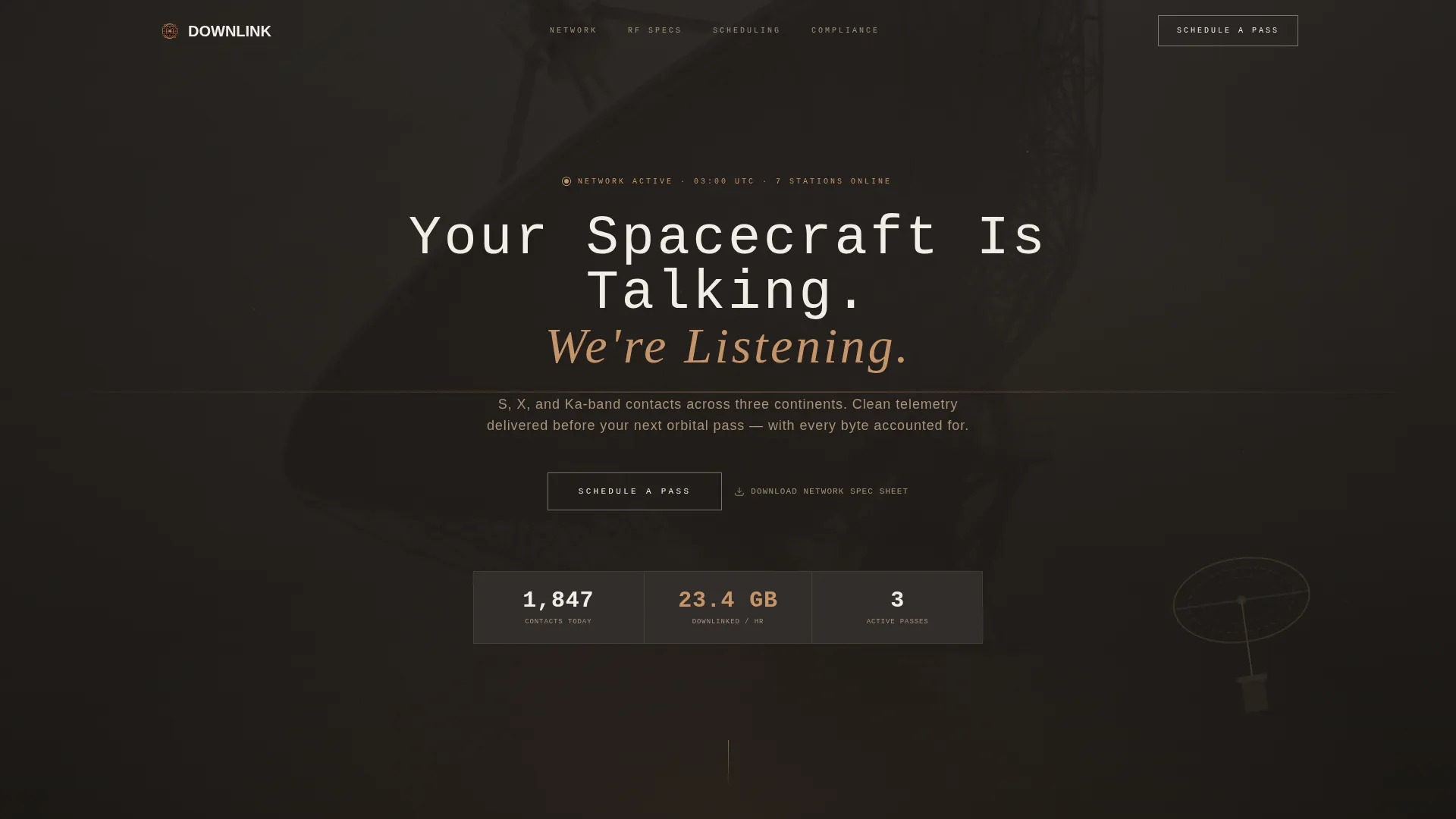
- A full-screen video background header with a live pass counter and a ghost-outlined primary call to action
- Four modular card clusters covering Network Coverage, Radio Frequency Performance, Scheduling and Integration, and Compliance and Security
- A dual call-to-action system: a solid clay-accent "Schedule a Pass" button and a secondary "Download Network Spec Sheet" path for engineers who need to share data internally
Feature list
This template is built around a set of deliberate design and structural decisions. Each feature below reflects what the prompt specifies as a delivered component.
Full-Screen Video Background Header
The header occupies the full viewport with a slow drone shot of a 13-meter dish at golden hour. A monospaced headline phases in over the footage. A live pass counter sits below it, showing contacts completed today and bytes downlinked this hour, grounding the visual moment in real operational data.
Modular Spec Card Grid
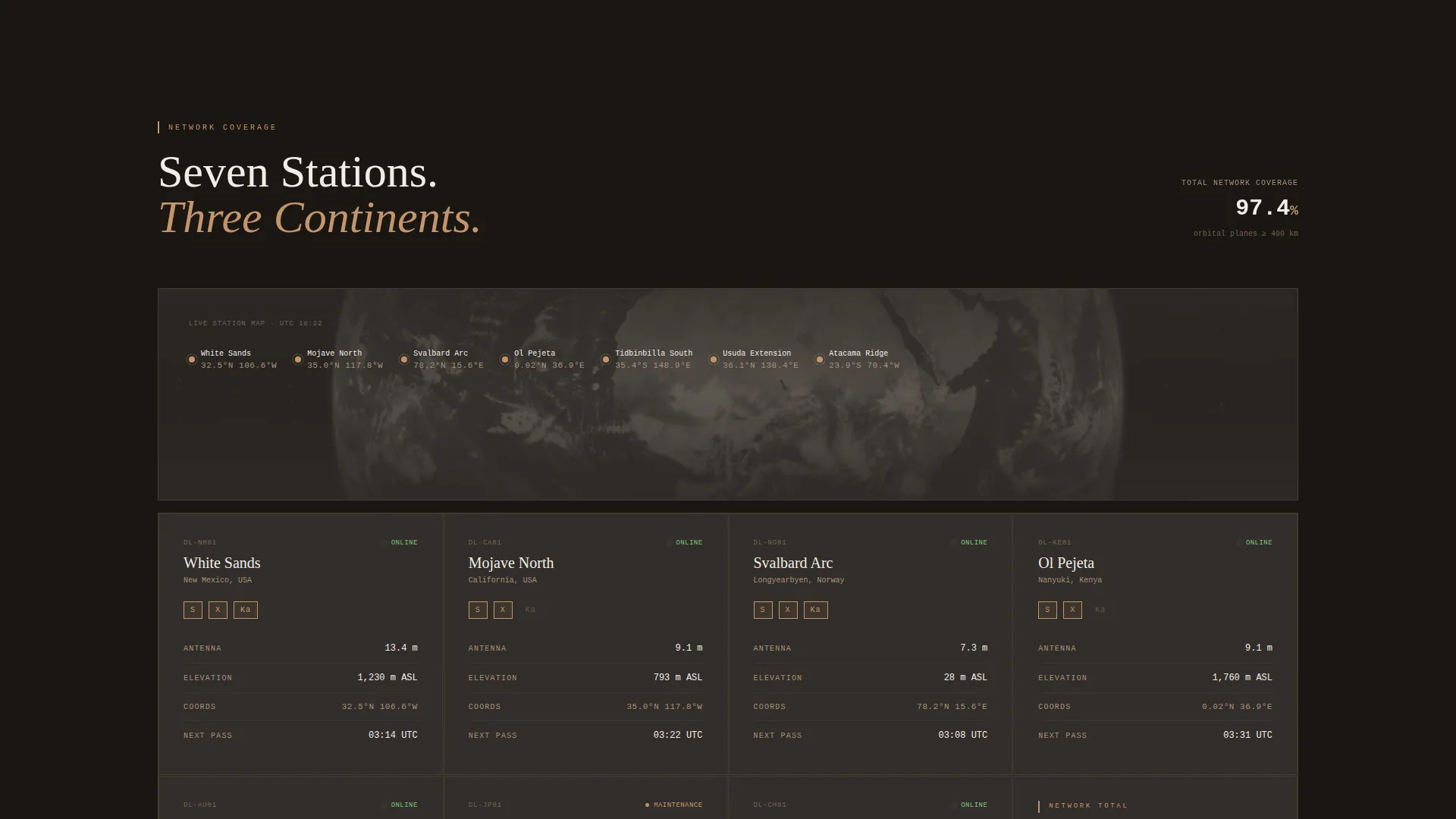
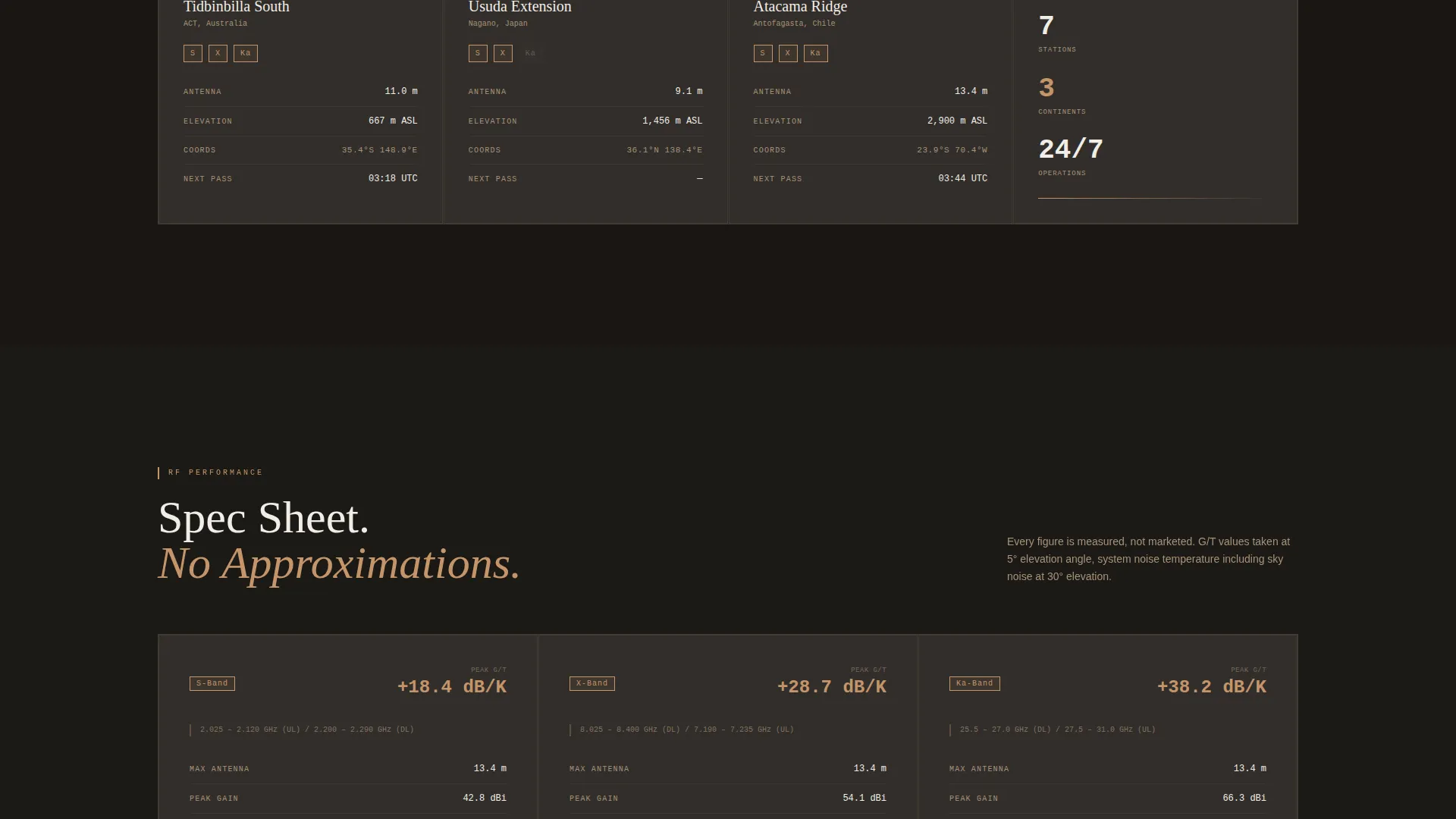
Cards are grouped into four thematic clusters. Each card presents ground station site data or capability data as clean data pairs: antenna diameter, gain, frequency bands (S-band, X-band, and Ka-band), G/T figures, geographic coordinates, and ITAR status. The layout is spacious and scannable, not dense.
Dual Call-to-Action Architecture
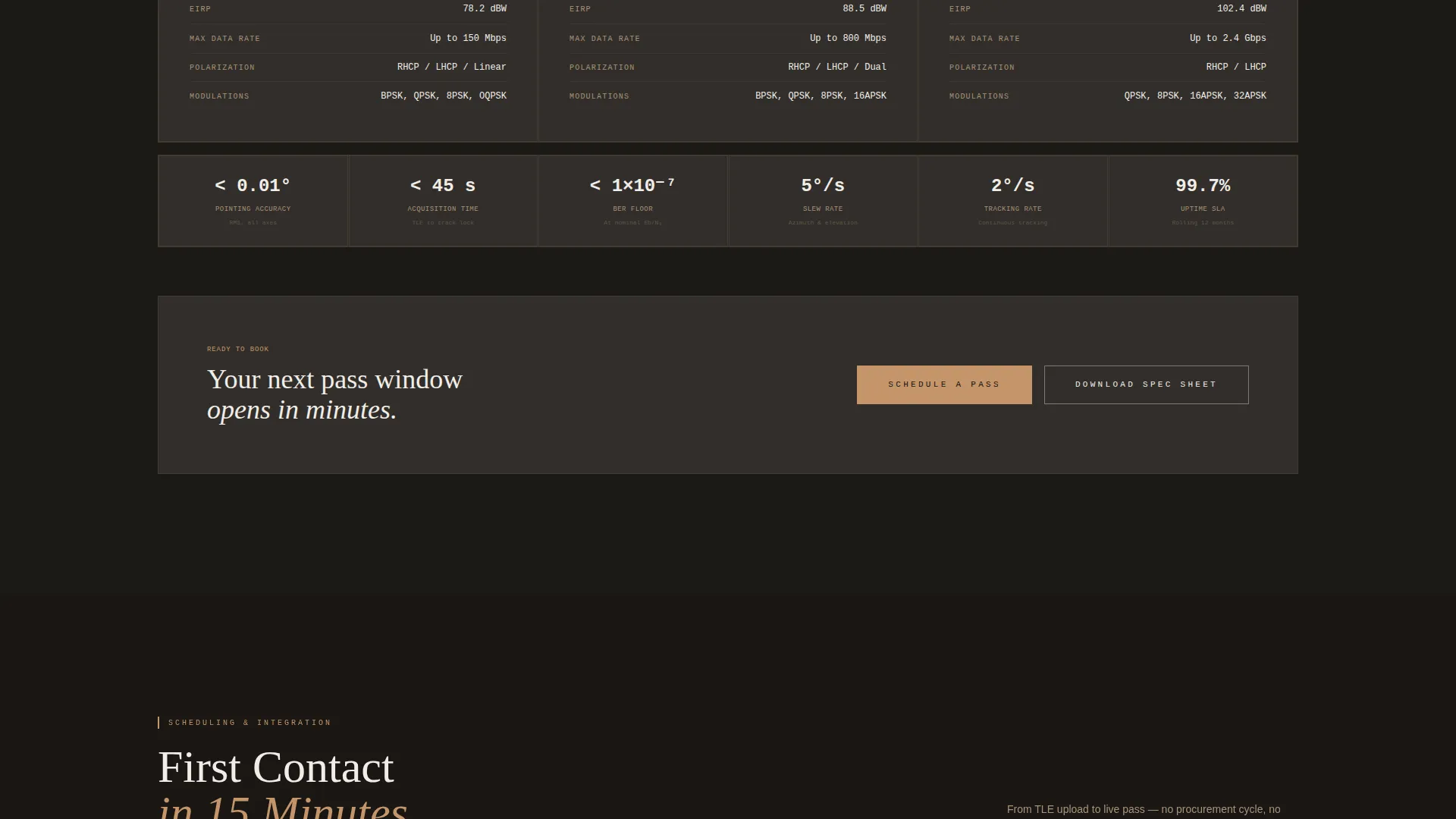
The primary call to action, "Schedule a Pass," appears first as a ghost-outlined button in the header, then reappears as a solid clay-accent button after the Radio Frequency Performance cluster. A secondary link, "Download Network Spec Sheet (PDF)," captures engineers who need to review specifications offline before committing.
Progressive Trust Scroll Flow
The card clusters are ordered deliberately: Network Coverage, then Radio Frequency Performance, then Scheduling and Integration, then Compliance and Security. This sequence moves the visitor from geographic proof to technical proof to operational readiness, building confidence through accumulated data rather than persuasion copy.
Dashboard Pro Dark Theme
The page uses a Warm Stone color system built for a control-room aesthetic. Deep basalt dominates backgrounds, sandstone carries secondary text and dividers, dry clay activates on hover states and live-status indicators, and antenna-white keeps card faces crisp. The result feels operational, not decorative.
No-Form Click-Through Flow
There is no contact form on this page. The call to action carries qualified visitors directly into an authenticated scheduling dashboard where they select a station, a frequency band, and a contact window. This removes friction for buyers who already know what they need.
Page sections overview
| Section | Purpose |
|---|---|
| Video Header | Establish atmosphere and surface live pass stats |
| Live Pass Counter | Show real operational proof above the fold |
| Network Coverage Cards | Display antenna locations across three continents |
| RF Performance Cards | Present gain, frequency bands, and G/T figures |
| Scheduling & Integration Cards | Communicate contact window speed and workflow |
| Compliance & Security Cards | Signal ITAR status and operational standards |
| Primary call to action Block | Drive click to the scheduling portal |
| Spec Sheet Download | Capture engineers needing offline review |
Design & branding system
The visual identity is built around a Warm Stone palette that reads like a remote ground station site at low sun. Every color has a functional role, not just an aesthetic one.
- Deep basalt (#2C2825) dominates all backgrounds, giving the page a control-room darkness that keeps data cards readable
- Sandstone mid-tone (#A89279) handles secondary text, dividers, and supporting labels across all card clusters
- Dry clay (#C4956A) fires on hover states and live-status indicators, and anchors the solid primary call-to-action button after the Radio Frequency Performance section
- Antenna-white (#F0EDE8) keeps card surfaces and primary typography crisp and scannable against the dark backgrounds
Mobile & speed optimization
The card grid layout is modular by design, which makes it well-suited to responsive stacking on smaller screens. The visual hierarchy is preserved as cards reflow from multi-column to single-column.
- Modular card components stack cleanly on mobile without losing the data-pair readability that makes spec content useful
- The full-screen video header is designed to remain impactful at reduced viewport sizes, with the monospaced headline and live counter remaining prominent
- Call-to-action buttons are sized and positioned for thumb-friendly interaction on mobile devices
How this template helps you convert
This page is built as a click-through optimized landing page. Every structural decision reduces friction and moves a qualified visitor toward the scheduling portal.
- The live pass counter in the header provides immediate operational proof, replacing the need for testimonials or case studies above the fold
- The progressive card sequence builds technical trust incrementally, so by the time the solid "Schedule a Pass" button appears after the Radio Frequency Performance cluster, the visitor has already absorbed enough specification data to act with confidence
- The secondary "Download Network Spec Sheet" path keeps engineers in the funnel even when they are not yet ready to schedule, giving the systems team a reason to return
Other information about this template
This template sits at the intersection of the Aerospace and Defense category, the Space and Satellite subcategory, and the Ground Station Operator niche. It is built on the Dashboard Pro theme using a Card Grid (Modular) template style, and it is classified as a Click-Through landing page with a Spec Sheet creative direction. The header concept is a Full-Screen Video Background.
- The template is designed for operators whose buyers are familiar with telemetry, tracking, and command workflows, and who expect to see technical specifications presented as primary content rather than supporting detail
- The Warm Stone color system was selected to reflect the physical environment of remote ground station sites, creating a visual language that resonates with people who work in or near these facilities
- The page earns its conversion click by demonstrating technical credibility through accumulated specification data, not through persuasion copy or promotional language
- This template is a strong fit for any ground station operator who wants to present a multi-continent antenna network, communicate radio frequency capabilities clearly, and route qualified buyers directly to a scheduling interface
Theme
Dashboard Pro
Creative direction
Spec Sheet
Color system
Warm Stone
Style
Card Grid (Modular)
Direction
Click-Through
Page Sections
Full-screen Video Background Header
Modular Spec Card Grid
Progressive Trust Scroll Flow
Dual Call-to-action Architecture
Dashboard Pro Dark Theme
No-form Click-through Flow
Related questions
Does this template include a contact form?
Can I update the spec card data for my own antenna network?
Is the live pass counter connected to a real data source?
Who is the typical visitor this page is designed for?
Can I use this template for a single ground station site rather than a multi-site network?



