Industrial Mail Operations Landing Page Template
Dispatch is a Bold Brutalist hub and spoke landing page template built for mailing operations management software. It leads with animated stat counters, a fixed vertical spoke navigation, and an industry-report scroll narrative. The template is designed to capture high-value leads through a low-friction audit form and a gated report download, giving dispatchers and operations managers every reason to act.
by Rocket studio
Quick summary
Dispatch is a single-page, anchor-navigated landing page template for mailing pipeline management software. It opens with three massive odometer-style stat counters, then guides visitors through a five-section industry report covering volume, tracking, compliance, audit, and integration. The goal is lead generation through authority, not persuasion by emotion.
Who this template is for
This template is built for teams selling or presenting mailing operations management software to serious operational buyers. The layout speaks directly to people who measure success in processed pieces, not page views.
- Operations managers at insurance carriers who handle high-volume compliance mailings and need certified proof of delivery
- Print shop owners juggling multiple client accounts who want to replace spreadsheets with a structured dispatch management process
- Municipal clerks and government offices that must document delivery of mass notices such as tax statements or legal filings
What problem this template solves
Effective dispatch management is critical to meeting customer needs and ensuring operational efficiencies across logistics, transportation, and regulated mailing services. Yet most landing pages for dispatch operations software either overload visitors with technical jargon or undersell the operational risk of doing nothing. This template solves both problems.
- Operations buyers scroll past vague benefit claims. This template leads with hard data, sourced industry findings, and escalating risk evidence so the visitor builds conviction before reaching the call to action.
- Dispatchers and procurement officers need to trust a system before they sign up. The report-style scroll structure document the cost of missing chain-of-custody, turning skeptics into qualified leads.
What you get with this template
You get a complete, fully structured landing page built around a hub and spoke navigation system. Every section is production-ready and wired for the dispatch management audience from the first pixel.
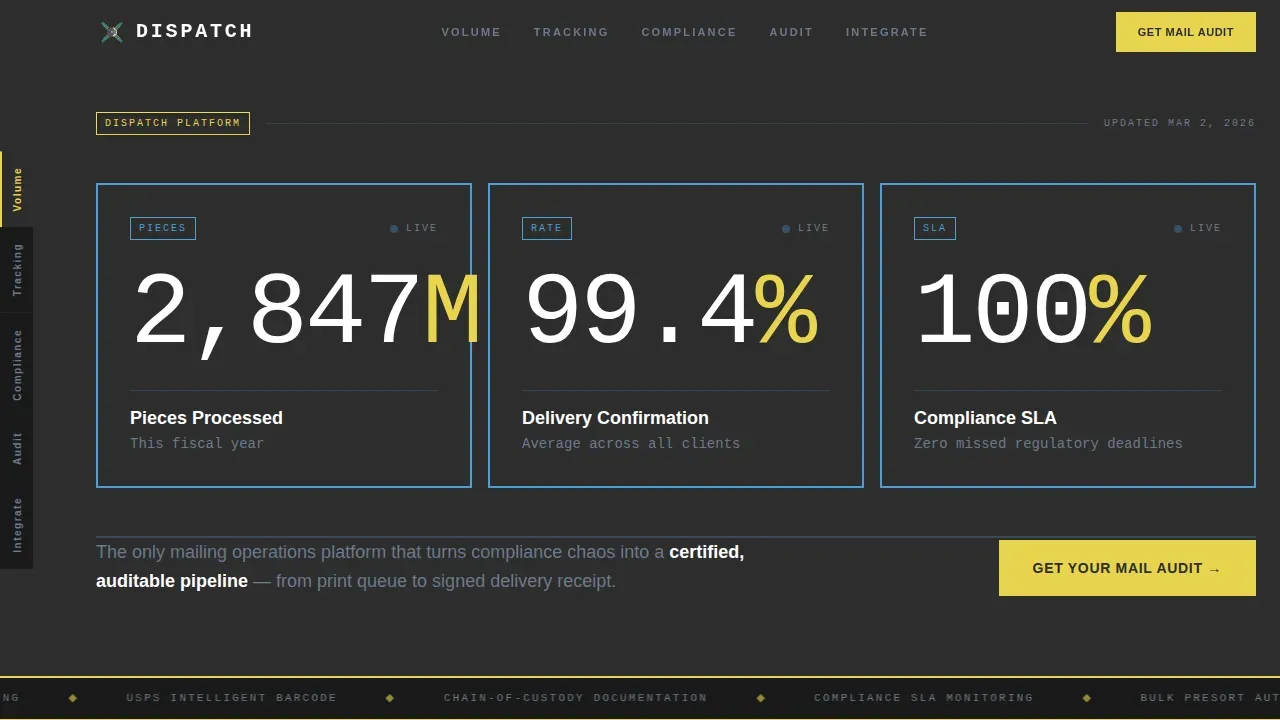
- A header block with three animated 120-pixel monospaced stat counters, a positioning statement, and brutalist concrete-slab containers with sky-blue borders
- Five anchor-linked content sections covering Volume, Tracking, Compliance, Audit, and Integrate, each opening with a bold industry data finding
- A fixed left vertical spoke navigation with single-word pill labels, a dual-path lead capture form, and a minimal footer in horizontal flow layout
Feature list
This template packages every component an operations-focused dispatch management landing page requires. Each feature is deliberate and sourced directly from the project brief.
Animated Stat Counter Header
Three oversized counters render in 120-pixel DM Mono type and tick upward like an odometer on load. They sit inside charcoal slab containers with two-pixel sky-blue borders. The numbers carry the credibility. No hero image is required.
Fixed Vertical Spoke Navigation
A pill-stack nav stays fixed to the left side of the viewport as the visitor scrolls. Each pill carries a single blunt label: Volume, Tracking, Compliance, Audit, Integrate. Active states update with scroll position, so the user always knows their location in the report.
Industry Report Scroll Sections
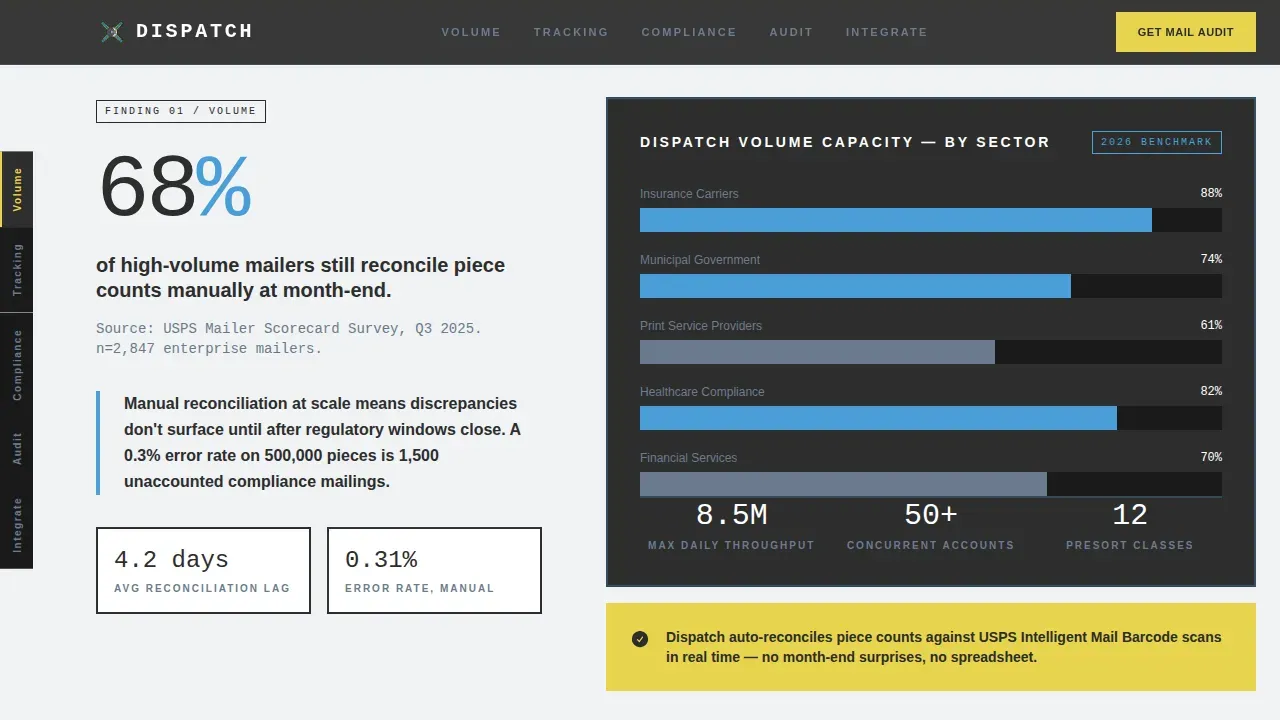
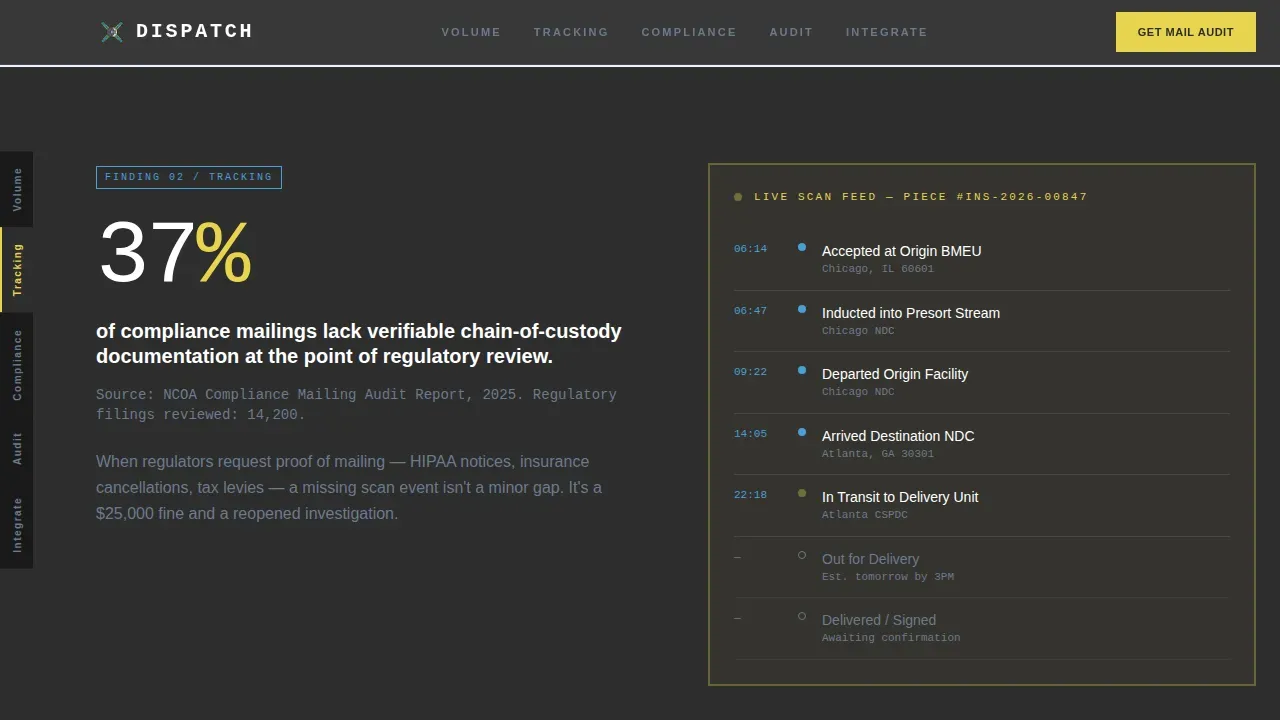
Each of the five hub sections opens with a cited data finding relevant to dispatch operations, then pivots to show how the platform closes that gap. The structure escalates the risk of unmanaged logistics across every section, building the case through evidence rather than emotion.
Dual-Path Lead Capture Form
The primary form asks for company name, monthly mail volume via dropdown, and work email. That is three fields, no phone number, no fax line. A secondary path offers a gated report download behind an email field alone, capturing leads who need more time before they sign.
Brutalist Flat Bar Charts
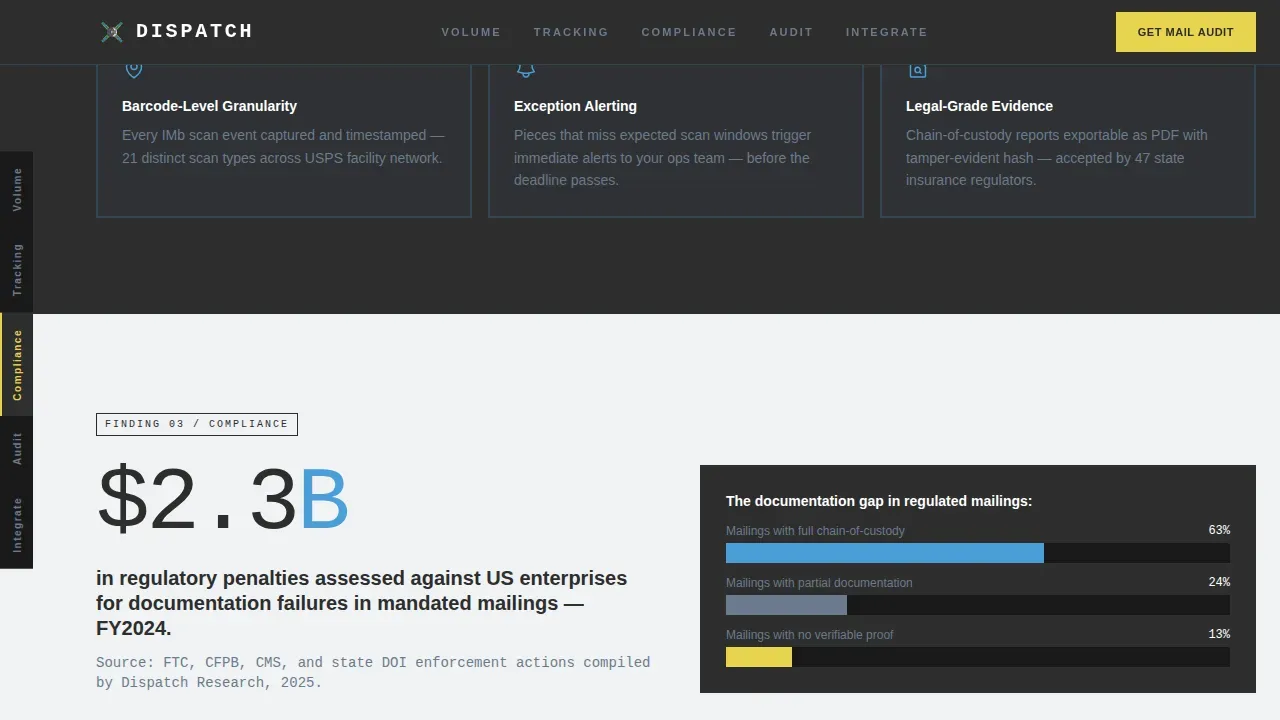
Data visualizations across the tracking and compliance sections render as flat, two-color bar charts with no gradients and no rounded corners. Charts are built to display dispatch metrics clearly and reinforce the industrial, no-nonsense tone of the page.
Responsive Layout with Desktop Priority
The template is desktop-first, matching how operations managers typically access dashboards at their workstations. The layout scales down for any device without breaking the spoke navigation or the counter animations, so dispatchers in the field can still view and interact with the page.
Page sections overview
| Section | Purpose |
|---|---|
| Header Stat Counters | Lead with animated operational metrics to establish platform credibility |
| Volume Hub Section | Present industry data on mail volume challenges and platform capacity |
| Tracking Hub Section | Surface chain-of-custody gaps and show real-time tracking solution |
| Compliance Hub Section | Escalate regulatory risk and introduce compliance management tools |
| Audit Hub Section | Demonstrate proof-of-delivery documentation and full audit trail |
| Integrate Hub Section | Show system connections and present the dual-path lead capture form |
| Minimal Footer | Horizontal flow footer with essential links and brand close |
Design & branding system
The visual identity follows a Bold Brutalist theme using the Slate and Sky color system. Every color decision reinforces the loading-dock aesthetic: industrial surfaces, hard edges, and a wide open sky above.
- Color palette: poured-concrete charcoal (#2D2D2D) for backgrounds, exposed-aggregate gray (#6B7B8D) for secondary text, open-sky blue (#4A9FD9) for borders and active states, high-vis marker yellow (#E8D44D) reserved exclusively for interactive hotspots and call-to-action button states, and light block (#F0F2F4) for alternating section backgrounds
- Typography: DM Mono for all stats, data labels, and monospaced content blocks; Manrope in heavy weights for headings and body copy; oversized sizing throughout to stamp content onto the page like a franking mark
Mobile & speed optimization
The template is built desktop-first but remains fully responsive across every device. Operations buyers at workstations get the full fixed-nav, animated-counter experience. Dispatchers checking the page from a handheld device can still scroll, read, and submit the form without friction.
- The spoke navigation adapts for smaller screens so it does not block content, and anchor scroll links remain functional across all viewport sizes
- Static sections use server components for fast initial render, while the counter animations and nav state updates run as client components, keeping the page responsive without unnecessary overhead
How this template helps you convert
This template converts by replacing soft benefit claims with hard operational evidence. By the time a visitor reaches the call-to-action button, the report has already done the selling.
- The stat counter header immediately signals platform scale, so operations managers and dispatchers know they are looking at a system that can handle their volume before reading a single paragraph.
- The escalating industry-report structure builds a logical case across five sections, turning passive browsers into convinced prospects who understand exactly what goes wrong without centralized dispatch management.
- The dual-path form captures both ready buyers with the audit request and research-stage leads with the report download, so the template generates pipeline from every stage of the decision process.
Other information about this template
This dispatch industrial mail operations management landing page template is a strong fit for any business building authority in the mailing logistics or transportation industry. The layout and content system can support a range of presentation and pitch scenarios beyond a live website, including sales slide decks, investor presentations, and internal upgrade proposals.
- Teams can customize color tokens, swap in real company metrics, and update the cited data findings without touching the layout structure, making brand changes fast and low-risk
- The dispatch form template section is designed to follow specific instructions for lead qualification: company name, volume tier, and work email only, so you protect data quality from day one
- The page works well for businesses operating across the United States, including those in Texas and other high-volume mailing markets, because the content system scales with volume rather than geography
- Dispatch management templates like this one can be used for presentations to stakeholders, helping teams illustrate scheduling, tracking, and delivery routes in a format that is easy for any audience to follow
- The template supports ideas around supply chain visibility, driver hours reporting, and fleet coordination by providing a structured content framework that teams can adapt when creating additional pages or slides for their broader logistics pitch
Theme
Bold Brutalist
Creative direction
Industry Report
Color system
Slate & Sky
Style
Hub & Spoke (Anchor Nav)
Direction
Lead Generation
Page Sections
Animated Odometer Stat Counters
Fixed Vertical Spoke Navigation
Evidence-led Industry Report Sections
Dual-path Lead Capture Form
Brutalist Flat Data Charts
Responsive Desktop-first Layout
Related questions
Can I use this template without coding experience?
What kind of businesses benefit most from this template?
Does the template include the lead capture form?
How does the hub and spoke navigation work?
Can I add more sections or change the spoke labels?



