Dispatch - Powerful Itservices Landing Page Template
Dispatch is a bold brutalist IT services landing page built for mobile app lead generation. It uses a split-screen layout, a dark glass panel header, and a scrolling Feature Matrix to walk visitors through every core capability. The design system pairs deep gunmetal and atmosphere blue to communicate precision, urgency, and technical authority at a glance.
by Rocket studio
Quick summary
Dispatch is a single-page lead generation landing page for an IT services mobile app. It captures work emails from MSP technicians, solo sysadmins, and IT directors using a ruthless Feature Matrix scroll and a sticky "Get Early Access" bar. The template is built on a bold brutalist 50/50 split-screen layout in a Slate and Sky color system.
Who this template is for
This template is built for teams and individuals who live inside complex IT environments and need to prove their tools keep up. It speaks directly to operators who manage clients, not just servers.
- Managed service provider (MSP) technicians handling multiple small and medium-sized business (SMB) clients simultaneously
- Solo system administrators who need remote visibility into tickets, patches, and uptime at all hours
- IT directors who need clear evidence that their team resolved issues before a service level agreement (SLA) breach
What problem this template solves
Most IT service tools look like they were designed by committee in 2009. When you are pitching a modern mobile-first incident management app, the page itself needs to earn trust before the visitor reads a single word of copy.
- Visitors arrive skeptical and leave before they scroll, because nothing on the page matches the urgency of their daily work
- Product credibility suffers when screenshots sit in generic card layouts that feel nothing like real operational dashboards
- Lead forms placed too early collect low-intent emails from visitors who have not yet seen enough proof to commit
What you get with this template
This template delivers a fully structured, design-ready landing page built around a single conversion goal: collecting qualified IT professional leads. Every section is purposeful and sequence-driven.
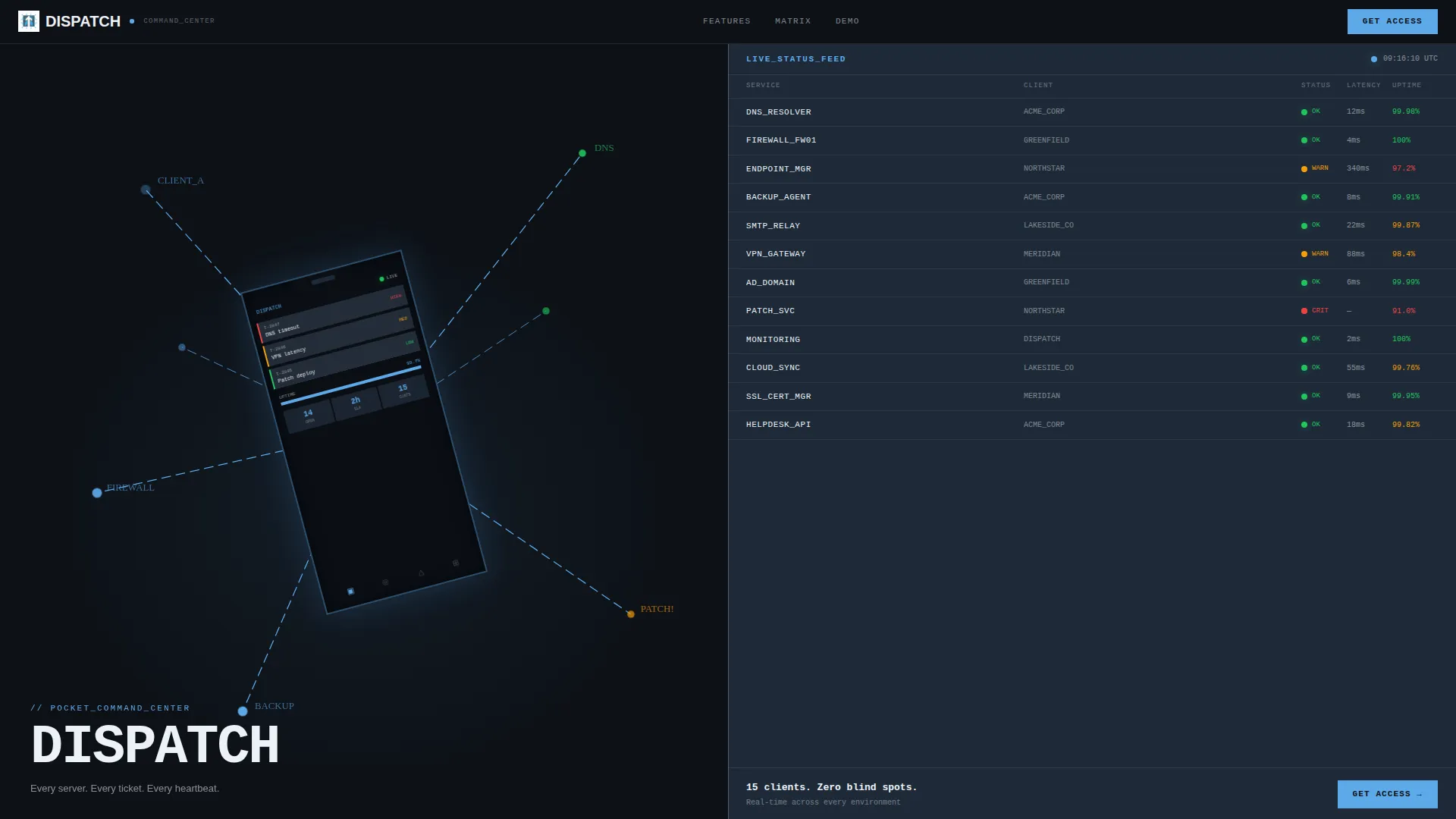
- A 50/50 split-screen header with two dark glass panels showing a live-feeling incident dashboard on the left and a pulsing service status wall on the right
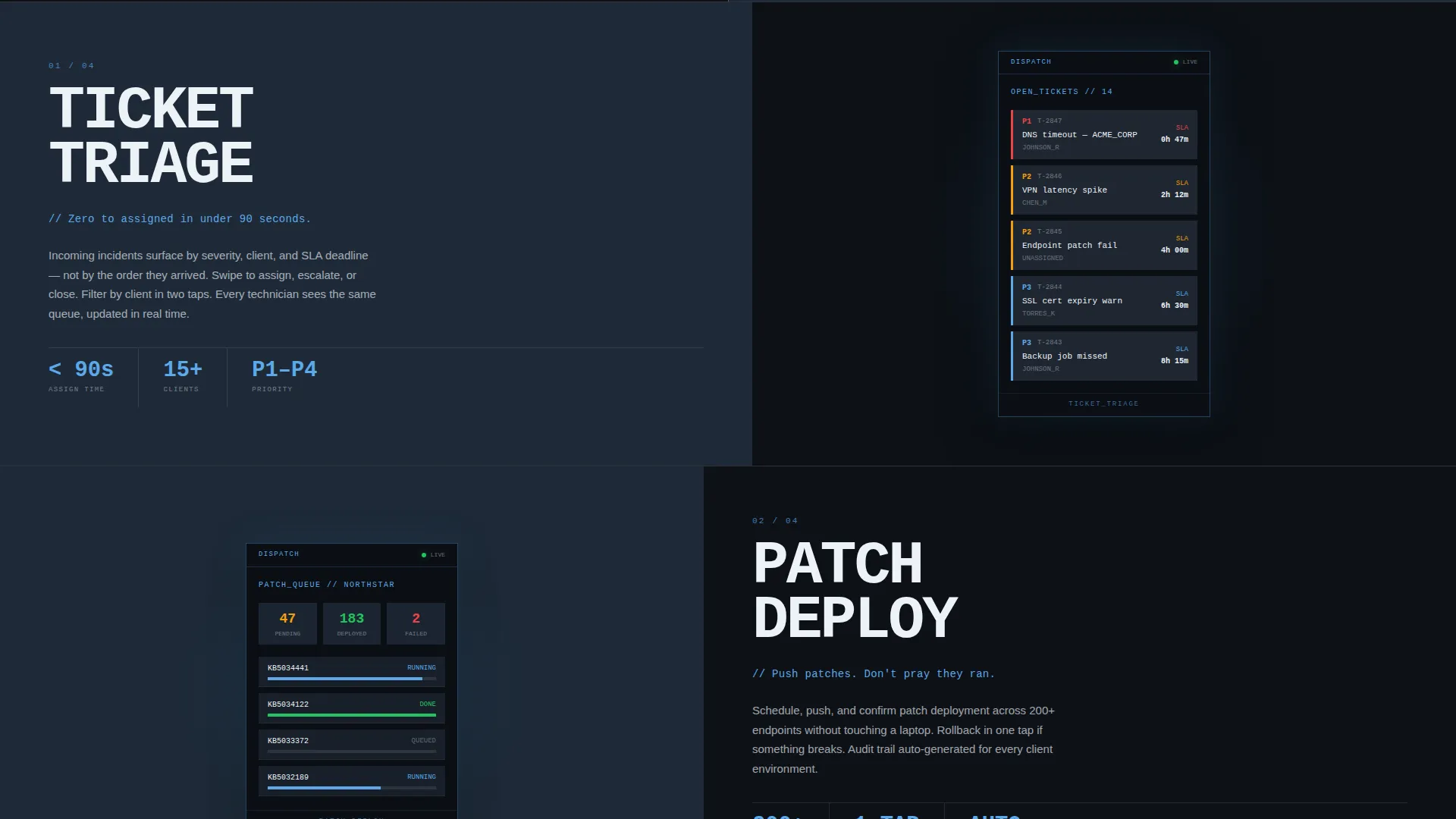
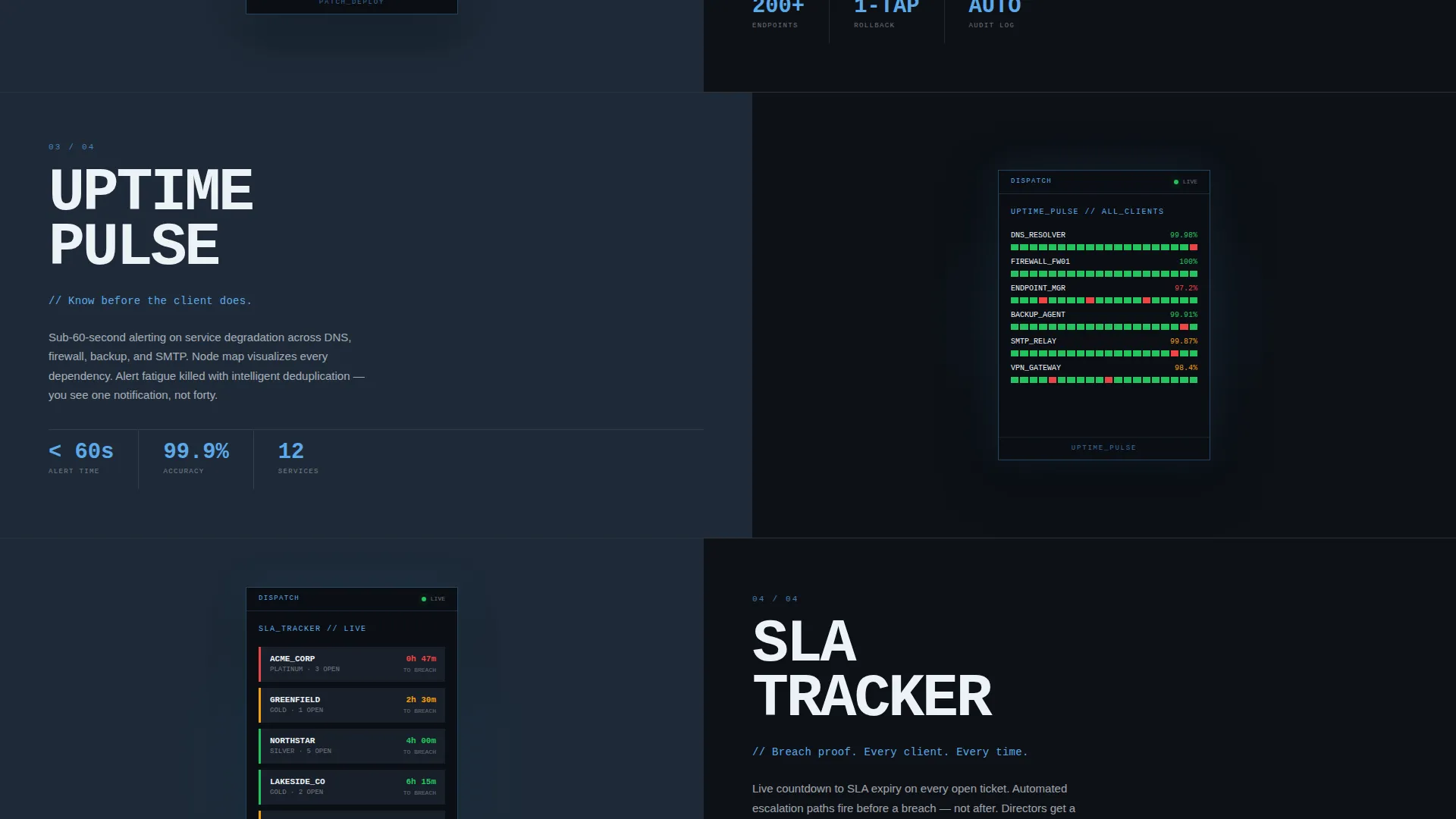
- A scrolling Feature Matrix that pairs oversized brutalist feature labels (TICKET TRIAGE, PATCH DEPLOY, UPTIME PULSE, SLA TRACKER) with on-device app screens on the right
- A sticky lead capture bar containing a single-step brutalist form with a work email field, company size dropdown, and a client environment checkbox, plus a secondary "See the Live Demo" link
Feature list
This template is structured around features that build a cumulative proof argument. Each design element serves the conversion goal, not decoration.
Dark Glass Panel Header
The header divides the viewport dead center into two obsidian-style panels. The left panel displays a matte-black phone tilted at fifteen degrees, its screen alive with a blue node-map incident dashboard. The right panel runs a wall of monospaced service status rows with green and amber pulsing indicators beside names like DNS, Firewall, Endpoint, and Backup.
Scrolling Feature Matrix
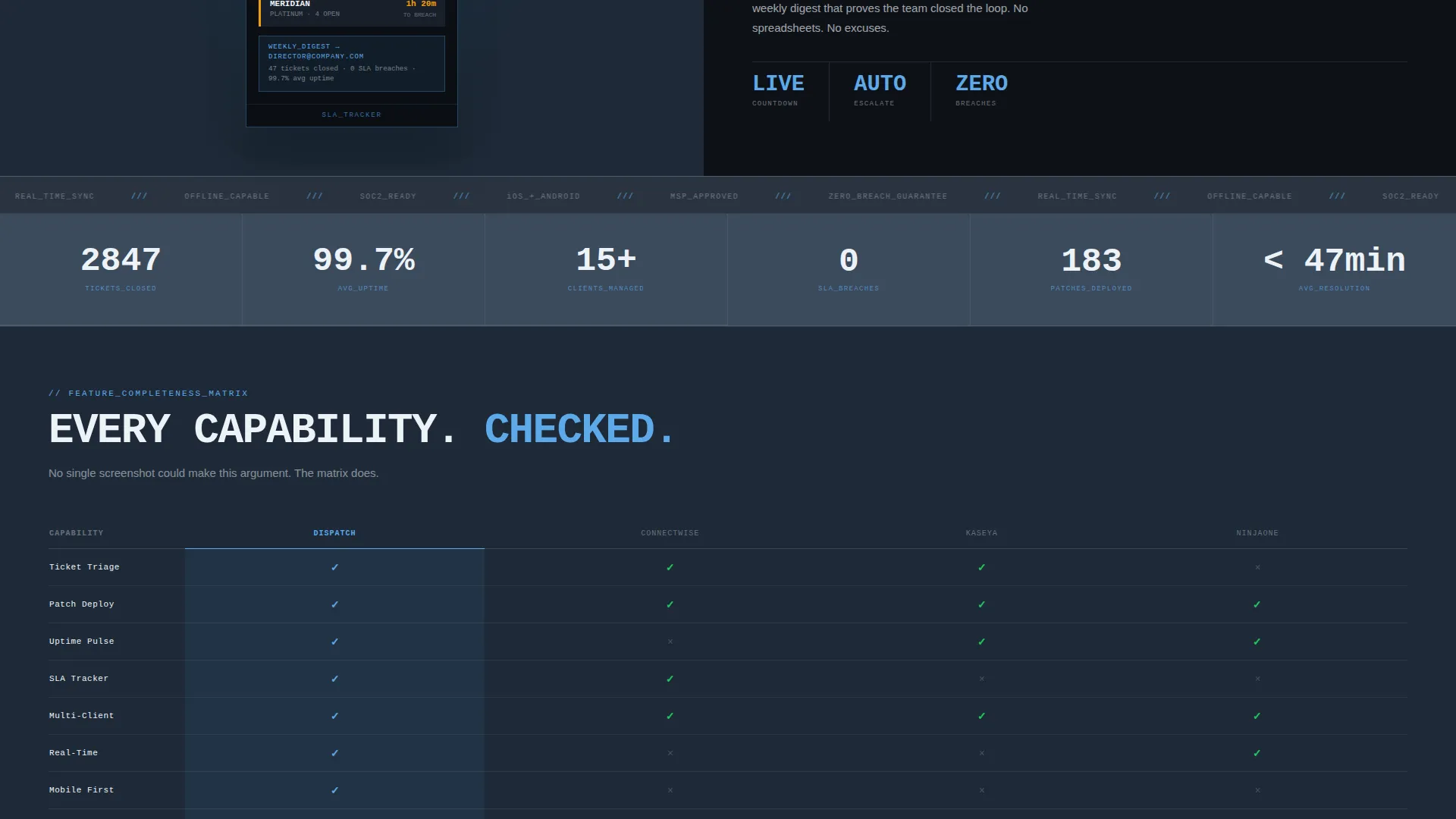
As the visitor scrolls, each section of the page splits the screen into a named capability on the left and an on-device app screenshot on the right. Feature labels are set in oversized monospaced brutalist type. At the bottom of the scroll, all features accumulate into a visible matrix grid where every cell is checked, forming a completeness argument that no single screenshot could make alone.
Sticky Lead Capture Bar
After the visitor passes the second feature slab, a sticky bottom bar locks into view. It holds the primary call to action: "Get Early Access." The bar stays visible through the rest of the scroll without interrupting the reading rhythm.
Single-Step Brutalist Lead Form
The lead capture form is a hard-edged card with zero border radius. It collects a work email address, a company size selection from four range options (1-10, 11-50, 51-200, 200+), and a single checkbox confirming the visitor manages multiple client environments. There are no multi-step flows or distracting micro-animations.
Secondary Demo Path
Alongside the primary form, a clearly labeled "See the Live Demo" link offers a lower-commitment entry point. Visitors who are not ready to submit their email can still engage with an interactive prototype, keeping them inside the conversion funnel.
Monospaced Brutalist Typography System
All feature labels and primary headings are set in oversized monospaced type, pushed to grid edges like stencil lettering on a data center cage. Ice-white text sits against deep gunmetal and polished slate backgrounds, with atmosphere blue reserved for every interactive element, toggle, and status indicator.
Page sections overview
| Section | Purpose |
|---|---|
| Dark Glass Header | Establish credibility and product context instantly |
| Service Status Wall | Show real-time operational visibility at a glance |
| Ticket Triage Slab | Prove fast incident identification capability |
| Patch Deploy Slab | Demonstrate remote patch push workflow |
| Uptime Pulse Slab | Show continuous server heartbeat monitoring |
| SLA Tracker Slab | Evidence SLA breach prevention in context |
| Feature Matrix Grid | Accumulate all proof points into one completeness view |
| Sticky call to action Bar | Hold the primary lead capture action in view |
| Lead Capture Form | Convert qualified visitors into early access leads |
| Live Demo Link | Offer a low-friction secondary conversion path |
Design & branding system
The visual identity is built on a Bold Brutalist theme. Every design decision prioritizes industrial clarity over decoration. The color system is called Slate and Sky, and it reads like a rain-wet rooftop server enclosure at dusk.
- Colors: deep gunmetal (#1E2A38) and polished slate (#3B4A5C) for backgrounds alternating in hard-edged blocks, atmosphere blue (#5DA9E9) for all interactive elements and status indicators, and ice-white (#EDF2F7) for type and dividers
- Typography: oversized monospaced fonts slammed to grid edges, no gradients, no soft drop shadows, zero border radius on all containers
- Visual rhythm: panels feel like two slabs of obsidian separated by a single one-pixel ice-white rule, with backgrounds switching between gunmetal and slate in abrupt, unpadded block transitions
Mobile & speed optimization
The template is designed with a mobile-first context in mind, reflecting the core user who operates the app from a phone between client sites. The split-screen layout and sticky call to action bar are structured to translate cleanly to smaller viewports.
- The 50/50 split-screen adapts its stacking behavior so each panel reads independently on mobile without losing the brutalist grid feel
- The sticky bottom call to action bar is positioned for one-thumb reach on mobile screens, keeping the lead form accessible without scrolling back to the top
- On-device app mockups are sized and cropped to remain legible at mobile viewport widths without requiring pinch-zoom
How this template helps you convert
The conversion logic in this template is mechanical and deliberate. Each section earns the next click rather than asking for trust before it has been given.
- The dark glass header creates an immediate emotional match with the visitor's daily environment, reducing bounce before the first scroll by communicating "this was built for people like you."
- The Feature Matrix builds a cumulative proof stack with every downward scroll. By the time the visitor reaches the sticky call to action bar, they have seen every key capability mapped and confirmed, removing the primary objection before the form appears.
- The two-path conversion structure (early access form plus live demo link) captures both high-intent and exploratory visitors, increasing the total number of qualified leads without adding form complexity.
Other information about this template
This template is category-matched to the Technology vertical, specifically the IT Services Digital Presence subcategory. It is designed for an IT services mobile app niche and carries an intersection match score of 13, indicating a high degree of alignment between the design direction and the target use case.
- The creative direction is Feature Matrix, meaning scroll depth is the primary trust-building mechanism rather than written testimonials or case study sections
- The header concept is Dark Glass Panels, a deliberate visual metaphor for professional-grade operational tooling
- This template works well for pre-launch mobile app campaigns, early access waitlist programs, and product demo request funnels in the IT services space
- The bold brutalist theme and Slate and Sky color system are specifically selected to resonate with technically minded audiences who distrust polished marketing aesthetics
Theme
Bold Brutalist
Creative direction
Feature Matrix
Color system
Slate & Sky
Style
Split Screen (50/50)
Direction
Lead Generation
Page Sections
Dark Glass Split-screen Header
Scrolling Feature Matrix
Sticky Early Access Call to Action Bar
Single-step Brutalist Lead Form
Secondary Live Demo Path
Brutalist Monospaced Typography System
Related questions
Who is this landing page template designed for?
What is the purpose of the Feature Matrix layout?
Can I use this template for a product that is not yet launched?
How does the two-path conversion structure work?
Is this template limited to IT services apps only?



