Dispatch - Intelligent Dispensary Landing Page Template
Dispatch is a hub-and-spoke landing page template built for cannabis AI customer service platforms. It showcases an intelligent dispensary concierge that handles strain questions, live inventory checks, and compliance-filtered conversations across web chat, SMS, and kiosk. The dark, electric design and freemium conversion flow make it ideal for operators ready to deploy automation and capture leads fast.
by Rocket studio
Quick summary
Dispatch is a single-page, anchor-navigated landing page template for a cannabis AI concierge product. It combines a glowing dark-dashboard aesthetic with a structured feature matrix that proves capability section by section. The template is built to convert dispensary operators into free-trial signups using a three-step inline form and a live sandboxed demo widget.
Who this template is for
This template is designed for cannabis technology companies and AI platform providers targeting dispensary operators. It speaks directly to buyers who need to prove technical credibility fast and generate qualified signups from a single page.
- Multi-location cannabis operators (MSOs) managing state-by-state compliance across multiple storefronts
- Single-store dispensary owners handling repetitive customer questions about THC percentages, terpene profiles, and product availability
- Delivery platforms and cannabis tech teams needing order-status automation without round-the-clock staffing
What problem this template solves
Dispensary operators lose time and sales when staff are buried in the same twenty questions every shift. There is no good tool for showing a technical AI product's full capability on a single, scannable page. This template solves both problems at once.
- Budtenders spend hours answering basic strain and inventory questions that an AI concierge could handle instantly
- Cannabis AI platforms lack a credible, conversion-focused page that demonstrates compliance awareness and multi-channel reach
- Potential customers need to see the product work before they trust it enough to sign up
What you get with this template
You get a complete hub-and-spoke landing page built around five anchor-navigated capability spokes: Conversations, Compliance, Integrations, Analytics, and Channels. Every section is designed to prove a feature rather than just describe it.
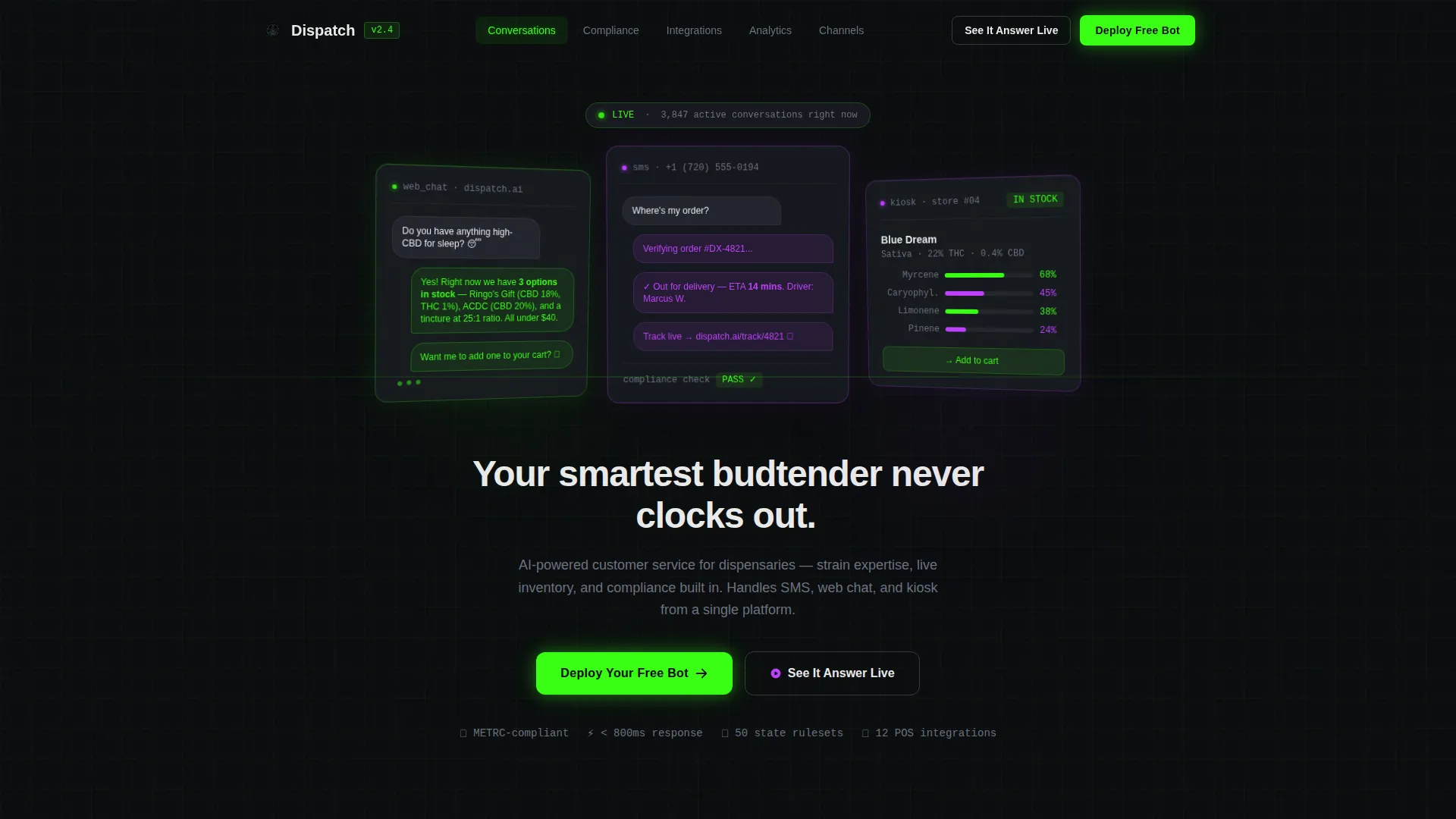
- A sequential animated header with three dark-glass user interface panels showing live web chat, SMS, and kiosk interactions
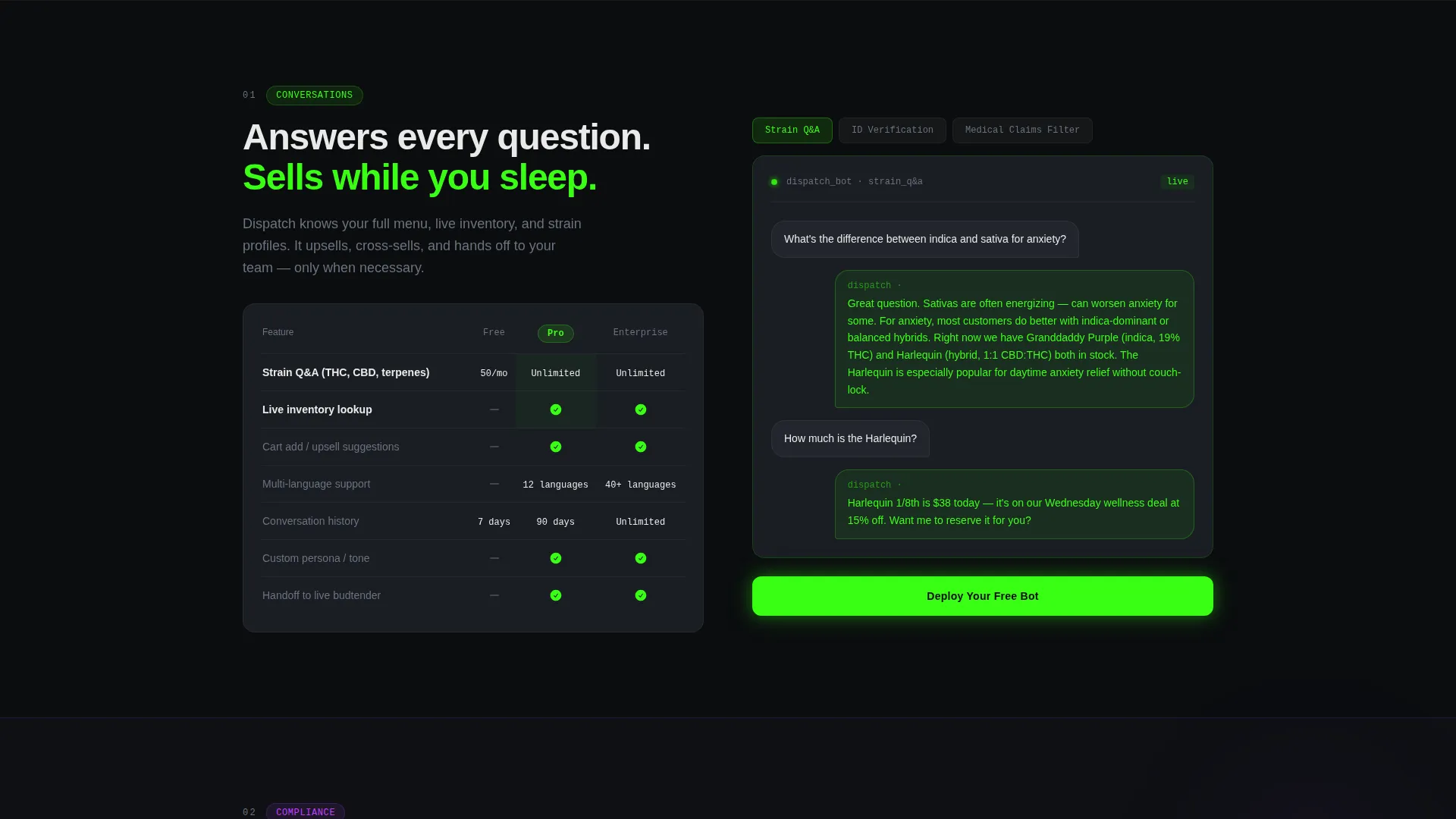
- Five spoke sections each containing a feature comparison table (Free versus. Pro versus. Enterprise) and interactive sample conversation toggles
- A pinned anchor nav with a terminal-green "Deploy Your Free Bot" call-to-action and a secondary "See It Answer Live" demo widget
Feature list
This template ships with a carefully assembled set of interactive and visual components drawn directly from the product brief.
Animated Dark Glass Header
Three frosted-glass user interface cards animate in sequentially against a void-black background. Each panel shows a different live interaction: a web chat reply, an SMS delivery thread, and a kiosk strain recommendation with terpene radar charts. After the panels settle, a single tagline types itself out below them.
Anchor Navigation with Pinned call to action
A persistent anchor nav links to each of the five capability spokes. The primary call-to-action button sits pinned inside the nav and repeats at the close of every spoke section, keeping conversion pressure constant without interrupting the reading flow.
Capability Spoke Sections
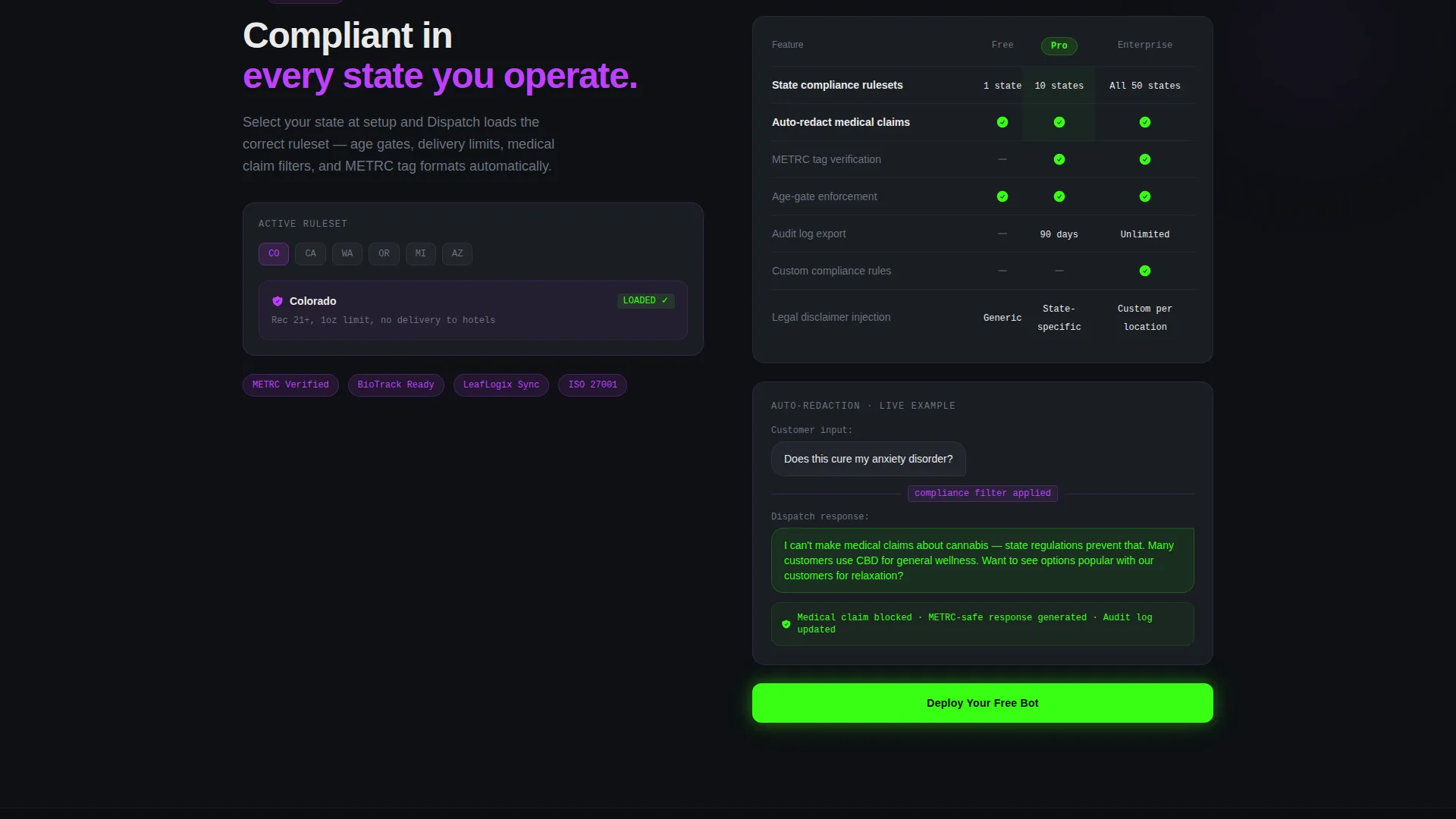
Five structured spoke sections cover Conversations, Compliance, Integrations, Analytics, and Channels. Each opens with a glowing three-tier comparison table and expands into interactive detail showing real AI behavior, such as ID verification prompts and auto-redacted medical claims.
Three-Step Inline Signup Form
Clicking "Deploy Your Free Bot" opens a compact three-step form inline. The visitor enters their dispensary name and state to load the correct compliance ruleset, selects a point-of-sale integration from a dropdown of twelve platforms, and provides a work email.
Live Sandboxed Demo Widget
A secondary conversion path labeled "See It Answer Live" launches a sandboxed chat widget in the corner. Visitors can ask real strain questions against a sample menu, experiencing the AI's capability firsthand before committing to the signup form.
Compliance-Filtered Conversation Previews
Interactive toggles inside the Compliance spoke let visitors see the AI auto-redacting medical claims to meet regulatory standards and handling ID verification prompts. These previews are embedded directly in the page rather than linked to an external demo environment.
Page sections overview
| Section | Purpose |
|---|---|
| Animated Glass Header | Establishes the product's live, multi-channel capability with three sequentially animated dark-glass user interface panels |
| Anchor Navigation Bar | Keeps all five capability spokes reachable and pins the primary call to action in view throughout the scroll |
| Conversations Spoke | Shows AI handling strain questions and live inventory lookups with sample conversation toggles |
| Compliance Spoke | Demonstrates ID verification prompts and auto-redacted medical claims in a compliance-filtered context |
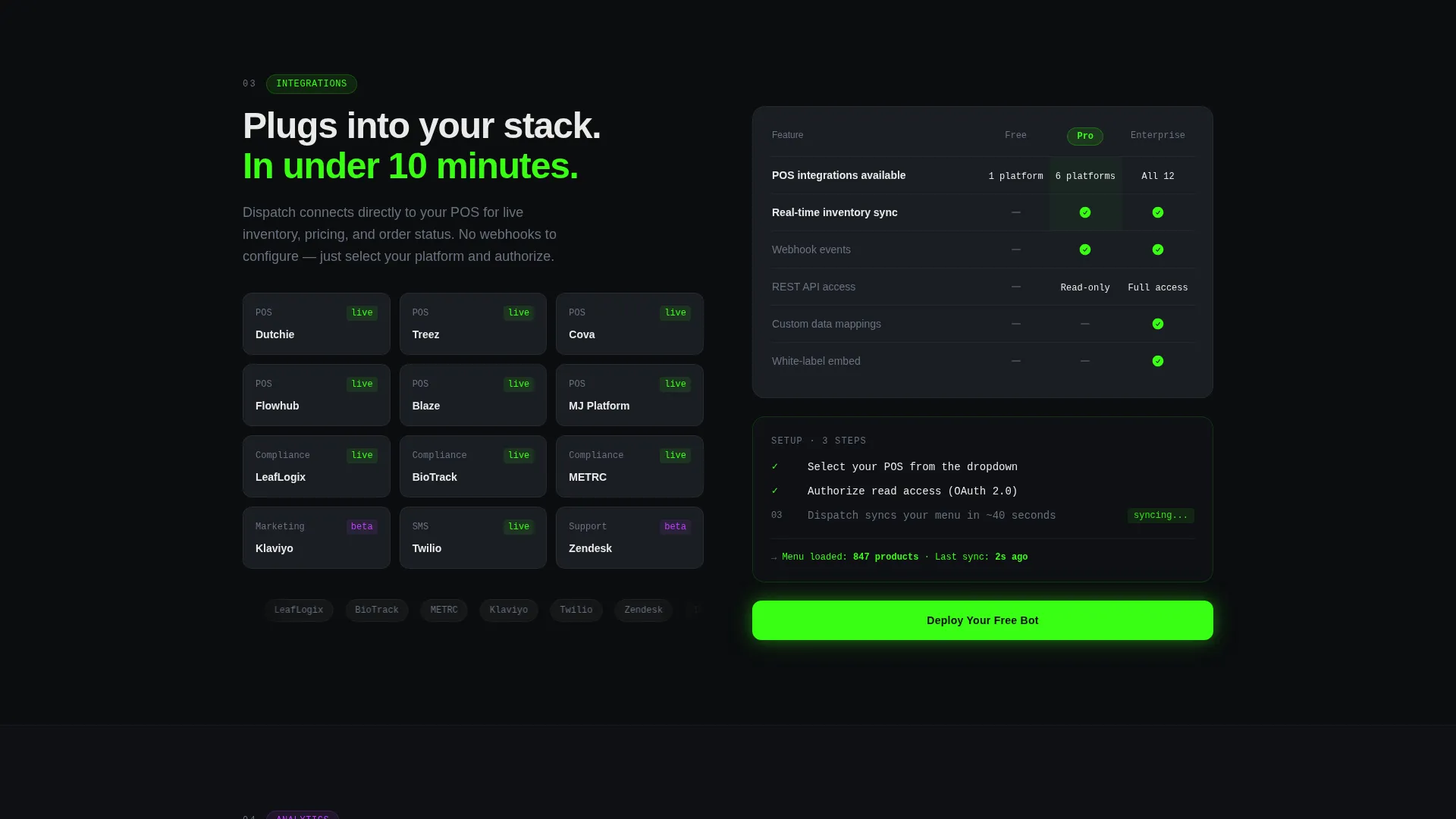
| Integrations Spoke | Displays point-of-sale connection options and the twelve-platform dropdown selection |
| Analytics Spoke | Presents the capability tier comparison table for reporting and usage data features |
| Channels Spoke | Covers web chat, SMS text, and kiosk delivery channel capabilities side by side |
| Inline Signup Form | Collects dispensary name, state, POS selection, and work email in three focused steps |
| Demo Chat Widget | Lets visitors test the AI against a live sample menu before completing the signup form |
Design & branding system
The visual identity is built on an Acid Digital color system that feels like a grow-room monitoring dashboard crossed with a developer's terminal. Every background stays at interface smoke (#1A1D23) or below, so content appears to float on darkness the way menu boards glow in a dim dispensary showroom.
- Core palette: void black (#0B0D0F) for the base, terminal green (#39FF14) for calls to action and active states, UV purple (#BF40FF) for section transitions and hover effects, and crisp white (#EAEAEA) for body text and data labels
- Card surfaces use interface smoke (#1A1D23) with faint green and purple light refractions at glass-panel edges to create depth
- Terminal green dominates every interactive trigger; UV purple marks the transitions between sections, creating a clear visual rhythm as the visitor scrolls
Mobile & speed optimization
The template's layout is structured to translate its dark-dashboard density into a clean single-column reading experience on smaller screens. The anchor nav collapses into a compact mobile header, keeping the pinned call to action accessible at all times.
- The three animated glass panels reflow into a vertically stacked sequence on mobile so each interaction preview remains readable without horizontal scrolling
- Feature comparison tables inside each spoke section are designed to scroll horizontally on narrow viewports rather than collapsing into unreadable stacked cells
- The inline signup form and demo widget both function as self-contained components that fit within a standard mobile viewport without layout overflow
How this template helps you convert
The entire page is engineered around two conversion paths: a freemium signup and a live product demo. Neither path asks for commitment before delivering value.
- The "Deploy Your Free Bot" call-to-action is pinned in the anchor nav and repeated at the end of every spoke section, so a visitor who becomes convinced at any point in the scroll is never more than one click from the form.
- The "See It Answer Live" demo widget lets skeptical visitors test a real AI response against a sample dispensary menu before touching the signup form, lowering the trust barrier at its highest point.
Other information about this template
This template is built on the Dashboard Pro theme and uses the Hub and Spoke (Anchor Nav) template style, making it straightforward to extend with additional capability spokes if the product grows. The Feature Matrix creative direction means every section functions as a living spec sheet rather than a marketing narrative.
- The three-step form is designed to pre-qualify leads by capturing state (for compliance ruleset loading) and POS platform before a work email, reducing unqualified submissions
- The page references point-of-sale integrations with platforms including Dutchie and Treez as part of the Integrations spoke demonstration content
- The freemium conversion model means the primary goal is volume signups for the free tier, with Enterprise upsell positioned through the tier comparison tables inside each spoke
Theme
Dashboard Pro
Creative direction
Feature Matrix
Color system
Acid Digital
Style
Hub & Spoke (Anchor Nav)
Direction
Freemium/Trial
Page Sections
Animated Dark Glass Header Panels
Hub and Spoke Anchor Navigation
Glowing Feature Comparison Tables
Interactive Compliance Conversation Toggles
Three-step Freemium Inline Signup Form
Live Sandboxed Demo Chat Widget
Related questions
What kind of business is this template designed for?
Can I customize the five capability spoke sections?
How does the three-step inline signup form work?
Does the sandboxed demo widget require a live integration?
Is this template suitable for a small single-store dispensary, or is it aimed at large operators?



