Deploy - Precision Itservices Landing Page Template
Deploy is a scroll-reveal landing page template built for IT services job boards. It targets sysadmins, DevOps engineers, cloud architects, and the MSPs recruiting them. The template opens with an interactive job feed preview, reveals live counters and a comparison table as users scroll, and drives app downloads through a persistent, contextual call-to-action flow.
by Rocket studio
Quick summary
Deploy is a single-page, scroll-reveal landing page template designed for an IT services job board. It opens with a working mini-dashboard that lets visitors filter real-styled job listings before the first call to action appears. Every section reveals progressively, like drilling into a monitoring dashboard, until the page earns its app download conversion with data and product experience.
Who this template is for
This template is built for teams launching or promoting an IT-focused job board. It speaks directly to two audiences at once: the platform operators marketing the product, and the professionals they want to attract.
- IT directors at mid-market companies who need a faster way to post and fill technical roles
- Contract engineers, sysadmins, DevOps practitioners, and cloud architects hunting for precision-matched opportunities
- Managed service providers (MSPs) actively recruiting specialized IT talent
What problem this template solves
Generalist job boards bury IT roles under unrelated listings. Technical candidates waste time filtering noise. Hiring managers waste budget on boards that do not understand cert stacks, clearance levels, or on-call requirements. This template gives an IT job board a landing page that immediately proves it is different.
- Visitors arrive skeptical; the interactive header lets them experience the filtering product before committing
- The side-by-side comparison table directly addresses why generalist platforms fall short for technical hiring
- Every scroll section adds a harder proof point, reducing friction before the download ask
What you get with this template
You get a fully structured, dark-mode landing page built around progressive disclosure. Each section is designed to appear as the visitor scrolls, maintaining focus and building confidence section by section.
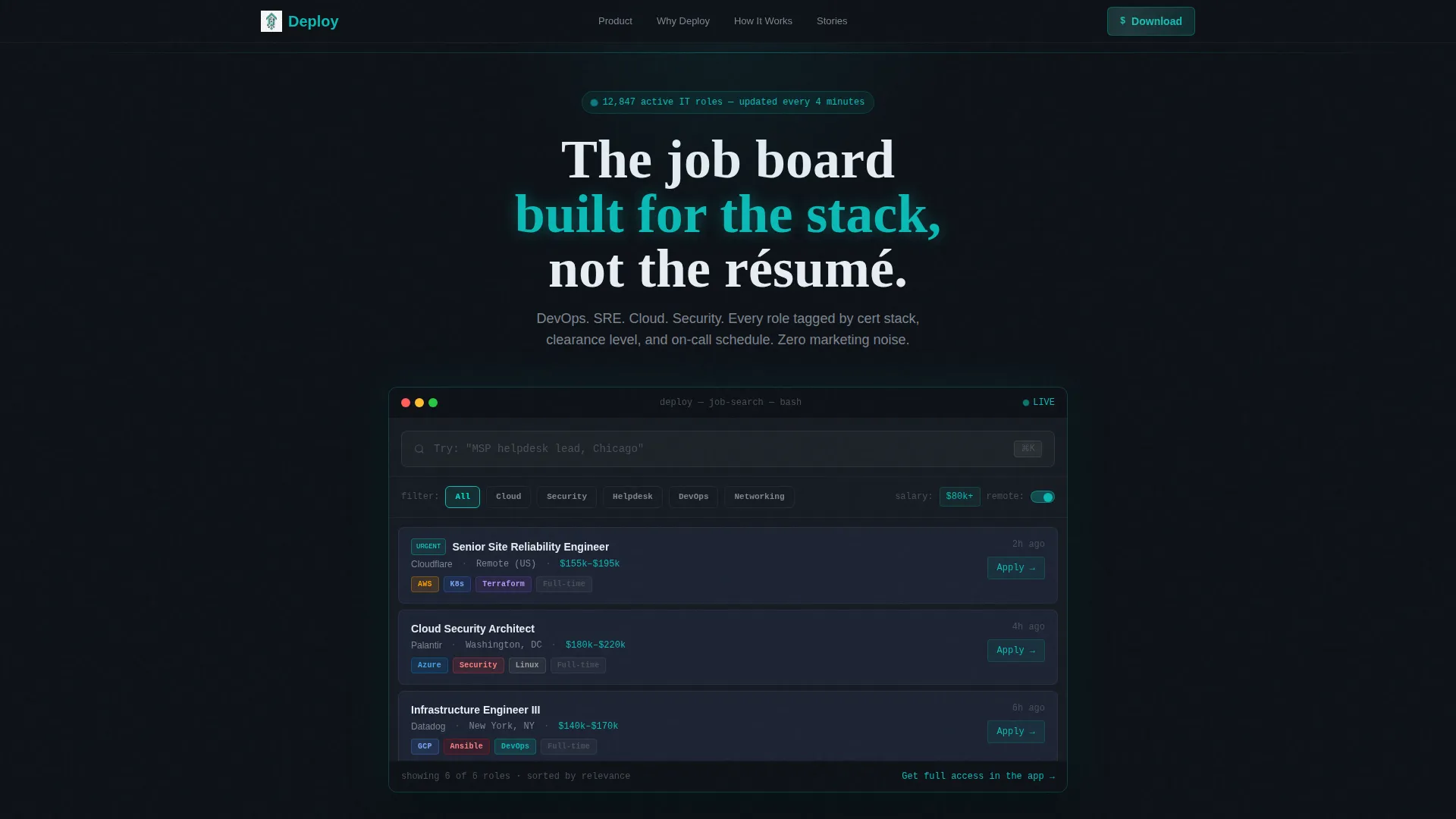
- An interactive header with live-styled job filters, salary sliders, location toggles, and tech stack pills
- Four scroll-revealed content sections: a live counter strip, a comparison table, a four-step seeker timeline, and a testimonial carousel
- A multi-placement app download call-to-action block with App Store and Google Play buttons, a desktop QR code, and an optional email capture field
Feature list
A paragraph introduces each feature below. Together they form the complete set of built-in capabilities this template delivers.
Interactive Job Feed Header
The header is the product demo. Visitors land inside a functioning mini-dashboard showing a live-styled job feed. Filter chips for Cloud, Security, Helpdesk, DevOps, and Networking let users sort results in real time. A salary range slider and location toggles adjust the visible listings. Tech stack tags render as colored pills, with AWS in orange, Azure in blue, and Linux in charcoal. An animated placeholder in the search bar reads "Try: 'Senior SRE, remote, $140k+'" to prompt immediate interaction.
Animated Live Counter Strip
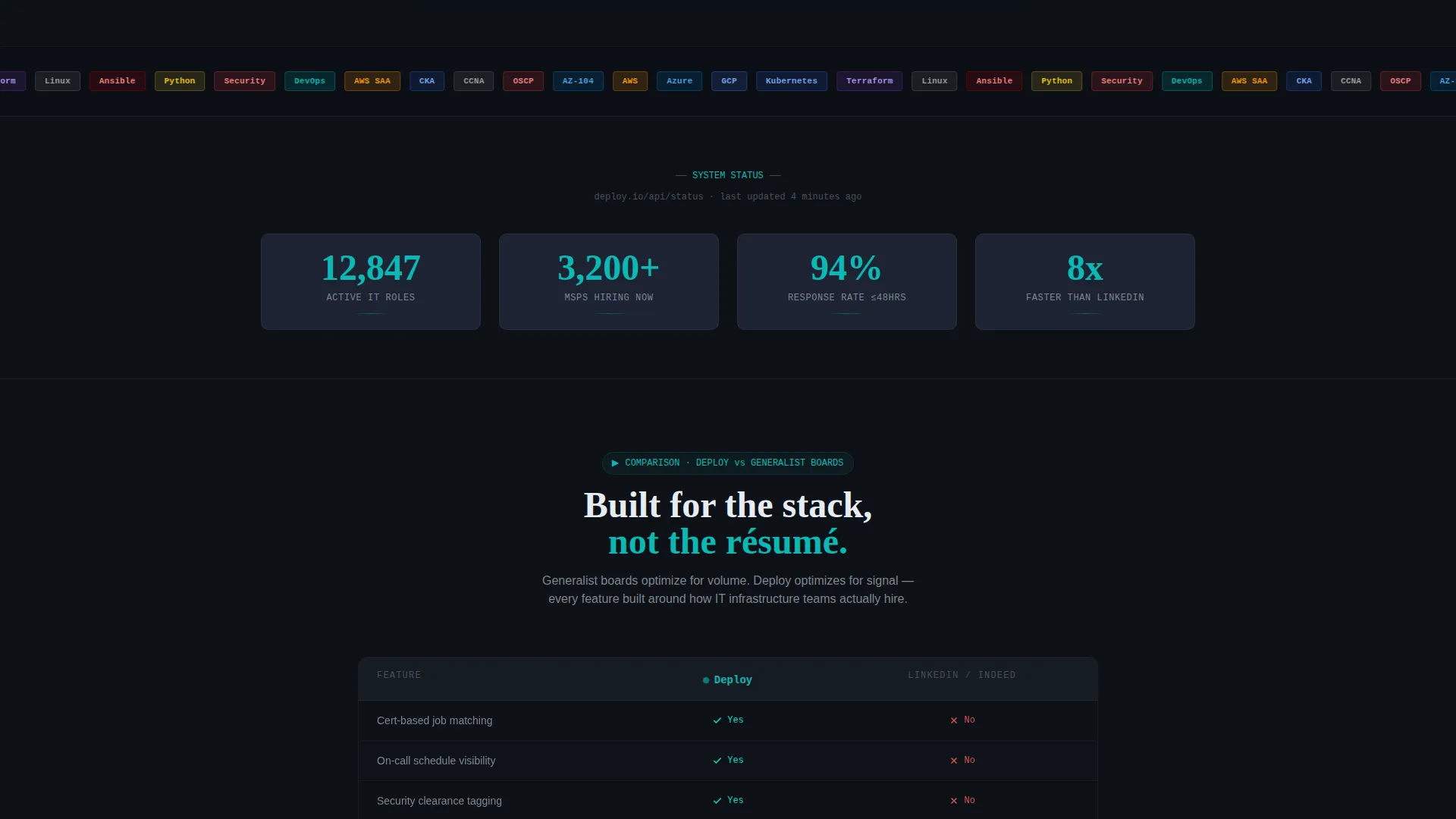
The first scroll reveal shows a live counter strip that ticks upward on entry. It surfaces platform-scale signals such as active IT roles, MSPs hiring, and response rate benchmarks. The eased count-up animation makes the numbers feel current and earned rather than static.
Generalist versus. Platform Comparison Table
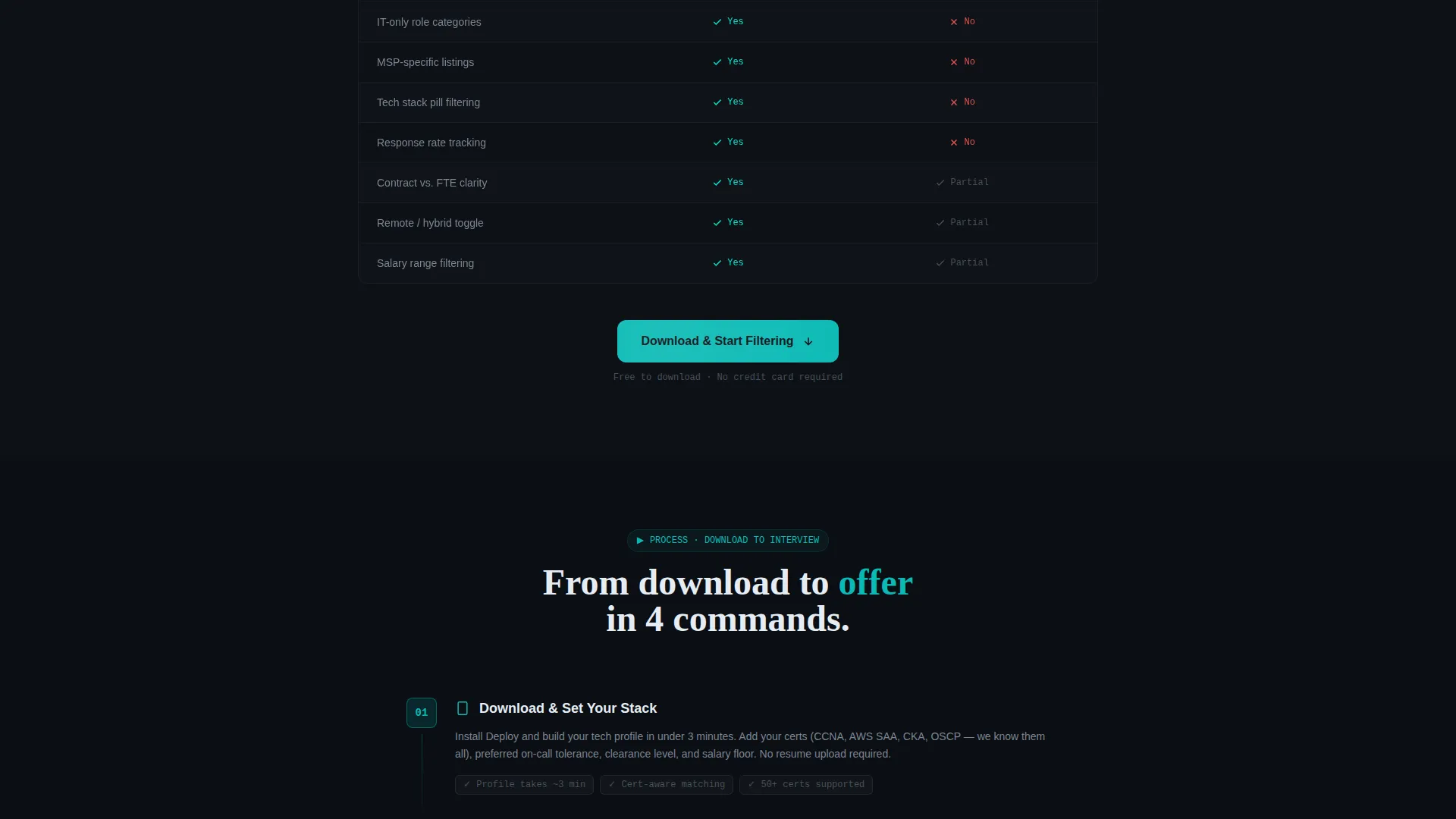
A side-by-side table places this platform against generalist job boards. Comparison rows cover cert-based matching, on-call schedule visibility, and clearance-level tagging. Checkmarks render in system teal and negative marks appear in muted red, making the advantage immediately scannable.
Four-Step Job Seeker Timeline
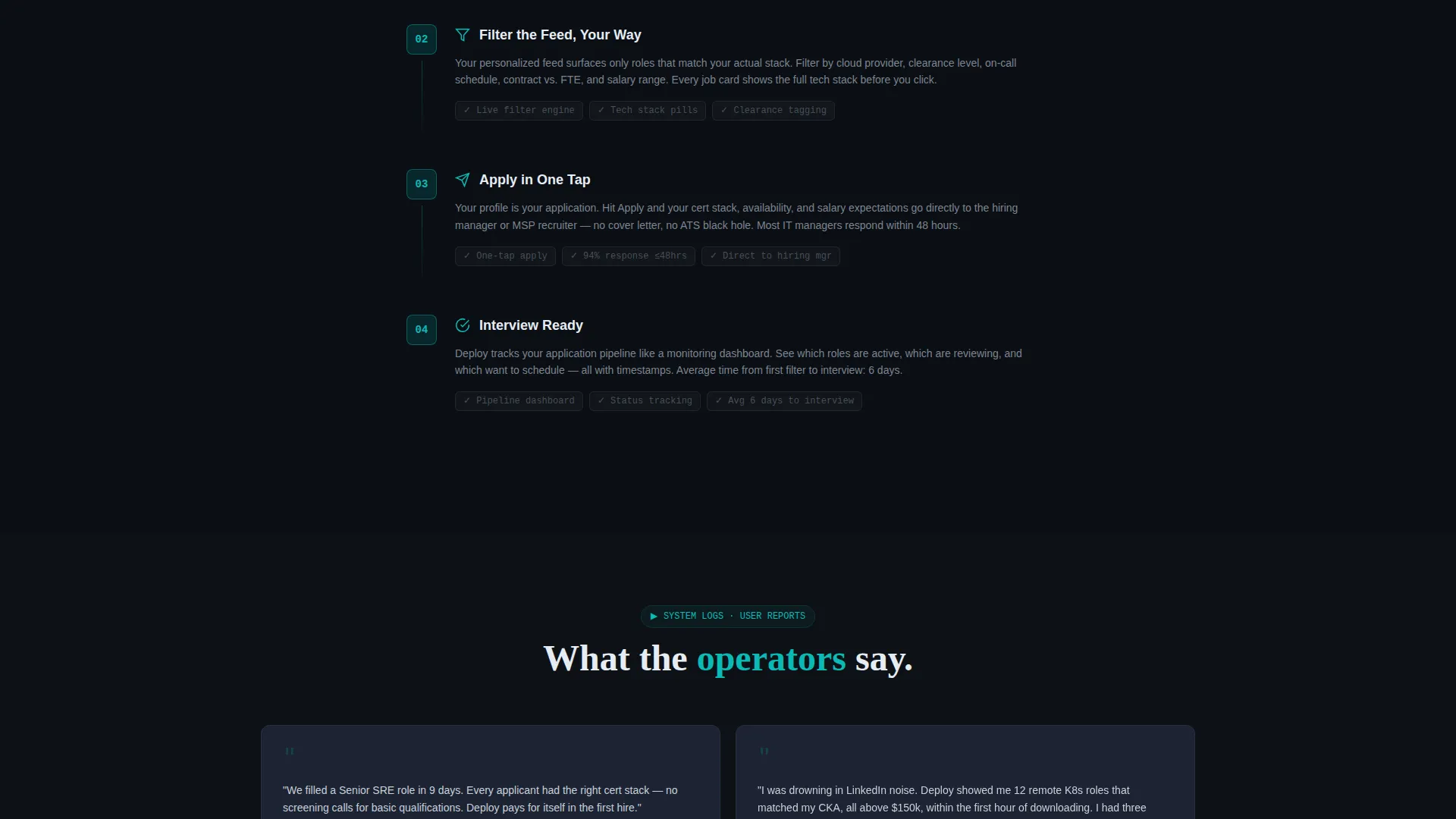
A vertical timeline walks visitors through the journey from download to interview in four steps. Each step reveals more detail as it enters the viewport, matching the progressive scroll reveal pattern of the full page.
Testimonial Carousel with Metrics
Dark-mode testimonial cards display feedback from IT managers with their titles, company sizes, and time-to-hire figures shown as system-style metrics. The carousel format keeps the social proof section compact and credible.
Multi-Placement App Download call to action
The call to action appears three times: as a floating bottom bar after the header interaction, as a full-width section after the comparison table, and as the closing block. Each placement includes App Store and Google Play buttons side by side with a QR code for desktop users and an optional email field labeled "Or get the link texted to you."
Page sections overview
| Section | Purpose |
|---|---|
| Interactive Job Feed Header | Let visitors filter live-styled listings before any call to action appears |
| Floating Download Bar | Capture early intent after the header interaction |
| Live Counter Strip | Build platform credibility with animated role and MSP counts |
| Comparison Table | Prove precision advantage over generalist job boards |
| Full-Width call to action Block | Reinforce the download ask after the comparison proof point |
| Job Seeker Timeline | Show the download-to-interview journey in four revealed steps |
| Testimonial Carousel | Display real IT manager feedback with time-to-hire metrics |
| Closing Download Block | Final conversion section with QR code and email capture |
Design & branding system
The visual identity follows a Dashboard Pro theme built on the Teal Catalyst color system. The palette feels like a network operations center at 2 AM: dark enough to focus on for hours, with teal signals confirming system health.
- Primary background in deep terminal black (#0D1117), card surfaces in muted slate (#1C2333), and body text in clean monitor white (#E6EDF3)
- System teal (#0ABAB5) accents interactive elements and data highlights; a sharper signal teal (#00E5CC) fires on hover states and live counters
- No hero images or stock photography; the interface itself is the visual, keeping every pixel functional and information-forward
Mobile & speed optimization
The template is structured for a scroll-reveal (progressive) presentation pattern. Sections enter the viewport one at a time, which keeps the experience focused and prevents the page from feeling overwhelming on smaller screens.
- Scroll-triggered reveals deliver content progressively, reducing visual clutter on mobile viewports
- The floating call to action bar and QR code layout adapt for desktop and mobile contexts, ensuring the download path stays visible at every scroll depth
How this template helps you convert
This template earns the conversion before it asks for it. The header places visitors inside the product experience immediately, so the download request arrives after they have already seen the value.
- Visitors interact with live job filters in the header, experiencing the platform's precision before any sign-up prompt appears
- Progressive scroll reveals layer in platform statistics, competitive proof, and social metrics, each section making the download decision easier than the last
Other information about this template
Deploy fits naturally into a broader IT services digital presence strategy. It is built specifically for the IT services job board niche, where generic templates consistently fail to communicate technical depth or platform focus.
- The template style is Scroll Reveal (Progressive), meaning animations and content reveals are tied to scroll position rather than page load
- The creative direction follows a Spec Sheet pattern: each section presents harder evidence than the previous one, building toward a confident close
- The header concept is an Interactive Preview, which is a deliberate choice to let the product demonstrate itself rather than relying on marketing copy alone
- The landing page direction is App Download, and every call to action placement is sequenced to follow a proof point rather than interrupt the experience
- This template is categorized under Technology and sits within the IT Services Digital Presence subcategory, making it a strong fit for teams building awareness around a specialized IT hiring platform
Theme
Dashboard Pro
Creative direction
Spec Sheet
Color system
Teal Catalyst
Style
Scroll Reveal (Progressive)
Direction
App Download
Page Sections
Interactive Job Feed with Live Filters
Animated Live Counter Strip
Generalist Versus. Platform Comparison Table
Four-step Progressive Timeline
Testimonial Carousel with System Metrics
Multi-placement App Download Call to Action
Related questions
Who is the primary audience for this landing page template?
Does the interactive header require any coding to set up?
How many times does the app download call to action appear on the page?
Can I customize the comparison table to reflect my platform's specific advantages?
What makes this template different from a general technology landing page template?



