Deploy - Powerful Itservices Landing Page Template
Deploy is a dark-themed, dashboard-style careers landing page built for IT services companies hiring technical talent. It opens with an interactive team-fit calculator that shows candidates their role match, salary band, and stack overlap before they read a single line of copy. The result is a page that earns candidate trust through real data, not recruitment jargon.
by Rocket studio
Quick summary
Deploy is a single-page careers landing page designed for tech services firms that hire senior sysadmins, cloud architects, and developers. The page leads with a live team-fit calculator widget, unfolds into a sortable role data grid, and surfaces real working metrics like on-call rotation ratios and deploy frequency. Every section is styled as a dark dashboard panel.
Who this template is for
This template is built for IT services companies that need to attract experienced technical candidates without relying on generic job boards or bland careers pages. It works best for firms with multiple open roles across disciplines and a culture worth showing off through real data.
- Talent teams at managed services and tech operations firms hiring sysadmins, DevOps engineers, cloud architects, and developers
- Companies that want to replace static job listings with a data-driven candidate experience
- Engineering leaders who want the page to reflect the actual working environment, not polished HR language
What problem this template solves
Most IT services careers pages fail technical candidates. They offer a wall of text, a list of job titles, and a generic "we value innovation" paragraph. Experienced engineers see through that immediately and move on.
- Senior engineers need to know the stack, the salary range, and the on-call expectations before they invest time applying
- Candidates with options compare culture and working conditions, not just titles, and static pages give them nothing to compare
- Hiring teams lose qualified candidates who never make it to the application form because the page gave them no reason to stay
What you get with this template
You get a fully structured, dark-themed IT services careers landing page built around a live team-fit calculator and a real-time role data grid. Every scroll reveals a deeper layer of working data, from sprint rhythms to benefits utilization rates.
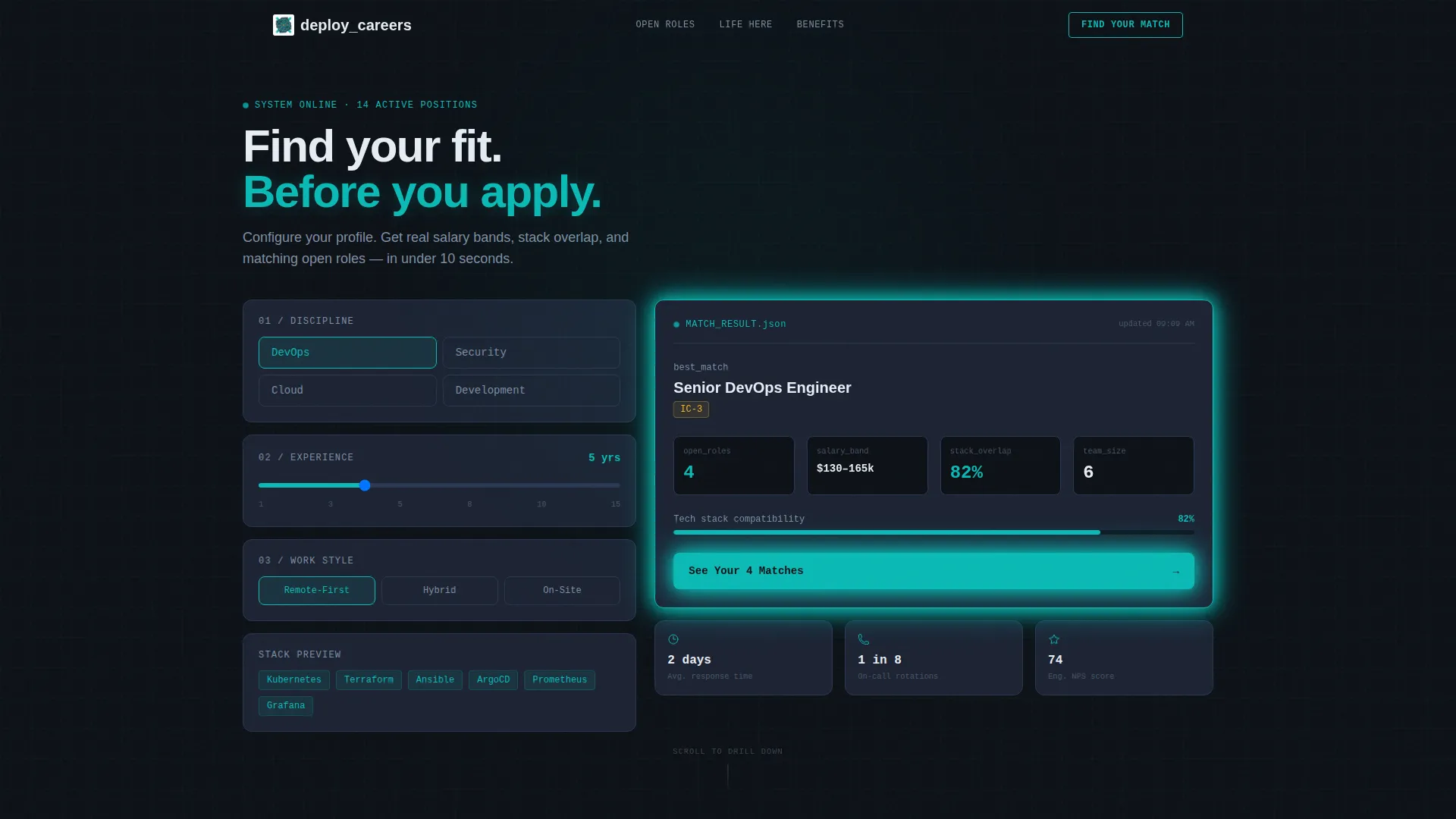
- An interactive calculator header widget that outputs personalized role matches, salary bands, and tech stack overlap scores
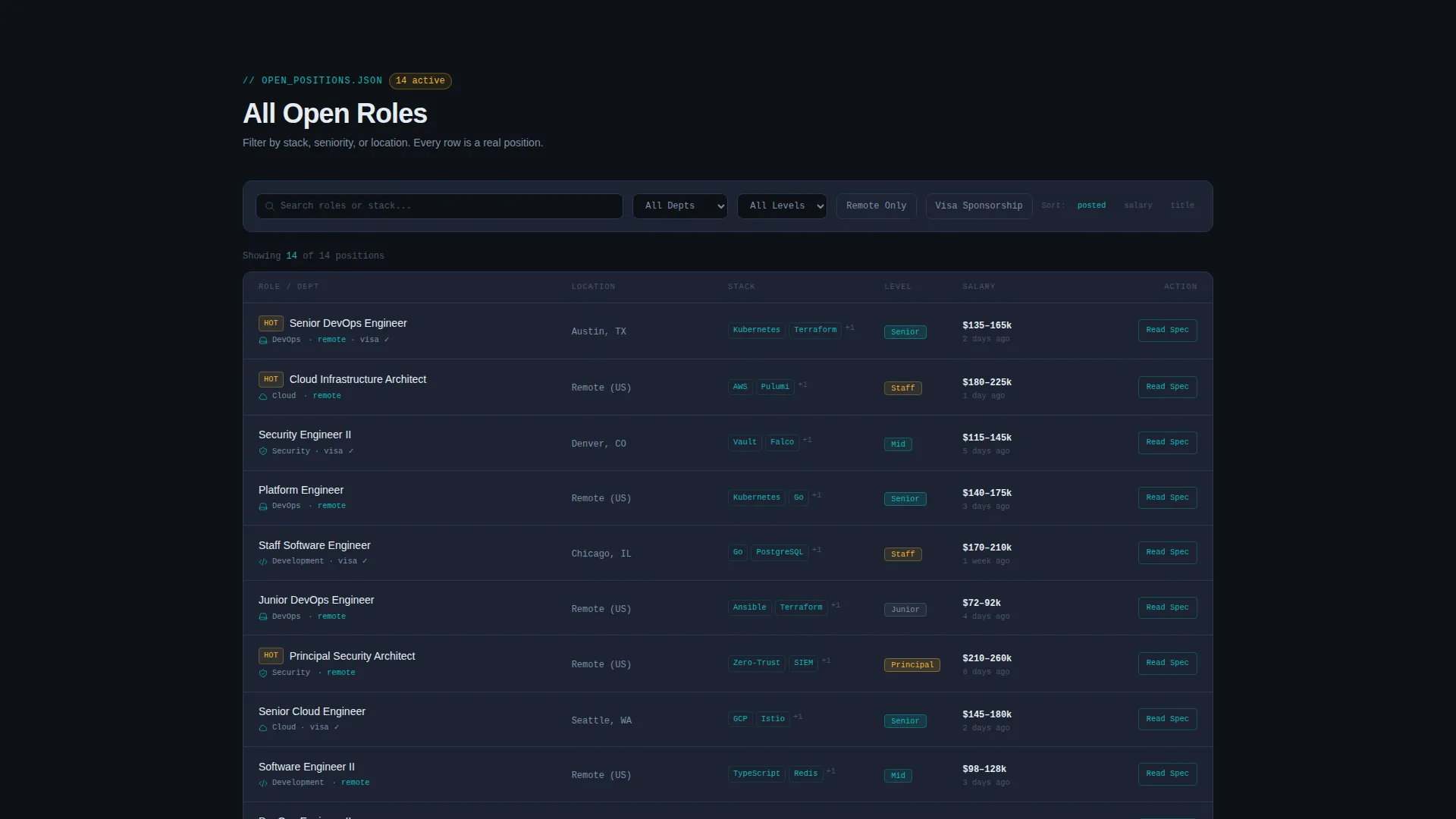
- A sortable, filterable open-roles data grid with columns for department, location, stack, seniority, and visa sponsorship
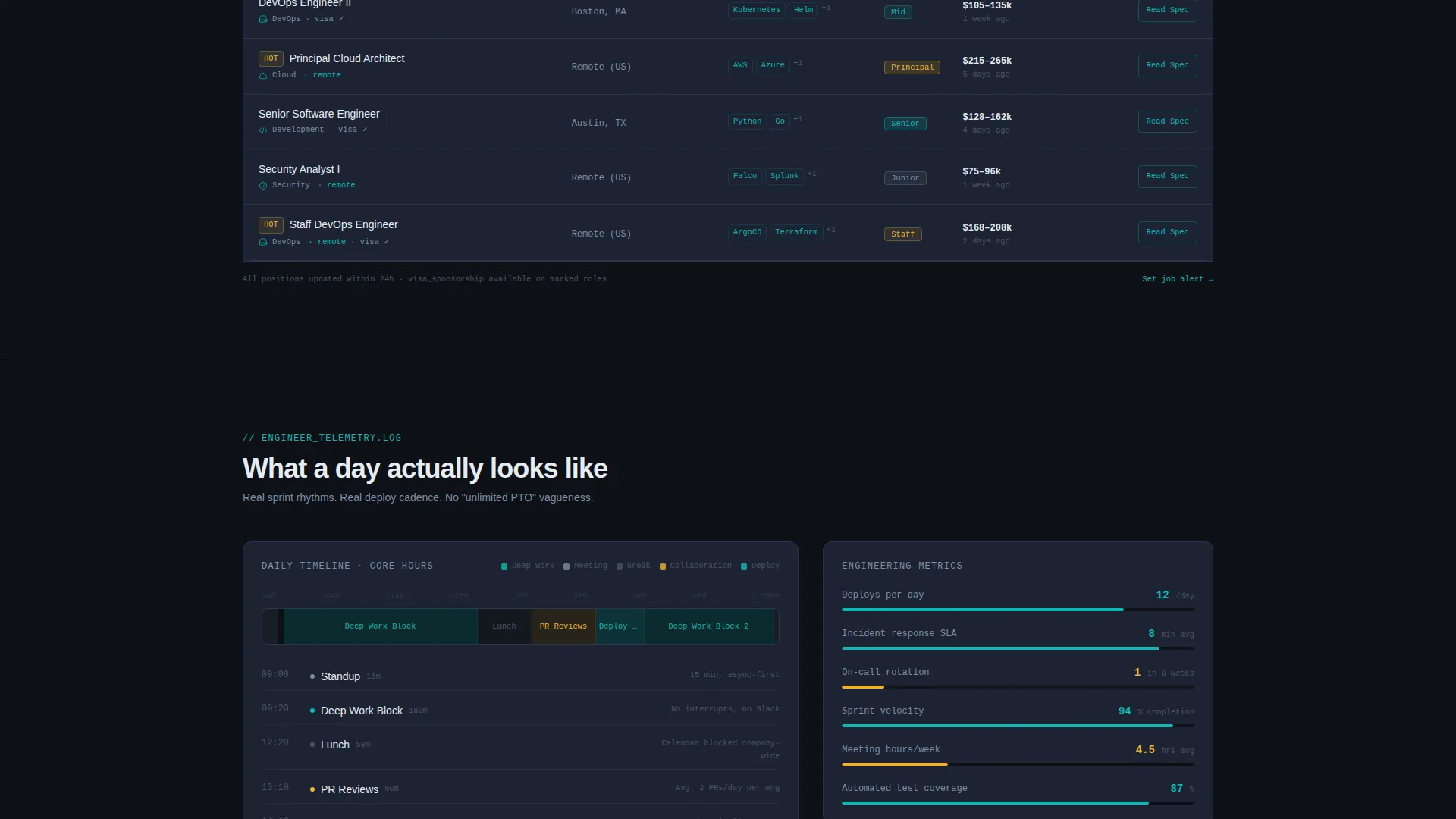
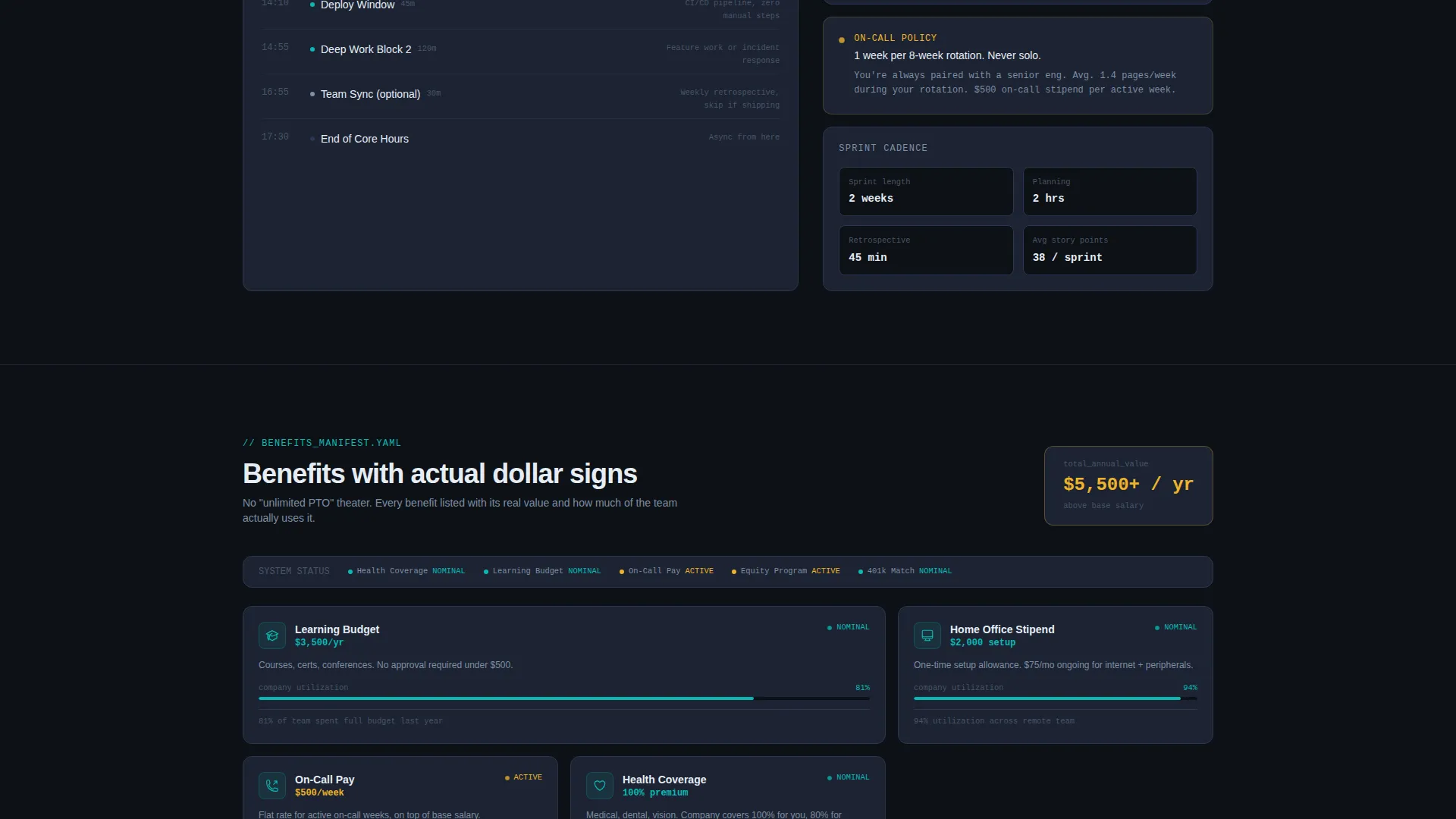
- An engineer's day timeline panel, a benefits card grid rendered as system-status tiles, and a primary "See Your Match" call-to-action flow
Feature list
This section covers the core built-in components that make Deploy work as a high-converting IT services careers landing page.
Team-Fit Calculator Widget
Visitors select their discipline, years of experience, and preferred work style. The widget instantly outputs a personalized dashboard card showing matching open roles, salary band range, tech stack overlap percentage, and team size. The calculator delivers value before the visitor reads a single paragraph.
Live Open-Roles Data Grid
A real-time data grid displays every open role with sortable columns across department, location, tech stack, seniority level, and visa sponsorship availability. Candidates can filter the grid in real time, and each row includes a "Read the Spec" secondary call-to-action in monospace type.
Engineer's Day Timeline Panel
A timeline visualization shows actual sprint rhythms, deploy frequencies, and on-call rotation ratios drawn from internal metrics. This panel replaces vague culture claims with concrete data about what a working day actually looks like on the team.
Benefits System-Status Card Grid
Each benefit is rendered as a system-status tile displaying its real dollar value and company-wide utilization rate. Learning budgets, home-office stipends, and sabbatical policies are shown as live metrics, not bullet points on a PDF.
Pre-Filtered Application Flow
The primary call-to-action, "See Your Match," is embedded directly inside the calculator output. It routes candidates to the full role description with a pre-filtered application form. By the time a candidate clicks, they already know the role, the stack, and the salary band align.
Dark Dashboard Visual System
The entire page is styled as a terminal-dark dashboard using a deep black base, active teal highlights, muted slate card surfaces, and signal white text. Alert amber accents mark urgent calls-to-action and notification badges throughout the layout.
Page sections overview
| Section | Purpose |
|---|---|
| Fit Calculator Header | Delivers instant, personalized role matches based on discipline, experience, and work style |
| Open Roles Grid | Shows every current opening with sortable, filterable columns and per-row spec links |
| Engineer's Day Timeline | Visualizes real sprint cadence, deploy frequency, and on-call rotation data |
| Benefits Status Grid | Displays each benefit as a system-status tile with dollar value and utilization rate |
| Role Description Flow | Routes calculator matches to pre-filtered application forms via "See Your Match" call to action |
Design & branding system
The visual identity follows a terminal-dark palette that feels like a well-organized monitoring dashboard at 3 AM. Everything is calm, legible, and clearly organized. Nothing looks like it is on fire.
- Core palette: deep terminal black (#0D1117) for the base, active teal (#0ABAB5) for highlights and status indicators, muted slate (#1C2333) for card surfaces, and signal white (#E6EDF3) for body text
- Accent layer: alert amber (#F0B429) marks urgent calls-to-action, notification badges, and time-sensitive role indicators
- Typography leans on monospace styling for secondary calls-to-action and data labels, reinforcing the dashboard aesthetic throughout every section
Mobile & speed optimization
The page layout is designed to translate cleanly from a wide desktop dashboard view to a stacked mobile experience. Each panel section is self-contained, which keeps the scroll experience predictable on smaller screens.
- The calculator widget, data grid, and timeline panel each collapse into focused vertical stacks on mobile without losing their interactive function
- Card-based sections like the benefits grid reflow naturally into single-column layouts, keeping all metric values visible without horizontal scrolling
How this template helps you convert
Deploy is built around a single conversion insight: candidates apply when they already know the role is right for them. The page earns that certainty before asking for a click.
- The team-fit calculator runs at the top of the page and delivers a personalized match score, salary range, and stack overlap before the candidate scrolls. This removes the uncertainty that causes most technical candidates to leave without engaging.
- The "See Your Match" call-to-action is placed inside the calculator output itself, so the click happens at the moment of highest confidence. The pre-filtered application form reduces friction further by carrying the candidate's selections forward.
Other information about this template
Deploy is categorized under IT services company website templates and is specifically designed for the IT services company careers page niche. It follows the Dashboard Pro theme with the Teal Catalyst color system, a Calculator/Tool First creative direction, and an Interactive Preview header concept. The landing page direction is Click-Through, and the template style is Dashboard/Data Grid.
- Template theme: Dashboard Pro with Teal Catalyst color system
- Creative direction: Calculator/Tool First with an Interactive Preview header
- Template style: Dashboard/Data Grid optimized for a Click-Through landing page direction
- Niche fit: IT services company careers page within the broader Technology category
Theme
Dashboard Pro
Creative direction
Calculator/Tool First
Color system
Teal Catalyst
Style
Dashboard/Data Grid
Direction
Click-Through
Page Sections
Team-fit Calculator Widget
Live Open-roles Data Grid
Engineer's Day Timeline Panel
Benefits System-status Card Grid
Pre-filtered Application Flow
Terminal-dark Dashboard Visual System
Related questions
Can I customize the open roles shown in the data grid?
Does the team-fit calculator connect to a live database?
Is this template suitable for a company with only a few open roles?
Can I change the color palette to match our brand?
Who is the primary audience this careers page is designed to attract?



