Instant Market Intelligence API Landing Page Template
Endpoint is a dark-themed, dashboard-style landing page built for proptech API products. It opens with a live API response panel, moves into a scrollable feature comparison matrix, and closes with an inline cost calculator and a frictionless signup form. The design speaks directly to CTOs, solo developers, and integration engineers who need to evaluate a real estate data API fast and ship before sprint end.
by Rocket studio
Quick summary
Endpoint is a single-page, terminal-aesthetic landing page template purpose-built for property data API products. It combines a live dashboard hero, a capability comparison matrix, inline code samples, a cost calculator, and a three-tier pricing section. Every section is designed to move a developer or technical decision-maker from first scroll to "Get API Keys Free" without friction.
Who this template is for
This template is built for technical founders and developer-facing go-to-market teams in the proptech space. It works equally well for a solo developer shipping a rent-to-own calculator and a CTO at a Series A real estate platform evaluating vendors before a board meeting.
- CTOs and integration engineers at real estate platforms or mortgage lenders who need to assess a real estate data API quickly
- Solo developers and product leads who want a professional, credible page that reflects the quality of their API
- Proptech startups launching a property data product and competing directly against legacy providers or in-house builds
What problem this template solves
Choosing a real estate data API provider is a long-term commitment that will directly shape your product's success. Most API landing pages fail because they list features without proving value. They bury response times, hide pricing, and offer no way to test before committing. Developers leave to search for a competitor who just shows them the data.
- No way to compare your API against build-in-house costs or legacy provider pricing side by side
- No live demonstration of response quality, so developers cannot see property details, data points, or query parameters before signing up
- Long signup forms that ask for credit cards and phone numbers, killing conversion before a single API call is made
What you get with this template
This template delivers a complete, production-ready landing page that balances technical precision for developers with a clear value proposition for business stakeholders. Every section is prompt-driven and purposeful. Nothing is decorative.
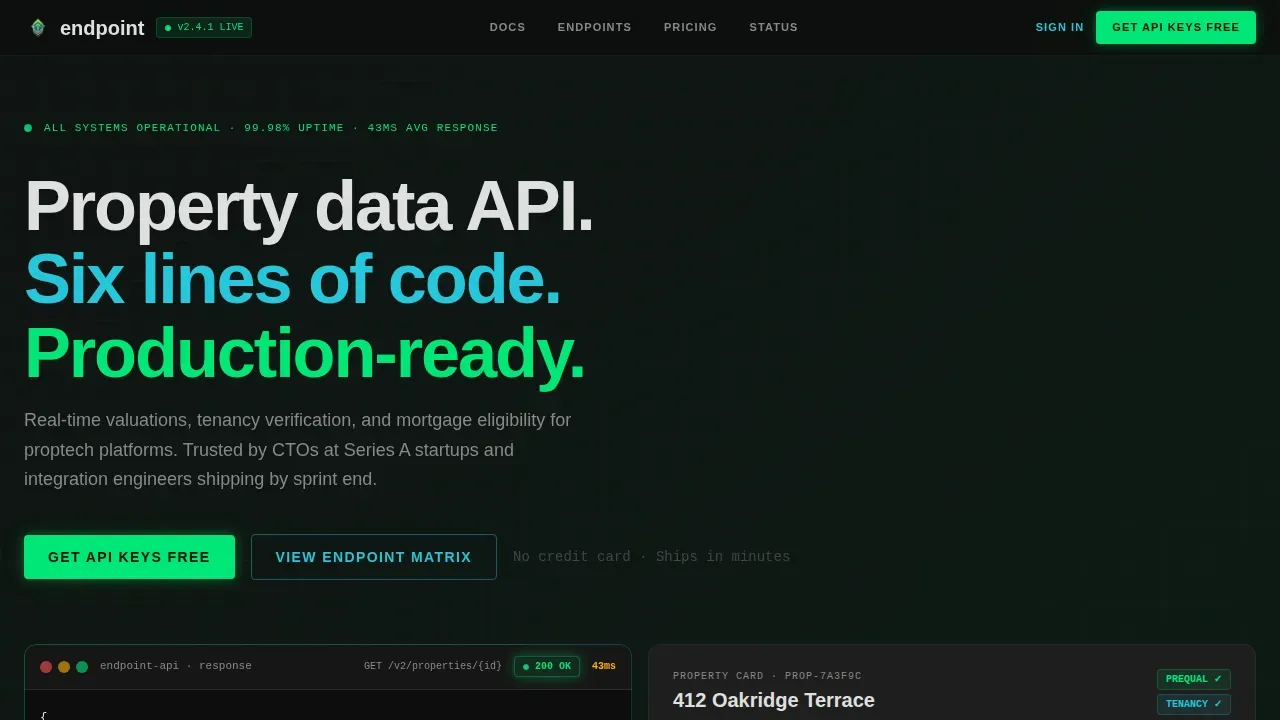
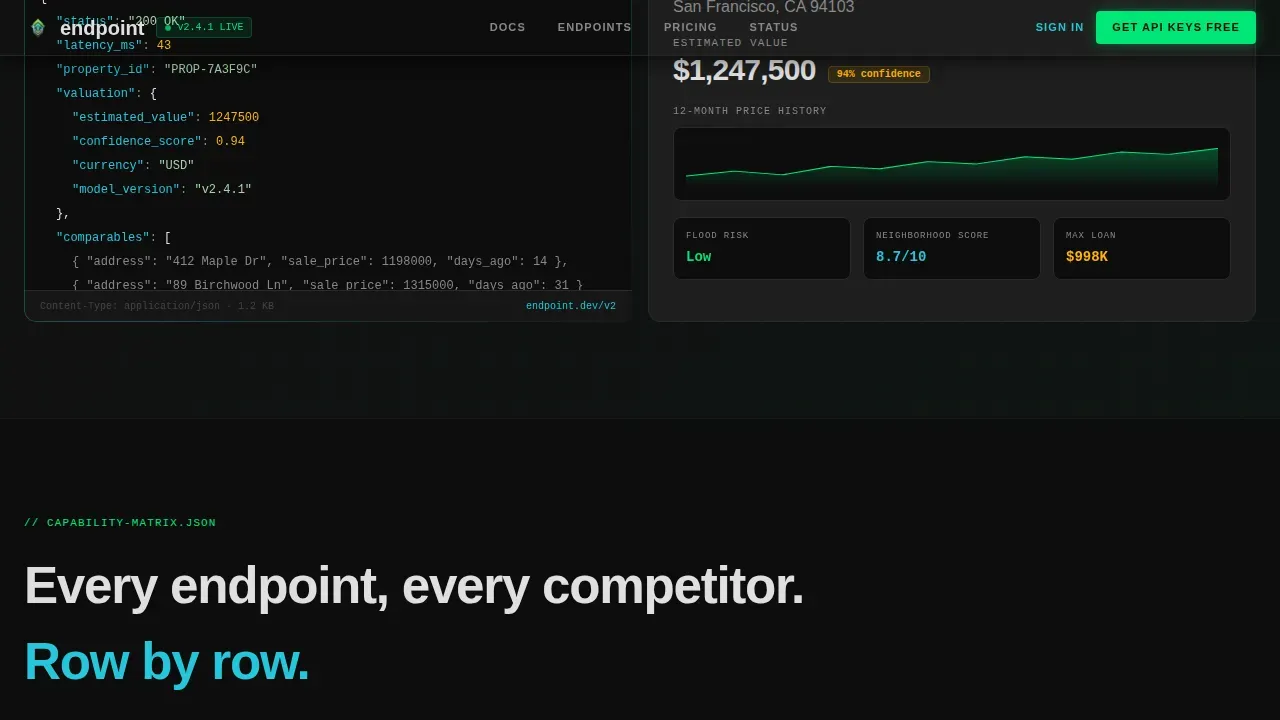
- A live dashboard hero showing a real GET request panel with a JSON response, a 200 status badge, and a 43ms latency counter
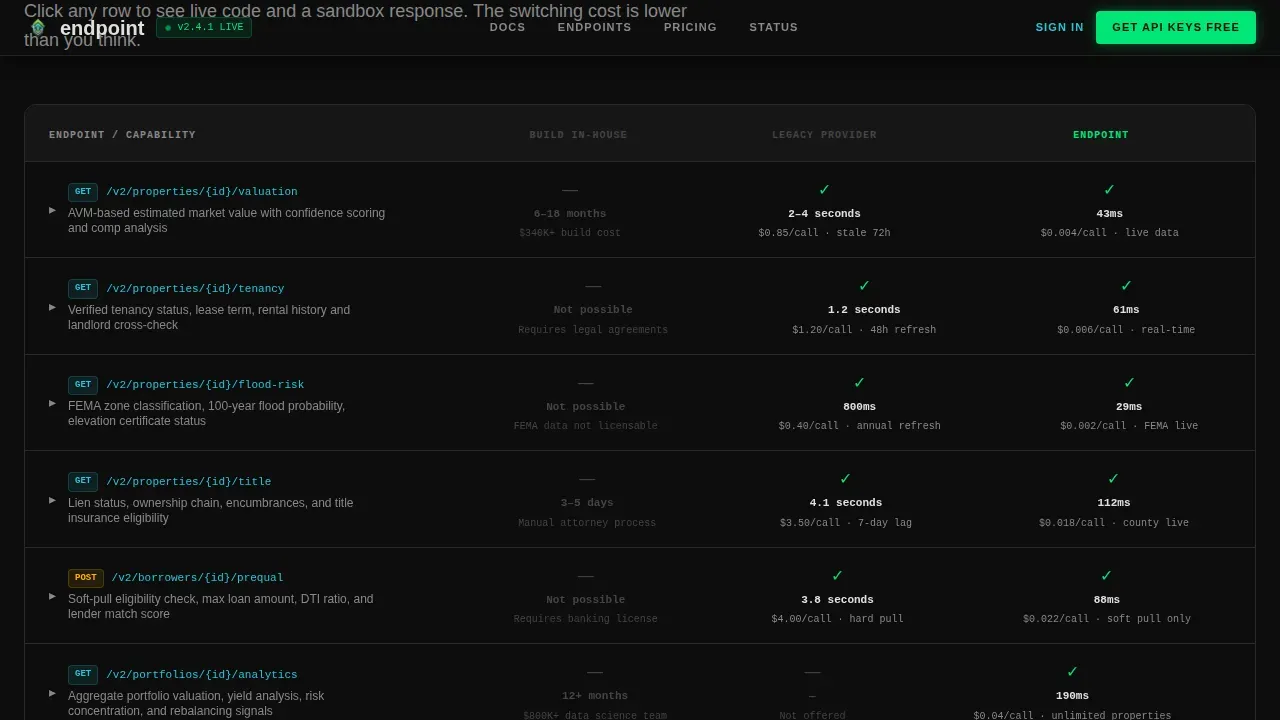
- A scrollable feature matrix comparing your API against build-in-house and legacy providers across response times, data freshness, and pricing per call
- An inline cost calculator, a six-line code integration block with sandbox runner, three-tier pricing, and a single-row footer
Feature list
This template is built around six core sections, each designed to handle a specific stage of the developer evaluation journey. The features below reflect what the template delivers out of the box.
Live API Dashboard Hero
The header renders a pixel-accurate mock of an API response panel. It shows a GET /v2/properties/{id} call returning a JSON payload with valuation confidence scores and comparable sale arrays. The right half displays the same data as a formatted property card with a price history sparkline, a neighborhood risk score, and a mortgage pre-qualification badge. A latency counter reads 43ms. No stock imagery is used; the product itself is the hero.
Expandable Feature Comparison Matrix
Scrolling past the hero drops the visitor into a data grid where every row is an API capability: property valuations, tenancy verification, flood risk, title search, mortgage pre-qualification, and portfolio analytics. Each column represents a provider option. Cells show response times, data freshness intervals, and cost per call. Green check icons mark available features; gray dashes mark gaps. Every row expands on click to reveal a live code snippet and a sandbox response, letting developers evaluate each endpoint returns in context.
Inline Sandbox and Code Samples
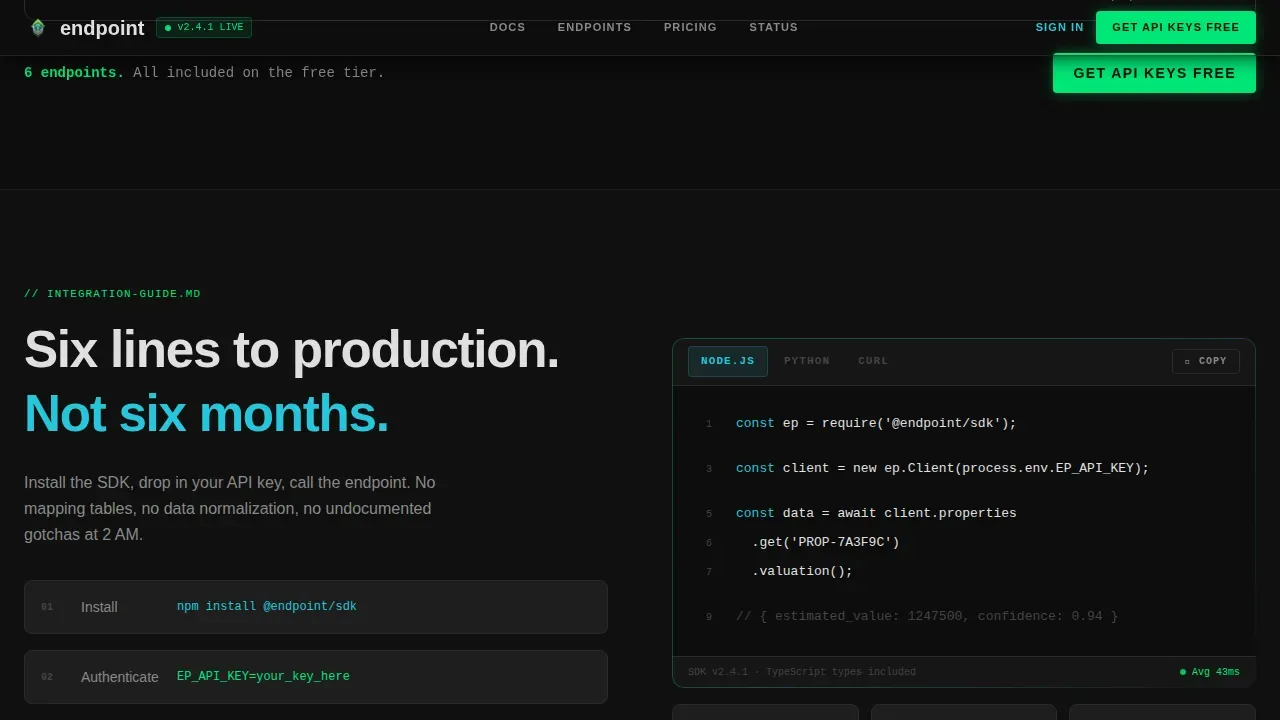
Every code block in the template pairs with a "Run in Sandbox" button that opens an interactive request builder inline. This lets developers test API endpoints directly on the page without leaving or incurring costs. The sandbox environment supports common queries and shows live JSON responses, making the integration decision concrete rather than theoretical. Code samples are shown in monospaced type for immediate readability.
Interactive Cost Calculator
Below the matrix, a calculator lets visitors input their monthly API call volume. It then displays cost per call compared to a build-in-house estimate. The output makes the financial case without a sales call. Developers and CTOs can see the maximum value of switching before they ever create an account.
Frictionless Signup and API Key Access
The primary call-to-action is "Get API Keys Free," pinned in a slim top bar that darkens on scroll. The signup form asks only for work email and company name. No credit card, no phone number. Instant access to an api key after form submission removes the last barrier to first integration.
Three-Tier Pricing Section
A clear pricing table covers Free, Growth, and Enterprise tiers. It explains api usage limits per tier, such as free calls per month, so developers can plan before committing. The pricing model is designed to align with business needs at every growth stage, from early search and validation through to scale.
Page sections overview
| Section | Purpose |
|---|---|
| Dashboard Hero Panel | Show live API response with status, latency, and property card |
| Feature Comparison Matrix | Compare API capabilities row by row against alternatives |
| Code Integration Block | Display six-line snippet with inline sandbox runner |
| Cost Calculator | Visualize savings versus build-in-house by call volume |
| Three-Tier Pricing | Communicate free, growth, and enterprise api usage tiers |
| Single-Row Footer | Provide links, documentation reference, and legal defaults |
Design & branding system
The visual identity follows a Dashboard Pro theme built on a Carbon Fiber color system. Every color carries functional meaning. Nothing is applied for decoration.
- Background is deep cockpit black (#0D0D0D), card surfaces use brushed graphite (#1E1E1E), live response indicators use status-green (#00E676), and monospaced foreground type renders in signal-white (#E0E0E0)
- Interactive api endpoints and hover states use a proptech-specific teal (#26C6DA); typography combines Plus Jakarta Sans for headings and body with JetBrains Mono for all code and data output
- Animation details include cursor blink effects, typing animations, live counter transitions, and row-expand interactions that reinforce the terminal aesthetic throughout the page
Mobile & speed optimization
The template is built desktop-first, reflecting how CTOs and engineers typically evaluate API vendor pages on workstations. It remains fully responsive for smaller screens without losing the data-dense layout.
- Server Components handle all static sections, minimizing client-side JavaScript hydration and keeping the page fast on initial load
- Interactive elements such as the matrix row expanders, inline sandbox, and cost calculator use minimal client hydration targeted only where interactivity is required
- High animation fidelity, including the live counter, typing effects, and expandable rows, is preserved on desktop while gracefully simplified on mobile viewports
How this template helps you convert
This template is built specifically for a Comparison/Versus conversion flow. Every design and content decision is oriented toward removing doubt and reducing switching friction.
- The pinned "Get API Keys Free" call-to-action bar stays visible throughout scroll, and the minimal signup form asks only for work email and company name, so the path from interest to api key is as short as possible
- The feature matrix proves value row by row with real data points: response times, data freshness intervals, and cost per call, so developers do not need to request a demo to understand why switching costs are lower than staying
- The cost calculator makes the financial case concrete by letting visitors model their own monthly call volume and see the comparison before they create an account, turning a click into a financial inevitability rather than a commitment
Other information about this template
This template is particularly well-suited for proptech teams building products that surface property records, run market analysis across zip codes, or expose data from public records and MLS data sources. It supports all the properties in a portfolio view as easily as it supports a single property lookup. The page architecture is designed to handle the documentation demands of a serious real estate data API, including sections for query parameters, data coverage by property type, and filtering logic for residential and commercial properties.
- Developers can use the sandbox to retrieve property details such as square footage, active liens, home equity estimates, and owner history without writing a line of production code
- The documentation reference in the footer can link to OpenAPI or Swagger specs, giving engineers instant access to the full list of api endpoints, response schemas, and default values
- Teams that monitor api usage across multiple clients or manage datasets for investment firms, home services providers, and mortgage lenders will find the pricing tiers and calculator section directly relevant to their planning workflows
- The template supports pulling data use cases across zip codes and geographic datasets, with filtering by property address, property type, and date range baked into the matrix row examples
- Automated valuation models (AVMs) powered by AI are a natural fit for the valuation row in the matrix, and the template's code samples section is structured to showcase how a single endpoint call can return AVM-grade property valuations with confidence scores
Theme
Dashboard Pro
Creative direction
Feature Matrix
Color system
Carbon Fiber
Style
Dashboard/Data Grid
Direction
Comparison/Versus
Page Sections
Live API Dashboard Hero Panel
Scrollable Feature Comparison Matrix
Inline Sandbox and Code Integration Block
Interactive Cost Calculator
Frictionless API Key Signup Flow
Three-tier Pricing with Usage Clarity
Related questions
Can I customize the feature matrix rows for my own API endpoints?
Does the sandbox section require a real backend connection?
Is the cost calculator formula editable?
What kind of documentation does this template support?
Who is this template best suited for?



