Family First Consulting Marketplace Landing Page Template
The Counsel Family First Consulting Marketplace landing page template is built for independent consultants who want vetted advisory engagements without the grind. Three comparison tables guide visitors from "why this platform" to "how it works" to "which path fits my life." A warm, editorial design and a progressive application form make signing up feel natural, not transactional.
by Rocket studio
Quick summary
Counsel is a single-page consulting marketplace landing page template designed for professionals who want meaningful work without sacrificing family time. It uses three structured comparison tables, a progressive recruitment form, and a warm editorial design to move independent consultants from curiosity to application. The page is desktop-first with strong mobile support for late-night browsing.
Who this template is for
This template is built for marketplace founders and platform operators targeting independent advisory talent. It speaks directly to mid-career professionals who left corporate burnout behind and want flexible, curated engagements. It is equally useful for anyone launching a consulting network with a strong wellness and family-first positioning.
- Independent consultants: fractional executives, change managers, and strategists seeking schedule-respecting engagements
- Solo practitioners: counselors, therapists, psychologists, life coaches, and wellness professionals who need a reliable client pipeline
- Platform builders: operators creating a professional marketplace for advisory or therapy services
What problem this template solves
Finding advisory work as an independent professional is exhausting. Most consultants and therapists spend time on LinkedIn hustle or pay agency fees with no schedule control. A focused landing page removes that friction fast. This template gives potential clients and applicants a clear, trustworthy first step without overwhelming them.
- No clear comparison between platform options, recruiters, and solo sourcing leaves consultants guessing
- Onboarding flows buried inside generic websites confuse mental health professionals and advisors alike
- Vague engagement terms make it harder for counselors and therapists to commit with confidence
What you get with this template
This template delivers a complete, single-page conversion experience. Every section is purposeful and sequenced to build trust, answer real objections, and guide visitors toward applying. The design and functionality are both included and ready to use.
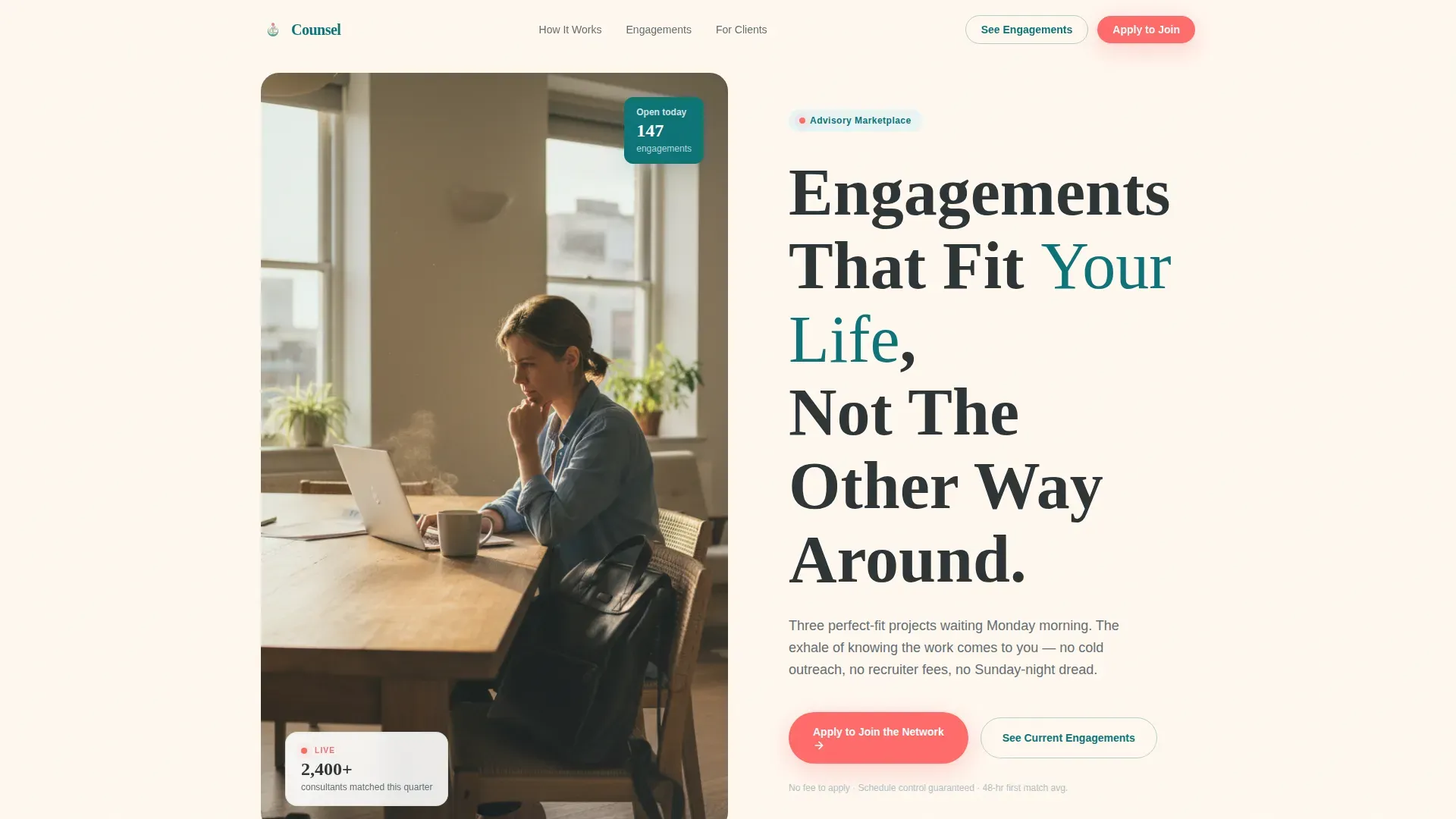
- A half-page editorial photo-and-text hero with a headline, coral call-to-action button, and a social proof micro-stat
- Three data-driven comparison tables covering platform value, onboarding journey, and engagement type tradeoffs
- A progressive three-step recruitment form with a secondary ghost button for browsing anonymized project briefs
Feature list
This template is designed around one goal: turning a skeptical professional into a confident applicant. Each built-in feature serves that conversion journey directly.
Three-Table Comparison Architecture
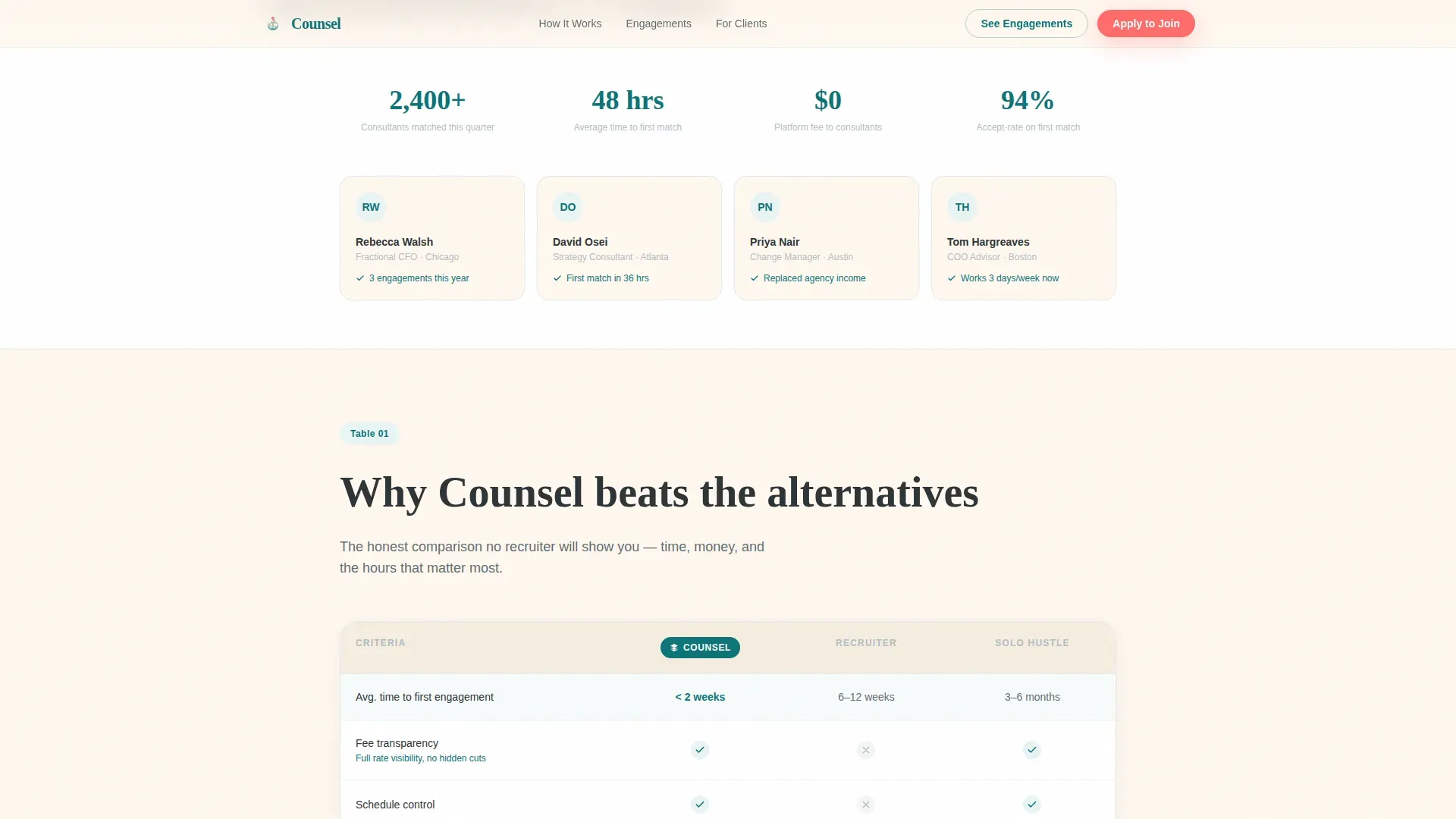
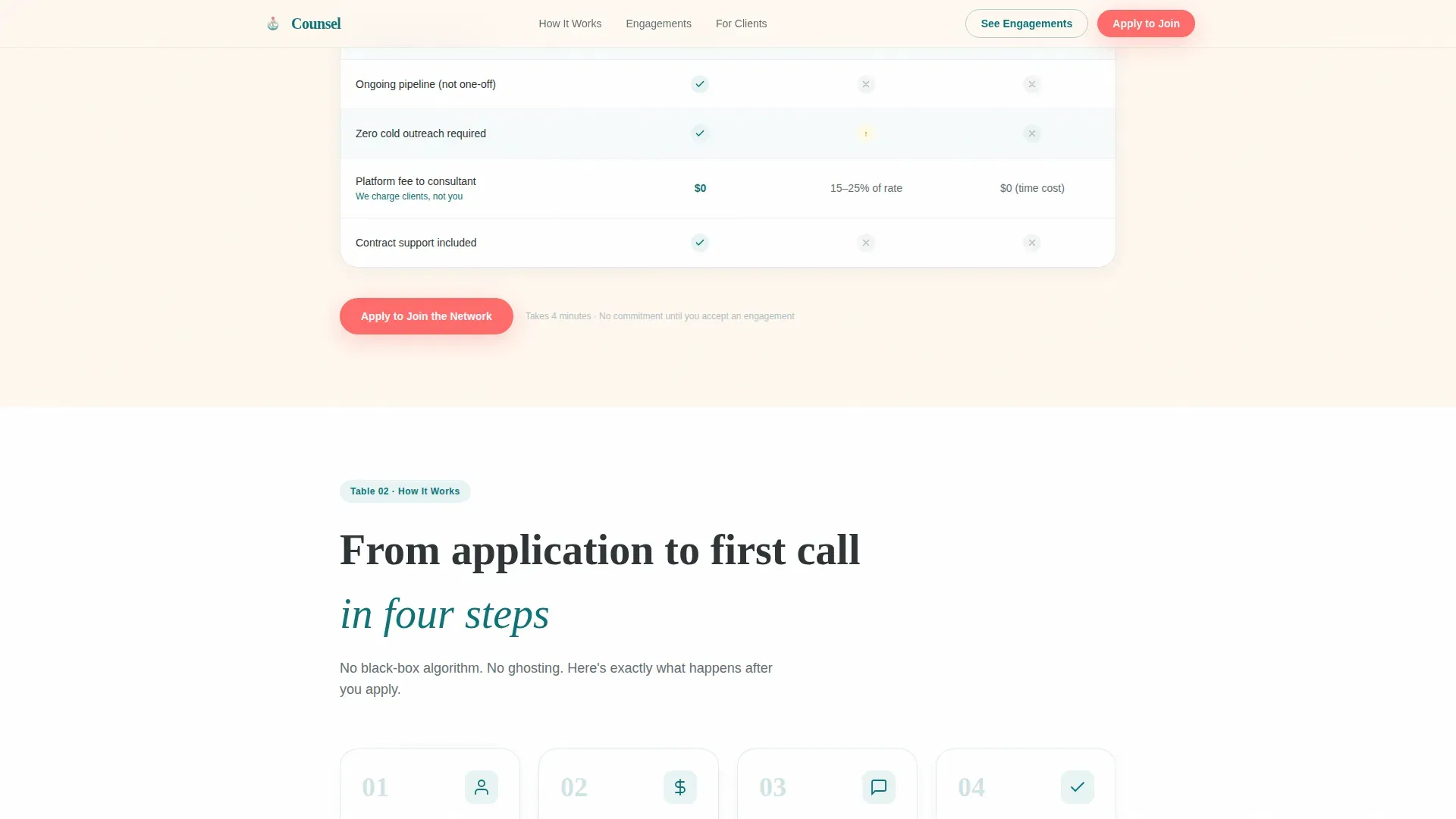
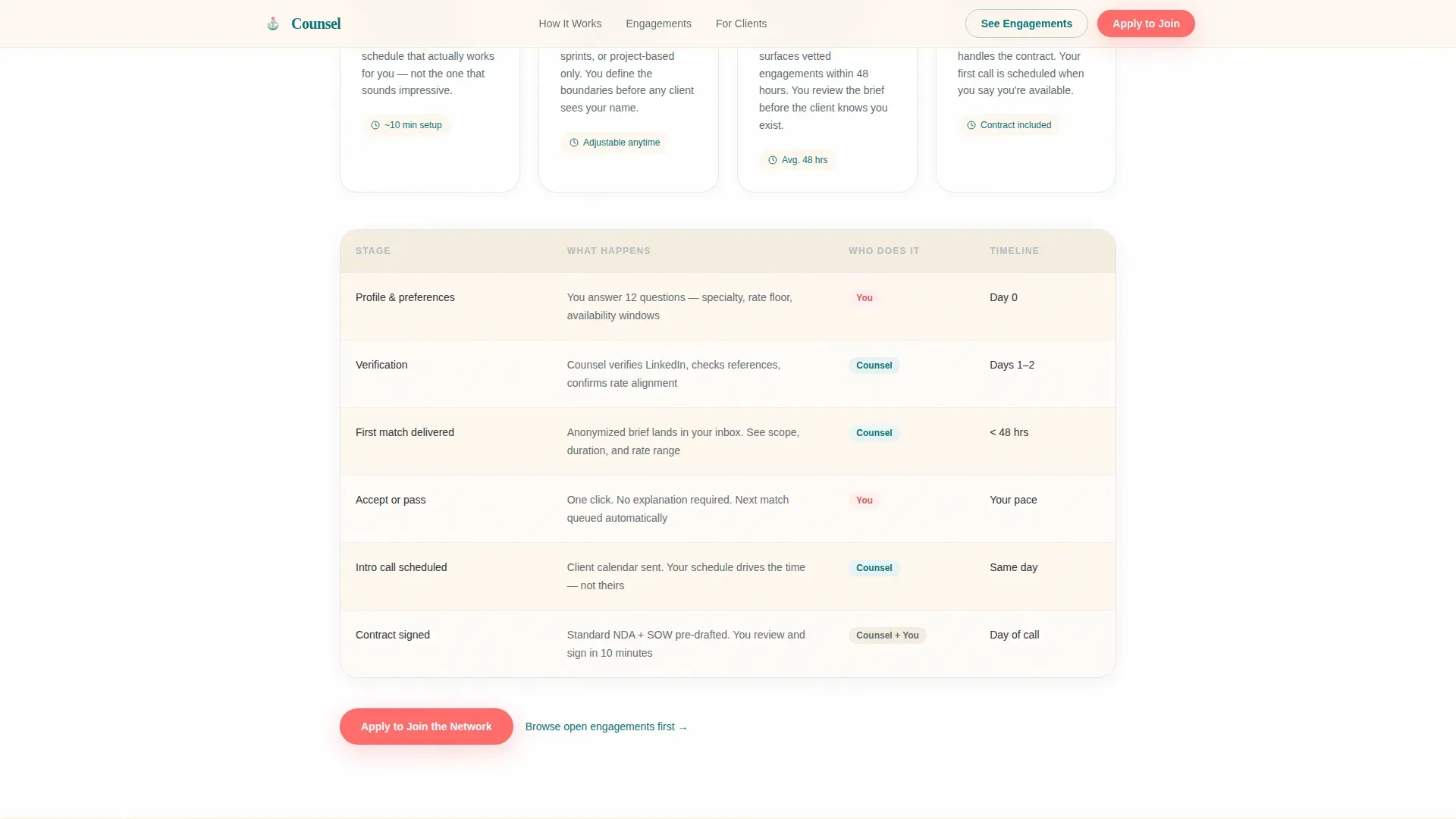
The core of this landing page is three sequential comparison tables. The first compares the platform against recruiters and solo hustle. The second walks through onboarding step by step. The third lays out engagement types with honest tradeoffs on income, time, and family flexibility. Each table is more persuasive than the last.
Progressive Three-Step Application Form
The recruitment form collects only the information needed across three short steps. Step one asks for a name and LinkedIn link. Step two covers consulting specialty and experience. Step three asks about availability and what an ideal work week looks like. This simplified lead form reduces friction and qualifies applicants simultaneously.
Editorial Hero with Social Proof
The hero section uses a candid split-layout design. A real-feeling editorial photograph sits beside the headline and a coral call-to-action button. A micro-stat reading "2,400+ consultants matched this quarter" provides immediate social proof and builds trust before visitors scroll.
Scroll-Reveal Animations and Table Interactivity
The page includes smooth animations on scroll reveals and staggered table row highlights. Magnetic button effects on calls to action and hover states on comparison tables create a modern, professional feel. These effects make the page easier to read and more engaging on desktops.
Floating Mobile Call to Action
A persistent floating call-to-action button appears on mobile screens throughout the entire page. This keeps the primary action reachable at every scroll position, which is especially useful for late-night browsing on smartphones.
Ghost Button Secondary Path
A teal ghost button labeled "See Current Engagements" offers a low-commitment alternative to the primary application. Potential clients and curious visitors can browse anonymized project briefs before deciding to apply, building confidence through transparency.
Page sections overview
| Section | Purpose |
|---|---|
| Editorial Hero Split | Introduces value, displays social proof, triggers first action |
| Platform versus. Recruiters Table | Answers "why this platform" with direct comparisons |
| Onboarding Journey Table | Walks through profile, match, and first call steps |
| Engagement Types Table | Compares fractional, project, and advisory board paths |
| Recruitment call to action Form | Collects applications via a three-step progressive form |
| Linear Single-Row Footer | Closes the page with clean, minimal site information |
Design & branding system
The design language feels like a well-lit home office at golden hour. It is warm and professional without being sterile. The Teal Catalyst color system is deliberate: every color carries a specific role across the page, and the fonts reinforce that calm authority.
- Colors: warm hearth cream (#FFF8F0) dominates backgrounds; deep decision teal (#0D7377) anchors headers and table highlights; grounding charcoal (#2D3436) carries body text; catalyst coral (#FF6B6B) appears only on calls to action and notification badges
- Typography: Fraunces is used for display headings and the hero headline; DM Sans handles all body text and table content for clean, modern readability
- Visual style: editorial photography, candid and warmly lit; no stock-polish imagery; a calming color palette that reflects professionalism while feeling genuinely human
Mobile & speed optimization
The template is desktop-first because most consultants review engagements on a laptop. However, mobile performance matters for the late-night LinkedIn scroller who finds the page on a phone. The design adapts gracefully across every device.
- Static comparison tables use server components for fast initial load; the interactive form uses client components only where interactivity is needed
- Responsive layout ensures the page looks great on all devices, from desktops to smartphones, without losing hierarchy or readability
- The floating mobile call-to-action button and touch-friendly form steps make applying easy on any screen size
How this template helps you convert
This landing page is built around a single conversion goal: consultant applications. Every design and copy decision reduces friction and builds confidence along the way. Specialized landing pages like this one can deliver significantly higher conversion rates than standard websites by removing distraction and keeping visitors focused.
- The hero section communicates value above the fold and builds rapport before visitors scroll, so the first step toward applying feels natural rather than pressured
- Three escalating comparison tables answer the real objections keeping consultants up at night, moving from platform credibility to onboarding clarity to personal fit
- The progressive form collects only essential information across three short steps, and a secondary ghost button gives skeptical visitors a no-commitment path that still builds trust
Other information about this template
This template sits within the HR and Hiring category, specifically the Freelance and Gig Marketplace niche for consulting and advisory services. It is relevant for a wide range of wellness and mental health professionals who operate independently. The design and functionality work equally well for a family therapist building a practice website, counselors running group therapy services, or psychologists seeking a modern professional web presence.
- Templates like Calmivelle offer a modern, elegant landing page design for consultant therapists and mental health professionals; Counsel shares that same conversion-first philosophy
- Consilo is a fully responsive Webflow template built for mental health professionals, counselors, therapists, and psychologists; the Counsel template targets a similar professional audience with a marketplace focus
- Mentaheal is a 12-page Framer template designed for mental health counseling practices; Counsel takes a single-page, landing-focused approach suited to recruitment and advisory marketplace use cases
- No coding skills are needed to customize this template; no-code functionality means developers are not required for standard content changes
- SEO-friendly structure helps the page establish a strong online presence and attract potential clients searching for wellness and therapy services
- Accreditation badges and professional association logos can be added to highlight credentials and build trust with visitors on a wellness journey
Theme
Family First
Creative direction
Step-by-Step Guide
Color system
Teal Catalyst
Style
Comparison Table
Direction
Recruitment/Hiring
Page Sections
Three-table Comparison Architecture
Progressive Three-step Application Form
Editorial Hero with Social Proof
Smooth Animations and Table Interactivity
Floating Mobile Call to Action
Ghost Button Secondary Path
Related questions
Is this template suitable for therapists and counselors, not just business consultants?
Can I use this template without coding experience?
Does the template support appointment booking?
How do the comparison tables help potential clients decide?
What makes this a landing page rather than a full website?



