Healthcare Consulting Reviews Website Template
Consult is a split-screen telehealth consulting landing page built for healthcare advisory practices. It pairs a testimonial-led header with a team-focused scroll, a scoping call form, and a gated resource download. The layout speaks directly to hospital CIOs, health plan directors, and HR benefits leads evaluating virtual care partners at an enterprise level.
by Rocket studio
Quick summary
Consult is a single-page telehealth consulting template designed for practices that sell trust before they sell services. The layout opens with a client testimonial and hard metrics, then walks visitors through named consultants and their specialties. Two conversion paths close the page: a scoping call form and a gated playbook download.
Who this template is for
This template suits healthcare consulting practices that work with large organizations on virtual care strategy. It is built for teams whose buyers need to vet credentials before picking up the phone.
- Hospital chief information officers migrating legacy systems to hybrid care models
- Health plan directors building virtual-first product lines
- HR benefits leads evaluating telehealth vendors for employer networks
What problem this template solves
Enterprise healthcare buyers move slowly. They need to see real people, real outcomes, and a clear path forward before they will commit to a conversation. A generic consulting page with stock photos and vague service lists does not earn that trust.
- Visitors leave without engaging because there is no human face behind the offer
- Decision-makers cannot tell whether the team has handled their specific situation before
- Dual-audience visitors (ready to talk versus still researching) are funneled into one path that fits neither
What you get with this template
The template delivers a structured single-page layout that introduces the team, proves outcomes, and captures leads through two distinct conversion paths. Every section is purposeful and sequenced to build confidence before asking for anything.
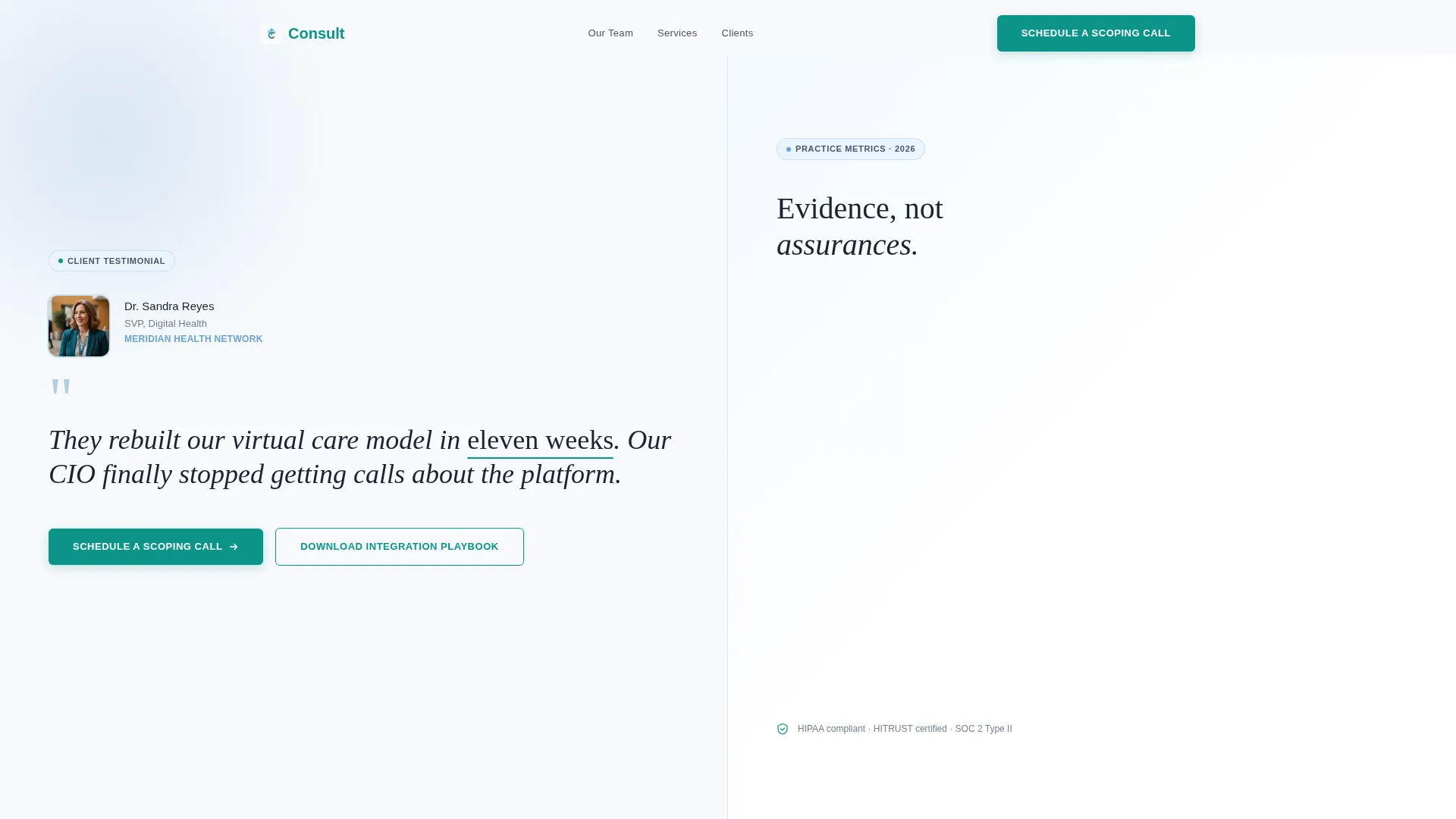
- A split-screen testimonial header with a portrait, a client quote, and a three-metric evidence cluster
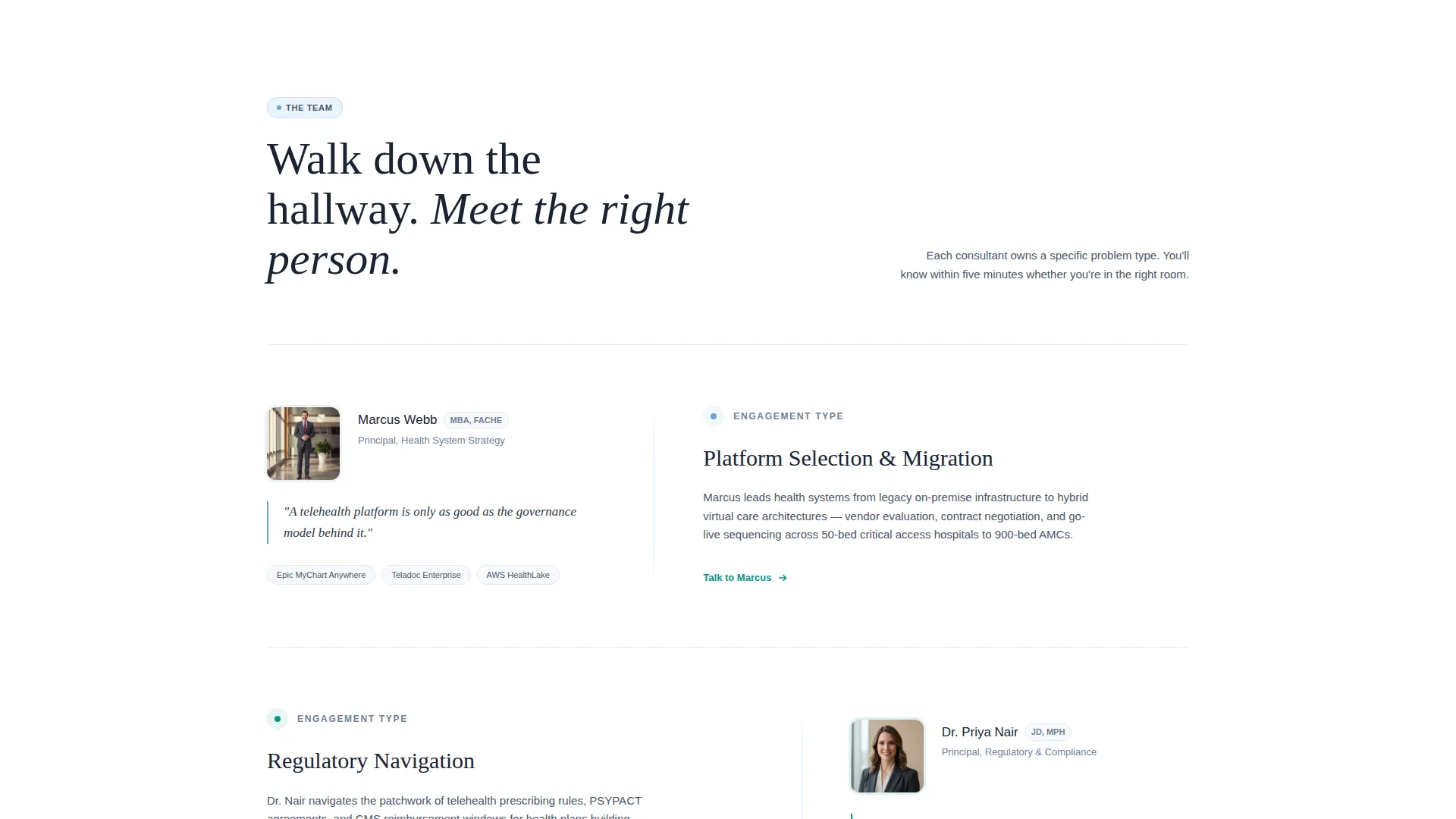
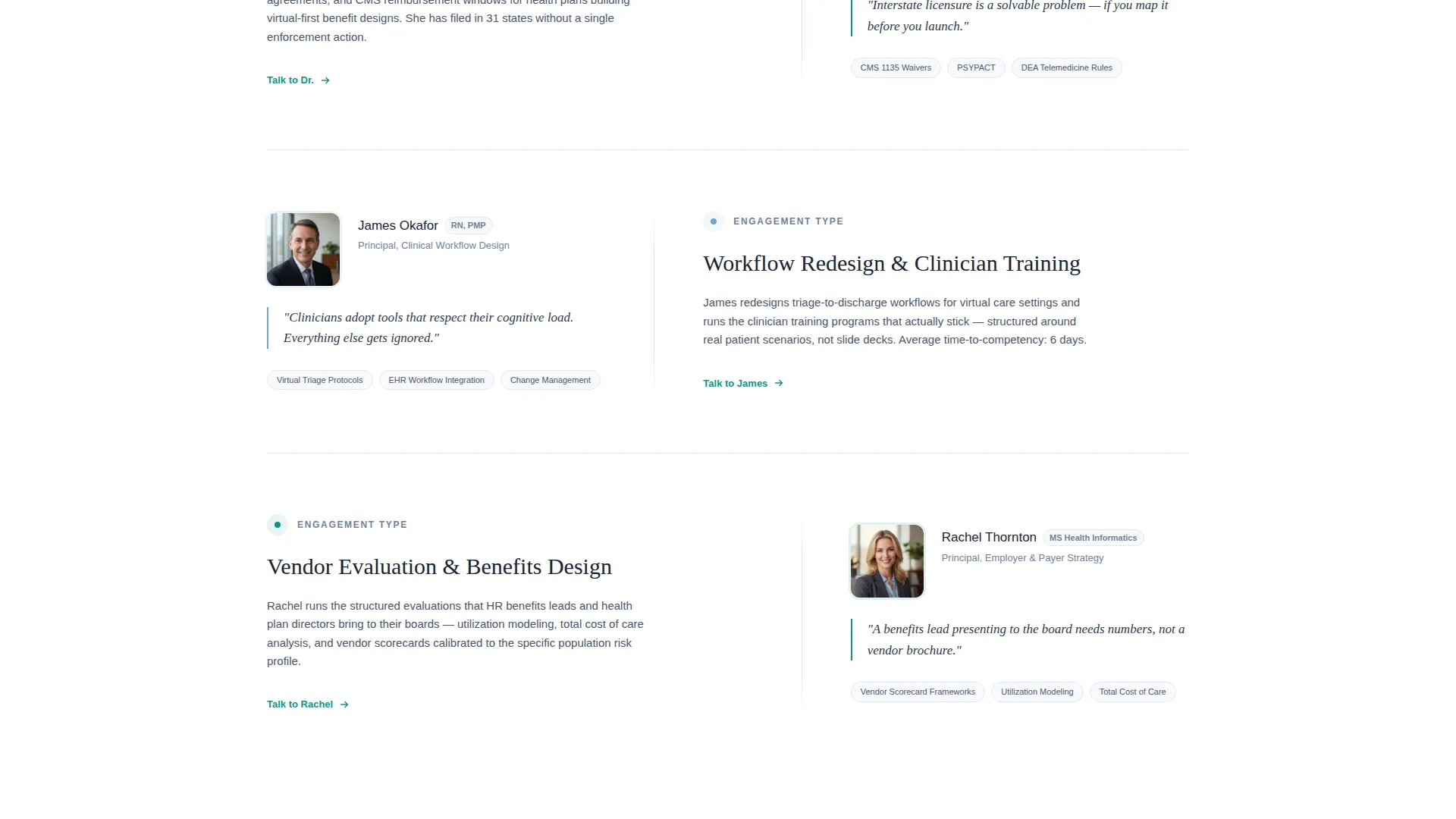
- A scrollable team section pairing consultant headshots and credentials with their engagement specialties
- A scoping call form with organization type, covered-lives tiers, and work email fields
- A secondary gated download path capturing email and role in exchange for an integration playbook
Feature list
Split-Screen Testimonial Header
The header divides the canvas evenly. The left panel holds a warm portrait of a real client, her role, and a large-serif quote. The right panel displays three floating metrics on cloud white: providers onboarded, states covered, and patient satisfaction score. No charts, no decoration, just evidence.
Named Consultant Scroll
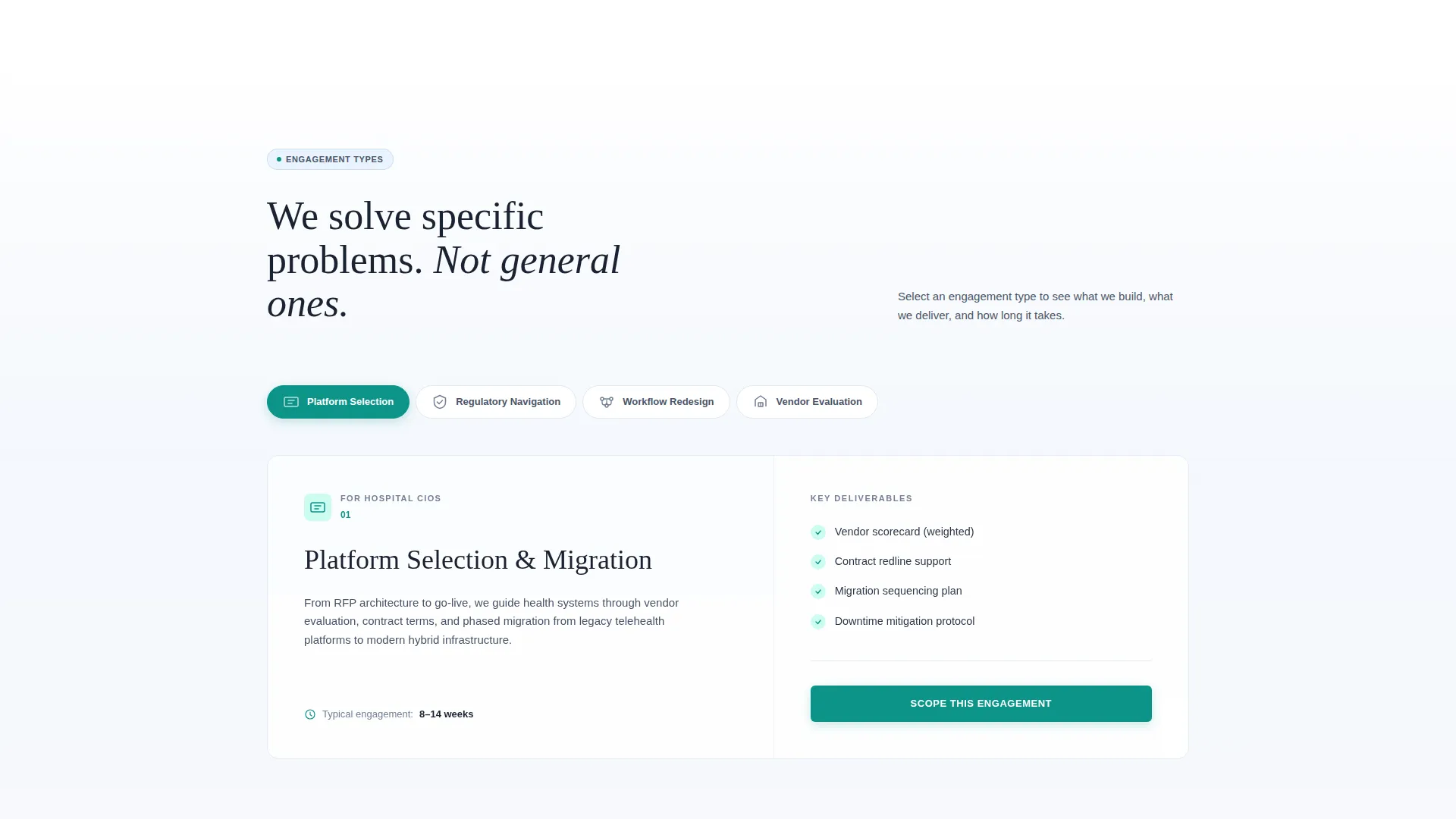
Each scroll section introduces one consultant by name. The left panel shows a headshot, a credential line, and a single-sentence philosophy. The right panel lists the engagement type they lead, such as platform selection, regulatory navigation, workflow redesign, or clinician training.
Partnership-Focused Scoping Form
The primary call to action, "Schedule a Scoping Call," anchors after the team section. The short form collects organization type via a dropdown, covered-lives tier via a second dropdown, and a work email. The layout makes the form feel like a natural next introduction.
Gated Playbook Download Path
Visitors who are not yet ready to book a call can download the Integration Playbook. A secondary form captures their email address and role. This path keeps researching buyers inside the funnel without pushing them toward a commitment they are not ready to make.
Service Utility Color System
The palette uses soft clinical white as the dominant canvas, steady slate for all body text, reassuring sky for section dividers and card backgrounds, and decisive teal reserved for buttons and active states. Color is used sparingly so that every teal element signals a decision point.
Page sections overview
| Section | Purpose |
|---|---|
| Testimonial Header | Opens with client proof and three outcome metrics |
| Metric Evidence Cluster | Displays providers onboarded, states covered, and satisfaction score |
| Consultant Introductions | Walks visitors through named team members and their specialties |
| Scoping Call Form | Captures organization type, covered-lives tier, and work email |
| Playbook Download Path | Offers a gated PDF for visitors still in the research phase |
Design & branding system
The visual identity follows a Service Utility theme. The palette is clinical and intentional, with each color assigned a single job so the layout never feels crowded or commercial.
- Soft clinical white (#F7F9FC) dominates the canvas and keeps the page unhurried
- Steady slate (#4A5568) carries all body text for reliable readability
- Reassuring sky (#6BA3D6) washes section dividers and card backgrounds
- Decisive teal (#0D9488) appears only on buttons and active states, signaling action without noise
Mobile & speed optimization
The split-screen layout is structured to reflow cleanly on smaller screens. Each panel stacks vertically so portrait images, quotes, and metric clusters remain readable without horizontal scrolling.
- The metric cluster uses floating numbers with no charts, keeping the header lightweight on any device
- Forms use dropdown fields that work reliably on touch interfaces
- The gated download path is a lightweight secondary form, not a modal layer, so it loads without delay
How this template helps you convert
The page earns the conversion by showing real humans and real outcomes before asking for anything. Each section is sequenced to reduce hesitation and raise confidence naturally.
- The testimonial header anchors credibility immediately, pairing a real client face with three concrete numbers so skeptical enterprise buyers feel oriented before they scroll
- The named consultant scroll builds specific trust by matching each team member to the problem they solve, making the scoping call form feel like meeting the right person rather than filling out a ticket
- The dual conversion path captures both ready buyers and active researchers, so no qualified visitor leaves without a next step that fits their timeline
Other information about this template
This template sits at the intersection of healthcare consulting and virtual care infrastructure strategy. It is well-suited for practices that serve complex, multi-stakeholder engagements across health systems, payers, and employer groups.
- The template is built on a single-page, section-led flow with no internal navigation required
- The creative direction follows a Team and People approach, making consultant credibility the primary conversion engine
- The header concept is metrics-forward, using three floating numbers rather than charts or infographics
- The layout supports a booking and scheduling conversion goal, with the scoping call form as the primary lead capture mechanism
- The design theme is Service Utility, meaning structure and clarity take priority over decorative elements
Theme
Service Utility
Creative direction
Expert Panel
Color system
Plum Executive
Style
Sidebar Companion
Direction
Booking/Scheduling
Page Sections
Split-screen Testimonial Header
Named Consultant Scroll
Scoping Call Form
Gated Playbook Download
Service Utility Color System
Related questions
Who is this template designed for?
What are the two conversion paths included in this template?
How does the named consultant scroll work?
Is this a single-page template or a multi-page site?
Can I replace the sample portraits and metrics with my own content?



