Hotel Team & Department Directory Website Template
Concierge is a dashboard-style hotel team landing page built on a Data Command theme. It maps every department head, sommelier, spa director, and night manager across a property's floors and wings. Staff cards show credentials, languages spoken, and live shift status. The page drives app downloads through interactive exploration before a single call to action is clicked.
by Rocket studio
Quick summary
Concierge is a single-page, data-grid landing page designed for hospitality operations teams. It presents an interactive staff roster with department tabs, floor maps, org charts, and a 24-hour shift timeline. The visual identity follows a dark Data Command palette. Every interactive section builds visitor confidence and moves them toward downloading the Command View app.
Who this template is for
This template is built for hospitality professionals who need to communicate operational depth to guests and stakeholders before check-in. It suits teams managing complex, multi-department properties where staff visibility directly shapes the guest experience.
- Operations directors at boutique hotel groups
- Regional general managers overseeing multi-property portfolios
- Resort brand managers who want guests to feel the depth of talent on the team
What problem this template solves
Most hotel team pages show a headshot and a job title. That approach fails to communicate the real expertise behind the experience. Guests and partners have no way to sense the operational sophistication of a property until they arrive.
- Guests cannot verify staff credentials, languages spoken, or specialties before booking
- Operations leaders lack a compelling visual format to showcase team depth and live availability
- A static staff directory does nothing to build trust or drive app adoption
What you get with this template
This template delivers a fully interactive, dashboard-style landing page that feels like a back-of-house command center. Every section hands visitors a new tool and deepens their sense of the product's capability.
- An interactive staff grid with department tabs, card-flip interactions, and live shift status indicators
- A property floor map, a filterable org chart, and a 24-hour shift-timeline visualization
- A persistent floating download bar with paired app store badge placements and a sandboxed live demo path
Feature list
This template includes purpose-built interactive components that work together to demonstrate operational control and earn the app download.
Live Staff Grid with Department Tabs
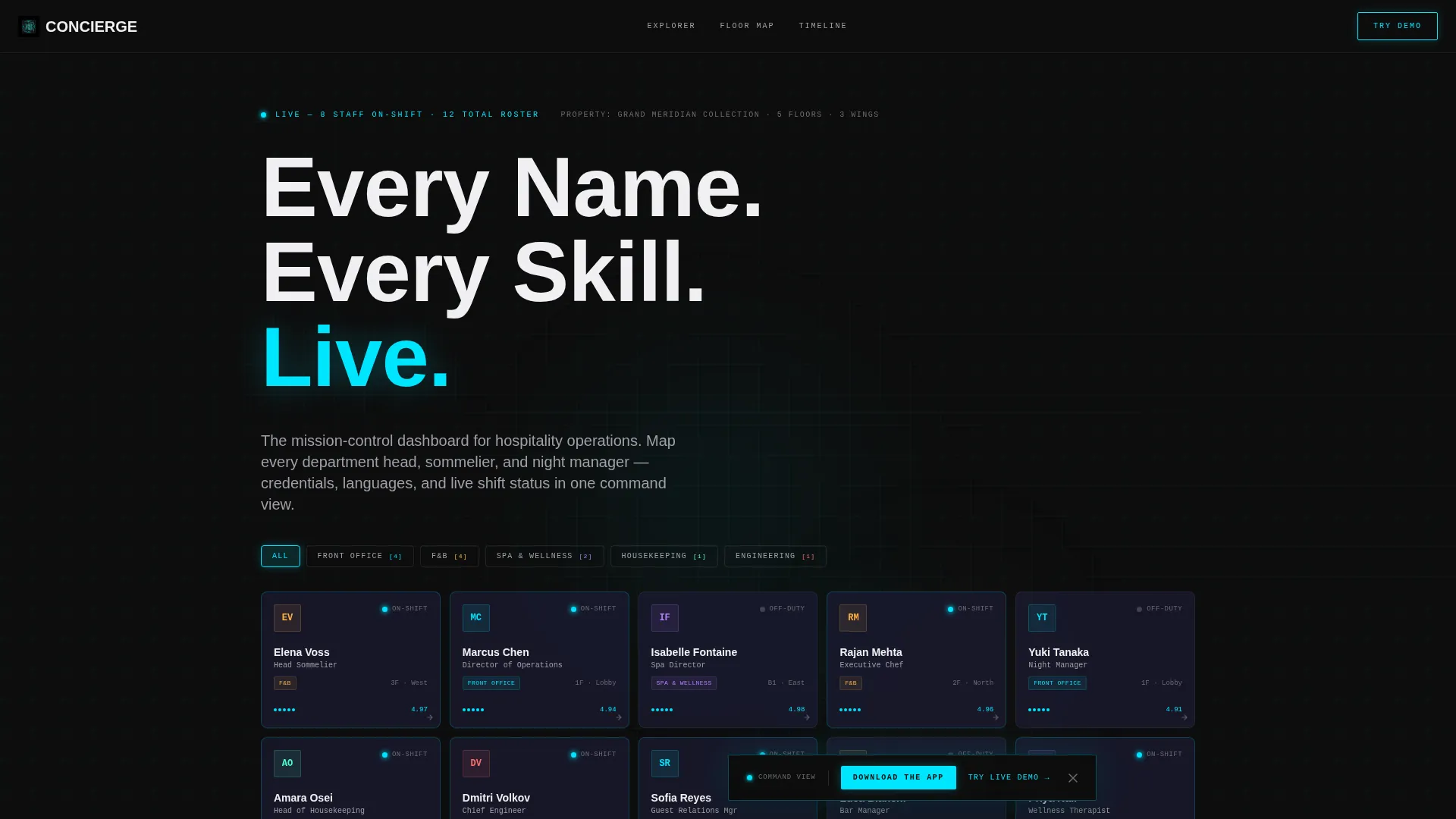
The header section displays a real-feeling staff roster organized by department. Tabs for Front Office, Food and Beverage, Spa and Wellness, Housekeeping, and Engineering let visitors filter instantly. Each card shows a name, title, specialty, and a glowing cyan availability pip that signals whether the staff member is on shift or off duty.
Card-Flip Credential Reveal
Visitors can tap or click any staff card to flip it and see full credentials on the back. Details include certifications such as Wine and Spirit Education Trust (WSET) levels, languages spoken, and guest rating scores. The interaction feels operational, not decorative, and makes the data feel genuinely useful.
Property Floor Map Explorer
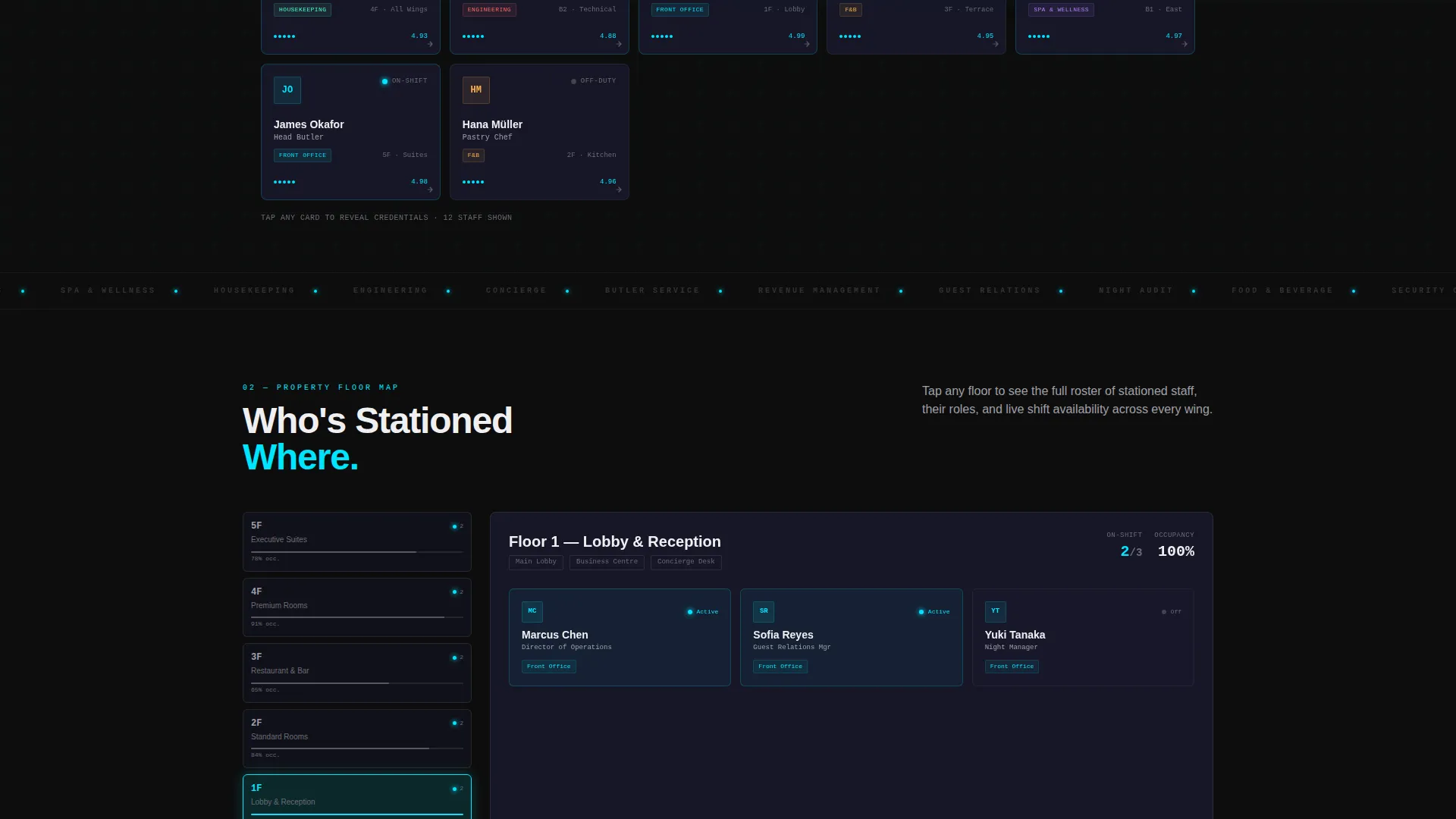
Below the main grid, a floor map lets users tap individual floors to see exactly who is stationed where across the property. This gives visitors a spatial understanding of how the team is deployed, reinforcing the message that every corner of the property is covered.
Filterable Org Chart
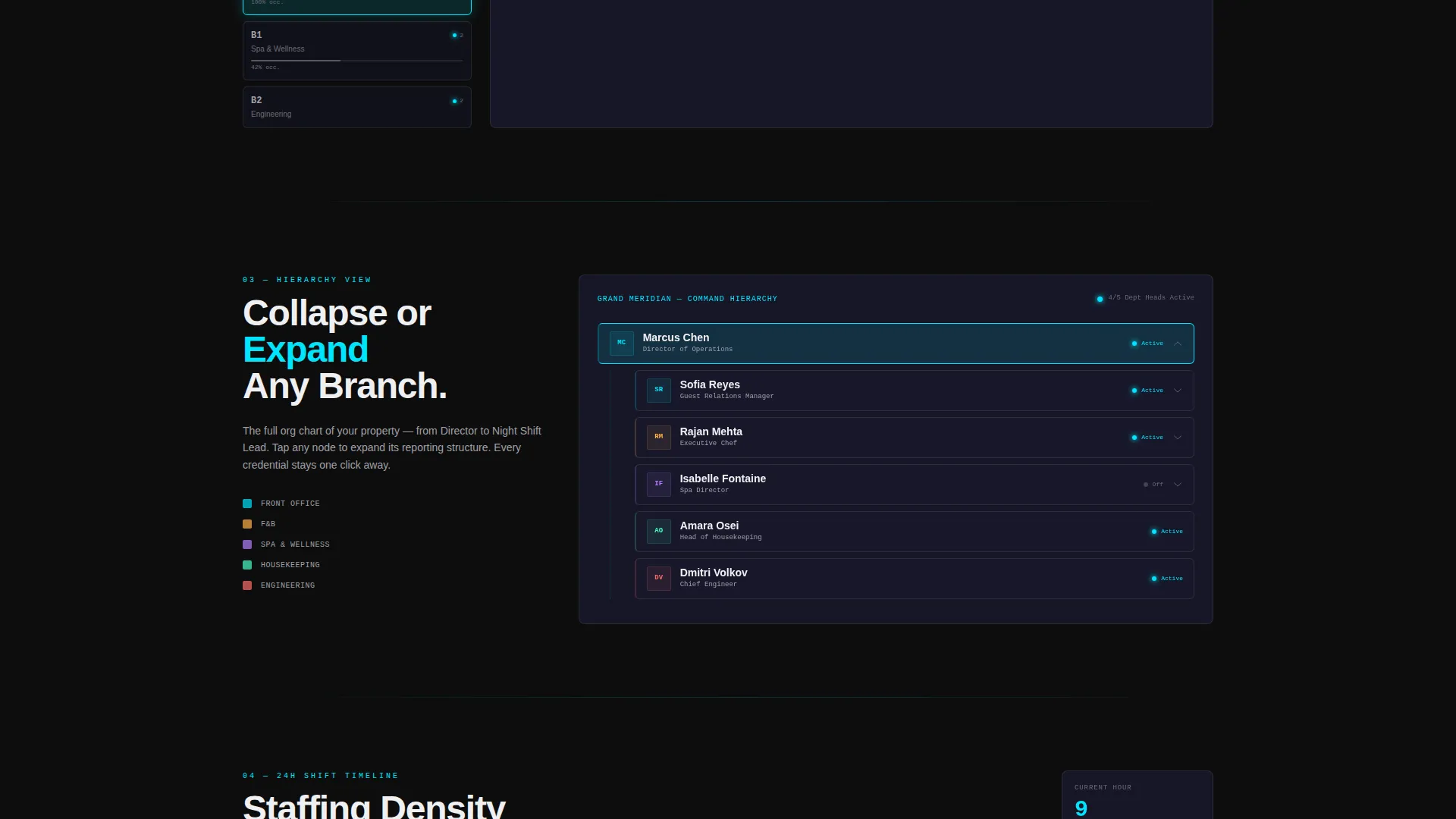
A collapsible and expandable org chart lets visitors navigate the team hierarchy at their own pace. Users can collapse entire departments or drill into a single role. This section reinforces the breadth of the team structure without overwhelming the page.
24-Hour Shift Timeline
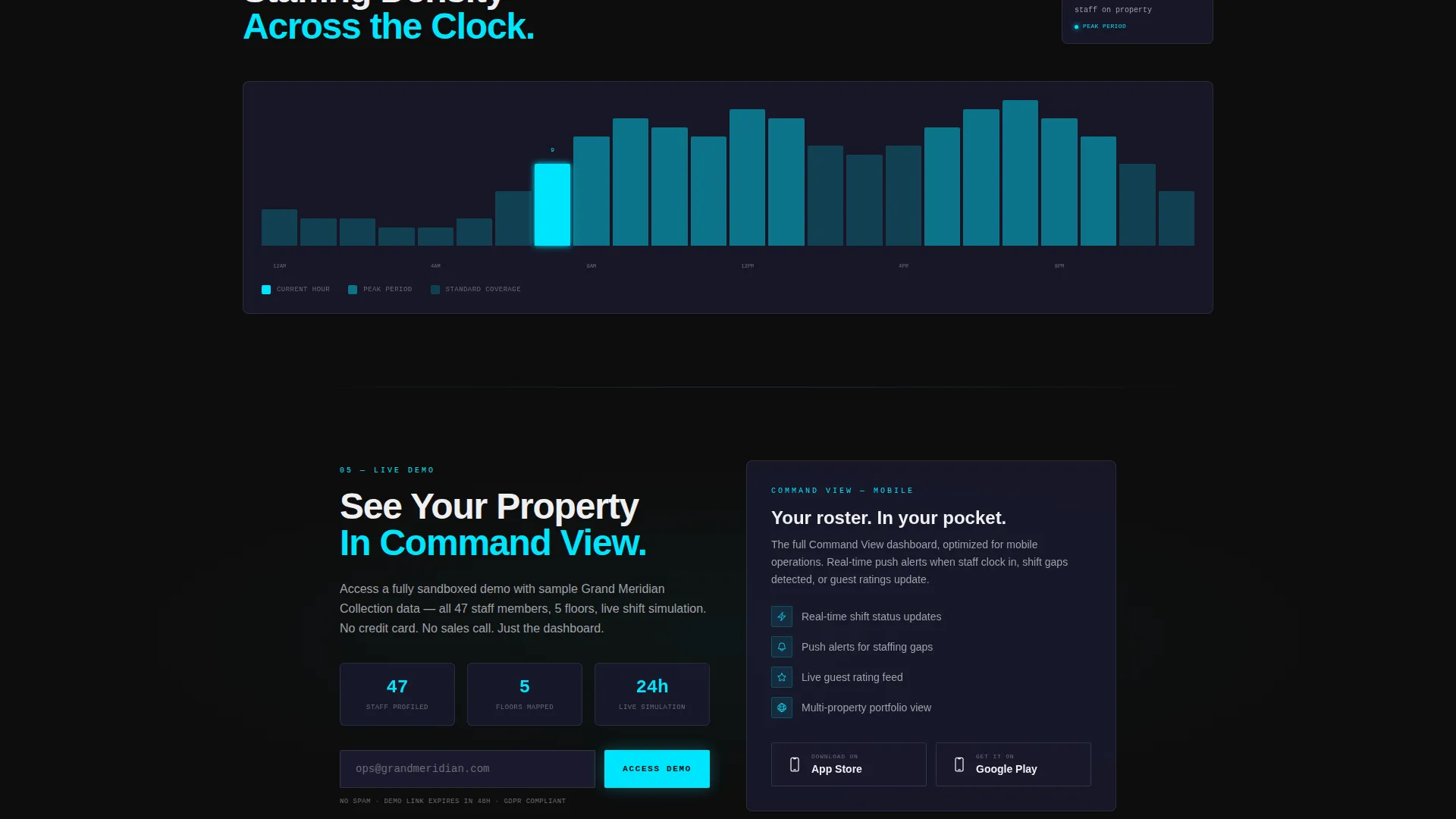
A staffing density visualization shows how team coverage rises and falls across a full day. Bars move like an audio equalizer, making it immediately clear when the property is at full strength and when coverage thins. It is one of the most convincing trust-building elements on the page.
Persistent Floating Download Bar
After the first visitor interaction, a floating bar slides up from the bottom of the screen. It carries the primary call to action, "Download the Command View," alongside paired App Store and Google Play badges. A secondary path offers a sandboxed live demo that captures an email before granting access.
Page sections overview
| Section | Purpose |
|---|---|
| Interactive Staff Grid | Show department tabs, staff cards, and live shift pips |
| Card Flip Reveal | Surface credentials, languages, and guest ratings on demand |
| Property Floor Map | Map staff positions across floors and wings |
| Filterable Org Chart | Navigate team hierarchy by collapsing or expanding departments |
| Shift Timeline Visualization | Display 24-hour staffing density as an animated bar graph |
| Floating Download Bar | Persist the primary call to action and app store badges after first interaction |
| Live Demo Gate | Capture email before granting access to sandboxed sample data |
Design & branding system
The visual identity follows a Data Command theme built on a Carbon Fiber color system. Every color choice is intentional, drawing from the instrument panel of a private jet at cruising altitude.
- Deep cockpit black (#0D0D0D) and woven carbon gray (#1A1A2E) form the background layers, keeping the focus entirely on the data
- Brushed titanium (#A0A0A8) is used for secondary labels and inactive interface elements
- Signal cyan (#00E5FF) activates on hover states, live-status indicators, and applied filters, giving the interface its sense of life and precision
Mobile & speed optimization
The template is designed so that every interactive element translates cleanly to touch-based devices. Visitors on mobile get the same depth of exploration as desktop users.
- Staff card taps, floor map taps, and org chart expansions are all built for touch interaction
- The persistent floating download bar is sized and positioned for easy thumb access on smaller screens
- Micro-animations, including card tilts on hover and ripple effects on filter activation, are kept purposeful so they do not slow the experience
How this template helps you convert
The conversion strategy is built on a play-first philosophy. Visitors earn conviction through interaction before they ever see a direct call to action.
- Every interactive section, from the staff grid to the shift timeline, functions as a product demo. Visitors experience the value of the app before they are asked to download it.
- The floating download bar appears only after a first interaction, meaning the call to action arrives at peak interest rather than on page load.
- The live demo path offers a lower-commitment entry point. Capturing an email in exchange for sandboxed access builds the lead list while giving hesitant visitors a risk-free way to explore the full product.
Other information about this template
This template sits within the Hotel and Resort Website Templates category under the Technology vertical. It is purpose-built for the hotel and resort team page niche, where operational storytelling is the primary conversion lever.
- The template style is classified as Dashboard and Data Grid, making it well suited for products that need to demonstrate data richness visually
- The creative direction follows an Interactive Explorer pattern, where each scroll section adds a new layer of user control
- The header concept is an Interactive Preview, meaning visitors engage with a functional-feeling representation of the app before committing to a download
- This template pairs naturally with app products in the hospitality technology space, particularly tools focused on staff management, shift visibility, and guest-facing team communication
Theme
Data Command
Creative direction
Interactive Explorer
Color system
Carbon Fiber
Style
Dashboard/Data Grid
Direction
App Download
Page Sections
Live Staff Grid with Department Tabs
Card-flip Credential Reveal
Property Floor Map Explorer
Filterable Org Chart
Hour Shift Timeline
Persistent Floating Download Bar
Related questions
Who is this landing page template designed for?
Can I customize the staff card details and department tabs?
Does the template include the live demo gate and email capture?
What is the primary call to action on this landing page?
Is this template suitable for a single hotel property or a multi-property group?



