Content Authoring Tool Landing Page Template
The Scribe structured content authoring tool landing page template is a sidebar-first, single-page layout built for documentation teams, course creators, and developer-relations professionals. It uses a Navy Authority color system, a search-as-product header, and a Network Effect scroll narrative to convert curious visitors into sign-ups, no form required, just one confident click.
by Rocket studio
Quick summary
This template gives you a complete, conversion-ready landing page for a browser-based content authoring tool. The page opens with a functional search box as its hero, pairs it with a visible sidebar folder tree, and walks visitors through a widening lens, solo author, collaborating team, full organization directory, before landing on a confident call to action.
Who this template is for
This template is built for teams and founders who need to present a structured content tool clearly to a technical, results-driven audience. Defining the target audience early shapes every section of the page.
- Documentation leads who maintain large knowledge bases and need a page that speaks their language
- Course creators and learning-and-development teams assembling modular training curricula at scale
- Developer-relations and product teams shipping API guides, release notes, and onboarding sequences on weekly cadences
What problem this template solves
A landing page for a structured content authoring tool must bridge the gap between complex technical documentation workflows and a user-friendly experience. Most generic templates force you to choose between looking polished and proving technical depth. This one does both.
- Visitors bounce when a page feels generic; this template uses role-specific social proof and a sidebar workspace preview to make the product feel real immediately
- Teams waste time rebuilding page structure from scratch; this template gives a ready-to-use format with pre-wired sections, style rules, and copy placeholders
- Conversion stalls when sign-up feels risky; the click-through approach routes directly to a signup flow with no form on the page itself
What you get with this template
You get a fully structured, single-page layout that covers every stage of a buyer's consideration, from first impression to final click. The template is organized so you can add pages or expand sections as your product grows.
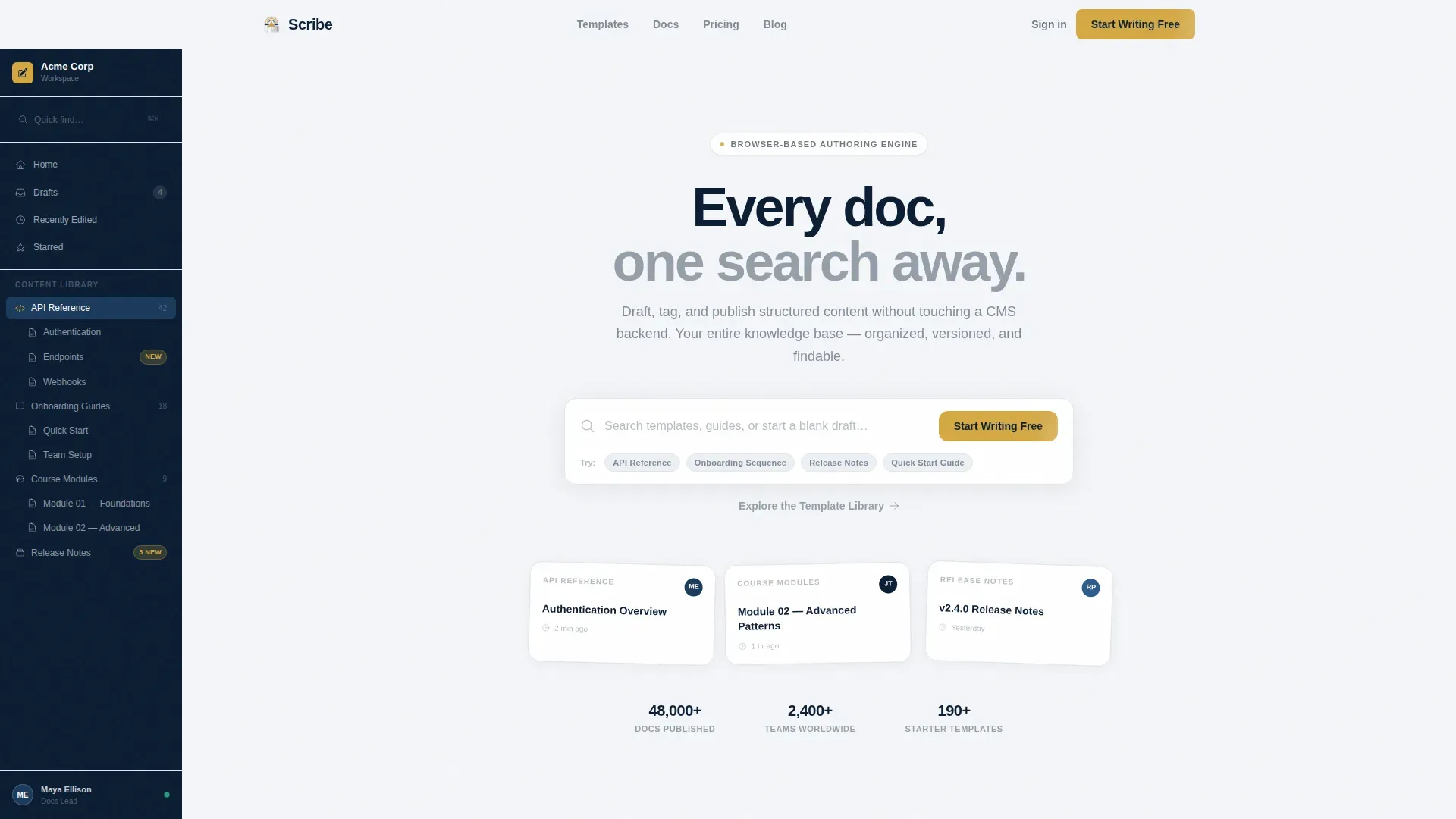
- A sidebar-first workspace preview that shows a populated folder tree from the very beginning, signaling that a living tool exists behind the search bar
- Five core page sections with clear purpose, ordered to build trust and momentum: hero, single-author drafting, team collaboration, organization directory, and testimonials
- A footer in Pattern 1 Linear Single-Row style, paired with a repeated gold call-to-action button and a secondary text link for visitors who want to explore before committing
Feature list
This template packages every element a content tool landing page needs to perform. Each feature serves a specific job in the persuasion and conversion process.
Search-as-Product Hero Section
The header centers a tall, softly shadowed search input with placeholder text and ghost-suggestion chips, API Reference, Onboarding Sequence, Release Notes. The search box is the product promise. It gives visitors an immediate feel for the tool's core value before they read a single word of body copy. The sidebar is already visible beside it, populated with a realistic folder tree.
Network Effect Scroll Narrative
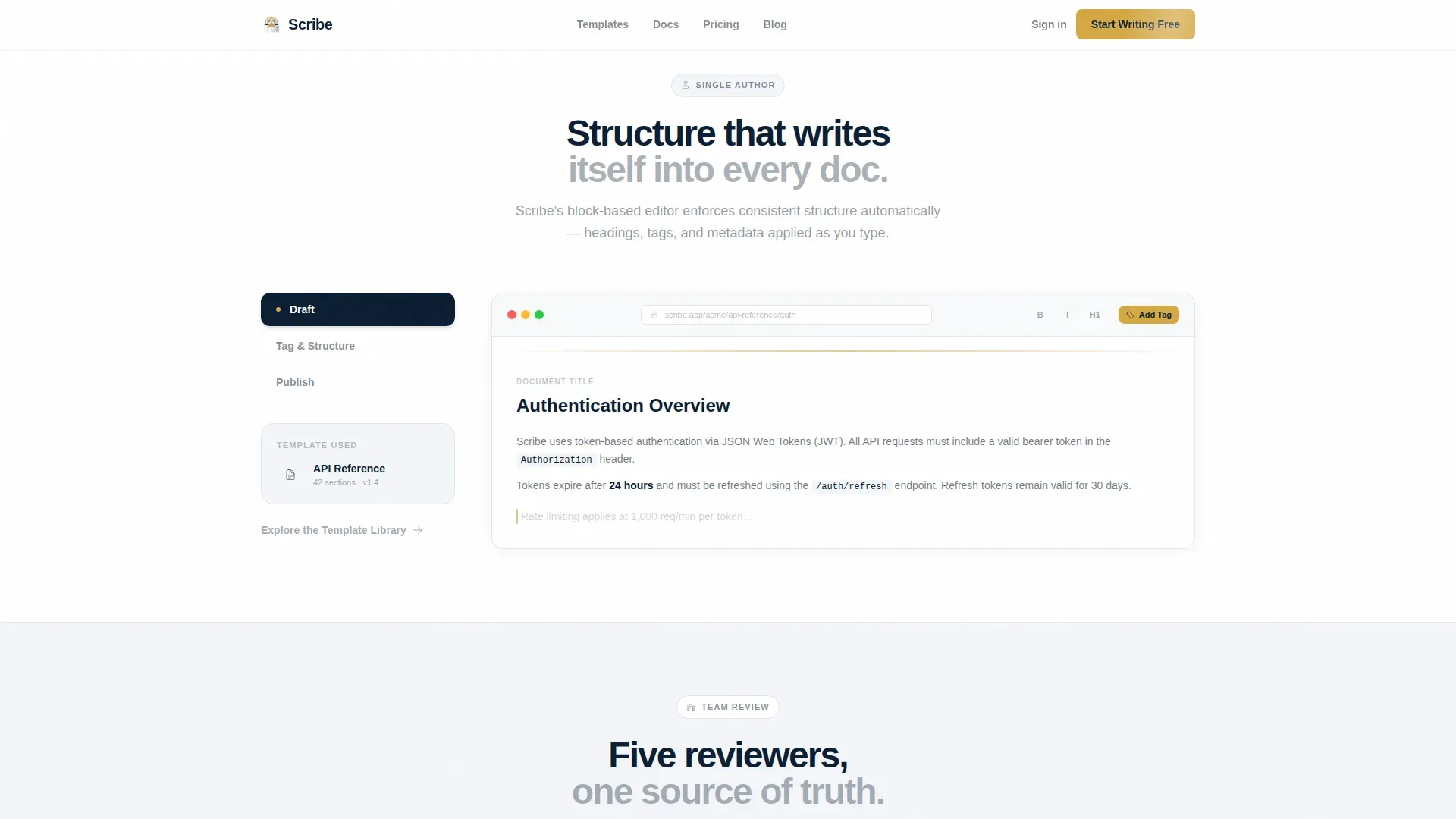
Each scroll section widens the lens deliberately. It begins with a single author drafting structured content, then adds inline comments and a multi-avatar review bento grid, then expands to a full organization directory. The sidebar subtly updates as the visitor scrolls, reinforcing that every document, article, and knowledge base entry is linked and findable. This structure lets data and social proof accumulate naturally rather than relying on hype.
Role-Specific Testimonials Block
The testimonials section features role-specific quotes drawn from each target audience segment. Documentation leads, course creators, and developer-relations professionals each get a voice. Quantifiable results, such as reduced documentation time, give the audience concrete data to evaluate. This approach follows best practices for testimonial effectiveness.
Inline Collaboration and Bento Grid Section
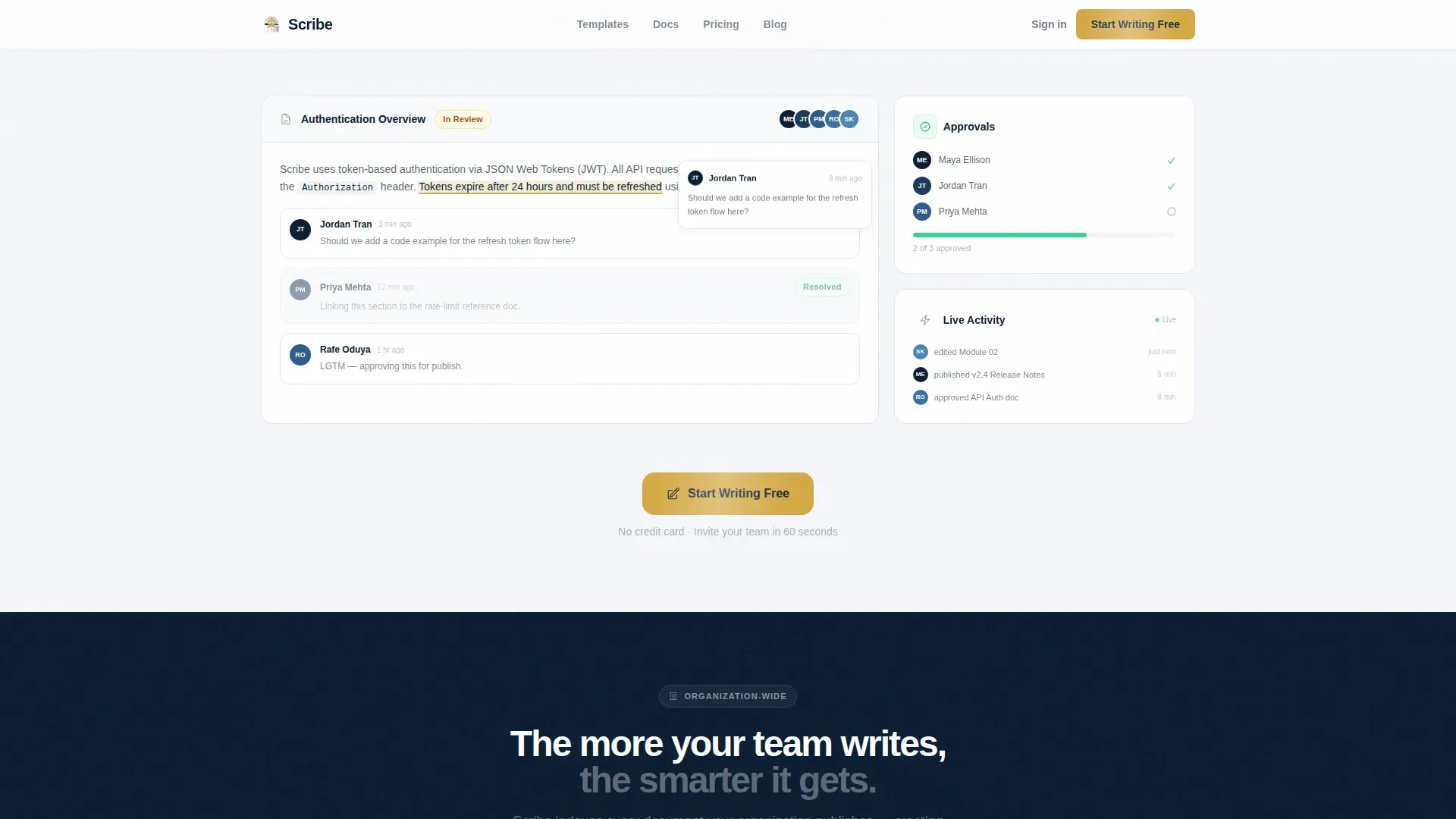
The team collaboration section uses a bento-style grid to show inline comments, multi-avatar review states, and shared content threads. It demonstrates how teams work together inside the tool without requiring a live demo. This section is where the network effect narrative accelerates.
Marquee Stats and Organization Directory
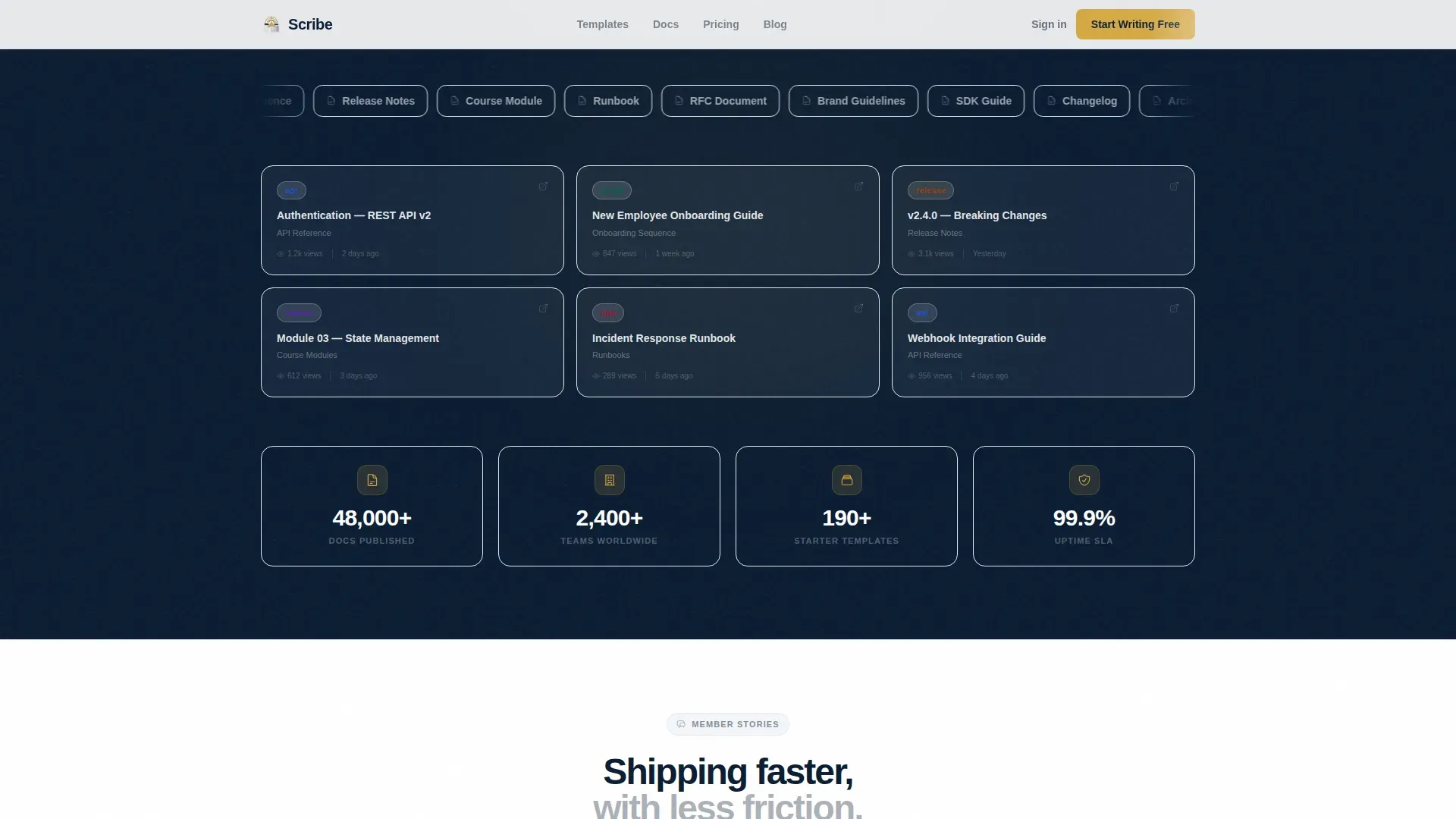
A marquee element presents usage metrics, documents published, teams using the platform, templates in the library. The organization directory section shows the full network effect: an entire company browsing a shared content space. This gives visitors confidence that the tool scales from a single author to an enterprise-wide knowledge operation.
Click-Through Call-to-Action System
The primary call to action, "Start Writing Free," appears first beside the search box, resurfaces after the team-collaboration section, and repeats at the footer. A secondary text link, "Explore the Template Library", lets hesitant visitors browse before committing. No form sits on this page; every click routes directly to a signup flow, removing friction at the moment of decision.
Page sections overview
| Section | Purpose |
|---|---|
| Hero Search Box | Present the product as a search-first workspace |
| Single Author Drafting | Show structured editing with tag blocks and template picker |
| Team Collaboration Grid | Demonstrate inline review and multi-avatar workflows |
| Organization Directory | Scale the network effect with a shared content directory |
| Role-Based Testimonials | Build trust with audience-specific social proof |
| Footer Call to Action | Close with the primary and secondary call to action buttons |
Design & branding system
The visual identity follows a Directory and Discovery theme. Every color and typographic choice reinforces the feeling of a well-organized, authoritative reference volume, navigable at a glance, never heavy.
- Navy Authority palette: deep command navy (#0B1D33) anchors the sidebar, pressed-ink blue (#1B3A5C) marks active states, catalog white (#F4F6F9) floods the content well, and signal gold (#D4A843) powers every call-to-action button, badge, and feature indicator
- Typography uses Plus Jakarta Sans at weights 400 and 800, keeping body copy readable and headers bold without adding visual clutter
- Animations include a scan-line effect, marquee scroll, intersection observer stagger on section entry, and tab-switching interactivity on the sidebar, all reinforcing the sense that the workspace is live and responsive
Mobile & speed optimization
The template is desktop-first, reflecting the primary use case of documentation teams working at a computer. It is also built to remain clear and functional on any device, with responsive support across screen sizes.
- The layout reflows cleanly for smaller screens, preserving the sidebar concept in a collapsible menu format so key navigation elements remain accessible on mobile
- Touch-friendly button sizing ensures the gold call-to-action elements remain easy to tap, following best practices for mobile page design
- The minimalist structure uses ample white space to prevent cognitive overload, keeping the page fast to scan on any device regardless of load conditions
How this template helps you convert
This template is conversion-focused by design. Every layout decision removes a reason to hesitate and adds a reason to click.
- The search box hero eliminates the need for a traditional headline by making the product interaction visible immediately, placing the primary call-to-action button beside it above the fold so users know exactly what to do from the beginning
- The Network Effect narrative builds confidence progressively, each section adds more avatars, more connected knowledge nodes, and more social proof, so visitors feel the value growing as they scroll rather than being asked to trust a single claim
- The secondary "Explore the Template Library" text link gives curious visitors a low-commitment path, reducing bounce without diluting the primary conversion goal
Other information about this template
This section covers additional context, compatibility notes, and workflow details relevant to buyers evaluating the template.
- The Scribe structured content authoring tool landing page template draws on established best practices for AI tool landing pages, including the F-Pattern layout, the Eyebrow Technique for headers, and a Problem-Agitation-Solution structure that guides professional buyers toward action without pressure
- Use Scribe's generative AI capabilities as content inspiration: the tool can write knowledge base articles, add titles and descriptions automatically, capture on-screen actions, and generate annotated screenshot guides, all of which map directly to the page sections included here
- Use Scribe's one-click sharing feature as a model for the call to action flow: visitors click once, land in the signup experience, and can immediately share resources via link or embed them in corporate wikis
- The template supports a "create once, publish everywhere" content reuse strategy, making it suitable for teams that need to output structured content across multiple channels, from PDF exports to embedded help portals
- You can use Scribe to organize knowledge base content into collections and categories, and this template reflects that same organizational logic in its sidebar folder tree and directory section
- The comparison table concept from the Scribe AI landing page playbook, displaying cost, turnaround time, and duplicate content risk, can be added as an optional section when you add pages or expand the default layout
- Founders, product teams, and catalog managers will find the template's tone and structure well-suited to presenting a content tool to a data-hungry, skeptical audience; the page is built to save time and work smarter without overpromising
- The template is newly created with high animation fidelity, including scan-line effects and intersection observer stagger, making it feel premium from the first scroll
Theme
Directory & Discovery
Creative direction
Network Effect
Color system
Navy Authority
Style
Sidebar Companion
Direction
Click-Through
Page Sections
Search-box Hero with Live Sidebar
Network Effect Scroll Narrative
Role-specific Testimonials Block
Bento Grid Team Collaboration Section
Marquee Stats and Organization Directory
Click-through Call-to-action System
Related questions
Can I customize the sidebar folder tree to match my actual content structure?
Does this template include a form for capturing leads?
Can I embed videos or annotated screenshots within the page sections?
Is this template suitable for training and onboarding use cases?
How do I add pages or expand beyond the default single-page layout?



