Cannabis Technology & Professional Website Template
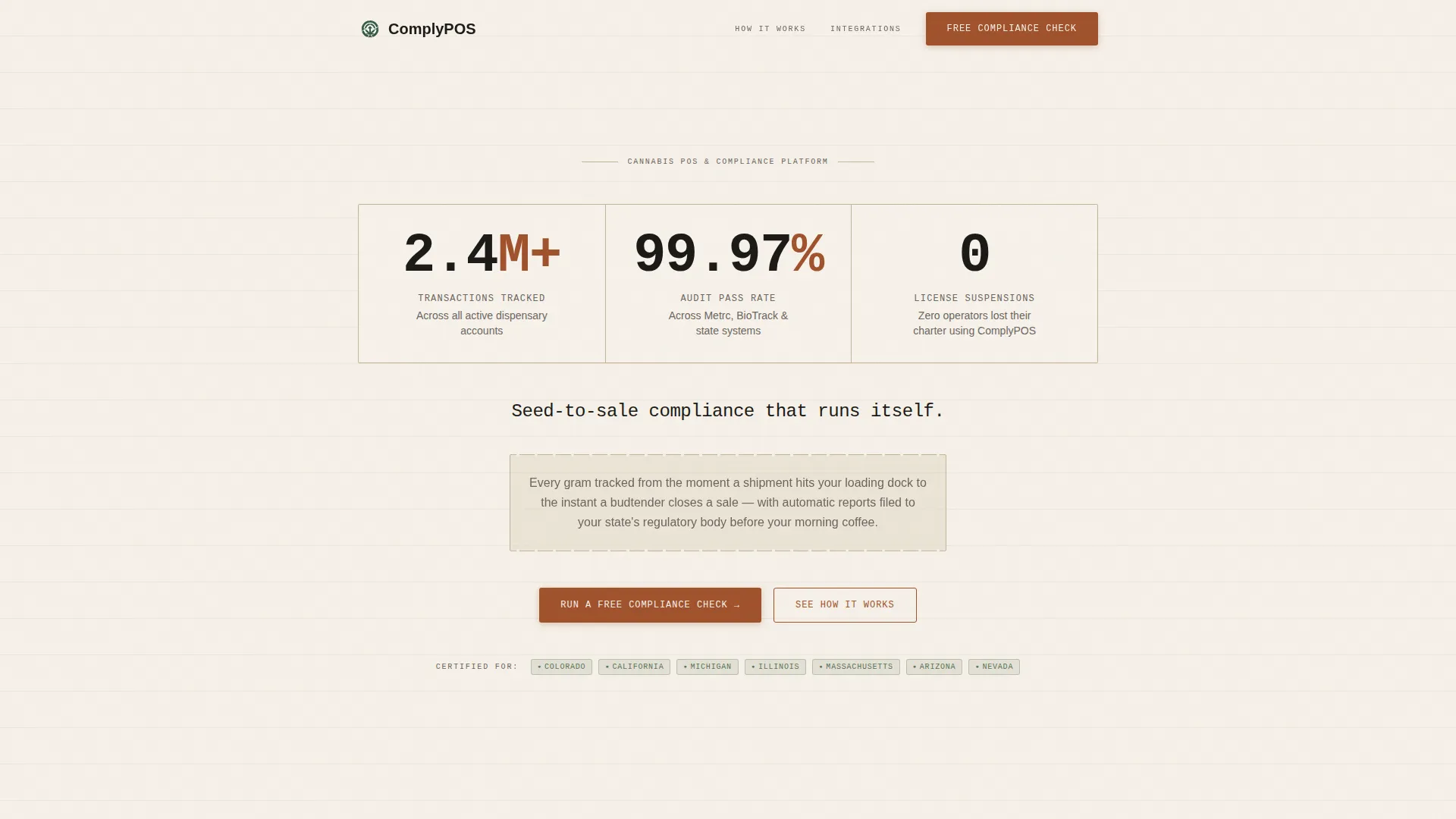
Comply is a single-column landing page template built for cannabis point-of-sale and seed-to-sale inventory systems. It opens with mechanical counter stats, walks visitors through a five-step transaction process, and closes with a lead generation form. The design uses a worn ledger aesthetic to signal operational trust before a single word is read.
by Rocket studio
Quick summary
Comply is a focused, single-column landing page template designed for cannabis point-of-sale and seed-to-sale compliance platforms. It leads with hard numbers, walks through the full transaction process step by step, and drives leads through a compliance check form. The aesthetic is functional and trustworthy, built to resonate with operators who treat their license as their livelihood.
Who this template is for
This template is built for cannabis technology companies and compliance software providers who need to reach dispensary operators directly. It speaks plainly to people who understand what an audit failure costs.
- Multi-location dispensary owners managing compliance across several sites
- Solo-license operators in newly legal states protecting their operating charter
- Operations managers who need to justify switching point-of-sale systems to ownership
What problem this template solves
Cannabis dispensary operators face serious regulatory pressure. A single inventory discrepancy can trigger a compliance audit, and a failed audit can cost an operator their license. Most generic software landing pages bury the compliance story under lifestyle imagery and vague benefit claims. This template puts the operational proof upfront.
- Visitors need to see system reliability before they trust a new platform
- Compliance buyers are skeptical and need process transparency, not promises
- Lead forms that skip state-of-operation questions lose qualified prospects immediately
What you get with this template
You get a fully structured single-column landing page with every section mapped to a specific stage of the buyer journey. Nothing is left to guess, and nothing requires a separate demo to understand.
- A stats header with three animated mechanical counters built in monospace type
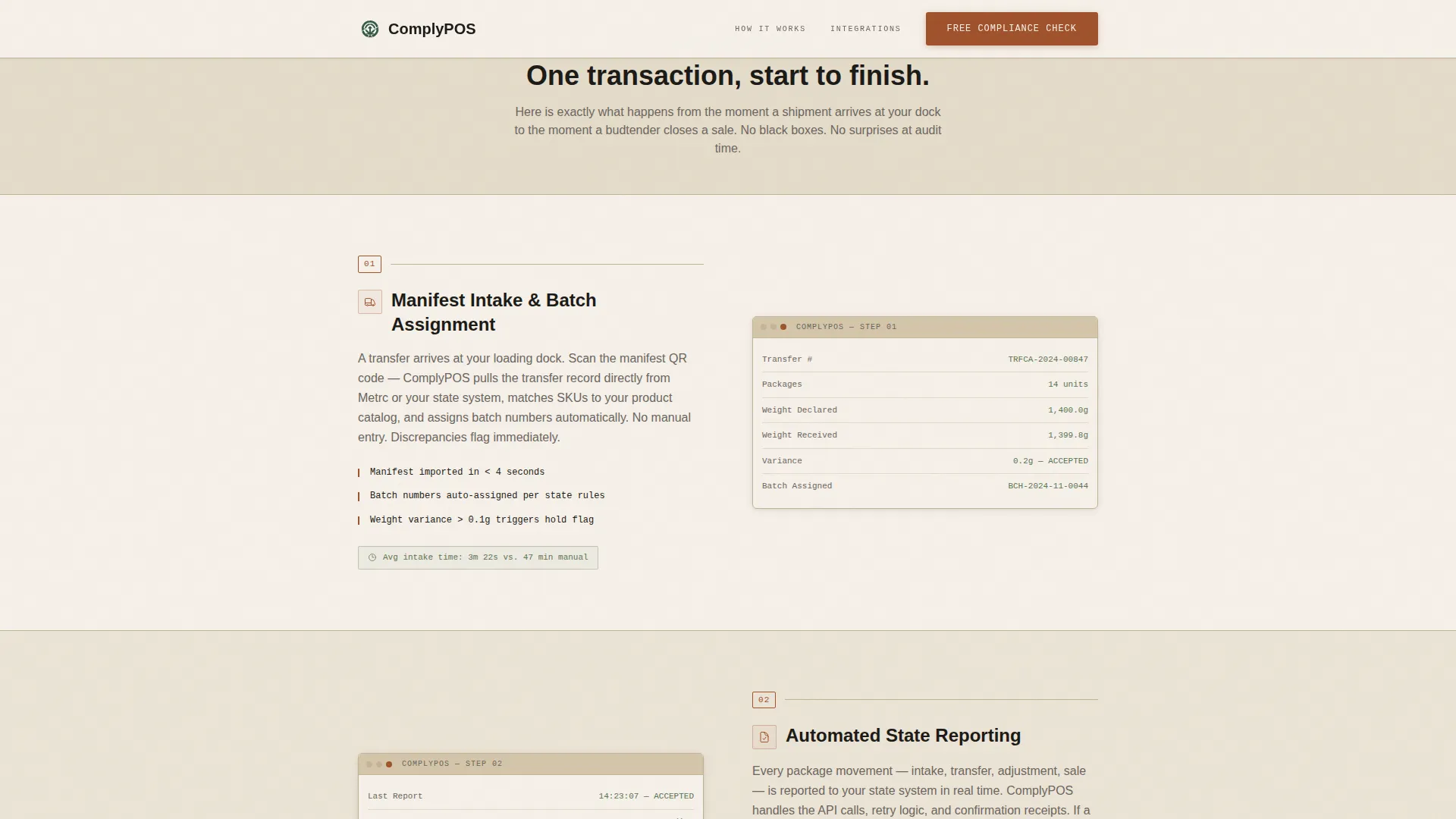
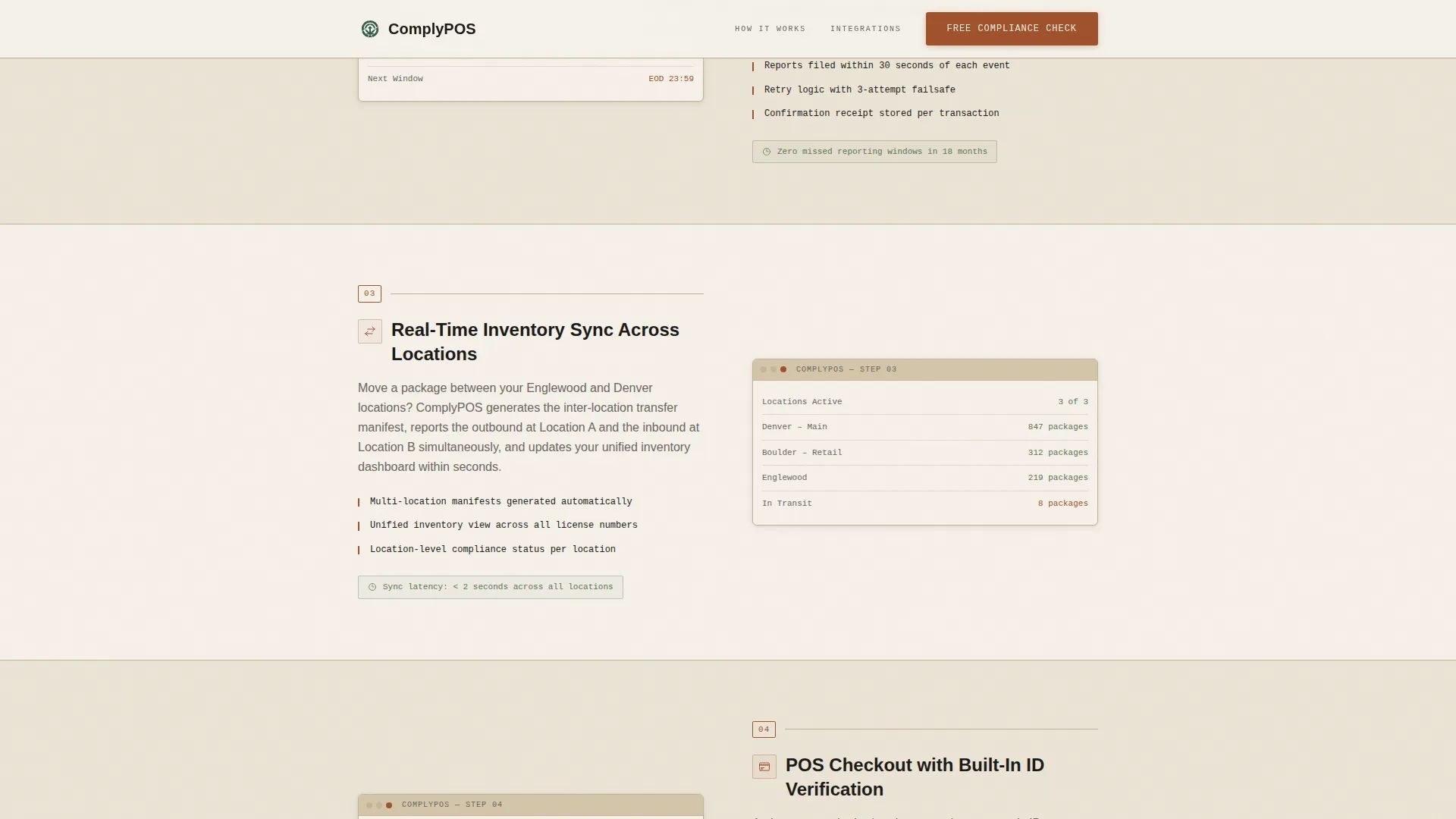
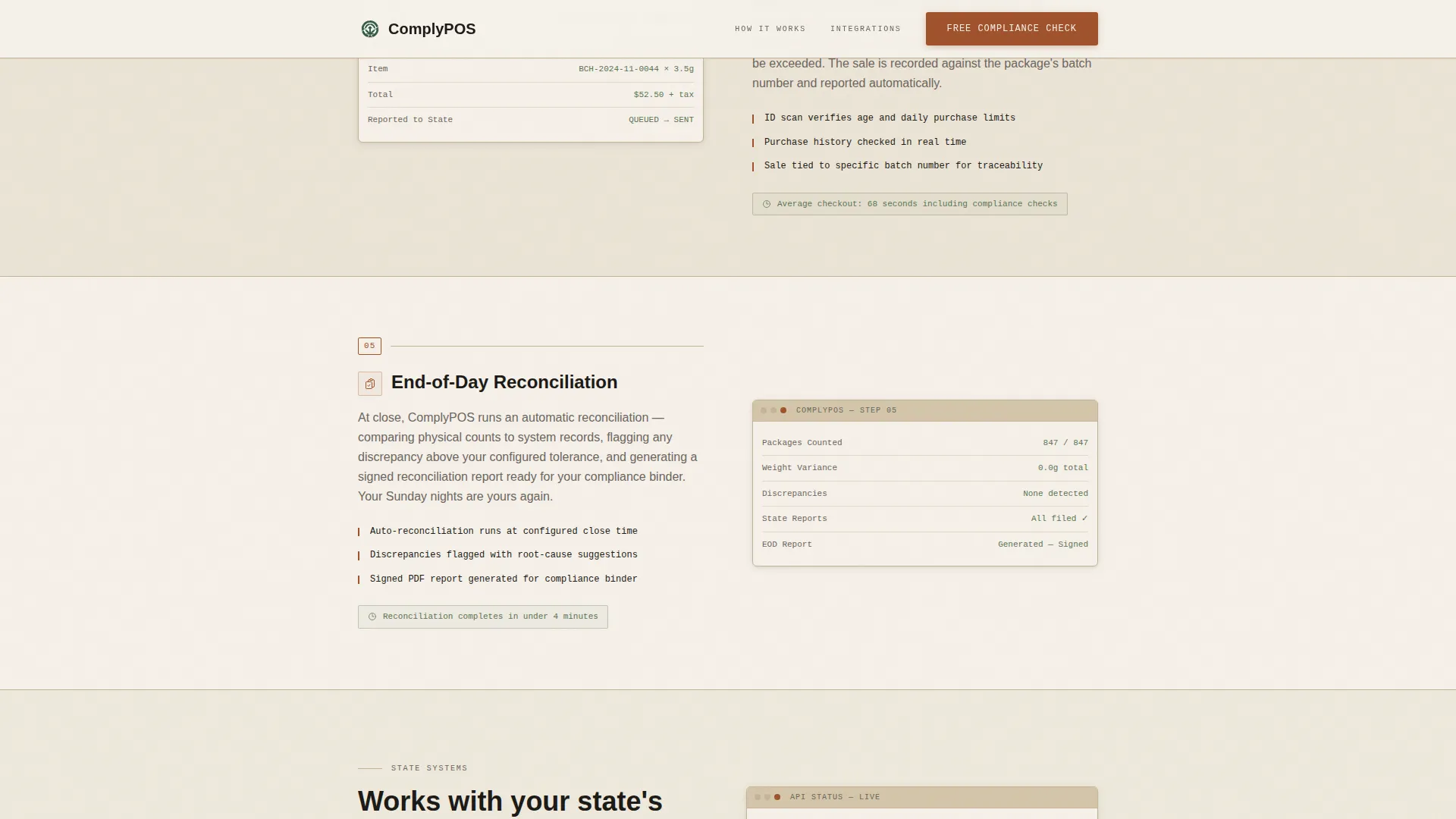
- A five-step process walkthrough with annotated interface screenshot placeholders
- A lead generation form with a state selector, location count field, and email capture
Feature list
This template ships with purpose-built sections and interaction patterns designed specifically for compliance-driven software products.
Mechanical Counter Header
Three large upward-counting stat displays open the page against a parchment background. Each counter uses a monospace typeface with a tick-up animation, presenting transaction volume, audit pass rate, and license suspension records as the first thing any visitor reads.
Five-Step Process Walkthrough
The scroll guides the visitor through one complete transaction: manifest intake and batch assignment, automated state reporting, real-time inventory sync, point-of-sale checkout with identity verification, and end-of-day reconciliation. Each step includes a simplified interface screenshot placeholder with short callout annotations.
State-Aware Lead Generation Form
The primary call-to-action form opens with a state-of-operation selector. It then collects number of locations, current point-of-sale system in use, and email address. This sequence qualifies leads by regulatory context before anything else.
Secondary PDF Conversion Path
A secondary offer section presents a downloadable compliance checklist gated behind a single email field. This captures earlier-funnel visitors who are not yet ready to switch systems but are already concerned about their next audit.
Sticky Mobile Call-to-Action Bar
On mobile viewports, a persistent bottom bar keeps the primary call-to-action visible at all times throughout the scroll. This prevents drop-off from visitors who are ready to act before reaching the form section.
State Integrations Grid
A dedicated section displays the regulatory reporting systems the platform connects with, presented as a compatibility reference. This gives operators an immediate answer to the question of whether their state is supported.
Page sections overview
| Section | Purpose |
|---|---|
| Stats counter header | Opens with three animated compliance metrics to establish credibility immediately |
| Process walkthrough | Walks through five transaction stages with interface screenshots and callouts |
| State integrations grid | Shows regulatory system compatibility for operator state-match confidence |
| Operator testimonials | Provides social proof with specific audit outcomes from real operators |
| Lead gen call-to-action | Hosts the compliance check form and the PDF checklist download offer |
| Footer row | Single-row linear footer with standard navigation and legal links |
Design & branding system
The visual identity follows a Service Utility theme. Every design choice references the aesthetic of a well-worn general store ledger: honest, dry, and functional. Nothing decorative competes with the operational content.
- Color system: aged parchment cream (#F5F0E8), warm sandstone (#D4C5A9), oxidized rust (#A0522D) for all interactive elements, deep ledger black (#1C1A17) for body text, and muted regulatory green (#5B7553) used sparingly to confirm compliance status
- Typography: JetBrains Mono for counters and data labels, DM Sans for all body copy
- Backgrounds alternate between parchment and sandstone to create natural section breaks without added decoration
Mobile & speed optimization
The template is structured with a desktop-first layout and a dedicated mobile adaptation layer for the call-to-action experience. Interactive elements use client-side rendering only where movement is required.
- Server Components handle all static content sections for efficient rendering
- Client Components are scoped to the mechanical counter animations and the lead generation form
- The sticky bottom call-to-action bar activates on mobile viewports to maintain conversion access throughout the scroll
How this template helps you convert
Every structural decision in this template is made to move a skeptical compliance buyer from doubt to action without requiring a sales call first.
- The stats header establishes proof before asking for anything, letting the numbers carry the first impression and reduce initial resistance from analytical buyers.
- The transparent process walkthrough removes uncertainty by showing exactly how the system handles each stage of a transaction, which is the single biggest trust barrier for operators considering a platform switch.
- The dual conversion paths capture both high-intent leads ready for a compliance check and lower-intent visitors who want the checklist first, maximizing the number of contacts collected from a single session.
Other information about this template
This template is built with a US state compliance focus, with all copy and form logic oriented around domestic regulatory bodies and state-by-state reporting requirements. The lead form is designed to segment leads by state before any follow-up communication begins.
- Template style: Single Column Flow, suitable for direct response campaigns and paid traffic landing pages
- Animation intensity: Medium, with mechanical counter tick-ups, scroll reveals, and section transitions
- Interactivity level: High, including a form with a state selector, sticky mobile bar, and process step reveal animations
- The Transparent Process creative direction means every section serves an educational function, reducing the need for a separate product demo before a prospect converts
Theme
Service Utility
Creative direction
Transparent Process
Color system
Parchment & Rust
Style
Single Column Flow
Direction
Lead Generation
Page Sections
Mechanical Counter Stats Header
Five-step Transaction Walkthrough
State-aware Lead Gen Form
PDF Checklist Conversion Path
Sticky Mobile Call to Action Bar
State Integrations Grid Section
Related questions
What kind of business is this template designed for?
Can I customize the lead generation form fields?
Does the template include the five-step process content, or do I supply it?
Is the sticky mobile call-to-action bar included by default?
How does the secondary PDF offer section work?