Comply - Streamlined Nonprofit Landing Page Template
Comply is a single-column landing page template built for nonprofit HR software. It opens with a live multi-step hiring form, guides visitors through a four-phase hiring lifecycle, and closes with a sticky conversion bar. Designed for operations managers at mid-size nonprofits, the layout turns a prospect's first scroll into a hands-on product experience.
by Rocket studio
Quick summary
Comply is a recruitment-focused landing page template for nonprofit HR software. It leads with an interactive three-step hiring form that puts visitors inside the product from the first second. A structured four-phase guide walks them through the full nonprofit hiring lifecycle before a sticky call-to-action bar closes the loop.
Who this template is for
This template is built for teams selling HR or hiring software to the nonprofit sector. It speaks directly to the people who feel the daily pressure of constrained budgets, seasonal grant hiring, and high staff turnover.
- Operations or HR managers at nonprofits with 40 to 200 employees
- Software founders or product marketers targeting the nonprofit HR space
- Agencies building conversion pages for nonprofit-focused B2B software clients
What problem this template solves
Nonprofit HR managers juggle hiring, benefits enrollment, compliance tracking, and annual reviews with far fewer resources than corporate HR teams. A generic software landing page does not reflect that reality. Comply is structured around the actual nonprofit hiring workflow, so visitors immediately recognize their own problems on the page.
- Spreadsheet-based onboarding processes that break down every grant season
- Disconnected email chains and manual reminders that slow down time-to-hire
- Conversion pages that fail to earn trust before asking for a signup
What you get with this template
You get a complete, single-column landing page layout pre-structured for a nonprofit HR software product. Every section is designed to reduce friction and build confidence before the visitor ever creates an account.
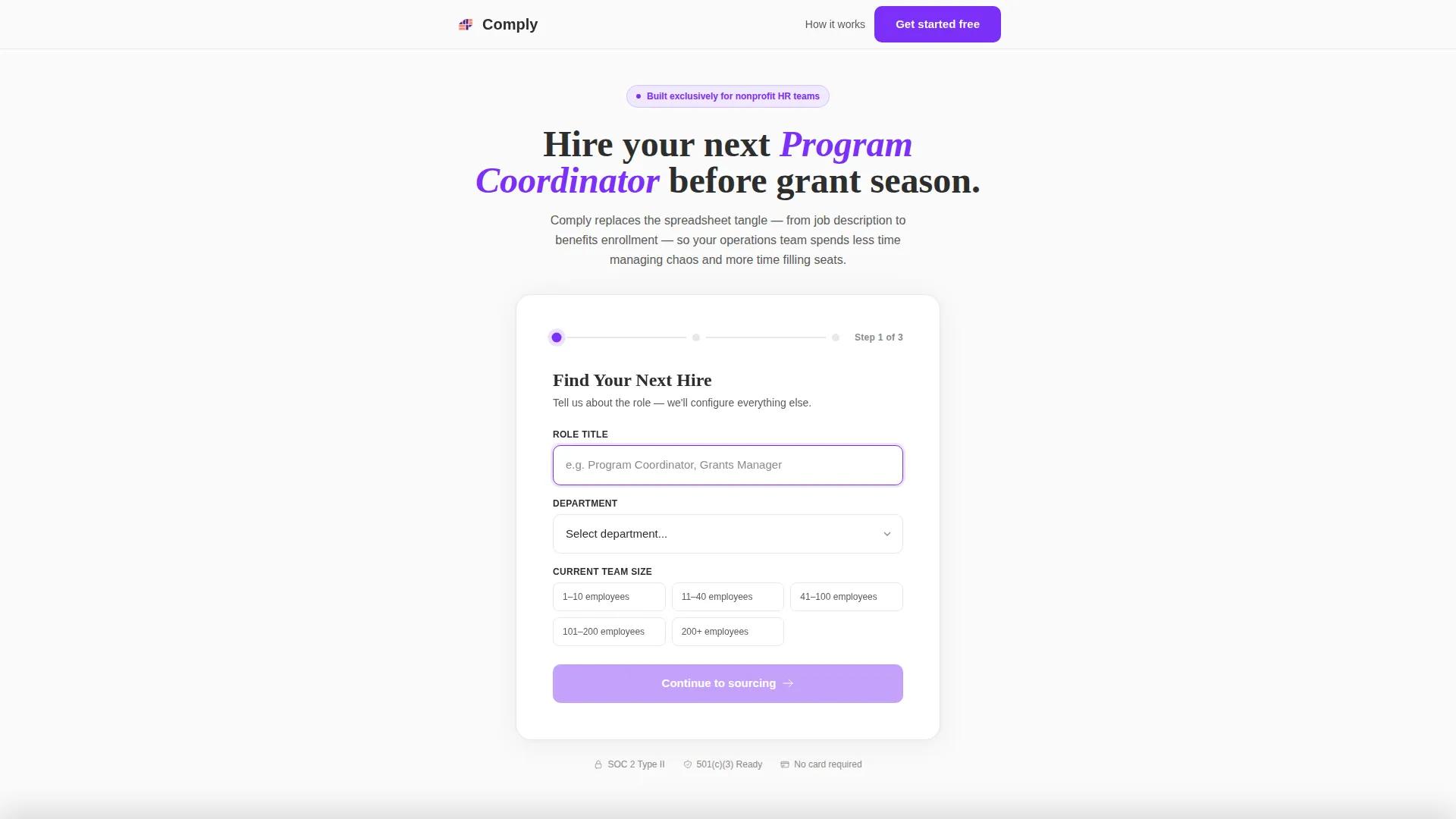
- A live three-step hiring form that acts as the hero section
- A four-phase step-by-step guide with a problem-then-proof scroll rhythm
- A sticky bottom bar with a primary call-to-action that appears after phase two
- Social proof section built for nonprofit-specific testimonials with real metrics
- A linear single-row footer layout
Feature list
This section outlines the core components built into the Comply template and what each one delivers for your visitors.
Live Multi-Step Hiring Form
The header is not a banner image. It is a functional three-step form titled "Find Your Next Hire." Step one collects role title, department, and team size. Step two continues the qualification flow. Step three captures org name, work email, and a 501(c)(3) verification checkbox. The step indicator glows violet on the active step and gray on the remaining ones, so visitors always know where they are.
Four-Phase Lifecycle Guide
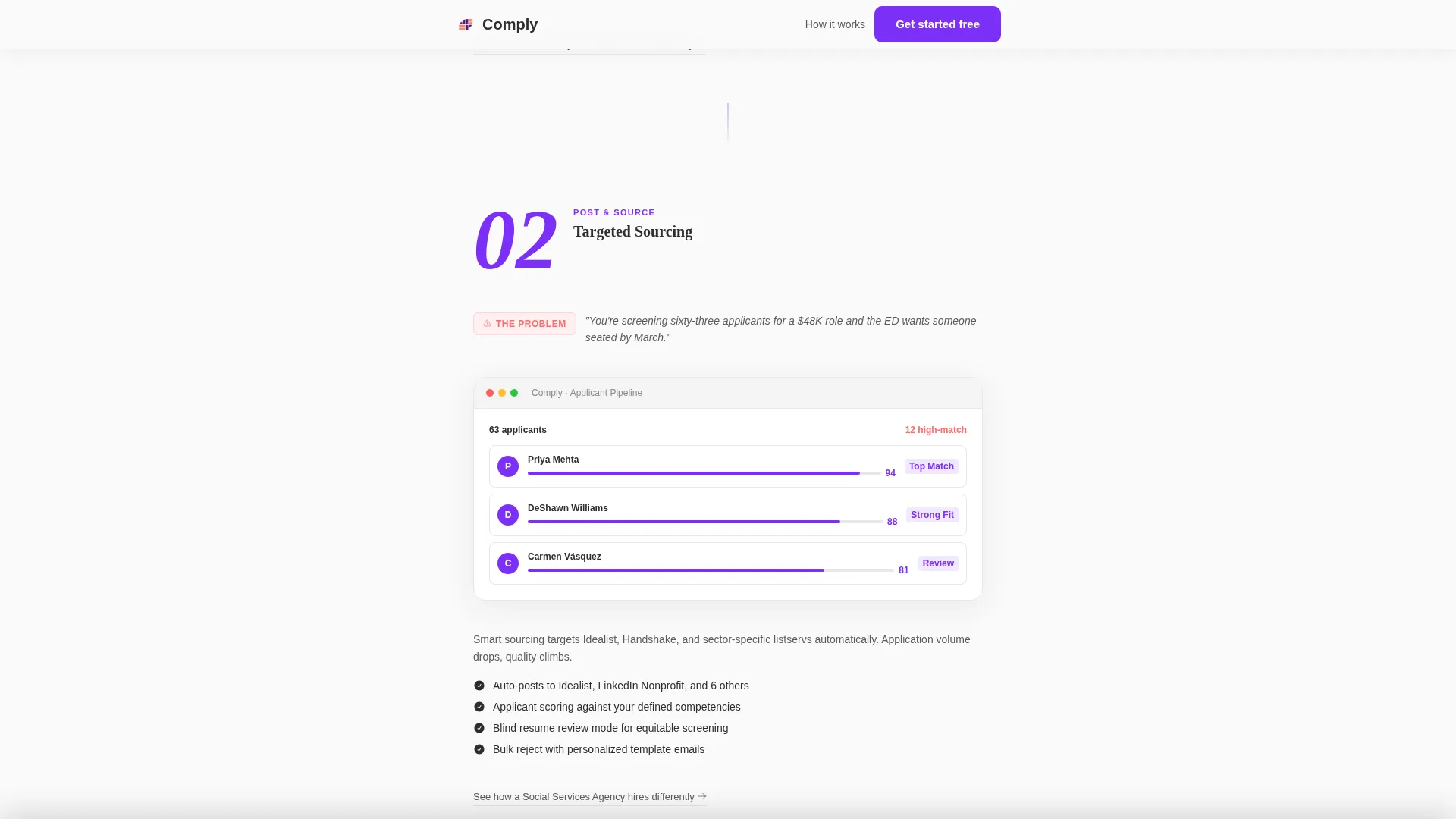
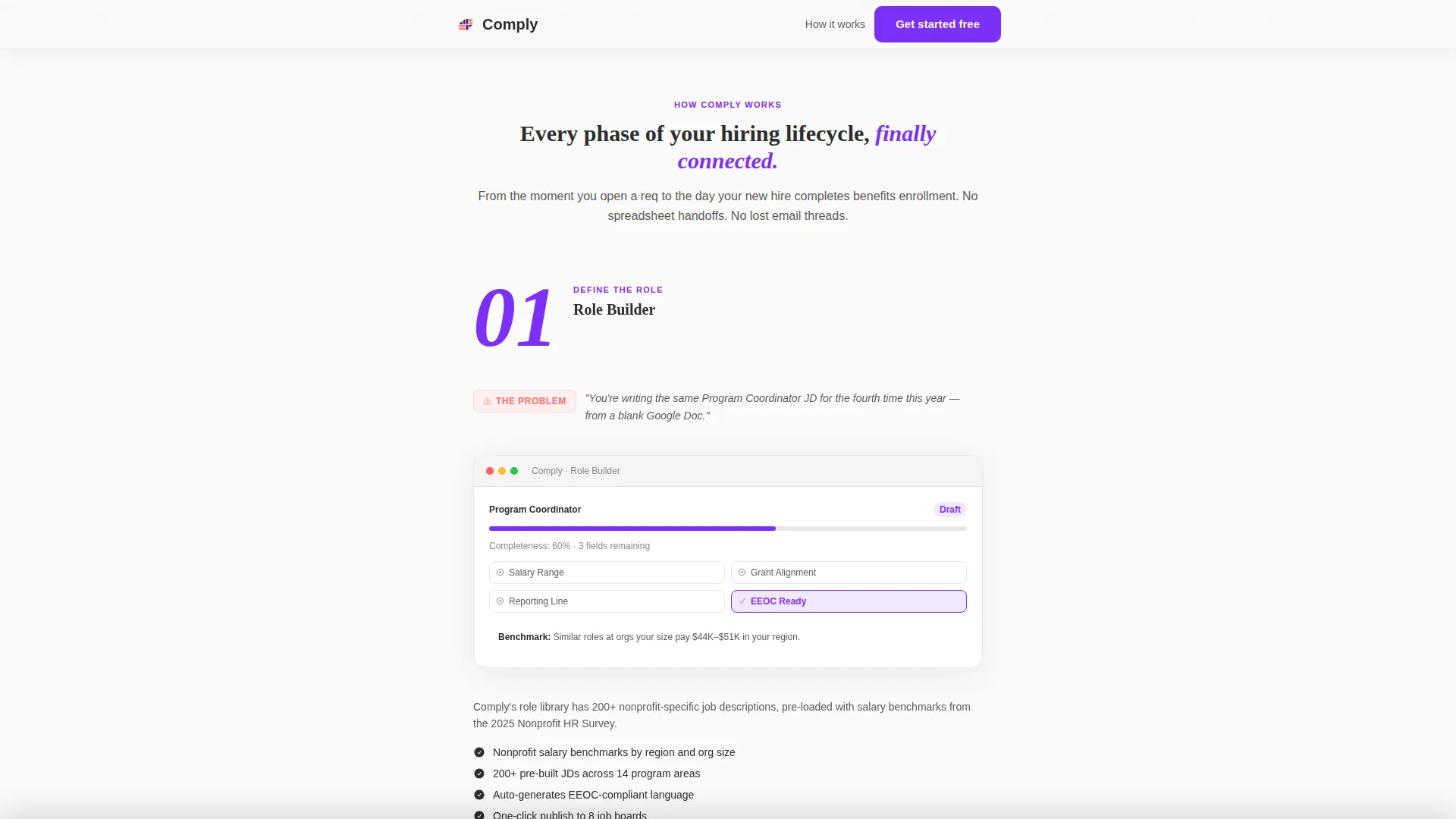
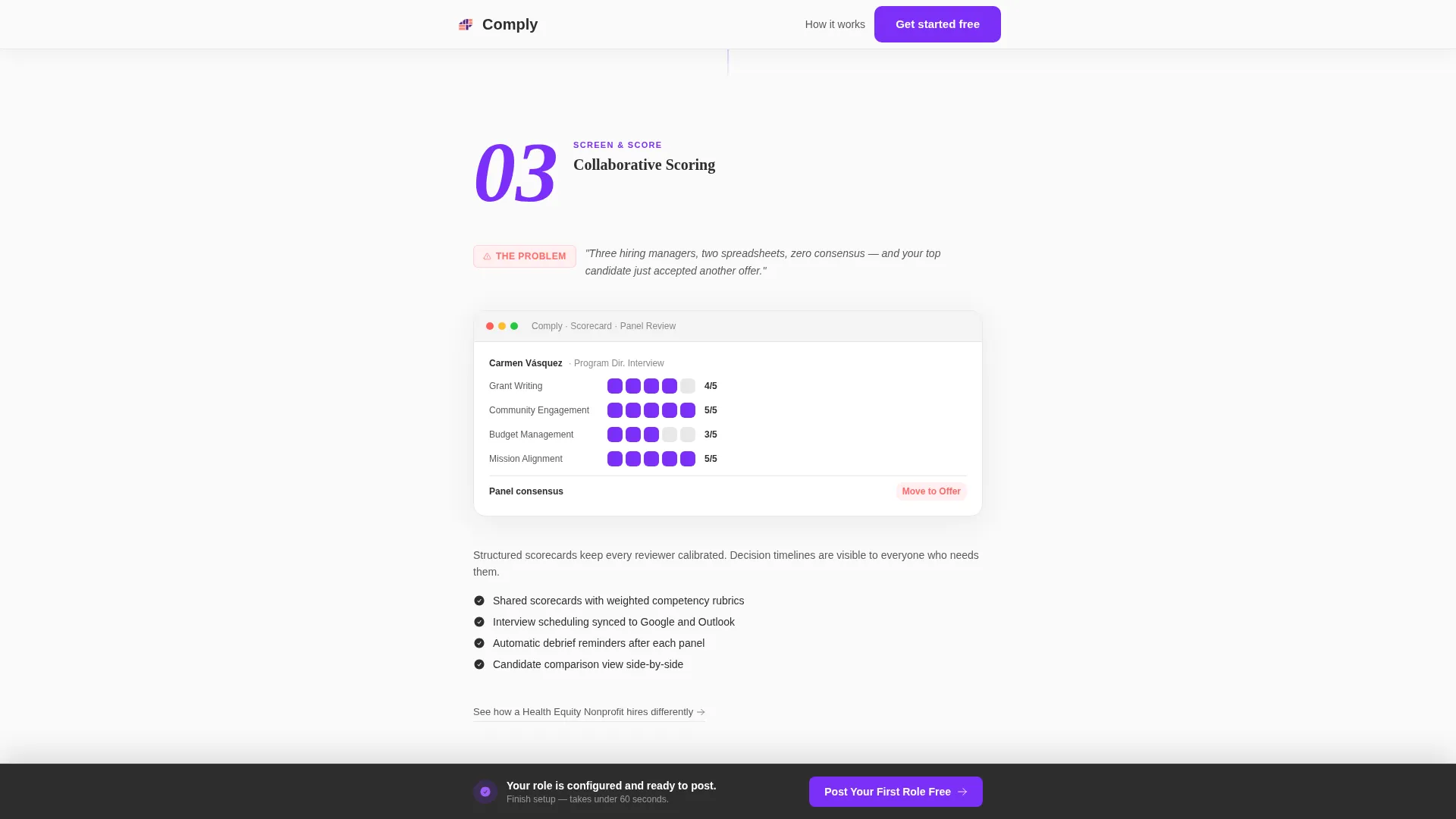
Below the form, four numbered sections map directly to the nonprofit hiring lifecycle: Define the Role, Post and Source, Screen and Score, and Extend and Onboard. Each phase opens with a bold phase number in electric violet, a one-line problem statement grounded in real nonprofit hiring pressure, and a product screenshot that shows the specific feature solving that problem.
Sticky Conversion Bar
After a visitor scrolls past phase two, a slim bar locks to the bottom of the screen. It displays the primary call-to-action, "Post Your First Role Free," and reinforces that the tool is already pre-configured with the data the visitor entered in the header form.
Segmented Case Study Links
Beneath each phase section, a secondary text link reads "See how [Organization Type] hires differently." These links lead to segmented case studies tailored by organization type, giving visitors relevant social proof without interrupting the main scroll flow.
Dopamine Pop Color System
Electric violet (#7B2FF7) drives buttons, progress indicators, and phase numbers. Warm coral (#FF6B6B) activates on hover states and confirmation moments. Crisp charcoal (#2D2D2D) anchors body text. Clean white (#FAFAFA) provides open, breathing background space. The result is a buttoned-up layout that rewards every interaction with a deliberate jolt of energy.
Corporate Precision Typography
Display numbers and headings use Fraunces for a structured, editorial weight. Body text and form interface elements use DM Sans for clean legibility at every size. The pairing gives the page authority without feeling cold or corporate.
Page sections overview
| Section | Purpose |
|---|---|
| Multi-Step Form Hero | Puts visitors inside the product immediately on page load |
| Phase One: Define Role | Opens the hiring lifecycle guide with a problem-proof beat |
| Phase Two: Post & Source | Continues the lifecycle rhythm with sourcing-stage proof |
| Phase Three: Screen & Score | Shows how the tool handles high applicant volumes |
| Phase Four: Extend & Onboard | Closes the lifecycle with onboarding-stage product evidence |
| Social Proof Section | Builds trust through nonprofit-specific testimonials and metrics |
| Sticky call to action Bar | Locks conversion after phase two scroll with a free-tier offer |
| Linear Footer Row | Delivers a clean, single-row footer to close the page |
Design & branding system
The visual identity pairs Corporate Precision structure with Dopamine Pop energy. The layout stays clean and organized, but every interaction point fires with color. The result feels like a well-labeled planner that suddenly has a hot-pink sticky note on the most important page.
- Color palette: electric violet (#7B2FF7) for primary actions, warm coral (#FF6B6B) for hover and confirmation states, charcoal (#2D2D2D) for text, and off-white (#FAFAFA) for backgrounds
- Typography: Fraunces for display elements and phase numbers, DM Sans for all body text and form interface labels
- Animations include step transitions on the multi-step form, scroll reveals on phase sections, a count-up effect on phase numbers, and a sticky bar entrance animation
Mobile & speed optimization
The template is designed desktop-first to match how nonprofit HR directors work, seated at a desk and navigating a full browser. A mobile-responsive fallback ensures the layout holds on smaller screens.
- Static page sections use server-side rendering for faster initial load
- The multi-step form and sticky bar run as client-side components to support live interactivity
- The single-column flow adapts cleanly to narrow viewports without breaking the form or phase guide structure
How this template helps you convert
Comply earns the signup by letting visitors experience the product's logic before they ever create an account. The page is built so that by the time a visitor reaches the final form step, they have already mentally hired someone through the tool.
- The multi-step form at the top creates immediate engagement. Visitors enter real data about their own hiring needs, which makes the product feel configured for them before any account exists.
- The four-phase lifecycle guide builds progressive confidence. Each problem-proof beat answers a real objection and moves the visitor one step closer to believing the software works.
- The sticky call-to-action bar appears at exactly the right moment, after phase two, when the visitor has seen enough evidence to act but has not yet left the page.
Other information about this template
Comply is tailored for the nonprofit HR software niche, where sector-specific terminology and workflow familiarity matter more than generic feature lists. The template includes department dropdown options pre-populated for nonprofit org structures, including Development, Programs, Grant Administration, and Volunteer Coordination.
- Localization is set for the United States market, using USD, MM/DD/YYYY date format, and nonprofit sector terminology throughout
- The social proof section is designed to accommodate named testimonials from nonprofit organization types with specific hiring metrics such as time-to-hire and applicant volume
- The 501(c)(3) verification checkbox on step three of the form signals to visitors that the product understands their organizational structure from the start
- The template is categorized under HR and Hiring, with a focus on the nonprofit HR subcategory and nonprofit HR software niche
Theme
Corporate Precision
Creative direction
Step-by-Step Guide
Color system
Dopamine Pop
Style
Single Column Flow
Direction
Recruitment/Hiring
Page Sections
Live Three-step Hiring Form
Four-phase Nonprofit Hiring Guide
Sticky Bottom Conversion Bar
Segmented Case Study Links
Dopamine Pop Interaction Design
Corporate Precision Typography Pairing
Related questions
What type of software is this landing page template designed for?
Can I customize the department dropdown options in the multi-step form?
Does the template include a call-to-action strategy?
Is this template suitable for a desktop-first audience?
How many sections does this landing page include?



