Comply - Powerful Insurancecompliance Landing Page Template
Comply is a modular card-grid landing page template built for insurance compliance management platforms. It opens with an isometric dashboard hero, leads with an interactive Compliance Gap Calculator, and flows through feature cards, carrier-size segments, and a gated lead-generation form. The Slate & Sky color system gives every section a focused, instrument-panel clarity.
by Rocket studio
Quick summary
Comply is a single-page, card-grid landing page template purpose-built for insurance compliance platforms. It combines a live dashboard hero, an interactive gap calculator, modular feature cards, and a progressive lead-capture form into one focused flow. The Data Command visual theme keeps every section feeling precise, trustworthy, and ready for a compliance-first audience.
Who this template is for
This template is built for compliance-driven software products operating in the insurance industry. It speaks directly to buyers who need to prove that their platform handles regulatory complexity at scale.
- Compliance managers at regional carriers tracking National Association of Insurance Commissioners (NAIC) model law adoptions across multiple states
- Managing General Agents (MGAs) entering new territories and needing a fast view of filing obligations
- Errors and Omissions (E&O) underwriters who must document due diligence when writing coverage
What problem this template solves
Insurance compliance teams face a fragmented, high-stakes environment. State-by-state regulations shift constantly, filing deadlines stack up, and a single missed bulletin can trigger a regulatory exam. Most platforms struggle to communicate that complexity clearly on a landing page. Comply solves the presentation problem so the platform can solve the compliance problem.
- Visitors arrive with specific, urgent pain points but leave before seeing the product's value
- A generic hero image or text-heavy layout fails to show how the tool actually works
- No interactive moment means no emotional hook before a form asks for commitment
What you get with this template
Comply delivers a complete, production-ready landing page layout with every section already structured and logically ordered. You get a template that earns visitor trust before it asks for anything.
- A full-width isometric dashboard hero showing a live-state compliance command center view
- A working Compliance Gap Calculator with carrier type, state selection, and line-of-business inputs
- Progressive disclosure lead-capture forms and a secondary gated PDF download path
Feature list
This template includes six core layout and interaction components, each designed to move a compliance buyer from curiosity to conversion.
Isometric Dashboard Hero
The header opens with a pixel-accurate, full-width rendering of the compliance command center. Visible on screen are a U.S. regulatory heat map color-coded by filing status, a sidebar ticker scrolling recent Department of Insurance (DOI) bulletins, a deadline calendar with upcoming filings highlighted, and a 94% compliance score displayed in a radial gauge. The product is the hero. No stock photography is needed.
Compliance Gap Calculator
Placed immediately below the header, this interactive tool lets visitors select their carrier type, choose operating states from a checkbox grid, and pick their lines of business. On submit, it returns a personalized risk card showing estimated regulatory exposure, upcoming filing deadlines within 90 days, and recently adopted model laws the visitor may have missed. This moment anchors the scroll.
Modular Feature Card Grid
A structured card grid presents the platform's core capabilities: Filing Tracker, Bulletin Monitor, Audit Trail, and State Comparison. Each card includes a micro-animation on scroll, keeping the section visually active without overwhelming the layout. The grid is fully modular, so cards can be reordered or extended.
Carrier Segmentation Row
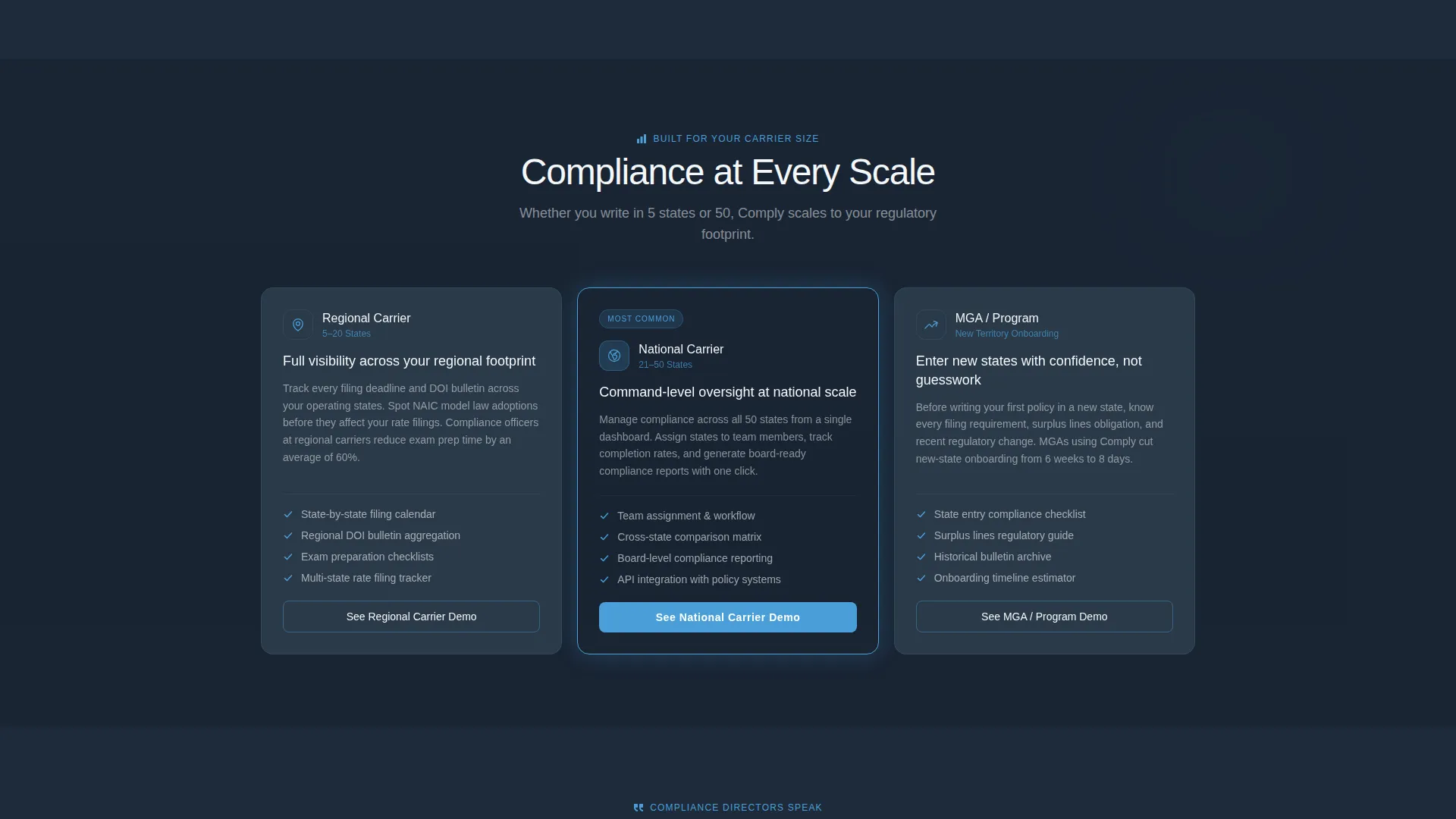
A dedicated row segments the audience by carrier size: Regional, National, and MGA or Program. Each segment links its own value context, helping different buyer profiles quickly self-identify and see relevant messaging without scrolling through content aimed at others.
Progressive Disclosure Lead Form
The primary call to action, "Run My Compliance Audit," collects company name, number of operating states, primary line of business, and work email in that order. Each field appears one step at a time, reducing form abandonment. This progressive disclosure pattern is positioned first beneath the calculator results and repeats as a sticky bottom bar after the feature grid.
Gated PDF Secondary Path
Visitors not ready to start a conversation can download the 2025 State Filing Calendar as a gated PDF. This path captures only email and carrier type, lowering the commitment barrier and keeping a second lead-generation option available throughout the page.
Page sections overview
| Section | Purpose |
|---|---|
| Dashboard Hero | Opens with isometric compliance command center preview |
| Compliance Gap Calculator | Interactive tool showing personalized regulatory exposure |
| Calculator Results Card | Displays risk score, deadlines, and missed model laws |
| Feature Card Grid | Highlights Filing Tracker, Bulletin Monitor, Audit Trail, State Comparison |
| Carrier Segmentation Row | Addresses Regional, National, and MGA buyer profiles |
| Testimonial Grid | Compliance directors cite specific exam outcomes and time savings |
| Primary Lead Form | Progressive disclosure form with "Run My Compliance Audit" call to action |
| Sticky call to action Bar | Persistent bottom bar repeating audit call to action after feature grid |
| Gated PDF Download | Secondary path offering 2025 State Filing Calendar for email capture |
Design & branding system
The Data Command theme uses a Slate & Sky color system that feels like a control tower at dawn. Every color decision reinforces precision, authority, and calm clarity.
- Deep regulatory slate (#1E2A3A) for primary backgrounds, brushed graphite (#3D4F5F) for card surfaces, open-sky blue (#4A9FD9) for active states and interactive elements, and cirrus white (#F4F7FA) for typography and negative space
- Cards float on the slate field with subtle 1-pixel graphite borders; sky blue glows softly on hover states and status indicators
- Headlines use a medium-weight sans-serif typeface; white text stays crisp against dark surfaces, echoing the clarity of a printed regulatory bulletin
Mobile & speed optimization
The card-grid structure translates naturally to smaller screens. Modular sections reflow cleanly without breaking the visual hierarchy or losing interaction context.
- The modular card layout stacks vertically on mobile, keeping the calculator, feature cards, and calls to action accessible without horizontal scrolling
- The sticky bottom call to action bar remains functional across screen sizes, keeping the primary conversion action visible at all times
- Section-level layouts are self-contained, so each component loads and renders independently without dependencies on adjacent blocks
How this template helps you convert
Comply is engineered around a give-first, ask-second conversion philosophy. Every section builds toward the lead form by delivering genuine value before requesting contact information.
- The Compliance Gap Calculator creates a personalized risk moment early in the scroll, making the visitor's own regulatory exposure visible before any form appears.
- Feature cards and the carrier segmentation row then show how the platform addresses those specific gaps, building product confidence across all buyer profiles.
- Progressive disclosure forms and the gated PDF download offer two separate commitment levels, capturing both sales-ready leads and early-stage prospects in the same page flow.
Other information about this template
Comply is a strong foundation for any insurance compliance software product that needs a landing page reflecting regulatory expertise and platform maturity.
- The template style is a modular card grid, making it straightforward to add, remove, or reorder sections as the platform evolves
- The Data Command theme and Slate & Sky color system are documented within the template, making brand customization consistent and repeatable
- The calculator and progressive form components are designed for the insurance compliance management niche, making the layout relevant out of the box for carriers, MGAs, and specialty underwriters



Theme
Data Command
Creative direction
Calculator/Tool First
Color system
Slate & Sky
Style
Card Grid (Modular)
Direction
Lead Generation
Page Sections
Isometric Dashboard Hero
Interactive Compliance Gap Calculator
Modular Feature Card Grid
Carrier Segmentation Row
Progressive Disclosure Lead Form
Gated PDF Secondary Path
Related questions
Can I customize the states shown in the Compliance Gap Calculator?
Does the template include actual compliance data or just the layout?
Can the sticky call to action bar be turned off on certain sections?
Is the testimonial grid ready to use with our own customer quotes?
How is the gated PDF download path set up?



