Comply - Compliance Software Landing page Template
Comply is a sidebar companion landing page template built for HR compliance automation software. It pairs a stats-first hero with a morphing fixed sidebar to keep the primary call to action always visible. Designed for startups and scaling teams, it converts visitors through bold onboarding metrics, a freemium signup flow, and a contextual team-size calculator, all on a single, clean page.
by Rocket studio
Quick summary
Comply is a single-page landing page template for HR compliance automation software. It opens with a team photo hero, anchors a fixed sidebar companion that shifts context as visitors scroll, and drives conversions through oversized impact stats. The layout speaks directly to startup HR managers and ops leads who need fast, trustworthy proof before they sign up.
Who this template is for
This template is purpose-built for teams selling or building HR compliance and onboarding automation tools. It fits product-led growth companies that convert best through proof, not persuasion.
- Startup HR managers handling onboarding for teams of 1 to 50 employees
- Scaling ops leads at Series B companies onboarding 15 or more people each month
- Fractional people-ops consultants managing compliance workflows across multiple states
What problem this template solves
Compliance software is often hard to explain quickly. Visitors arrive skeptical, juggling too many tabs, and unsure whether one tool can actually replace their patchwork process. This template cuts through that doubt fast.
- It leads with a credibility-building DOL audit stat before any product description appears
- It sequences proof points, time saved, paper eliminated, state coverage, so the case builds itself
- It keeps the freemium call to action fixed on screen so a decision never requires scrolling back up
What you get with this template
You get a fully structured, desktop-first landing page with a persistent sidebar layout and high interactivity built into every scroll section. The layout is ready to present an HR compliance automation product with confidence.
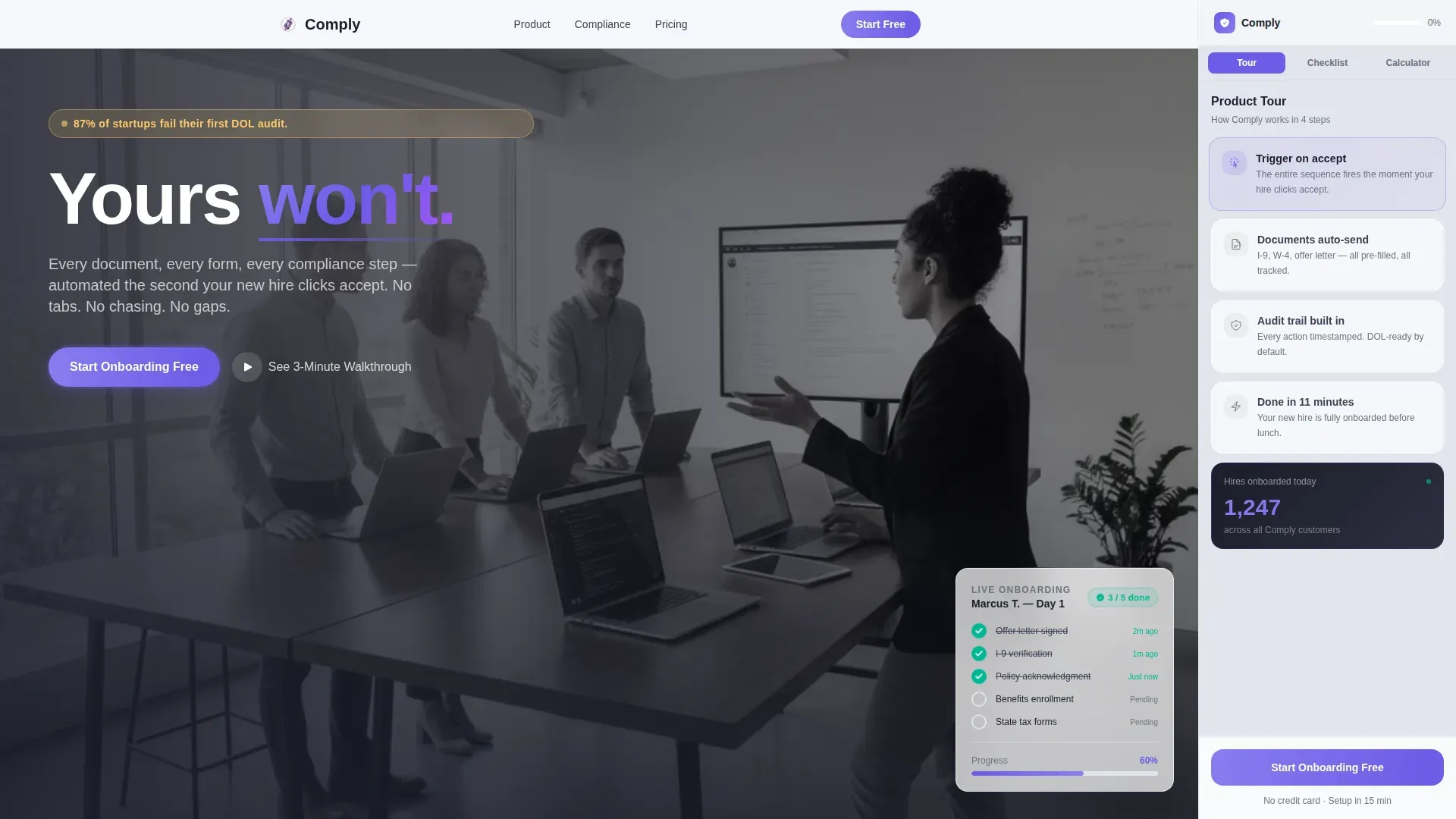
- A hero section with team photo, floating checklist overlay, and bold headline pairing a stat with a punchy response
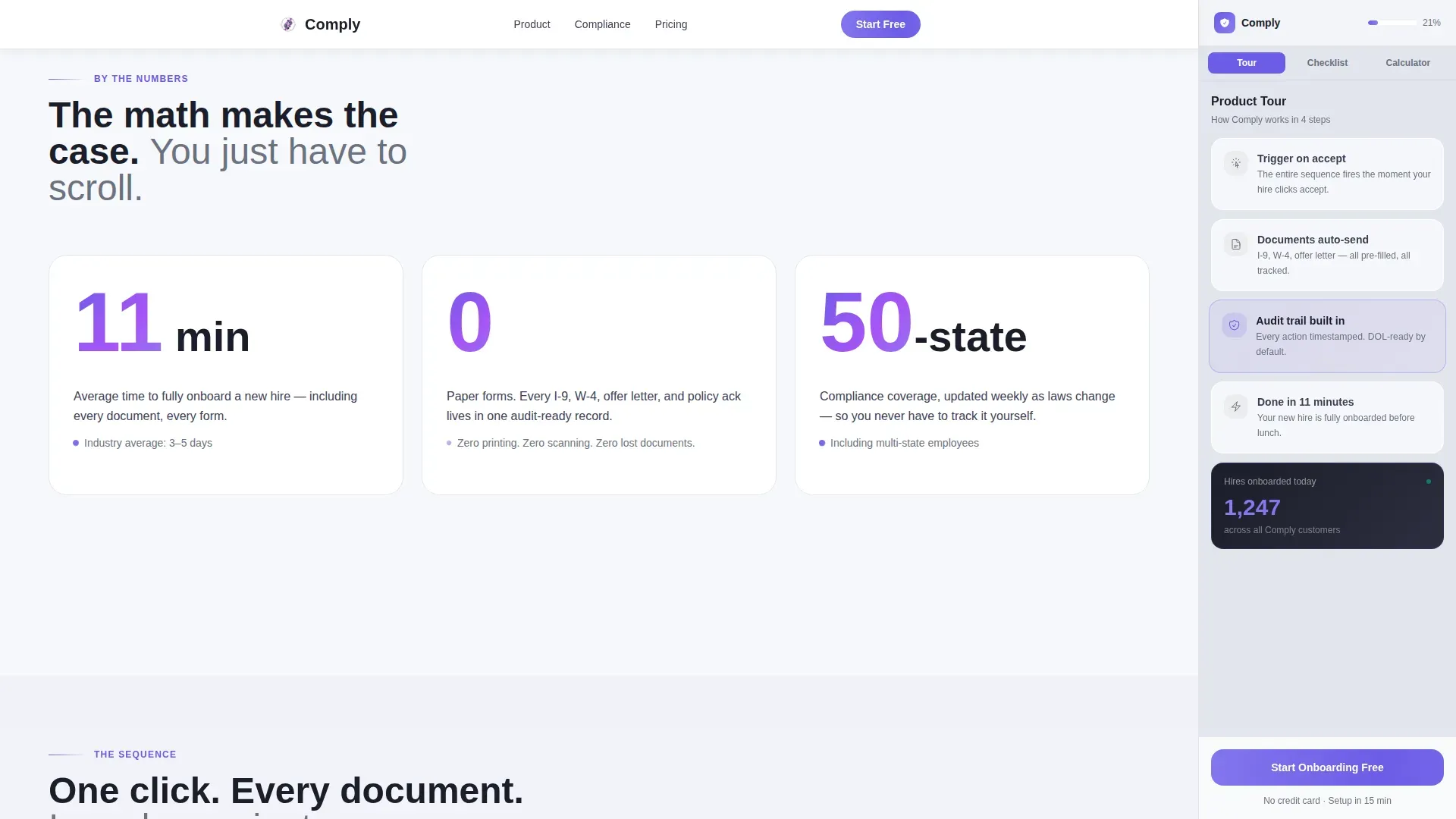
- A stats-impact section with oversized numbers and a morphing sidebar that transitions from mini product tour to compliance checklist to team-size calculator
- An inline freemium signup form and a secondary demo-capture path, both structured to minimize friction
Feature list
This template includes the following built-in components and layout features, all drawn from the project brief.
Fixed Sidebar Companion
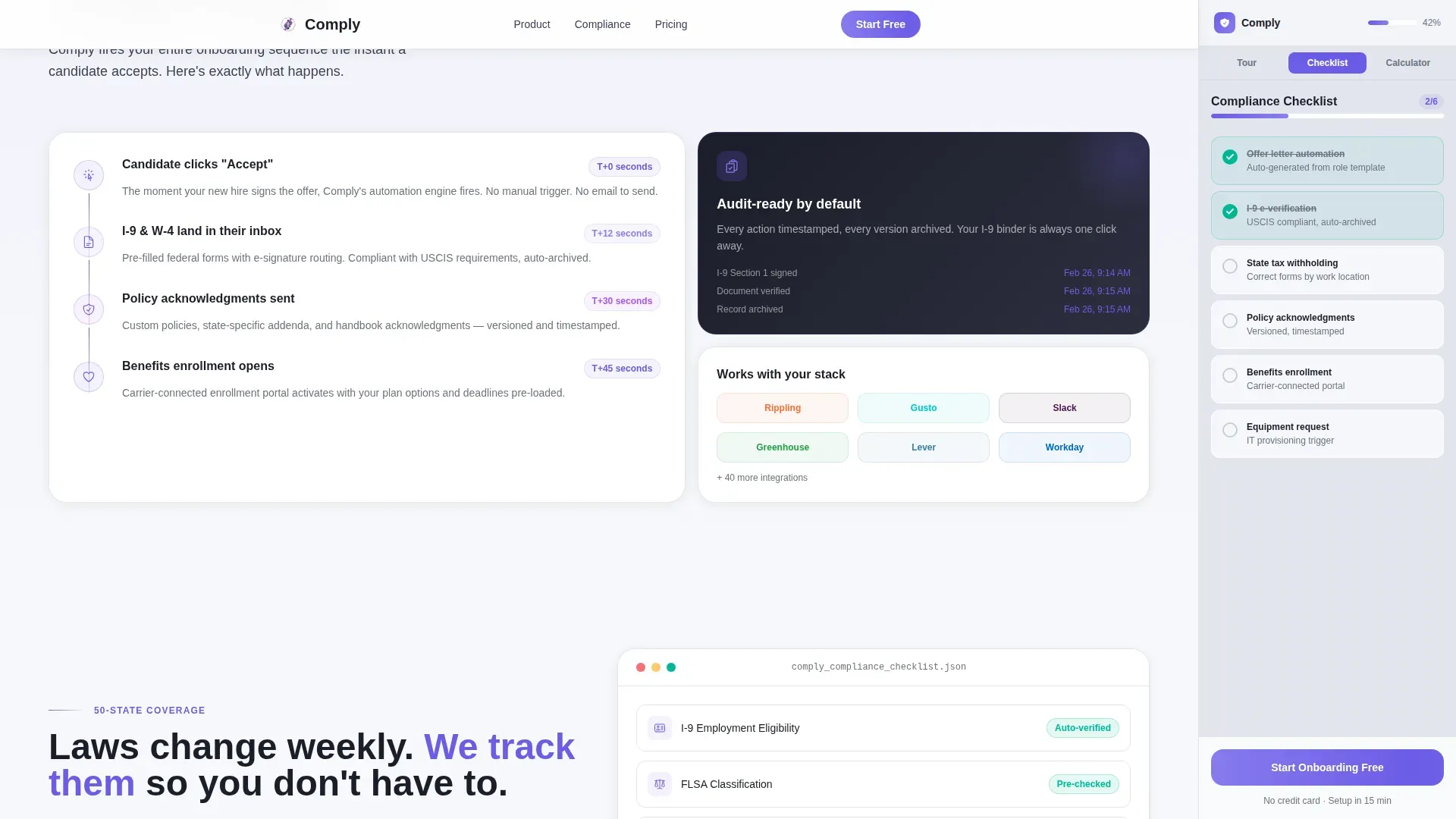
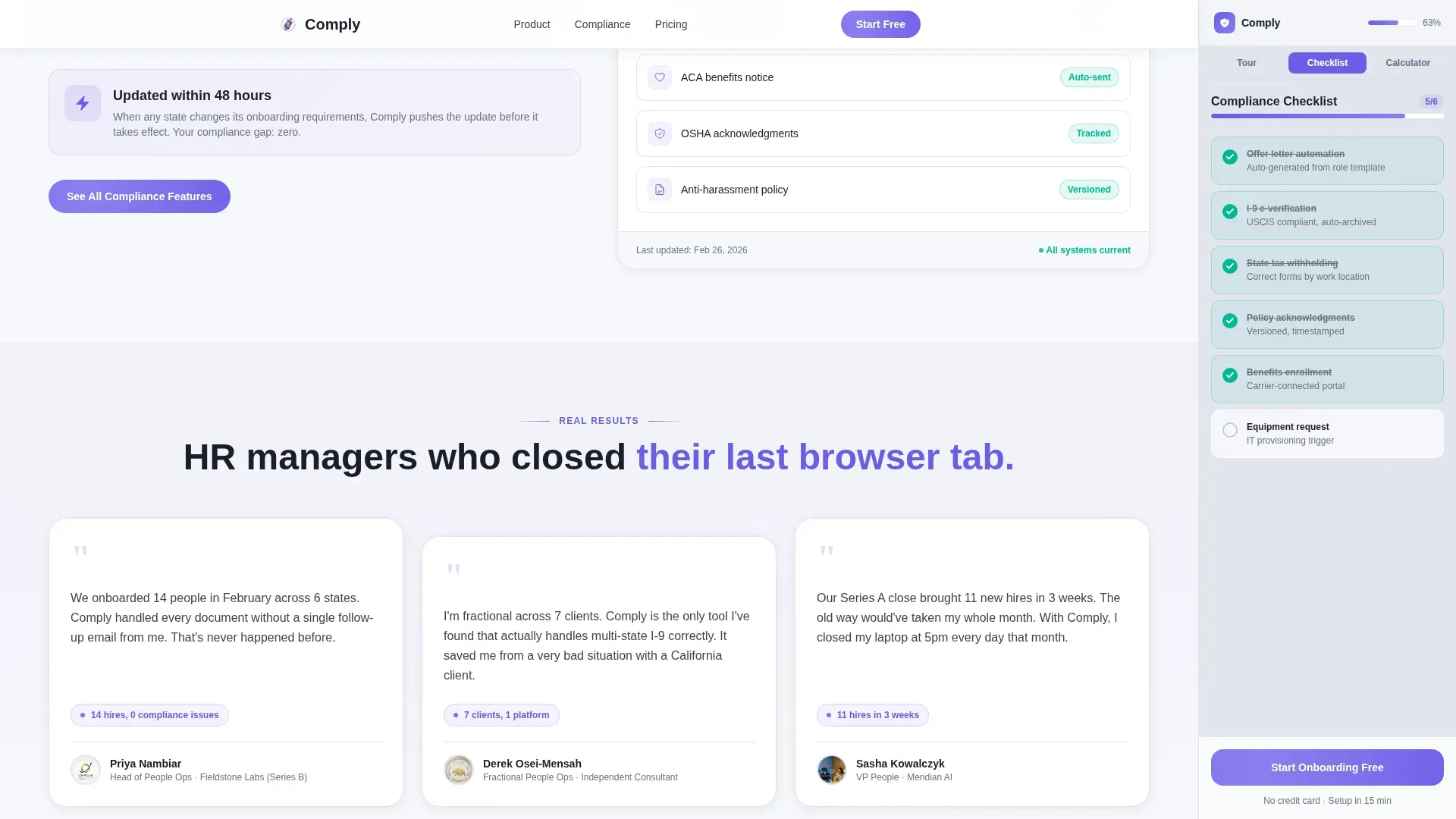
The right-hand sidebar stays on screen as visitors scroll. It shifts its content contextually: first showing a mini product tour, then a live-fill compliance checklist, then a calculator that estimates hours saved based on team size entered by the visitor.
Stats-First Impact Sections
Each scroll section opens with a single oversized number before any supporting copy appears. Featured figures include "11 minutes" for average onboarding time, "0 paper forms", and "50-state compliance, updated weekly." The numbers carry the argument; the copy reinforces it.
Hero with Floating user interface Overlay
The header uses a candid team photo that is desaturated just enough to let signal violet user interface elements pop. A live onboarding checklist with three checked items and a green completion badge overlays the right sidebar area. A bold floating stat and a two-line headline anchor the first impression.
Freemium Inline Signup Form
The primary conversion path collects only work email and company size via a dropdown with four ranges. No credit card is required. The form lives inside the pinned sidebar so it is always one glance away, regardless of scroll position.
Secondary Demo Capture Path
Below the main fold, a "See a 3-Minute Walkthrough" section offers an embedded demo video in exchange for an email address. This captures visitors who want more proof before committing to the free trial path.
How It Works Bento Layout
An asymmetric bento grid illustrates the trigger sequence: the moment a candidate accepts an offer, documents fire in order, offer letter, I-9 verification, policy acknowledgments, and benefits enrollment. The layout makes the automation logic visible without requiring technical explanation.
Page sections overview
| Section | Purpose |
|---|---|
| Hero with Sidebar | Anchors credibility with team photo, DOL audit stat, and live checklist overlay |
| Stats Impact Row | Builds urgency through oversized onboarding numbers and morphing sidebar |
| How It Works | Shows the accept-to-documents trigger sequence in an asymmetric bento grid |
| Compliance Coverage | Displays 50-state map with trust signals and social proof |
| Testimonials and Call to Action | Closes with HR manager quotes and inline freemium signup |
| Footer | Single-row linear footer with essential links |
Design & branding system
The visual identity follows a Startup Velocity theme using a Cloud Canvas color system. The palette feels like a freshly provisioned digital workspace: bright, weightless, and uncluttered.
- Background uses cloud white (#F7F8FC); the persistent sidebar rail uses mist gray (#E2E5ED); signal violet (#6C5CE7) appears on primary buttons and live data accents; headlines use ink navy (#1B1D2A)
- Typography pairs Plus Jakarta Sans for headlines with DM Sans for body copy, keeping hierarchy clean and scan-friendly
- Scroll-linked animations include staggered number reveals, a checklist fill animation, and intersection observer triggers throughout
Mobile & speed optimization
The template is designed desktop-first, matching how HR managers and ops leads typically work at a workstation. A solid mobile fallback is included so the page remains functional across devices.
- Desktop layout prioritizes the fixed sidebar experience, with the morphing companion and inline calculator fully visible alongside content
- Mobile fallback collapses the sidebar into inline sections, preserving the stats sequence and conversion forms without sacrificing readability
- Server components handle static sections while client components power the interactive sidebar, calculator, and checklist animations
How this template helps you convert
The conversion architecture is built around one principle: let the numbers make the case so the call to action feels obvious by the time a visitor reaches it.
- The hero drops a high-stakes stat ("87% of startups fail their first DOL audit") in the first viewport, creating immediate stakes and positioning the product as the solution before a single feature is described.
- The morphing sidebar keeps "Start Onboarding Free" pinned on screen through every scroll section, so the decision point is always one click away without interrupting the content flow.
- The secondary demo path below the fold captures email from visitors who need more context, ensuring the page works for both ready-to-sign-up visitors and those still evaluating.
Other information about this template
This template is part of a broader HR and hiring category and was built specifically for the legal and professional HR software niche. It is well-suited to product teams positioning compliance automation as a growth enabler rather than a legal burden.
- The localization defaults are English, USD pricing context, United States geography, and MM/DD/YYYY date formatting
- The DOL (Department of Labor) audit statistic displayed in the hero is a trust anchor intended to frame compliance risk for early-stage startup audiences
- Animation intensity is set to high, with scroll-linked sidebar morphing, staggered reveals, and intersection observer behavior throughout
- The template is categorized under HR and hiring, subcategory legal and professional HR, making it directly applicable to compliance-focused SaaS positioning
Theme
Startup Velocity
Creative direction
Stats-First Impact
Color system
Cloud Canvas
Style
Sidebar Companion
Direction
Freemium/Trial
Page Sections
Fixed Morphing Sidebar Companion
Stats-first Impact Layout
Hero with Team Photo and User Interface Overlay
Inline Freemium Signup Form
Secondary Demo Capture Section
How It Works Bento Grid
Related questions
What kind of product is this template designed for?
Does the freemium signup form require a credit card?
Does this template include a secondary lead capture option?
Who is the intended audience for this landing page template?
Is this a single landing page or a multi-page website?



