Claimflow - Powerful Claims Management Landing Page Template
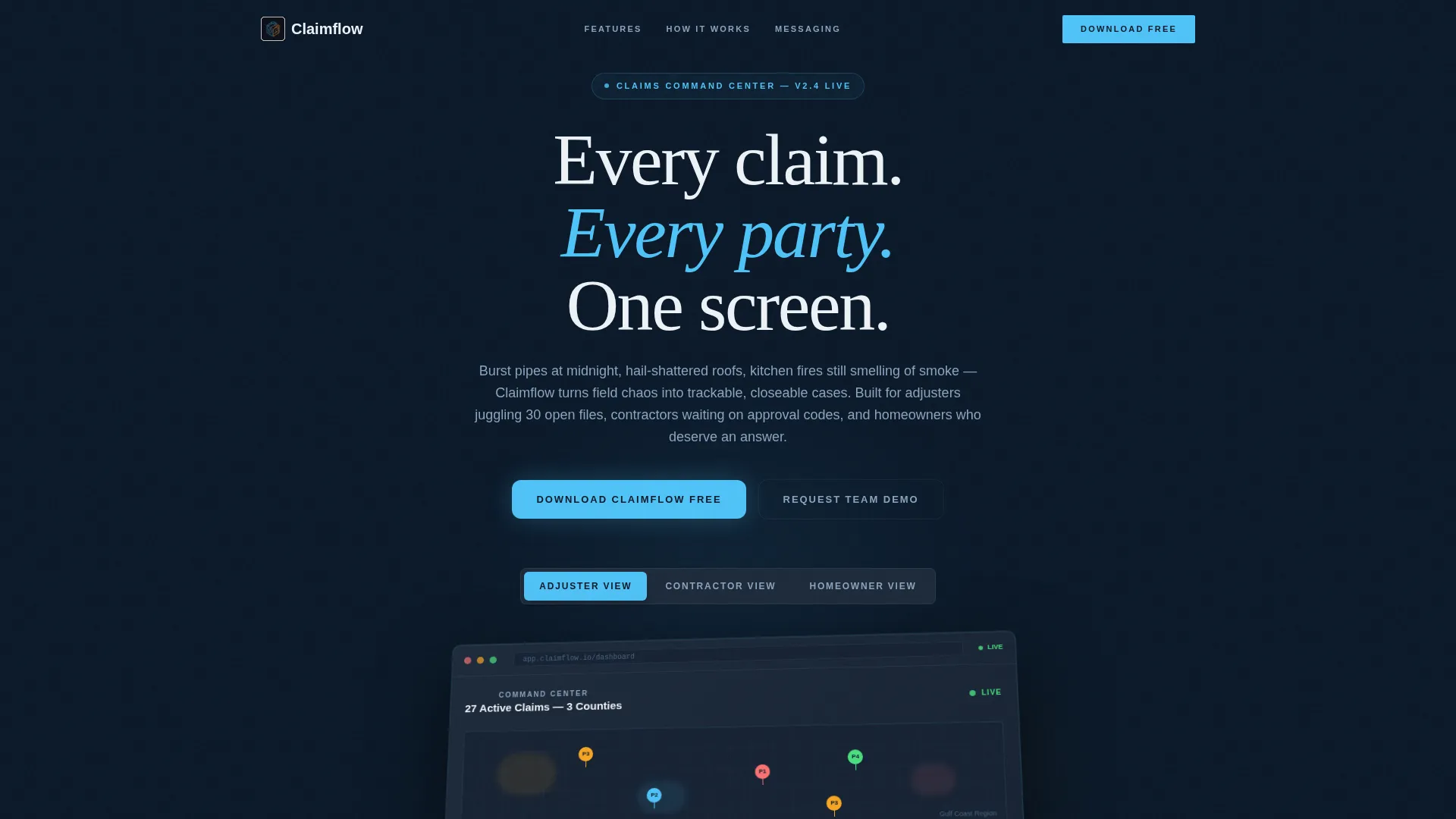
Claimflow is a scroll-reveal landing page template built for home services claims management platforms. It features a three-tab interactive dashboard header, progressive section reveals, and a Midnight Blue visual system that feels like a live dispatch console. The page drives app downloads with paired App Store and Google Play calls to action, plus an enterprise demo path for larger teams.
by Rocket studio
Quick summary
Claimflow is a single-page, scroll-reveal landing page template designed for home services claims management software. It opens with a three-tab dashboard switcher showing distinct views for adjusters, contractors, and homeowners. The Midnight Blue color system and progressive micro-interactions create a credible, professional platform feel that builds trust before asking visitors to download.
Who this template is for
This template is built for software teams and platform founders operating in the home repair and insurance claims space. It communicates clearly to three distinct user types within one scrolling experience.
- Independent adjusters and adjusting firms managing high-volume open caseloads across multiple locations
- Restoration contractors who need fast approval visibility before dispatching crews to job sites
- Homeowners seeking clear, real-time updates on the progress of their active repair claims
What problem this template solves
Claims management platforms often struggle to explain a complex, multi-role product in a single marketing page. Visitors leave before they understand the value because the page talks to no one specifically.
- The template solves unclear audience targeting by showing three distinct dashboard views inside one interactive header
- It removes the friction of a text-heavy product pitch by replacing it with live-looking user interface micro-interactions that demonstrate the platform in motion
- It closes the gap between casual browsers and committed downloaders by letting visitors explore the interface before any commitment is required
What you get with this template
You get a fully structured, scroll-reveal landing page built around a claims management platform narrative. Every section is sequenced to deepen engagement and move visitors toward the download call to action.
- A Feature Tab Switcher header with three rendered dashboard mockups: Adjuster View, Contractor View, and Homeowner View
- Progressive scroll sections covering claim intake, automated assignment logic, and real-time three-party messaging
- A conversion footer with App Store and Google Play download badges, a phone-number SMS input field, and a secondary enterprise demo request path
Feature list
This template includes six core feature areas, each designed to reflect a real capability layer of the claims management platform.
Three-Role Tab Switcher Header
The header places three clickable tabs above an isometric dashboard mockup. Each tab transforms the visible user interface: adjusters see a map with severity heat zones and clustered pins, contractors see an approval queue with dollar amounts and authorization countdowns, and homeowners see a friendly progress timeline with a named adjuster.
Scroll-Reveal Progressive Sections
Each capability section fades and lifts into view as the visitor scrolls. The reveal sequence moves from claim intake through assignment logic to messaging, creating the sensation of descending through the platform one layer at a time.
Claim Intake Engine Section
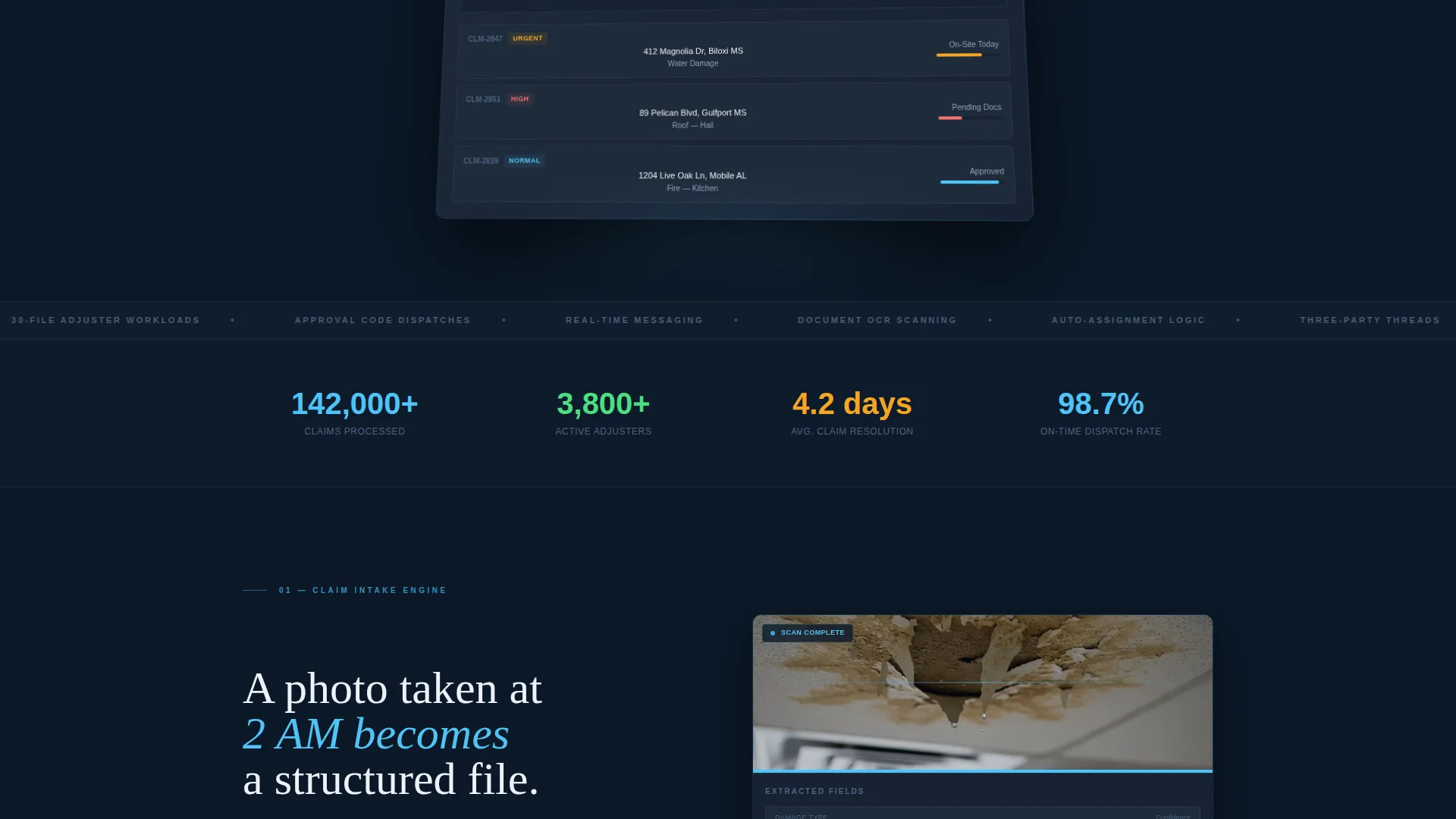
This section visualizes the document scanning process using a water-stained ceiling photo as the source asset. It communicates the platform's ability to process real-world claim evidence into structured case data.
Automated Assignment Logic Section
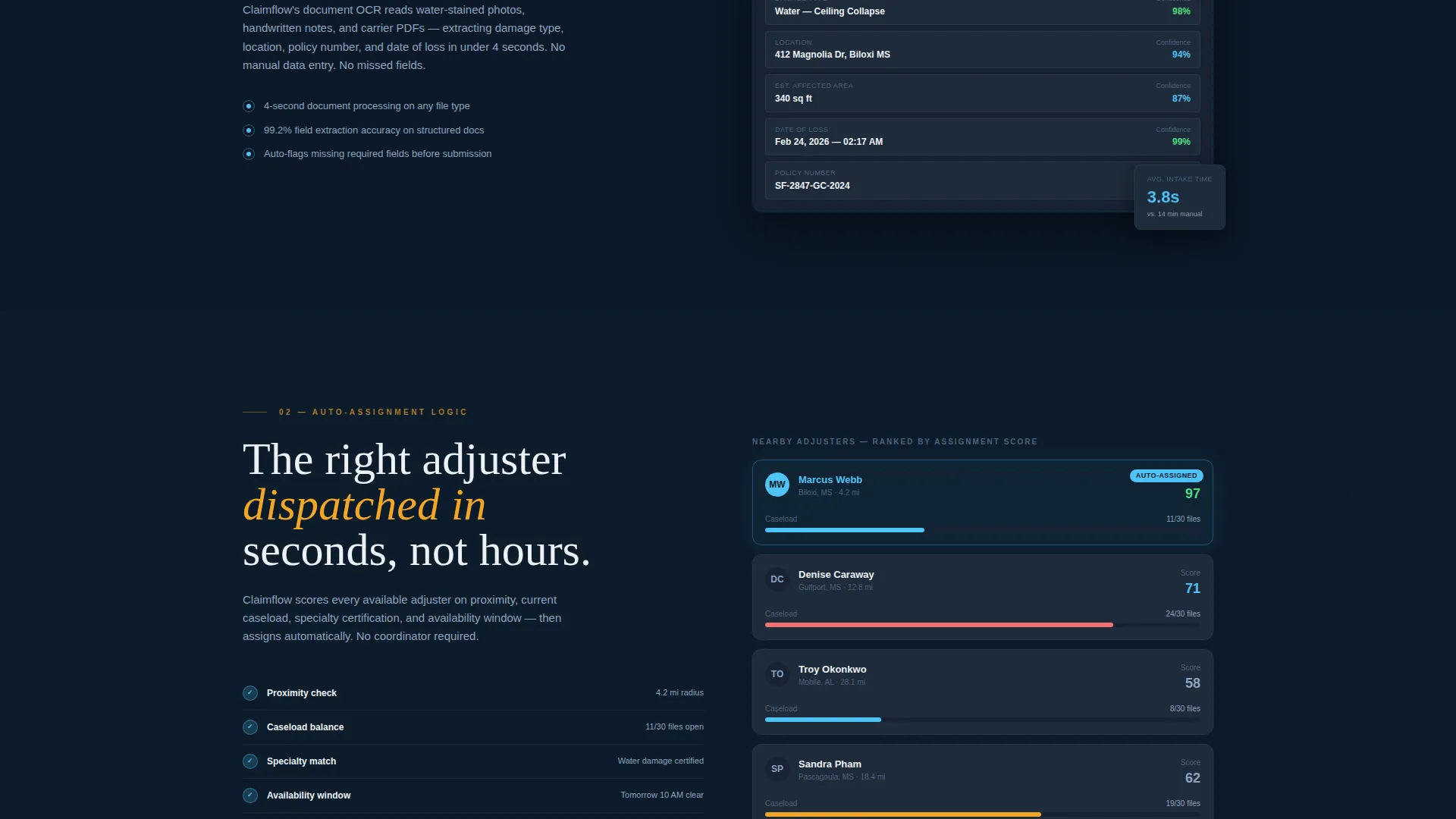
A dedicated scroll section shows adjuster proximity mapping and caseload balancing in a visual format. It demonstrates how claims are routed intelligently rather than manually assigned.
Real-Time Messaging Thread Section
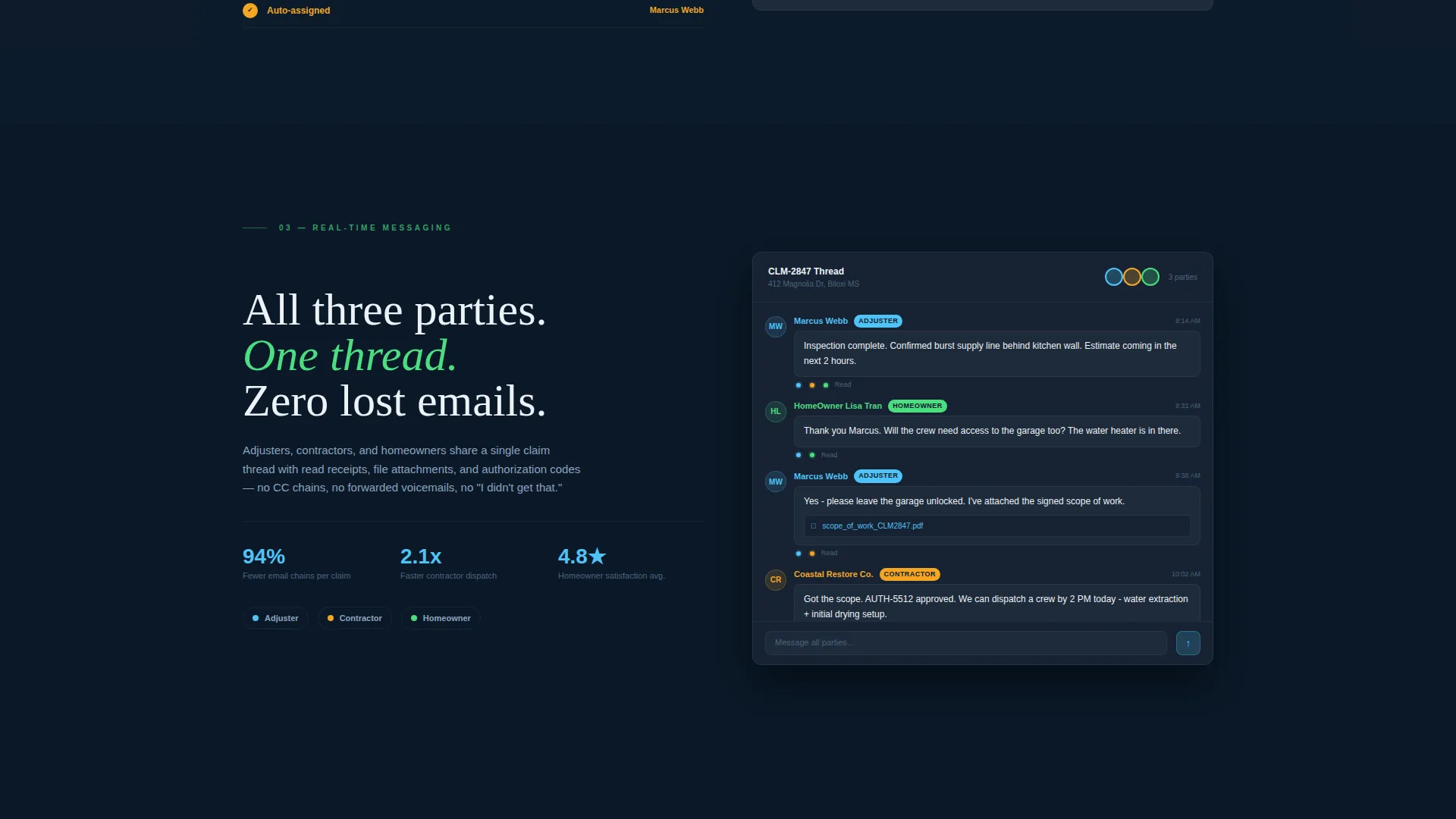
The messaging section renders a three-party conversation thread between adjuster, contractor, and homeowner. Read receipts and visible file attachments are shown to communicate the platform's transparency and coordination depth.
Scroll-Triggered Micro-Interactions
Progress rings fill, status chips flip from pending to approved, and user interface elements animate as visitors reach each section. These on-scroll interactions make the interface feel live without requiring a real backend connection.
Page sections overview
| Section | Purpose |
|---|---|
| Tab Switcher Header | Introduces three user role views inside one interactive dashboard mockup |
| Claim Intake Engine | Shows document scanning and case creation from real-world claim photos |
| Assignment Logic Display | Visualizes adjuster proximity routing and workload balancing |
| Messaging Thread Panel | Demonstrates three-party communication with read receipts and attachments |
| App Download call to action | Drives primary conversion with App Store, Google Play, and SMS link options |
| Enterprise Demo Request | Captures high-volume firm leads who need a conversation before committing |
Design & branding system
The visual identity follows a Dashboard Pro theme built entirely around the Midnight Blue color system. Every color in the palette carries a functional meaning rather than a decorative one.
- Background and surface layers use deep terminal navy (#0B1929) and steel-panel gray (#1E2A3A) to establish a monitoring-station aesthetic
- Active indicators, progress bars, and interactive states use ice-blue (#4FC3F7) against signal white (#EDF2F7) typography for clear contrast
- Claim-urgent amber (#F5A623) is reserved exclusively for alert badges and notification dots, keeping urgency signals visually distinct at a glance
Mobile & speed optimization
The template is structured for responsive display across screen sizes, ensuring the tab switcher and scroll-reveal sequences remain legible and functional on smaller viewports.
- The isometric dashboard mockup and tab switcher are designed to reflow cleanly on mobile without losing the three-role navigation structure
- Scroll-triggered micro-interactions are scoped to individual sections so each animation fires independently as the visitor reaches it
- The App Download call-to-action section places App Store and Google Play badges alongside the SMS input field in a stacked layout that works naturally on touch devices
How this template helps you convert
The conversion architecture of this template is built around earned commitment. Visitors are never asked to act before they have seen the platform in motion.
- The tab switcher lets visitors self-identify as an adjuster, contractor, or homeowner before reading a single feature description, which immediately increases personal relevance and time on page
- Progressive scroll reveals replace a static feature list with a guided platform tour, so by the time visitors reach the download call to action they have already experienced the interface rather than just read about it
- The dual conversion path separates individual app downloaders from enterprise teams, ensuring that high-value firm leads are captured through the demo request rather than lost to a single-action page
Other information about this template
This template is categorized under Technology and Home Services Software, making it well suited for teams building in the home services claims management niche. The Interactive Explorer creative direction means the design rewards curiosity.
- The page type is a single landing page, not a multi-page website, so all content and conversion paths are contained within one continuous scroll
- The header concept is a Feature Tab Switcher, a pattern that works especially well when a platform serves more than one distinct user role
- The template style is Scroll Reveal (Progressive), which means section visibility is tied to scroll position rather than loaded all at once on page entry
- The primary call-to-action direction is App Download, supported by a secondary enterprise path labeled "Request a Team Demo"
Theme
Dashboard Pro
Creative direction
Interactive Explorer
Color system
Midnight Blue
Style
Scroll Reveal (Progressive)
Direction
App Download
Page Sections
Three-role Tab Switcher Header
Scroll-reveal Progressive Sections
Claim Intake Engine Visualization
Automated Assignment Logic Display
Real-time Messaging Thread Section
Scroll-triggered Micro-interactions
Related questions
Who are the three user roles shown in the tab switcher?
Does this template support both individual app downloads and enterprise leads?
What sections are included in the scroll-reveal sequence?
Is the dashboard mockup in the header interactive or purely visual?
Can the color system be adapted for a different brand identity?



