App Update Notes Landing Page Template | Startup Velocity
The Changelog Startup Velocity App Update Notes Landing Page Template is a modular card-grid landing page built for teams that ship fast and communicate clearly. It turns raw commit messages and project management tickets into polished, user-facing release notes automatically. Designed in a dark-mode acid digital aesthetic, it drives freemium signups with live metrics, a feature matrix, and a zero-form GitHub OAuth call to action.
by Rocket studio
Quick summary
This template gives product teams a high-energy, single-page release notes engine. It combines live animated metrics, a three-row feature matrix of modular capability cards, and a dual-path conversion flow. The visual system uses void black, phosphor green, electric violet, and scanner gray to deliver a dark-mode IDE aesthetic that feels alive from the first scroll.
Who this template is for
Not every team has time to write release notes from scratch after every deploy. This template is built for the people who ship constantly and need their release notes page to do the heavy lifting.
- Product managers at Series A-to-C startups who need polished product release notes without writing them manually
- Developer advocates maintaining a public-facing release notes page for their user base
- Indie founders pushing frequent releases who never have time to keep users informed about new features
What problem this template solves
Without effective software release notes, product adoption lags. Users get frustrated, support tickets pile up, and the value of every release goes unseen. Good release notes are one of the most powerful levers a team has to keep users happy and engaged, yet most teams treat them as an afterthought. Cryptic commit messages and raw project management tickets are not release notes. They are noise. This template solves the gap between what developers write and what users actually need to read.
- Teams push new features and bug fixes daily but never publish a clear, structured release notes page
- Users miss key changes because product updates are buried in emails or never communicated at all
- Writing great release notes from scratch after every deploy wastes time that product teams do not have
What you get with this template
You get a fully structured, modular landing page designed around one goal: turning deploy events into polished, user-facing release notes that reach users fast. Every section is purposeful. Every card is a standalone proof point. The layout builds a complete mental model of the release pipeline from input to distribution.
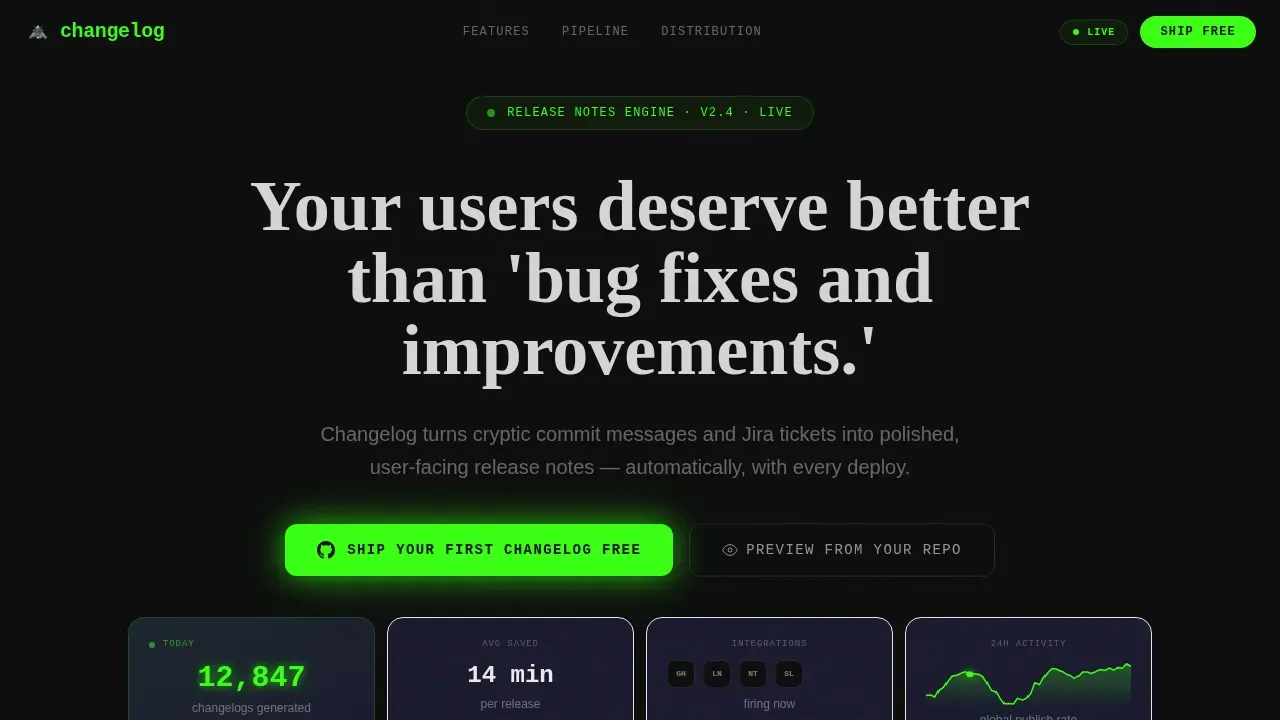
- A live stats dashboard header with animated counters, sparkline activity graph, and a typewriter headline
- A three-row feature matrix of capability cards covering input sources, transformation options, and distribution channels
- A dual conversion path with a primary freemium call to action and a secondary live repo preview generator
Feature list
This template ships with six categories of built-in capability, each represented as a self-contained card module in the grid.
Live Metrics Dashboard Header
The header functions as a real-time stats display. Animated counters roll up on load to show changelogs generated, average time saved per release, and integration activity. A sparkline graph traces global publish activity over the past 24 hours. The headline types itself out character by character, drawing attention immediately and setting the tone for everything below. This section helps ensure users understand the scale and momentum of the tool before reading a single feature description.
Input Source Cards with Connection Lines
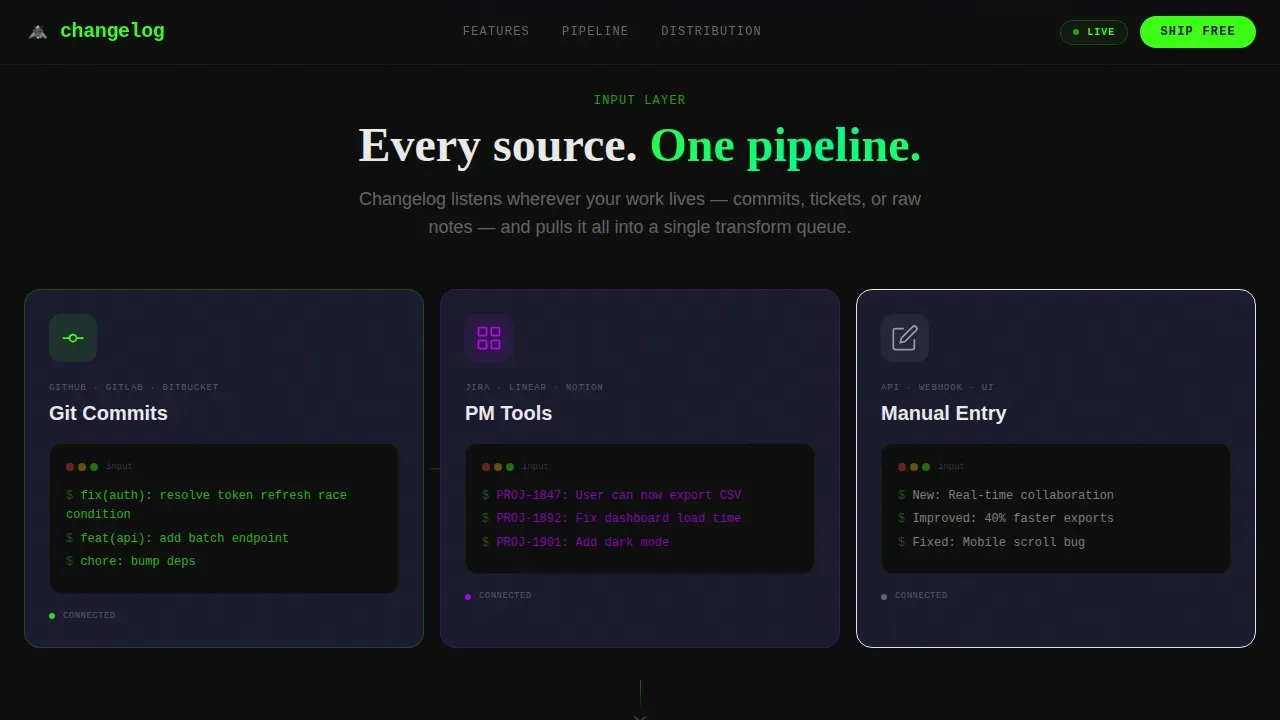
The first feature matrix row presents three cards showing the pipeline entry points: Git commits, project management tool tickets, and manual entry. Glowing connection lines run between the cards to visualize the flow of data. This layout makes it easy to communicate how release notes are assembled from real-world sources, giving visitors a brief overview of how the automation begins before any transformation happens.
Transformation Cards with Hover Flip
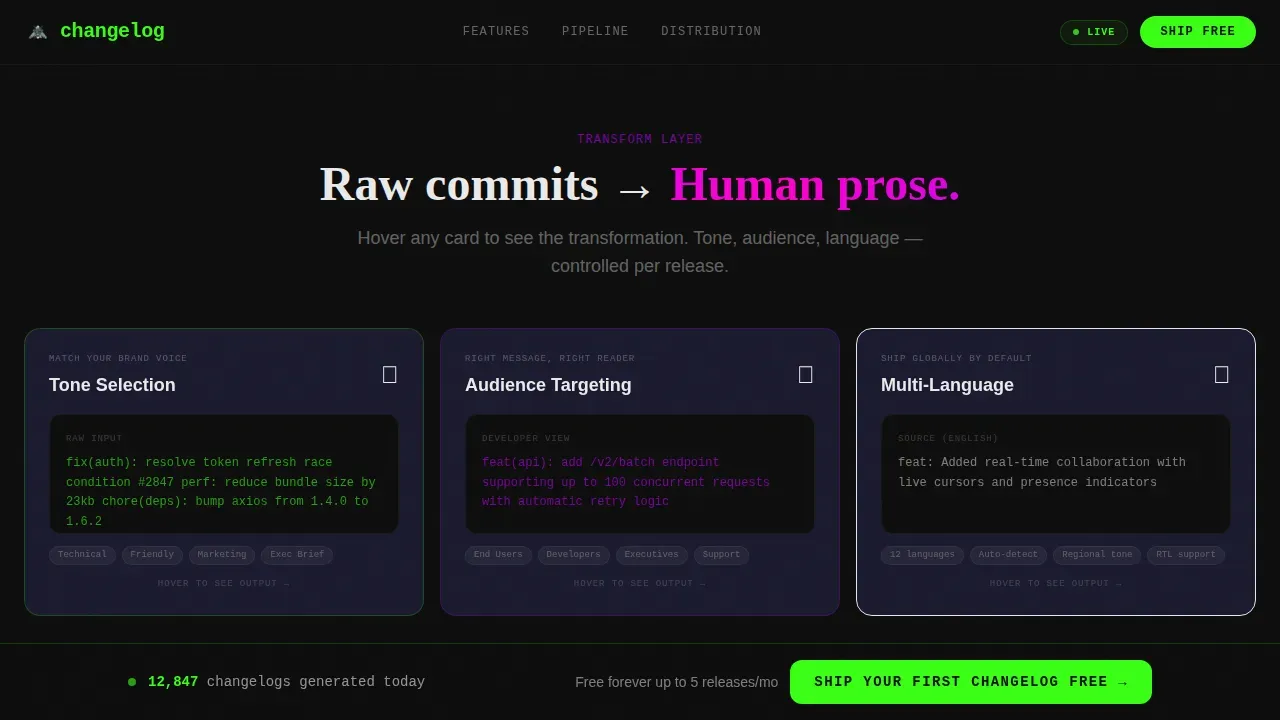
The second matrix row focuses on how raw input becomes polished product release notes. Three cards cover tone selection, audience targeting, and multi-language output. Each card flips on hover to reveal a before-and-after view: raw commit on one side, a clean release note on the other. This is one of the most effective ways to avoid technical jargon in your pitch and show visitors exactly what great release notes look like compared to what they currently ship.
Distribution Channel Cards
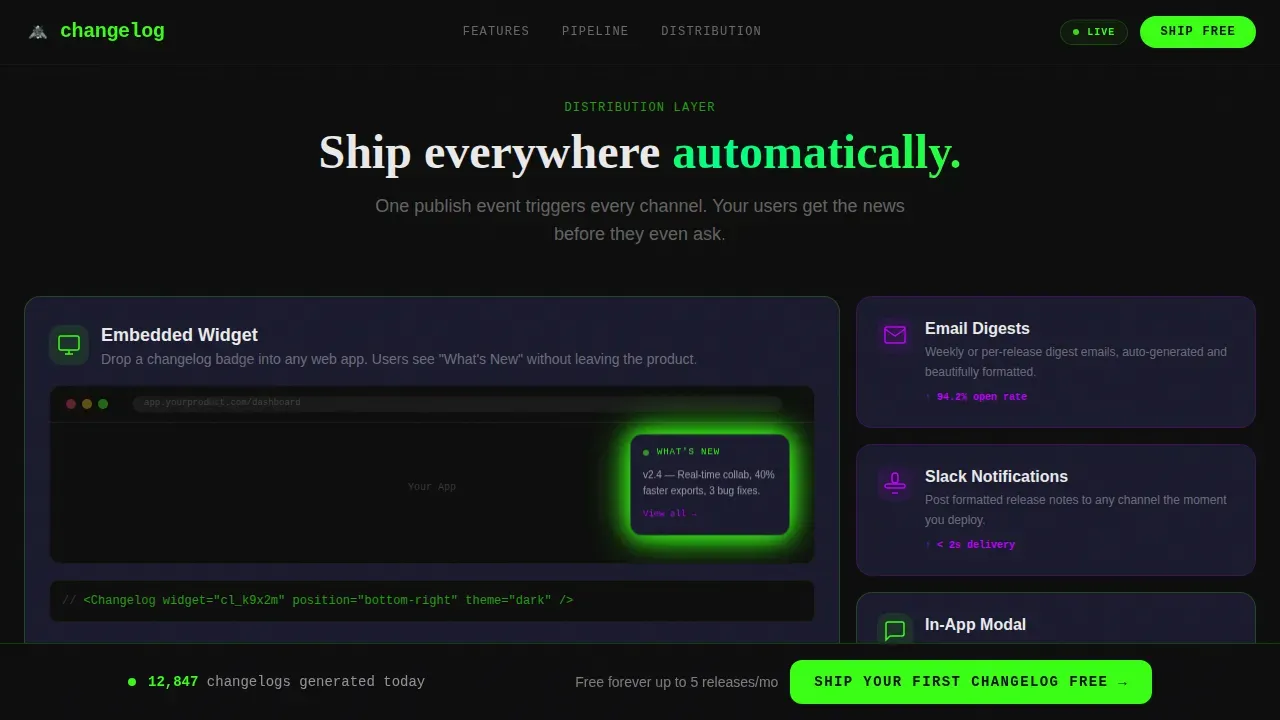
The third matrix row shows where your software release notes go after they are generated. Cards cover embedded widgets, email digests, in app messages, and in-app modals. This section demonstrates the full reach of the system: release notes pushed through multiple channels so you can reach users wherever they are, whether on the web, in their inbox, or inside the product itself.
Freemium Conversion Flow
The primary call to action reads "Ship Your First Changelog Free" in phosphor green on void black. It appears first beneath the header metrics and again as a sticky bottom bar after the second card row. The signup flow asks only for a GitHub connection or email, using one OAuth button with zero form fields. This frictionless path is designed to drive engagement from the moment a visitor lands on the page.
Live Repo Preview Generator
A secondary conversion path lets visitors paste a public repository URL and receive a generated release notes preview in seconds. This interactive element converts curiosity into commitment before an account even exists. It is one of the most powerful ways to engage users who are not yet ready to sign up but are willing to see the value for themselves.
Page sections overview
| Section | Purpose |
|---|---|
| Header Metrics Dashboard | Animated counters, sparkline, and typewriter headline establish immediate credibility |
| Input Source Cards | Visualize Git, project management, and manual entry as pipeline starting points |
| Transformation Card Row | Hover-flip cards show tone, audience, and language transformation options |
| Distribution Channel Cards | Cover email, widget, in app messages, and modal delivery options |
| Social Proof and Repo Preview | Testimonials paired with a live repo URL preview generator to drive signups |
| Footer | GitHub developer minimal pattern with clean navigation and legal links |
Design & branding system
The visual identity is built around a dark-mode acid digital palette that feels like a CI/CD pipeline dashboard at 2 AM. Every color carries a specific function, and the typography system separates data from body copy from display moments.
- Void black (#0D0D0D) dominates backgrounds; phosphor green (#39FF14) marks live data and success states; electric violet (#BF00FF) highlights interactive elements and hover states; scanner-line gray (#1A1A2E) separates card surfaces
- JetBrains Mono is used for code and data displays; DM Sans handles body copy; Fraunces appears in display headline moments for visual contrast
Mobile & speed optimization
The template is designed desktop-first for a product manager and developer audience, with responsive behavior for mobile viewports. Animated components are scoped carefully so they do not interfere with layout on smaller screens.
- Server components handle static content for fast initial load; client components manage animated counters, the typewriter effect, and card flip interactions
- The sticky call to action bar and the repo preview generator remain accessible and functional across device sizes
How this template helps you convert
Every layout decision in this template serves the freemium conversion goal. The page is structured to move a skeptical technical visitor from first impression to account creation in the fewest possible steps.
- The live metrics header creates instant social proof and sets expectations before a visitor reads a single feature card, making the value of professional release notes feel real and measurable
- The feature matrix builds a complete mental model of the pipeline row by row, so by the time a visitor reaches the call to action, the system feels inevitable rather than unfamiliar
- The repo preview generator offers a zero-commitment way to see the tool in action, allowing users to experience the output before they ever enter an email or connect a GitHub account
Other information about this template
This template is categorized under Documentation and Support, specifically in the Changelog and Release Notes subcategory. It is designed for the app update notes niche and aligns with best practices for modern SaaS companies that need to communicate product updates clearly and consistently.
Release notes are published updates that detail recent changes to a software product. They can cover anything from new features and new enhancements to bug fixes and updates to existing features. A well-structured release note typically includes a header with the product name, release number, and date of release, followed by organized categories that help users easily access the information most relevant to them.
Good release notes help set expectations with users and give them a single dedicated space to find answers without opening a support ticket. They also offer a way to showcase development momentum to both your user base and investors. Keeping running lists of past updates shows customers that a product is in a constant state of improvement.
The template supports best practices for writing and publishing updates across the full communication stack:
- Use clear, plain language to avoid technical jargon and ensure your release notes page is readable by the whole user base, not just engineers
- Distribute release notes through multiple channels: in app messages, email digests, social media posts, and embedded widgets to reach users wherever they are
- Include visuals such as short videos or screenshots to draw attention to key changes and make product release notes easier to scan
- Use bullet points and brief issue summary sections to keep release notes concise and avoid overwhelming users with dense paragraphs
- Add a call to action to each major update entry so users engage with new features rather than just reading about them
- Use the release notes page as a feedback loop by allowing users to leave feedback on individual entries, which supports customer feedback collection and helps product teams plan the product roadmap
This template is particularly well suited for top SaaS companies and growth-stage startups that push new releases frequently and need software release notes that reach users fast. For teams already using the changelog startup velocity app update notes landing page template format, this design system provides a plug-and-play solution that turns the automation tool concept into a live, deployable page.
The release notes page built from this template functions as a simple document on the surface but operates as a full distribution engine underneath. It supports social media sharing of significant updates, in-app modal delivery, and email digest formatting, giving product teams the ability to re engage users who have not interacted with the product recently.
Best practices for user engagement suggest that release notes should guide users to explore new features, not just inform them about recent updates. This template supports that principle by pairing every release note section with a direct call to action, making it easy for users interact with what is new and for product teams to drive engagement with every deploy.
Theme
Startup Velocity
Creative direction
Feature Matrix
Color system
Acid Digital
Direction
Freemium/Trial
Page Sections
Animated Live Metrics Header
Three-row Feature Matrix Grid
Hover-flip Transformation Cards
Multi-channel Distribution Cards
Dual-path Freemium Conversion Flow
Dark-mode Acid Digital Visual System
Related questions
What types of teams benefit most from this template?
Do release notes have to be technical to be useful?
How does the repo preview generator work?
Can this release notes page support multiple distribution channels?
Is the freemium call to action easy to customize?



