Advanced IT Services & Consulting Comparison Website Template
Certify is a dark-themed, dashboard-style landing page built for IT certification training platforms. It features an interactive learning dashboard hero, a scrollable feature matrix with live data comparisons, a side-by-side versus module, and a progressive enrollment form. The design uses a glassmorphic Data Command palette to make the page feel like a real training environment in action.
by Rocket studio
Quick summary
Certify is a single-page, dashboard-style landing page template built for IT certification academies. It puts a functional-looking learning dashboard front and center, then walks visitors through a scrollable feature matrix comparing certification tracks side by side. The glassmorphic dark design and interactive comparison tools make the offer feel credible before a single word is read.
Who this template is for
This template is built for digital academies and training platforms that help people earn IT certifications through structured, lab-heavy courses. It works especially well when the offer needs to compete on data, not just branding.
- IT training platforms offering courses mapped to recognized exam objectives
- Career-change programs targeting help desk analysts, junior developers, and role-switchers
- Certification prep providers who want to convert visitors through side-by-side comparison rather than passive scrolling
What problem this template solves
Most training landing pages look like brochures. They list course names and hope visitors trust the pitch. That approach falls flat for technically savvy learners who want proof, not promises.
- Skeptical learners bounce when they cannot compare tracks, pass rates, or lab hours at a glance
- Career-changers on a tight budget need structured decision support before they commit to enrolling
- Generic landing page designs fail to communicate the technical depth of a serious certification program
What you get with this template
You get a fully structured, single-page layout that mirrors the feel of a real learning platform. Every section is purpose-built to support a technically minded buyer through their decision.
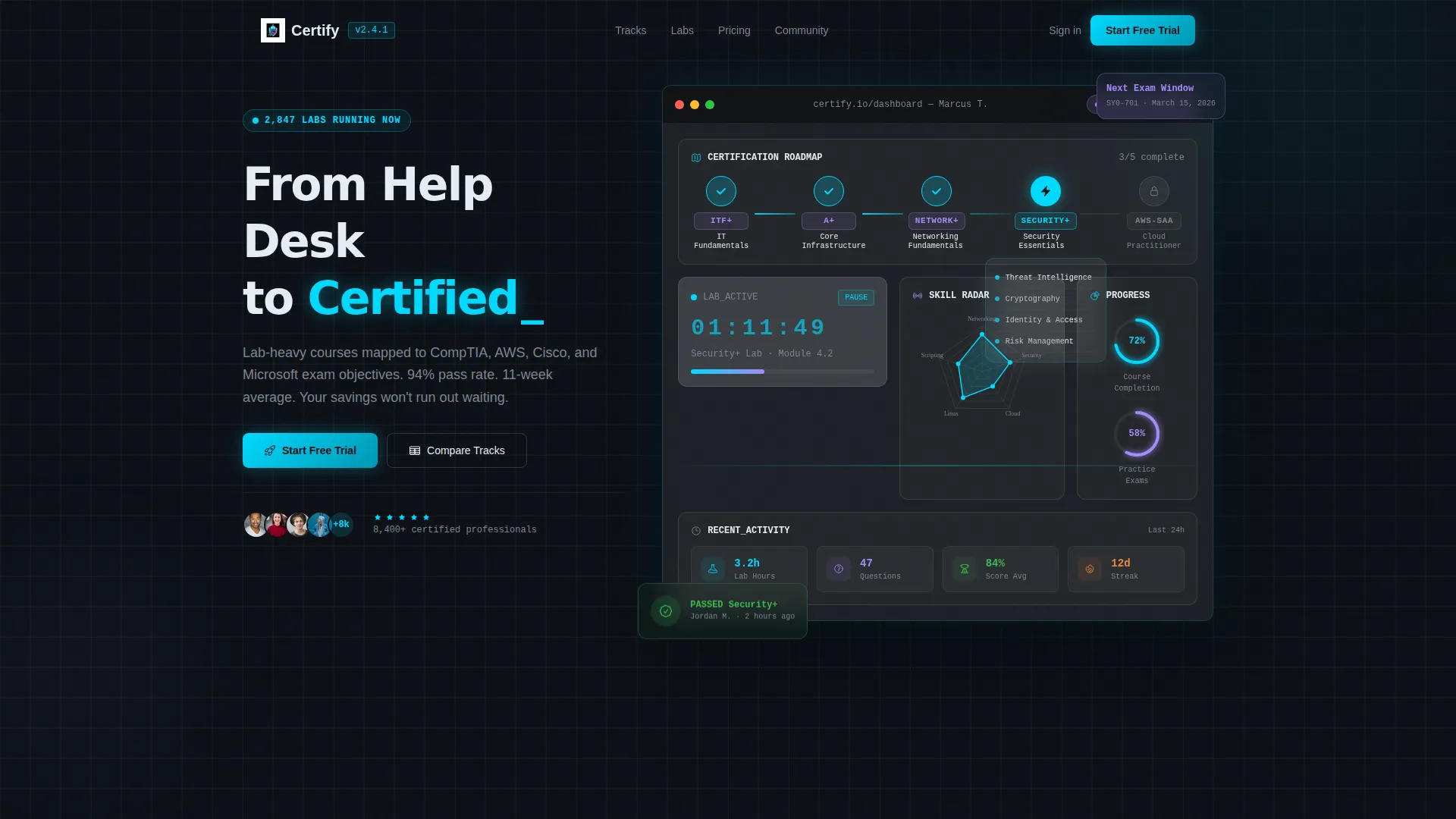
- An interactive dashboard hero showing a student profile mid-progress, with a certification roadmap, live lab timer, skills radar chart, and exam readiness badge
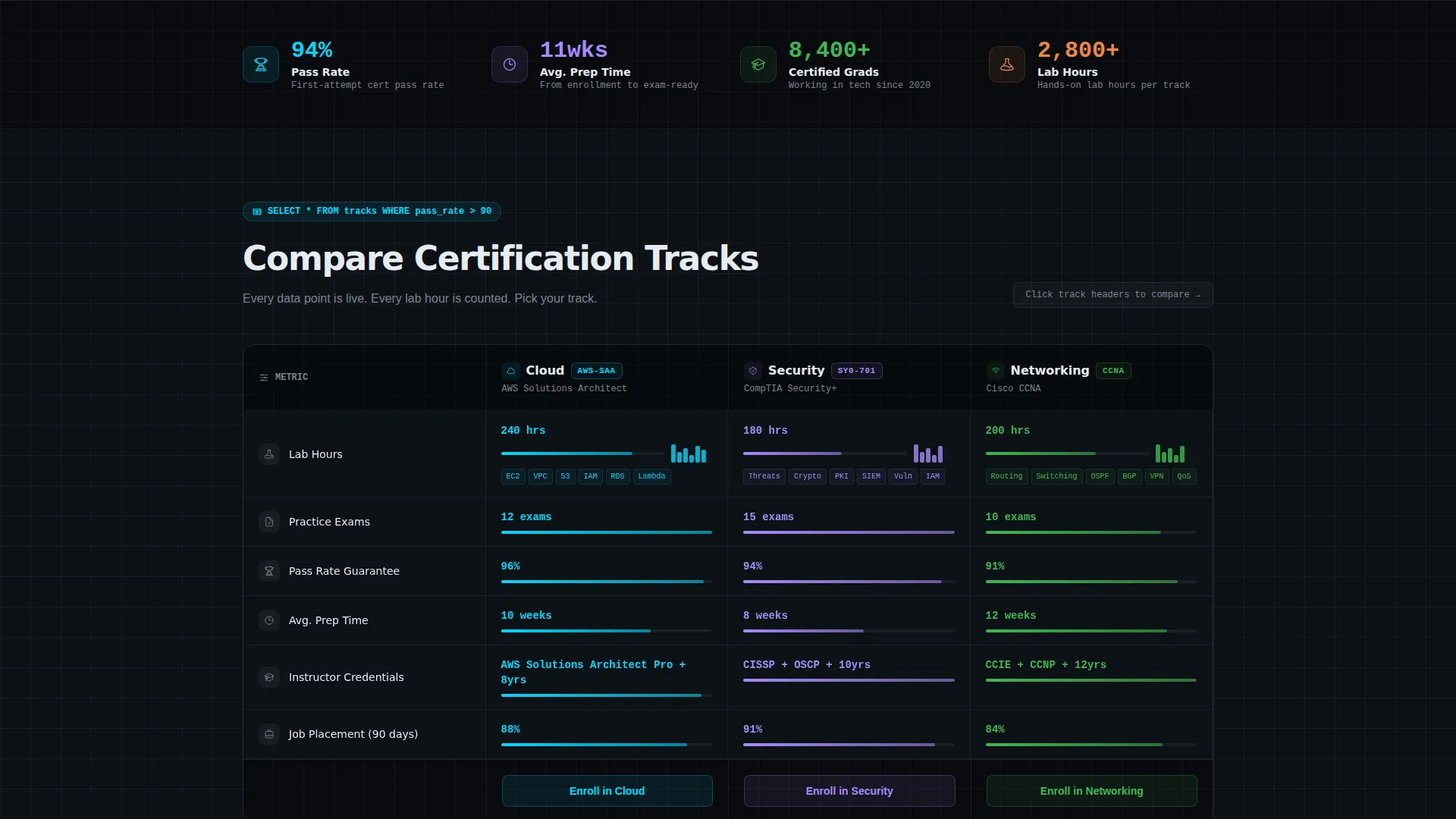
- A scrollable feature matrix displaying three certification tracks across rows of lab hours, practice exam counts, pass-rate data, and job placement stats
- A sticky comparison bar, a self-study versus platform module with animated stat counters, a progressive three-field enrollment form, and a lead-capture PDF download path
Feature list
This template ships with a focused set of purpose-built components. Each one is designed to move a technically minded visitor from curiosity to enrollment.
Interactive Dashboard Hero
The header renders a functional replica of the platform's learning dashboard directly in the viewport. Visitors see a student profile mid-progress: a five-node certification roadmap with three nodes glowing cyan as completed, a live lab timer counting down, a half-filled skills radar chart, and a notification badge reading "Practice Exam Ready." Hovering the radar chart expands individual skill breakdowns. Clicking a roadmap node reveals the course modules beneath it.
Scrollable Feature Matrix
Below the hero, a data grid of frosted glass cards arranges three certification tracks into columns. Each row surfaces a new comparison dimension: lab hours, practice exam count, pass-rate guarantee percentage, instructor credentials, and job placement stats. Rows animate in as the visitor scrolls, like query results populating a live table. Micro-visualizations including tiny bar charts, completion rings, and checkmark animations reinforce each data point visually.
Sticky Comparison Bar and Drag-to-Compare
A persistent bottom bar holds two slots where visitors can drag certification tracks to compare them side by side. The call-to-action button reads "Compare and Enroll" and glows with the electric cyan accent color. This keeps the conversion path accessible at any scroll depth without interrupting the browsing experience.
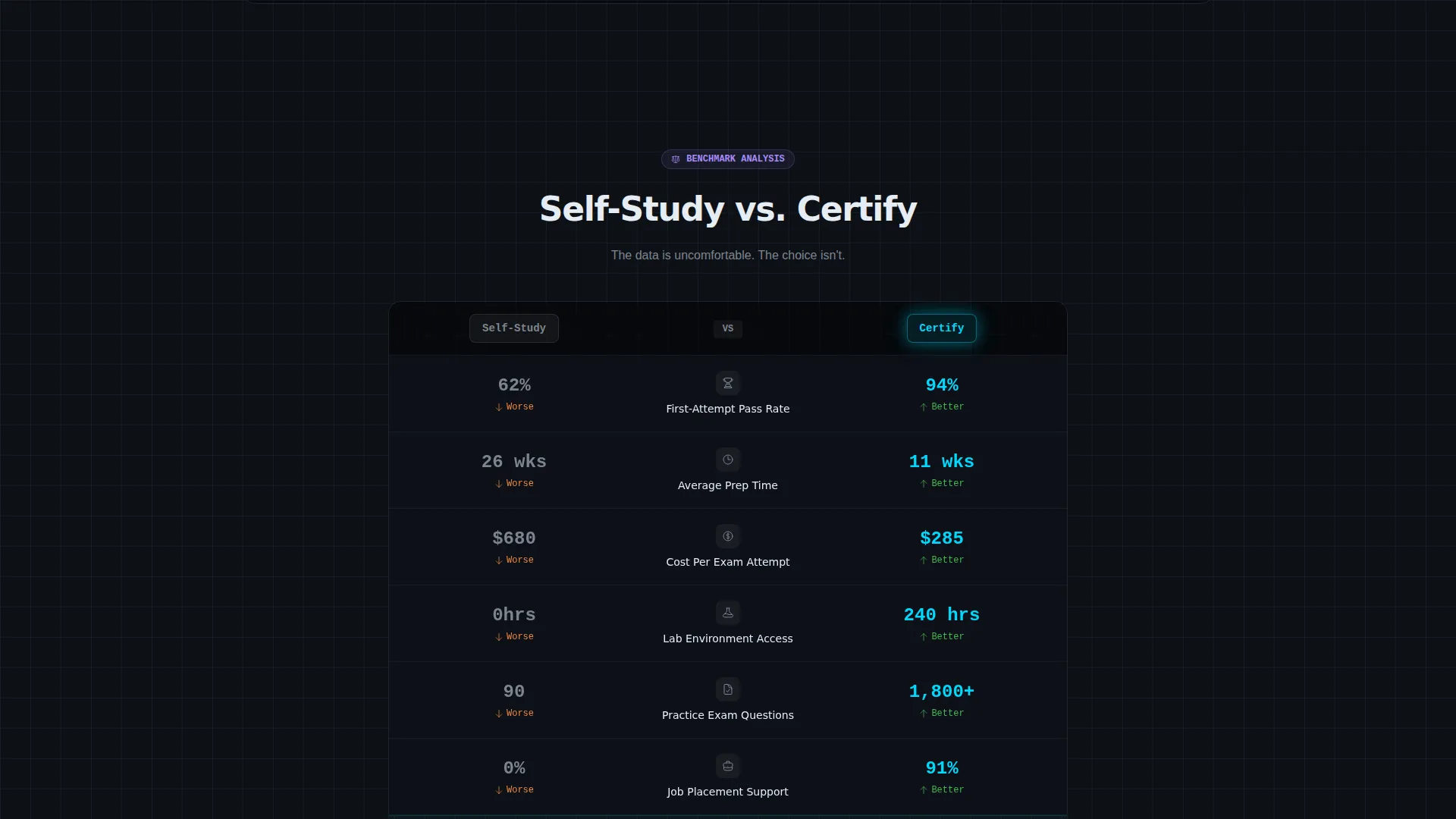
Self-Study Versus Platform Module
A toggle module below the feature matrix lets visitors switch between "Self-Study" and "Our Platform." Animated stat counters show a pass rate of 62 percent for self-study versus 94 percent on the platform, average prep time of six months versus eleven weeks, and cost-per-attempt savings. The counters animate on toggle, making the comparison feel dynamic rather than static.
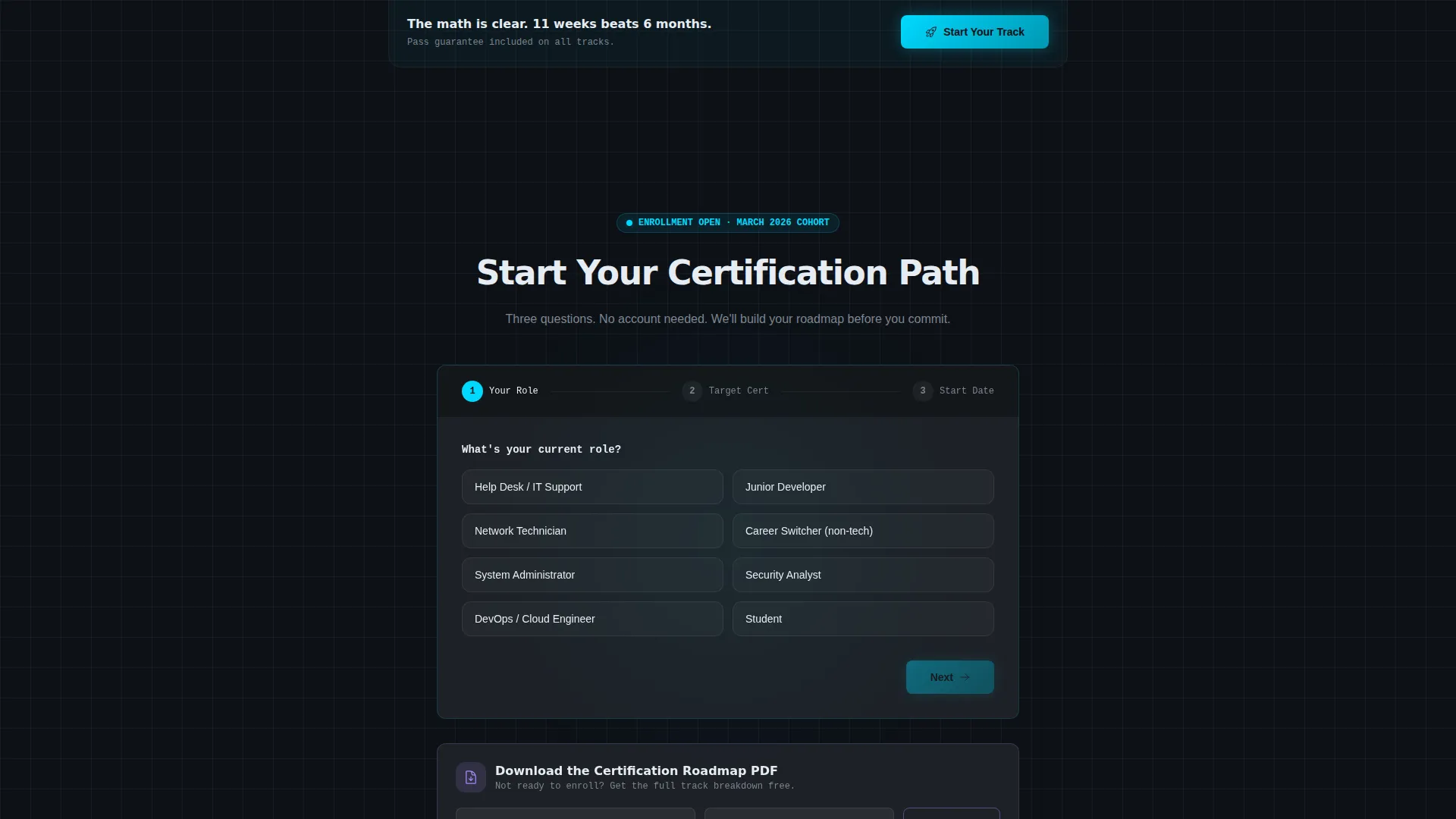
Progressive Enrollment Form
The primary conversion form uses progressive disclosure across three fields: current role, target certification, and preferred start date. No account creation is required until after the visitor has interacted with at least two comparison points. A secondary path offers a downloadable Certification Roadmap PDF, capturing only an email address and target certification for leads not yet ready to enroll.
Glassmorphic Data Command Design System
The visual identity uses a layered dark canvas with frosted glass panel surfaces, subtle blur effects, and a faintly gridded background. Electric cyan powers active states, progress indicators, and hover pulses. Muted lavender accents badges and certification icons. The result is a focused, terminal-like aesthetic that signals technical credibility without relying on stock photography or illustration.
Page sections overview
| Section | Purpose |
|---|---|
| Interactive Dashboard Hero | Show a live-style student progress view as the page header |
| Certification Roadmap Preview | Display a five-node progress path with clickable course modules |
| Skills Radar Chart | Expand individual skill scores on hover for deeper engagement |
| Feature Matrix Grid | Compare three certification tracks across key training dimensions |
| Animated Data Rows | Reveal lab hours, exam counts, and placement stats on scroll |
| Sticky Comparison Bar | Persist a drag-to-compare bar with the primary enrollment call to action |
| Versus Toggle Module | Animate self-study versus platform stat counters side by side |
| Progressive Enrollment Form | Collect role, target cert, and start date in three steps |
| PDF Lead Capture | Offer a roadmap download for visitors not ready to enroll |
Design & branding system
The design language is built around a Data Command theme rendered through a glassmorphic color system. Every surface is intentional: dark, layered, and backlit by cool accent glow that signals active systems.
- Core palette uses deep terminal black (#0D1117) as the base, frosted glass white at 12 percent opacity (#FFFFFF1F) for card surfaces, electric cyan (#00D9FF) for active states and progress indicators, and muted lavender (#A78BFA) for badges and certification icons
- Text is set in crisp anti-aliased white (#E6EDF3) against frosted panels, with hover states that pulse cyan like a blinking cursor
- Backgrounds layer subtle blur and translucent card surfaces that float above a faintly gridded dark canvas, with no stock photography or illustration anywhere on the page
Mobile & speed optimization
The template is structured for a focused, single-column reading experience on smaller screens. The layered glassmorphic surfaces and grid-based matrix adapt naturally to narrower viewports.
- The feature matrix collapses from a three-column data grid to a vertically stacked card layout on mobile, keeping the track comparisons readable without horizontal scrolling
- The sticky comparison bar and progressive form remain accessible at the bottom of the screen on touch devices, preserving the conversion path throughout the session
How this template helps you convert
Every design and layout decision in this template pushes a technically skeptical visitor closer to a confident enrollment decision.
- The interactive dashboard hero removes doubt immediately by showing the platform experience rather than describing it, building trust before the visitor reads a single feature bullet.
- The feature matrix and versus module replace vague marketing claims with specific, animated data points such as pass rates, prep time comparisons, and lab hours, giving visitors the evidence they need to choose a track and commit.
- The progressive form and PDF download path together serve two distinct intent levels, capturing both ready-to-enroll leads and early-research visitors without forcing either group into an uncomfortable ask.
Other information about this template
This template is designed for IT training and certification platforms operating in a competitive, data-literate market. The layout reflects the niche's specific conversion dynamics, where learners research carefully before spending on prep programs.
- The template is a single landing page, not a multi-page site, making it straightforward to deploy as a campaign or product-specific page
- The dashboard-style hero and data grid layout are particularly well matched to platforms offering cloud, security, and networking certification tracks
- The PDF roadmap download path is built in as a secondary lead capture option, reducing friction for visitors who are still in the research phase
- The drag-to-compare sticky bar is a distinctive interaction pattern that reinforces the platform's positioning as a structured, data-driven alternative to self-study
- No account creation is required until after the visitor has engaged with at least two comparison interactions, lowering the barrier to the first conversion step
Theme
Data Command
Creative direction
Feature Matrix
Color system
Glassmorphic
Style
Dashboard/Data Grid
Direction
Comparison/Versus
Page Sections
Interactive Dashboard Hero
Scrollable Feature Matrix
Sticky Comparison Bar
Self-study Versus Platform Module
Progressive Three-field Enrollment Form
PDF Roadmap Lead Capture Path
Related questions
What type of training platform is this template designed for?
Can I use this template for multiple certification categories?
Does the template include the PDF roadmap download feature?
How does the versus module present comparison data?
Is this template suitable for a single certification track?



