Specialist Hospitality Software Privacy Policy & Terms Website Template
Certify is a dashboard-style landing page template built for hospitality learning management platforms. It showcases a multi-property training overview with department completion grids, learner progress cards, and compliance metrics in a single screen. Designed for L&D directors and regional training managers, it communicates operational readiness at a glance and drives visitors toward a guided product tour.
by Rocket studio
Quick summary
Certify is a single-page landing page template built around a dashboard aesthetic for hospitality learning management systems. It leads with a full-width product screenshot, moves through spec-card sections covering course libraries and compliance dashboards, and closes with two clear calls to action. The layout is structured to convert L&D decision-makers who need proof before they click.
Who this template is for
This template is designed for teams selling or presenting hospitality training software to senior operations buyers. It speaks directly to the people responsible for keeping multi-property staff compliant and shift-ready.
- Vice President-level Learning and Development directors at hotel chains, resorts, and restaurant groups
- Regional training managers overseeing up to fifteen locations with high annual staff turnover
- Franchise compliance officers who need audit-ready completion records on demand
What problem this template solves
Multi-property hospitality operators struggle to show buyers that a training platform actually fits their world. Generic software landing pages fail to communicate operational specificity. Certify solves this by presenting the product as already working inside a real hospitality context.
- Buyers cannot quickly see how the platform handles department-level compliance across dozens of properties
- Standard templates do not support the browse-and-compare rhythm that L&D evaluators expect
- High-turnover hospitality environments require visible proof of shift-level readiness, not abstract feature lists
What you get with this template
This template delivers a complete, fully structured landing page ready to present a hospitality learning management system with confidence and clarity.
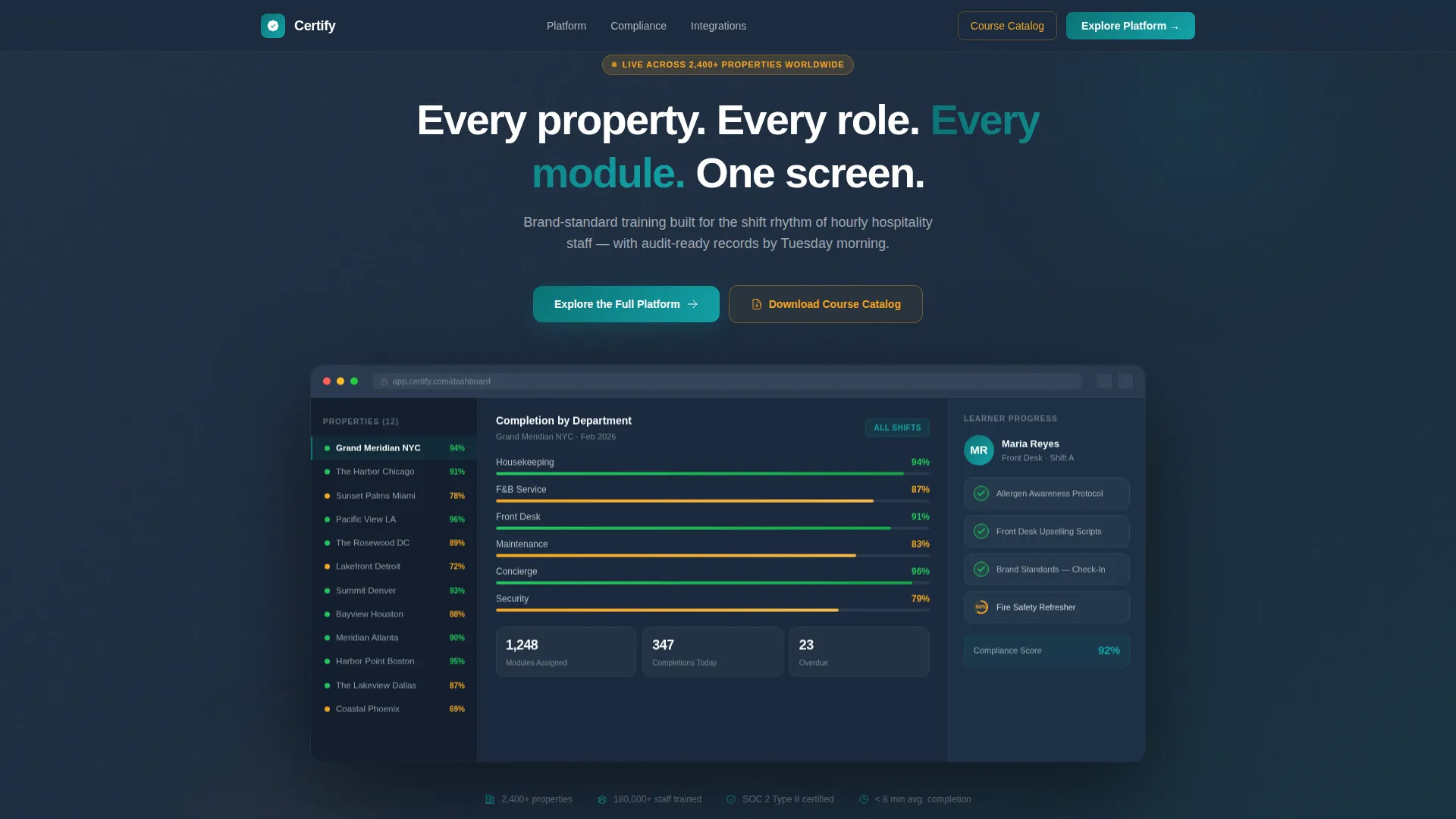
- A full-width product screenshot header showing a live multi-property dashboard with department completion rates and learner progress cards
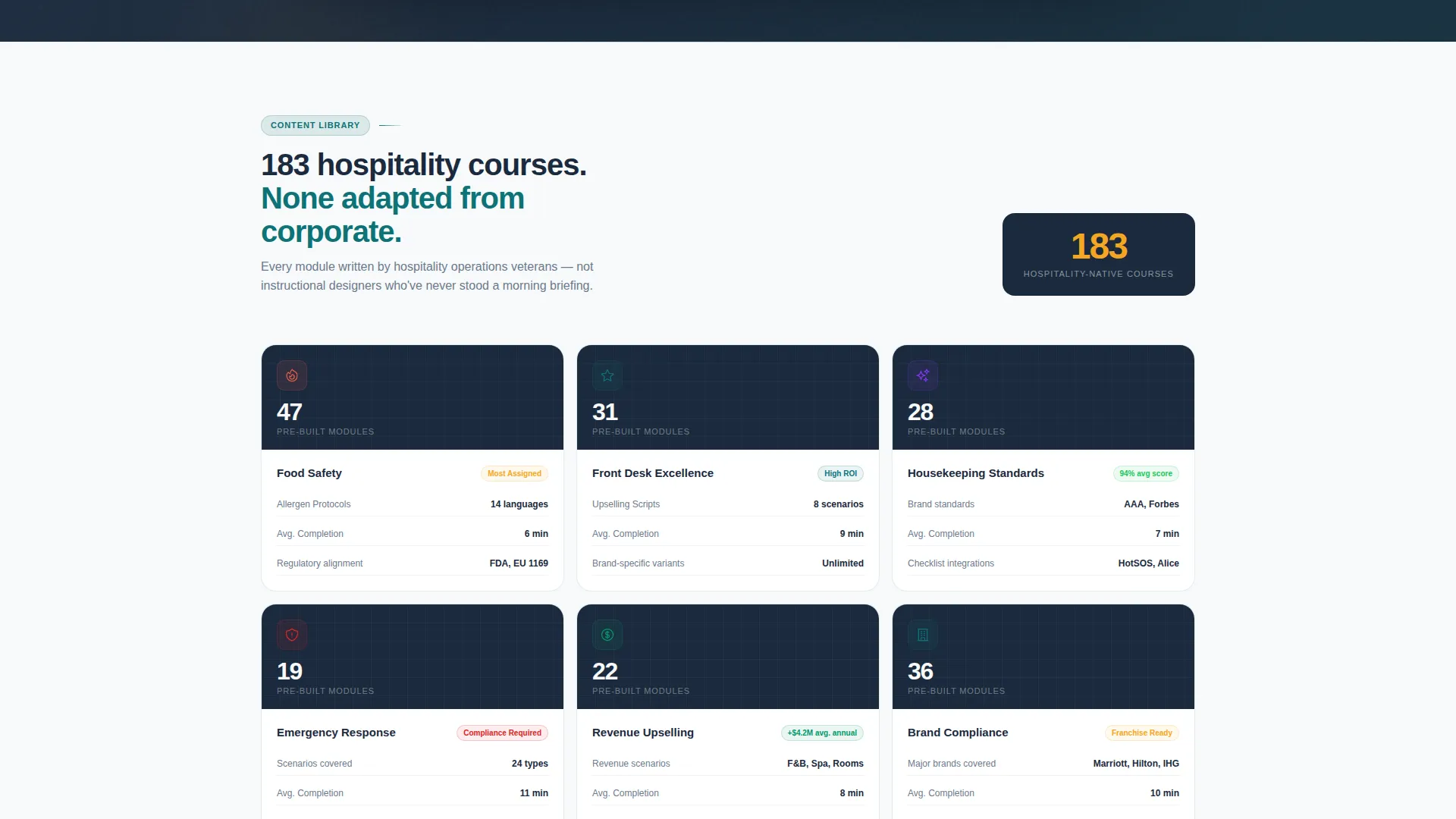
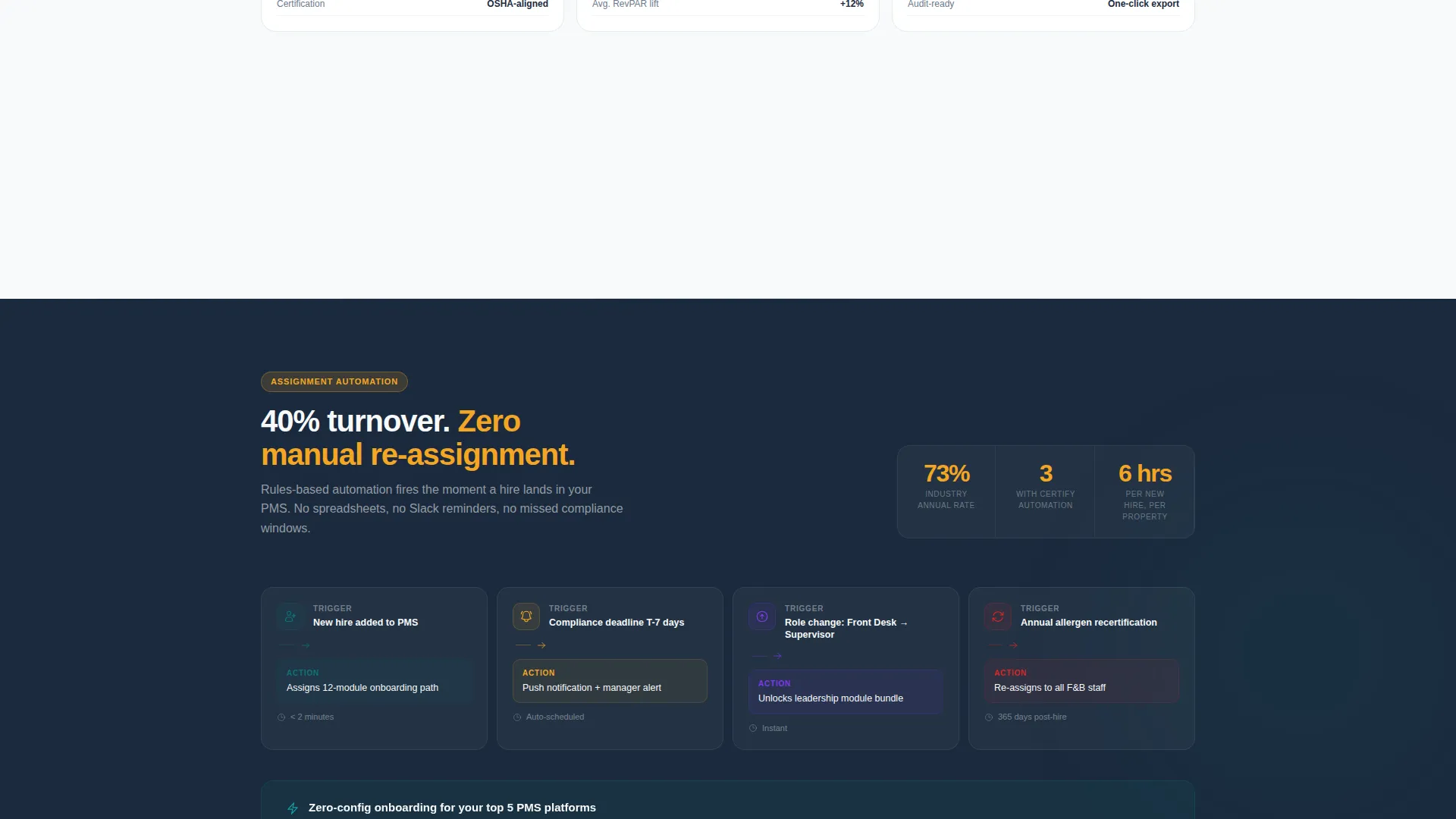
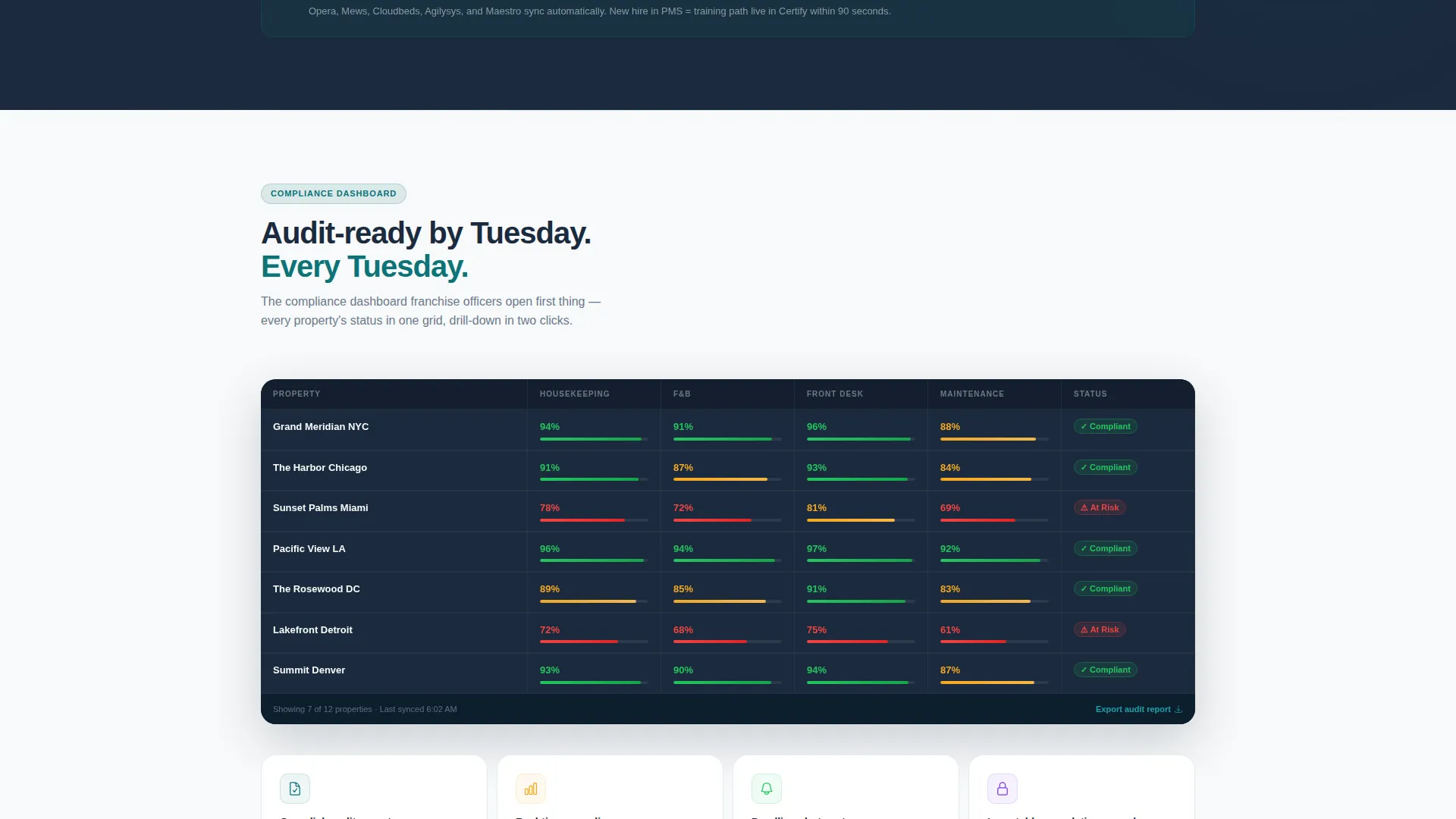
- Spec-card sections that isolate each platform capability, including course library depth, assignment automation, real-time compliance dashboards, and integration logos
- A sticky primary call-to-action button and a midpoint secondary call-to-action for a downloadable course catalog, both optimized for click-through
Feature list
This template includes purpose-built visual and structural components that reflect how hospitality training buyers actually evaluate software.
Multi-Property Dashboard Header
The header renders a pixel-perfect product screenshot on a midnight charcoal background with a browser chrome frame. It shows twelve property locations in a left-hand rail, a central department completion grid, and a right-side individual learner card with module progress indicators.
Department Completion Grid
A central data grid displays course completion rates by department. Housekeeping, Food and Beverage, and Front Desk figures are shown at a glance, giving evaluators an immediate sense of how the platform surfaces compliance health across roles.
Learner Progress Card
A right-side panel displays an individual staff member's training status. Three completed modules appear with green checkmarks and one in-progress module displays an amber progress ring at sixty percent, communicating real-time tracking without any explanation needed.
Spec-Card Section Rhythm
Each scroll section below the header isolates one platform capability as a self-contained data card. Cards include a mini-screenshot, a bold teal feature label, three specification lines, and one large pullout stat. Buyers can browse and compare without needing context from the previous card.
Dual Call-to-Action Architecture
The primary call to action, "Explore the Full Platform," appears as a sticky top-nav button and again as a full-width banner after the integration section. A secondary call to action, "Download the Hospitality Course Catalog," sits at the midpoint as a low-commitment PDF gate requiring only a work email.
Integration Logos Section
A dedicated section displays logos for point-of-sale, property management, and human resources information systems. This section builds confidence that the platform connects to the operational tools hospitality groups already use.
Page sections overview
| Section | Purpose |
|---|---|
| Sticky Navigation Bar | Anchors primary call to action and brand mark across scroll |
| Product Screenshot Header | Opens with full dashboard view and headline |
| Course Library Card | Highlights pre-built hospitality course depth |
| Assignment Automation Card | Shows how modules reach hourly staff on shift |
| Compliance Dashboard Card | Presents real-time audit-ready completion data |
| Integration Logos Section | Confirms compatibility with existing hospitality stack |
| Full-Width call to action Banner | Drives clicks to guided product tour |
| Catalog Download Gate | Captures work email with low-commitment offer |
Design & branding system
The visual identity follows a Directory and Discovery theme using the Teal Catalyst color system. Every color choice is functional, not decorative, and maps directly to a specific role in the interface.
- Deep operational teal (#0D7377) is used for primary actions, navigation rails, and feature label text across all spec cards
- Midnight charcoal (#1B2A3D) forms the data-grid backgrounds and the header canvas, grounding the template in a software context
- Crisp linen white (#F7F9FA) surfaces card backgrounds and content wells, while catalyst amber (#F5A623) is reserved exclusively for progress indicators, completion badges, and hover states
Mobile & speed optimization
The template is structured for clean rendering across screen sizes, keeping the dashboard-style layout legible whether a buyer opens it on a laptop or a mobile device.
- The sticky navigation and call-to-action elements are designed to remain accessible throughout the scroll on all viewport sizes
- Spec cards are laid out to reflow cleanly on smaller screens without losing the browse-and-compare rhythm that defines the desktop experience
How this template helps you convert
Certify is built around a click-through conversion model. Every design decision guides the visitor from first impression to product tour without friction.
- The product screenshot header shows the platform working at full scale before a single feature is described, so buyers arrive pre-convinced rather than skeptical
- The midpoint catalog download gate captures work emails from buyers who are not yet ready to tour, turning passive browsers into qualified leads with a single low-commitment action
Other information about this template
This template is part of a broader set of hospitality software presentation assets and pairs well with platforms targeting high-turnover staff training environments.
- The template is categorized under Technology and Hospitality Software, making it a strong fit for learning management system vendors serving hotel chains, resorts, and restaurant groups
- The Dashboard and Data Grid template style is intentionally chosen to mirror the operational interfaces that hospitality L&D buyers use daily, reducing the cognitive gap between the landing page and the actual product
- The Spec Sheet creative direction means each section card functions independently, so buyers who skim non-linearly still receive a complete picture of any single capability
Theme
Directory & Discovery
Creative direction
Spec Sheet
Color system
Teal Catalyst
Style
Dashboard/Data Grid
Direction
Click-Through
Page Sections
Multi-property Dashboard Header
Department Completion Data Grid
Individual Learner Progress Card
Self-contained Spec Cards
Dual Call-to-action Architecture
Integration Logos Section
Related questions
Who is this landing page template designed for?
What sections are included in this template?
Can I adapt the completion metrics and department names shown in the dashboard?
How does the call-to-action structure work?
What makes this template different from a generic software landing page?



