AI for Home Advanced Professional Website Template
Catalyst is a hub-and-spoke landing page template built for a home services AI image generator. It pairs a Dashboard Pro visual identity with a dark command-center color system to present a before-and-after rendering tool to roofers, painters, landscapers, and remodelers. The page drives app downloads with zero form fields and trade-specific proof at every scroll stop.
by Rocket studio
Quick summary
Catalyst is a single-page, anchor-navigated landing page template designed for a browser-based AI image generator serving home services contractors. It uses a data-driven Industry Report layout, a bold product screenshot header, and a teal-on-charcoal Dashboard Pro color system to move every visitor toward one action: downloading the app and generating their first free image.
Who this template is for
This template is built for teams launching or promoting a home services AI visual tool. It speaks directly to the contractors who will use the product and to the marketers putting it in front of them.
- Owner-operators running small painting or roofing crews who need proposal visuals fast
- Sales representatives at roofing or remodeling companies building pitch decks in the field
- Marketing coordinators at multi-location home services franchises standardizing visuals across many offices
What problem this template solves
Contractors lose jobs because they cannot show clients what the finished work will look like before it starts. A generic landing page cannot communicate that gap or close it. This template is structured to make the product's value immediately obvious.
- Visitors arrive and see a finished before-and-after render in the very first screen, removing doubt about output quality
- Each anchor section pairs a real industry stat with the specific feature that addresses it, keeping skeptical buyers reading
- The download call to action appears repeatedly without a form gate, removing friction at every decision point
What you get with this template
You get a complete, ready-to-customize hub-and-spoke landing page built around four anchor navigation spokes. Every section is pre-structured with stat-led copy blocks, feature demonstrations, and a repeating primary call to action.
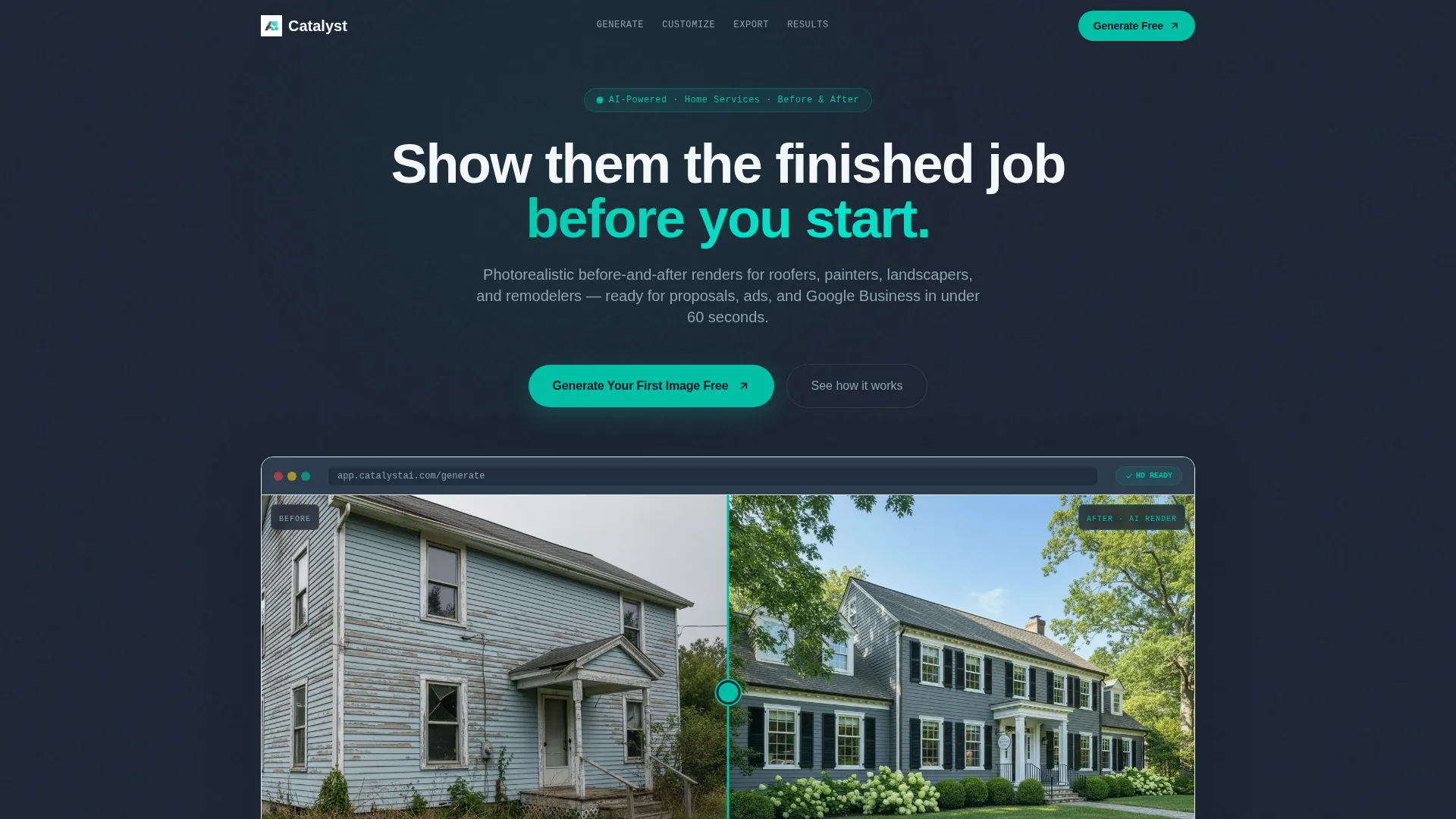
- A full-width product screenshot header showing the generator mid-task with visible interface chrome and a split before-and-after canvas
- Four named anchor sections: Generate, Customize, Export, and Results, each concluding with the primary download call to action
- A device-detection modal wired to the primary call to action that routes iOS visitors to the App Store, Android visitors to Google Play, and desktop visitors to a QR code
Feature list
This section covers the core template components as designed in the source brief.
Split Before-and-After Header Canvas
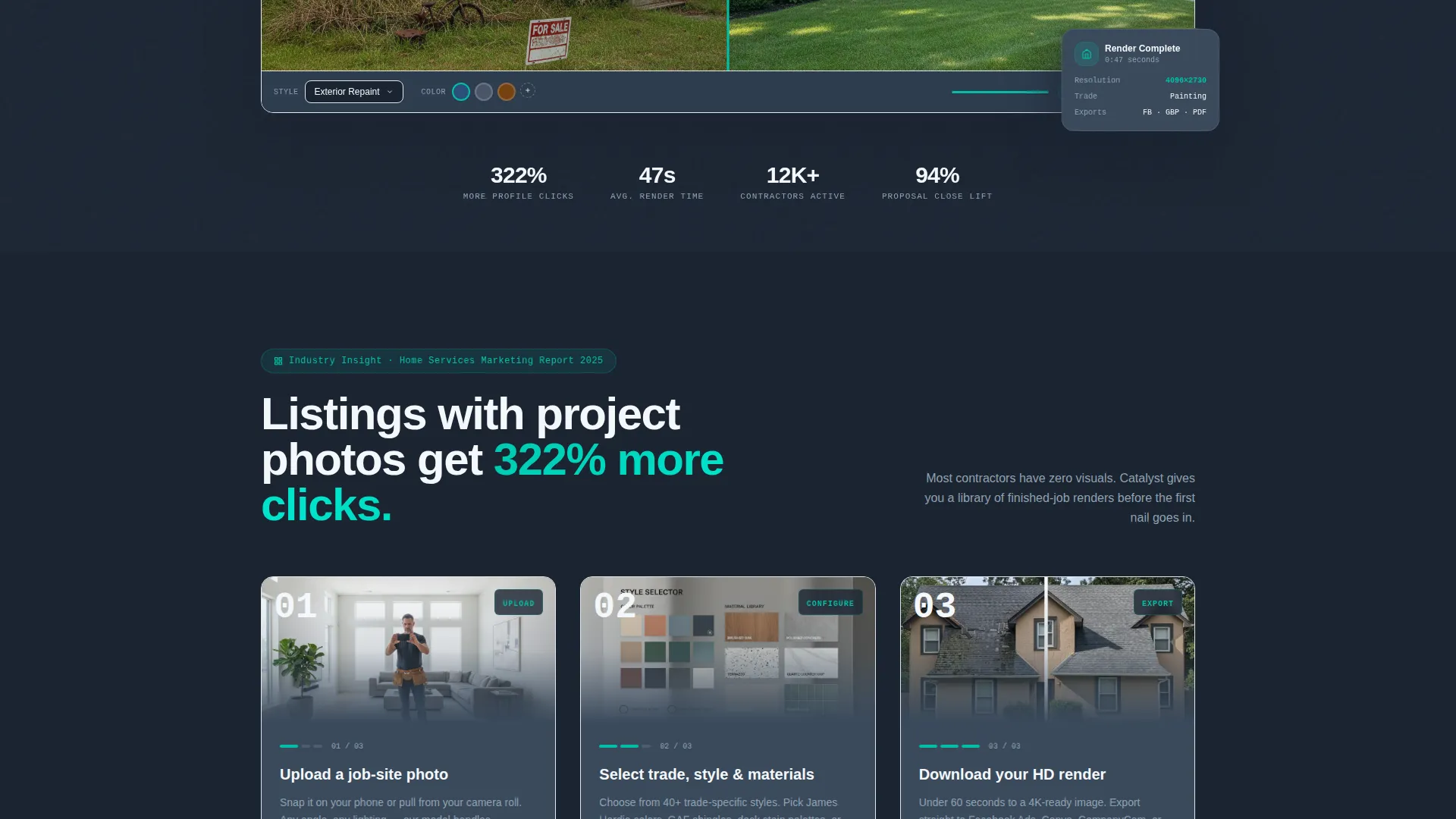
The header renders a full-width, pixel-perfect product screenshot. The left panel shows an unimproved property. The right panel shows the AI-rendered result with new siding, updated landscaping, and corrected lighting. Visible interface chrome, including a style selector, color swatches, and an "HD Ready" badge, communicates product quality before the visitor reads a word.
Anchor Navigation with Four Spokes
A sticky navigation bar anchors to four page sections: Generate, Customize, Export, and Results. This structure lets visitors jump directly to the section most relevant to their role. The primary call to action floats inside the nav bar so it is always one tap away.
Stat-Led Section Introductions
Each of the four anchor sections opens with a bold, sourced industry statistic. The statistic frames the problem, and the section immediately demonstrates the feature that solves it. This Industry Report pacing builds credibility while keeping the scroll moving forward.
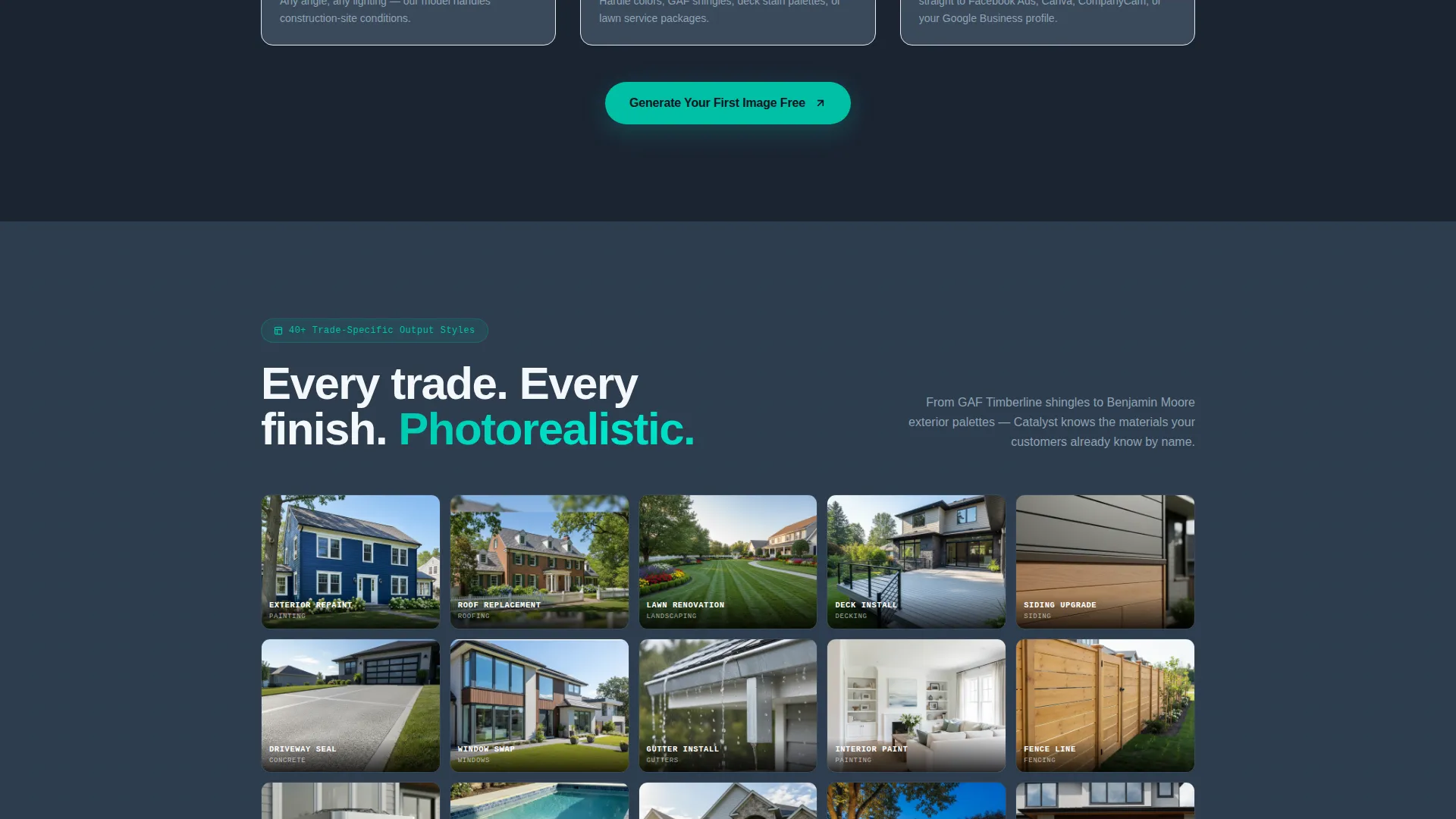
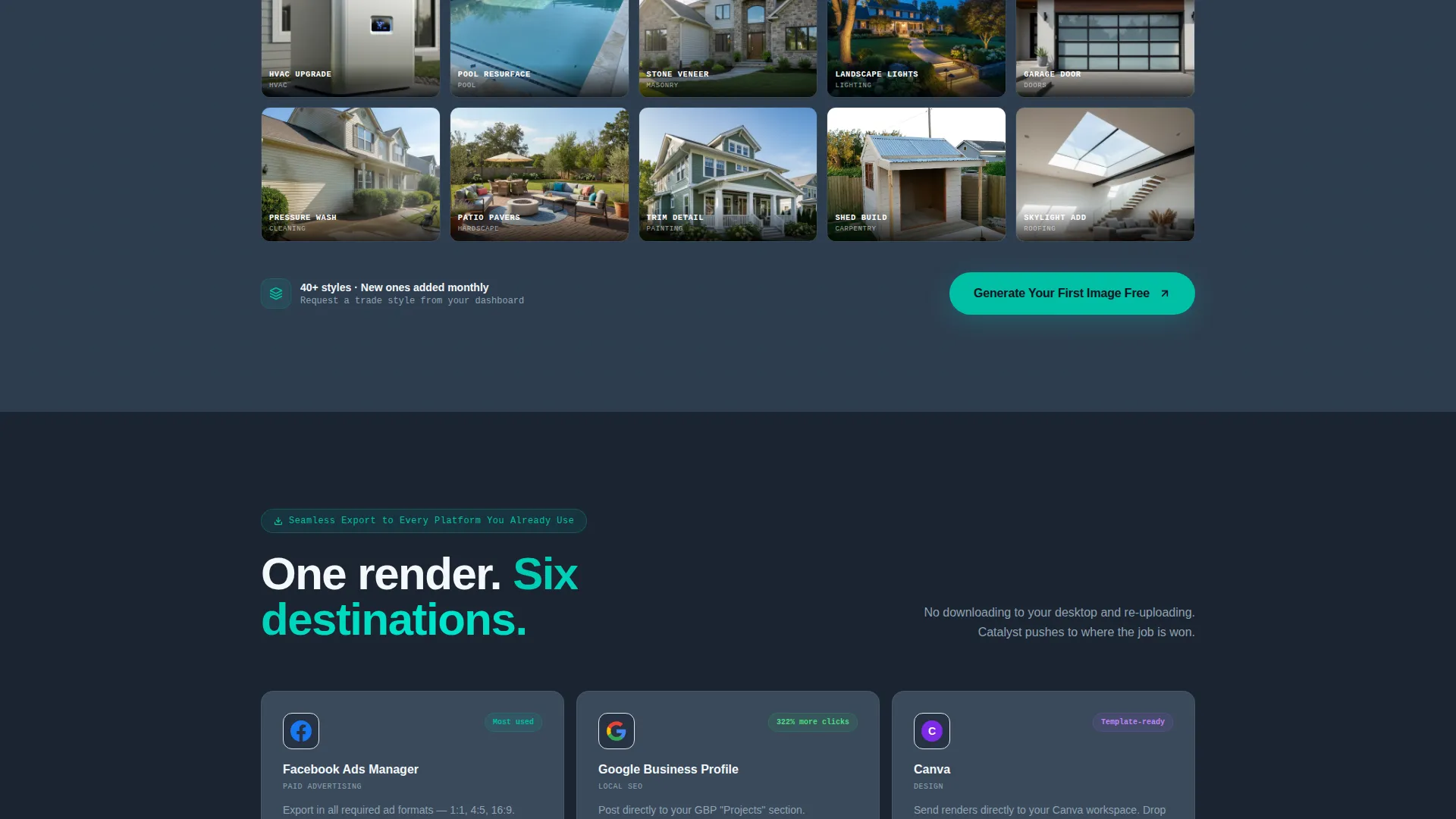
Twenty-Style Output Grid
The Customize section displays a grid of twenty distinct output styles available inside the generator. Visitors can see the range of rendering options, from exterior repaints to deck stains and lawn transformations, before they ever open the app.
Multi-Destination Export Panel
The Export section visualizes where generated images can go: ad platforms, design tools, contractor documentation apps, and business listing profiles. The layout makes the workflow feel complete and practical for real job-site use.
Contractor Case Study Carousel
The Results section presents a scrollable carousel of contractor stories reporting measurable proposal close-rate improvements. The carousel format keeps the section compact while delivering specific, trade-level social proof.
Page sections overview
| Section | Purpose |
|---|---|
| Full-width Header | Anchors trust with a live product screenshot and primary headline |
| Anchor Navigation Bar | Provides sticky spoke links and floating download call to action |
| Generate Section | Walks through the image generation workflow step by step |
| Customize Section | Displays twenty output style options in a visual grid |
| Export Section | Shows compatible export destinations for generated images |
| Results Section | Delivers contractor case studies in a scrollable carousel |
| Device-Detection Modal | Routes download intent to the correct app store or QR code |
Design & branding system
The template uses the Teal Catalyst color system layered over a Dashboard Pro theme. The palette is built for dark-background image presentation, meaning every generated visual pops against the deep charcoal base.
- Deep command-center charcoal (#1B2432) for the page background, electric teal (#00BFA6) for all interactive surfaces and progress indicators, cool slate (#3A4A5C) for card and panel backgrounds, and crisp interface white (#F4F7FA) for content wells
- Teal is applied consistently to every clickable element, every loading bar, and every success state so the eye always tracks momentum through the page
- The overall feel is a mission-control screen: dark enough to make imagery the focal point, bright at interactive edges to signal speed and trustworthiness
Mobile & speed optimization
The template is designed to feel like a freshly loaded dashboard from the first moment. Every layout decision supports fast orientation and confident scrolling on any screen size.
- The anchor navigation bar and floating call to action remain accessible on smaller screens so no visitor loses the download path mid-scroll
- Section layouts are responsive, keeping the stat-plus-feature rhythm readable on phones and tablets used by field-based sales reps
How this template helps you convert
The page is engineered to earn the download rather than demand it. Every structural choice reduces hesitation and increases confidence before the visitor ever taps the call to action.
- The header screenshot shows a finished, trade-specific output before any copy makes a claim, so trust is established visually in the first second of the visit.
- The repeating "Generate Your First Image Free" call to action at the header, in the floating nav, and at the close of each spoke section keeps the download moment in sight without pressure.
- The device-detection modal removes the final point of friction by routing each visitor directly to their correct download path, with zero form fields required.
Other information about this template
This template is a strong fit for product teams in the AI for home services category who need a launch page that doubles as a sales asset for contractor audiences.
- The page is built as a single-page hub-and-spoke structure, making it suitable as a standalone app marketing landing page or as an embedded product showcase
- The Industry Report creative direction means the page reads like a credible category resource, which supports broader content marketing goals beyond paid traffic
- The template style and color system are fully aligned with the Dashboard Pro theme, making it straightforward to adapt the visual identity if a team has existing brand guidelines
Theme
Dashboard Pro
Creative direction
Industry Report
Color system
Teal Catalyst
Style
Hub & Spoke (Anchor Nav)
Direction
App Download
Page Sections
Split Before-and-after Header Canvas
Sticky Anchor Navigation Bar
Stat-led Section Introductions
Twenty-style Output Grid
Contractor Case Study Carousel
Device-detection Download Modal
Related questions
Who is this landing page template designed for?
Does the template require visitors to fill out a form to download the app?
Can I customize the color system and section content?
What makes the anchor navigation useful for this type of page?
Is this template suitable for a multi-location home services company?



