Retail Software & SaaS Cost Estimator Website Template
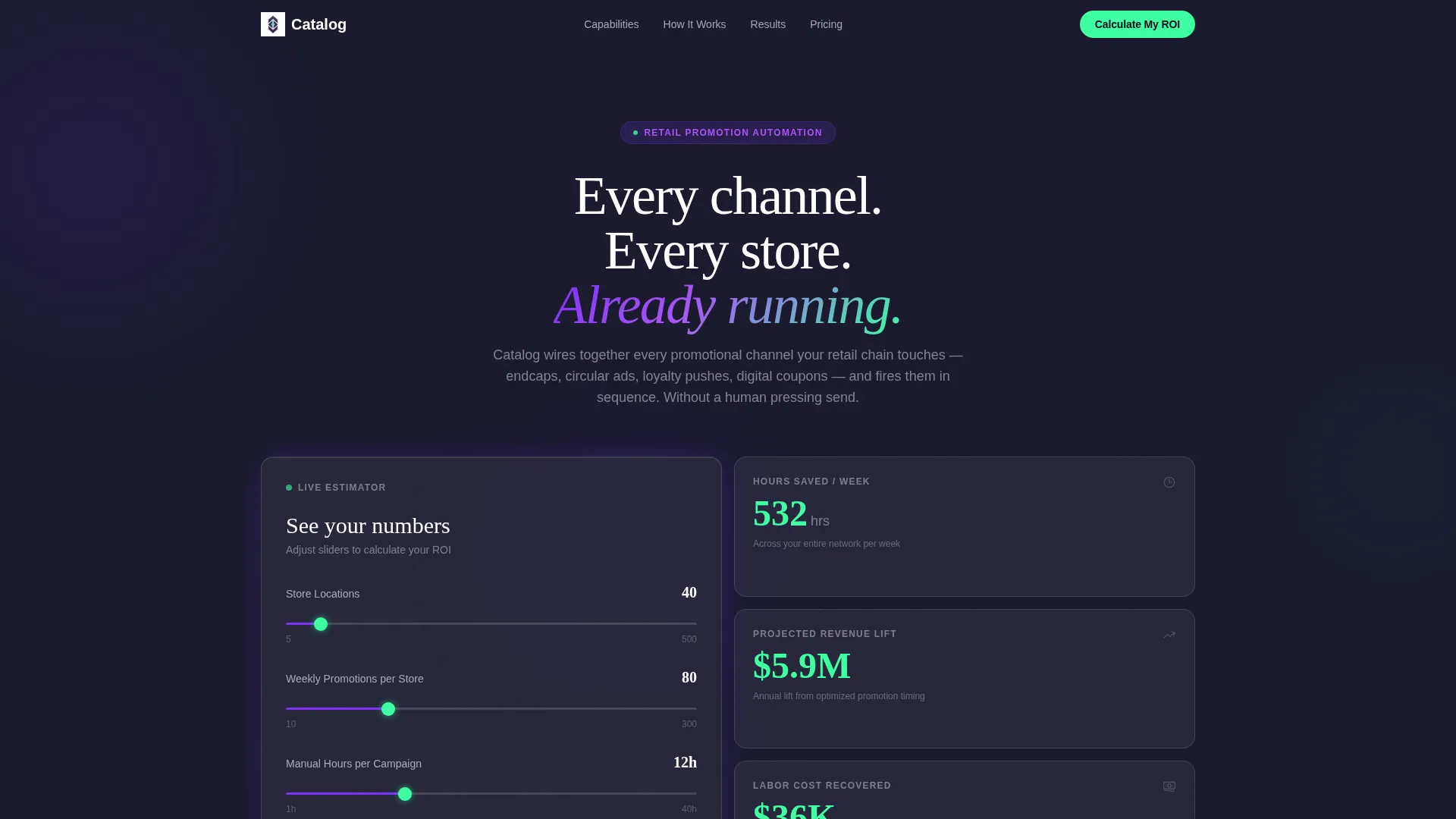
Catalog is a bento grid landing page template built for retail marketing automation platforms. It features a live ROI calculator in the header, glassmorphic frosted-card design, and capability tiles that expand with deeper specs. Designed for lead generation, the template guides grocery directors, big-box marketers, and franchise operators toward a qualified demo request.
by Rocket studio
Quick summary
Catalog is a single-page bento grid template for retail marketing automation platforms. The header opens with a live ROI estimator. Frosted capability tiles scroll below it. The page is built to qualify leads before they ever fill out a form, using the visitor's own numbers to earn the click.
Who this template is for
This template is built for retail software companies and SaaS platforms that need to speak directly to operations-minded buyers. If your product automates multi-channel promotions at scale, this layout gives your pitch a focused, data-forward structure.
- Regional grocery directors managing 40-store networks and weekly circular campaigns
- VP-level marketers at big-box chains coordinating 200 or more SKU promotions per week
- Franchise operators who need corporate campaigns localized to individual zip codes
What problem this template solves
Retail marketing automation is a hard sell. Buyers are busy, skeptical, and already sitting inside overcomplicated dashboards. A generic feature list does not move them. They need to see their own numbers before they believe the product is worth their time.
- Generic SaaS landing pages fail to speak to the specific scale and urgency retail operations teams face
- Visitors leave before reaching the call to action because no value has been demonstrated early enough
- Prospects in research mode have no secondary path, so the page loses them entirely
What you get with this template
You get a fully structured bento grid landing page with a live calculator header, expandable capability tiles, and a dual-path conversion flow. Every section has been designed to reflect the feel of a retail control room where campaigns are already running smoothly.
- A header ROI estimator with three slider inputs and a real-time results tile rendered in conversion mint
- An expandable bento tile grid covering channel orchestration, segmentation, compliance, A/B deployment, and analytics
- A primary call to action modal that carries forward calculator inputs and a secondary gated PDF download path
Feature list
This template ships with a structured set of purpose-built components. Each one maps to a specific moment in the buyer's decision journey.
Live ROI Calculator Header
Three frosted-glass input fields sit center-viewport at page load. Visitors enter store count, weekly promotion volume, and current manual hours per campaign. A connected bento tile updates in real time, showing hours saved, projected revenue lift, and recovered labor cost as ticking mint-colored figures.
Expandable Capability Tile Grid
Each bento tile acts as a capability card with an icon, a single supporting stat, and a two-line plain-language explanation. Tiles can be clicked to expand with deeper specification detail. The grid is designed to invite browsing rather than linear reading.
Simulated Campaign Timeline Tile
One oversized tile spans two columns midway through the page. It displays a visual campaign timeline across seven days, showing emails, push notifications, and in-store signage triggers cascading left to right in sequence.
Sticky call to action with Scroll Trigger
The primary call-to-action button reads "Calculate My ROI" and appears first inside the header estimator. It resurfaces as a sticky mint-colored button after the visitor passes the third scroll fold, keeping the conversion path always visible.
Gated Spec Sheet Download
A secondary conversion path offers a downloadable retail automation spec sheet as a gated PDF. This path captures visitors who are still in research mode without forcing them toward a demo before they are ready.
Pre-Filled Lead Capture Modal
Clicking the primary call to action opens a frosted-glass modal. It carries forward the calculator inputs already entered by the visitor, then asks for company name, email address, and a tech stack dropdown covering common platforms and an open-ended option.
Page sections overview
| Section | Purpose |
|---|---|
| Header ROI Estimator | Opens with live calculator inputs and animated results tile |
| Capability Tile Grid | Browses platform features as frosted expandable cards |
| Campaign Timeline Tile | Visualizes a seven-day multi-channel campaign sequence |
| Sticky call to action Layer | Resurfaces the primary call to action after the third scroll fold |
| Lead Capture Modal | Collects qualified lead data with pre-filled calculator context |
| Gated PDF Download | Offers a secondary path for research-stage visitors |
Design & branding system
The visual identity follows a Directory and Discovery theme built on a glassmorphic color system. The palette is designed to feel like a rain-streaked storefront window at night, with dark layers behind frosted glass and neon data glowing through the blur.
- Core colors: deep workspace charcoal (#1A1A2E) for backgrounds, frosted translucent card white (rgba 255,255,255,0.08) for tile surfaces, retail electric violet (#7B2FF7) for brand presence, and conversion mint (#3DFFA2) reserved for calls to action and live data pulses
- Card surfaces use backdrop-blur layers with single-pixel white borders at 12% opacity, and grid gaps let the charcoal breathe between tiles
- No stock photography and no illustration are used anywhere; the live data and ticking numbers serve as the visual hero
Mobile & speed optimization
The bento grid layout is structured to reflow cleanly on smaller viewports without losing the visual logic of the tile system. The design keeps the data-forward hero experience intact across device sizes.
- Frosted tile cards stack in a single-column flow on mobile while preserving backdrop-blur and border styling
- The sticky call to action layer remains accessible at all viewport widths, keeping the conversion path present throughout the scroll
- The calculator inputs and real-time results tile are sized for touch interaction on mobile screens
How this template helps you convert
The conversion strategy is built into the layout itself. Visitors are shown the value of the platform before they are asked for anything in return.
- The header calculator personalizes the pitch immediately, giving every visitor a specific dollar figure and time saving tied to their own store count and campaign volume before they scroll.
- The expandable capability tiles let buyers self-qualify by exploring the features most relevant to their role, building confidence in the product through browsing rather than reading a wall of text.
- The dual-path call to action structure captures both decision-ready buyers through the modal and research-stage visitors through the gated spec sheet, so the page does not lose either segment.
Other information about this template
This template is categorized under Technology, specifically within the Retail Software and SaaS subcategory. It is designed for the retail marketing automation niche and is well suited for platforms that handle multi-channel promotional orchestration at regional or enterprise scale.
- The template style is Bento Grid, and the header concept is a Calculator/Estimator, both matched precisely to the intersection context for this niche
- The tech stack dropdown in the lead capture modal includes Salesforce, HubSpot, Klaviyo, and an open Other option for broader compatibility signaling
- This template is a strong fit for retail automation platforms looking to generate qualified leads from high-intent buyers across grocery, big-box, and franchise verticals



Theme
Directory & Discovery
Creative direction
Spec Sheet
Color system
Glassmorphic
Style
Bento Grid
Direction
Lead Generation
Page Sections
Live ROI Calculator Header
Expandable Capability Tile Grid
Seven-day Campaign Timeline
Sticky Mint Call to Action Button
Pre-filled Lead Capture Modal
Gated Spec Sheet Download
Related questions
Can I customize the calculator inputs for my platform's metrics?
Does the bento grid layout work on mobile screens?
How does the lead modal use the calculator data a visitor already entered?
Who is the secondary gated download path designed for?



