Carte - Intelligent Hospitality Landing Page Template
Carte is a hub-and-spoke landing page template built for hospitality digital menu platforms. It opens with a floating dashboard preview and leads visitors through data-driven chapters on menu intelligence, allergen compliance, multi-location sync, and revenue analytics. The lead-generation layout captures demo requests and gated report downloads with a polished Tech Glass visual identity.
by Rocket studio
Quick summary
Carte is a single-page, anchor-nav landing page template for hospitality digital menu platforms. It follows an industry-report creative cadence: hard data first, then product proof. The layout guides restaurant operators and hotel food-and-beverage directors toward a demo request or a gated benchmark report download, using a dark Tech Glass aesthetic throughout.
Who this template is for
This template is built for teams selling digital menu technology to the hospitality industry. It speaks directly to operators who manage complexity at scale and need a polished, credible first impression.
- Restaurant group operations managers overseeing multiple locations
- Boutique hotel food-and-beverage directors who update menus seasonally
- Fast-casual founders managing allergen compliance across multiple languages
What problem this template solves
Paper menus and static PDF files cannot keep pace with a live kitchen. When a dish sells out, a price changes, or an allergen needs flagging, the old format fails the operator and the guest. This template gives a digital menu platform a landing page that makes that problem visceral and immediate.
- Visitors land on a live-looking dashboard render that shows the problem and the solution at once
- Each anchor-nav chapter connects an industry statistic to a specific platform capability
- Two conversion paths capture both ready buyers and early-stage researchers
What you get with this template
You get a fully structured, content-ready landing page built around four product chapters and two conversion entry points. Every section flows from the anchor navigation, so visitors can jump to the topic most relevant to their role.
- A sticky anchor nav with a persistent primary call-to-action button
- Four spoke sections: Menu Intelligence, Allergen Compliance, Multi-Location Sync, and Revenue Analytics
- A demo request form and a secondary gated report download to serve both buyer stages
Feature list
This template packages a specific set of design and structural capabilities drawn directly from the Carte brief.
Isometric Dashboard Header
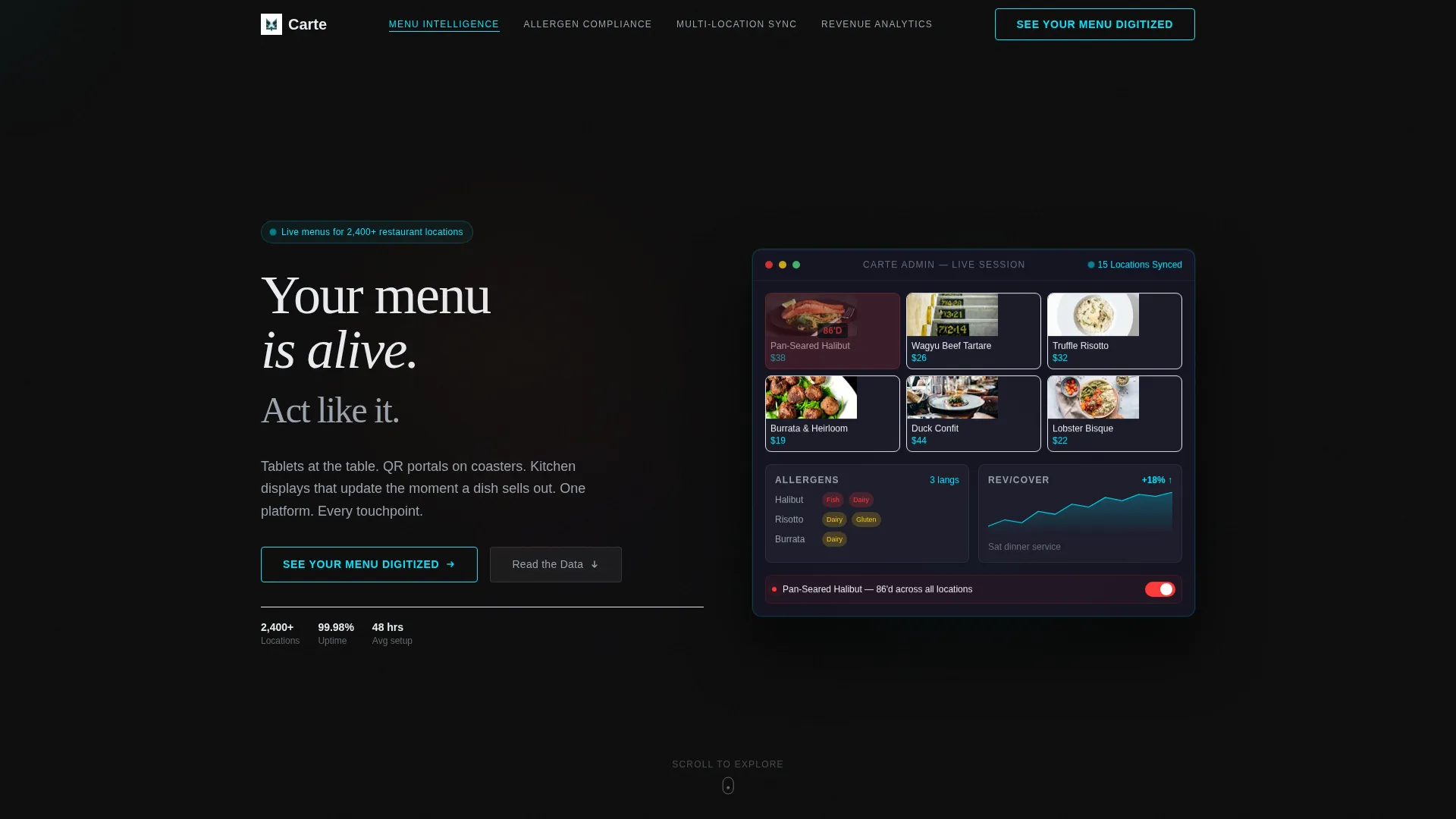
The header renders a floating isometric admin panel mid-session. It shows a live menu grid with dish thumbnails, a real-time sold-out item toggle glowing red, an expanded allergen matrix, and a revenue-per-cover graph. The panel sits on a translucent glass slab with soft restaurant bokeh behind it, making the product feel tangible before a word is read.
Hub-and-Spoke Anchor Navigation
A sticky navigation bar anchors the full page and links to each of the four product chapters. The active section indicator uses electric cyan to signal position. The primary call-to-action, "See Your Menu Digitized," appears persistently in the nav so it is always one tap away.
Industry-Report Chapter Structure
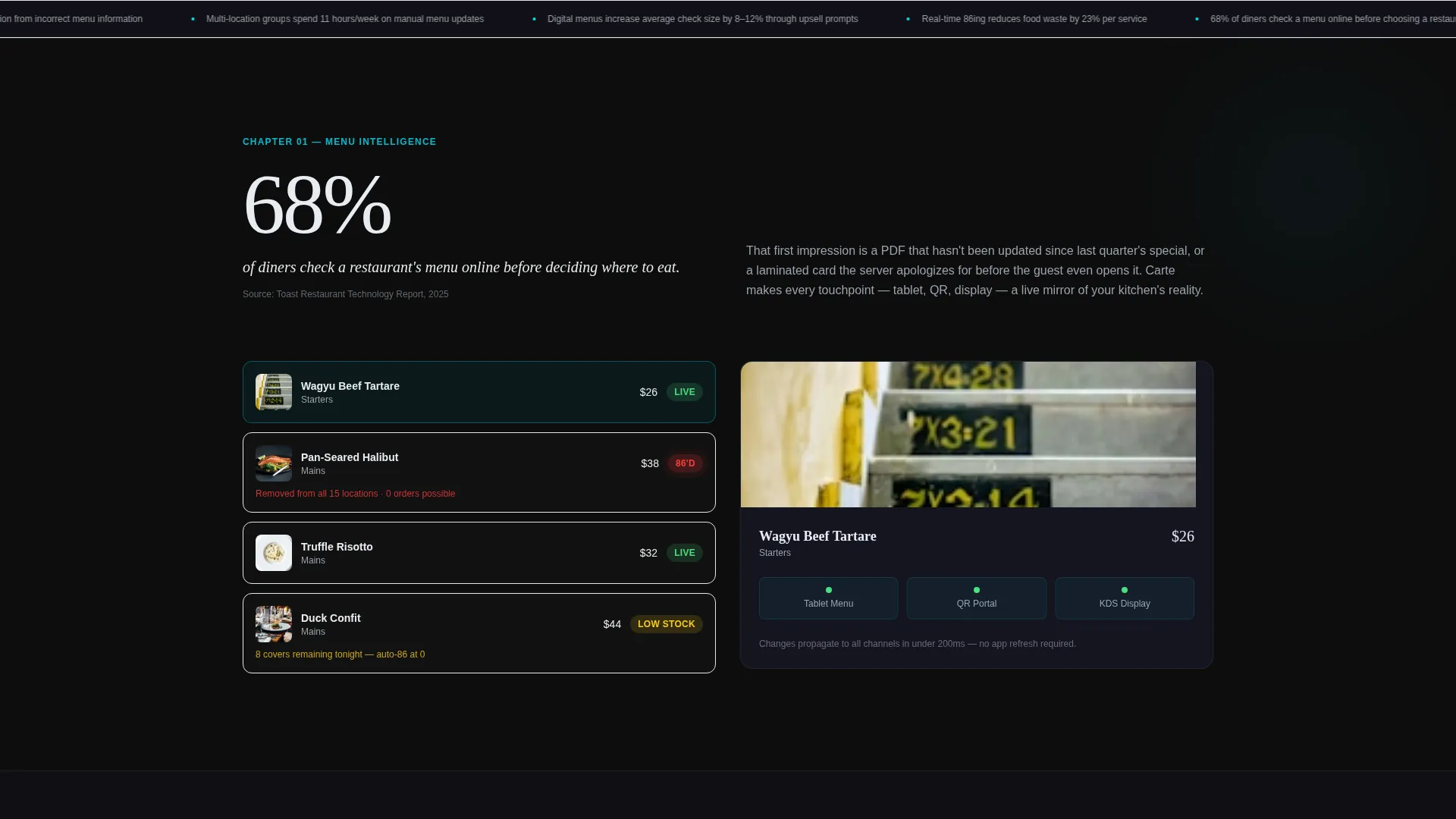
Each chapter opens with a sourced industry finding before presenting the platform's answer. The first stat, "68% of diners check a menu online before choosing a restaurant," sets the consulting-deck tone. Data builds the case; the product section closes it.
Dual Conversion Path Layout
The page captures two distinct visitor types. A demo request form collects restaurant name, number of locations, current menu format, and a work email. A secondary call-to-action offers a downloadable "2025 Digital Menu Benchmark Report" gated behind email-only capture, reaching visitors who are still in research mode.
Carbon Fiber Color System
The visual identity uses deep cockpit black, woven graphite, frosted panel white, and electric cyan. Cyan appears only on interactive states, active nav indicators, and call-to-action borders. The result is a matte dark surface aesthetic that feels engineered and precise.
Chapter Endpoint Calls-to-Action
Every product chapter ends with a repeat of the primary call-to-action. This placement catches visitors who read through a full chapter and are ready to act, without requiring them to scroll back to the top.
Page sections overview
| Section | Purpose |
|---|---|
| Hero Header | Introduce the platform with an isometric dashboard render and the headline "Your menu is alive. Act like it." |
| Sticky Anchor Nav | Provide persistent chapter navigation and a persistent primary call-to-action button |
| Opening Stat Block | Lead with the 68% diner research statistic to establish urgency |
| Menu Intelligence | Present the live menu grid and real-time item management capabilities |
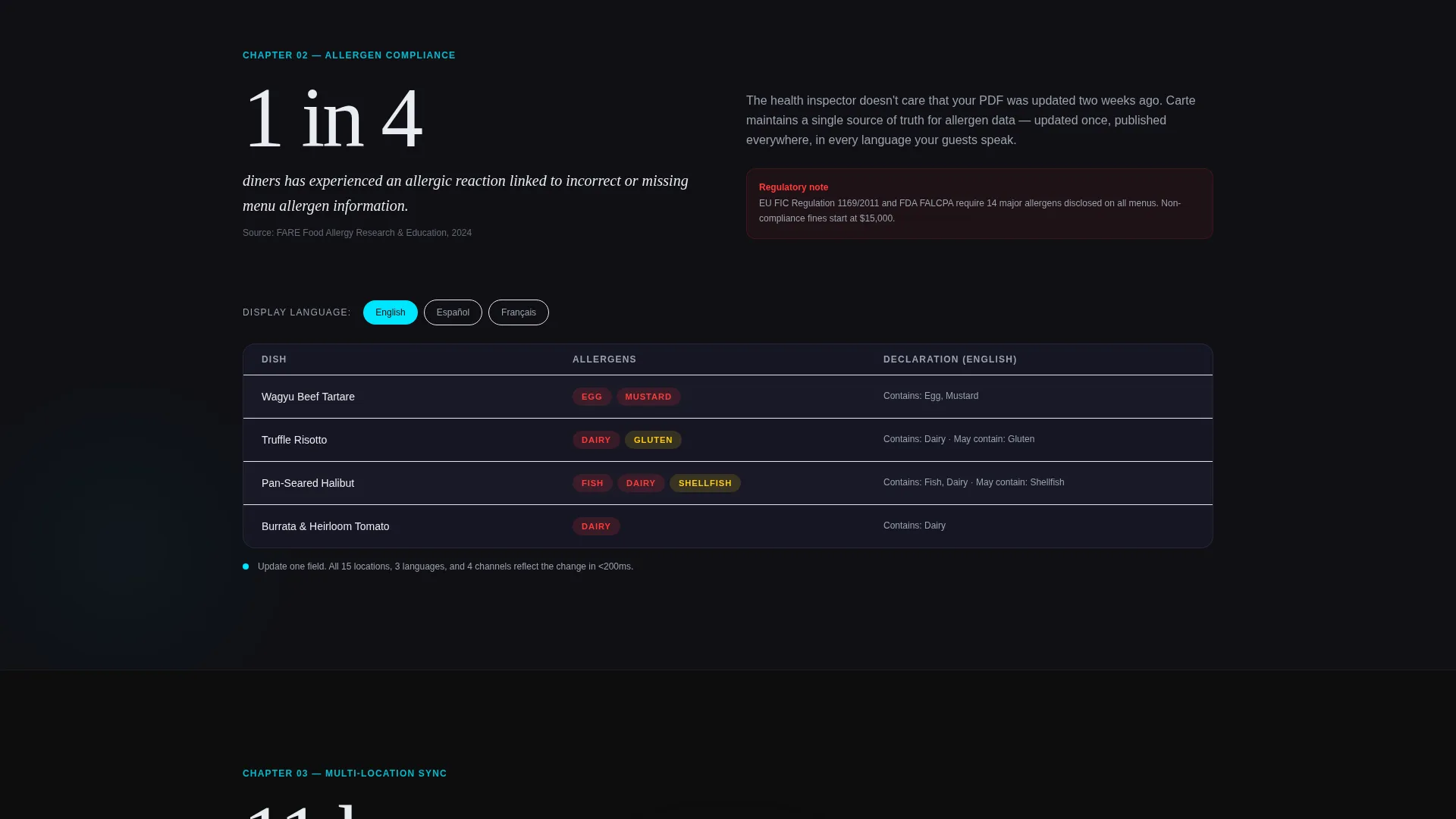
| Allergen Compliance | Address multi-language allergen requirements for fast-casual and hotel operators |
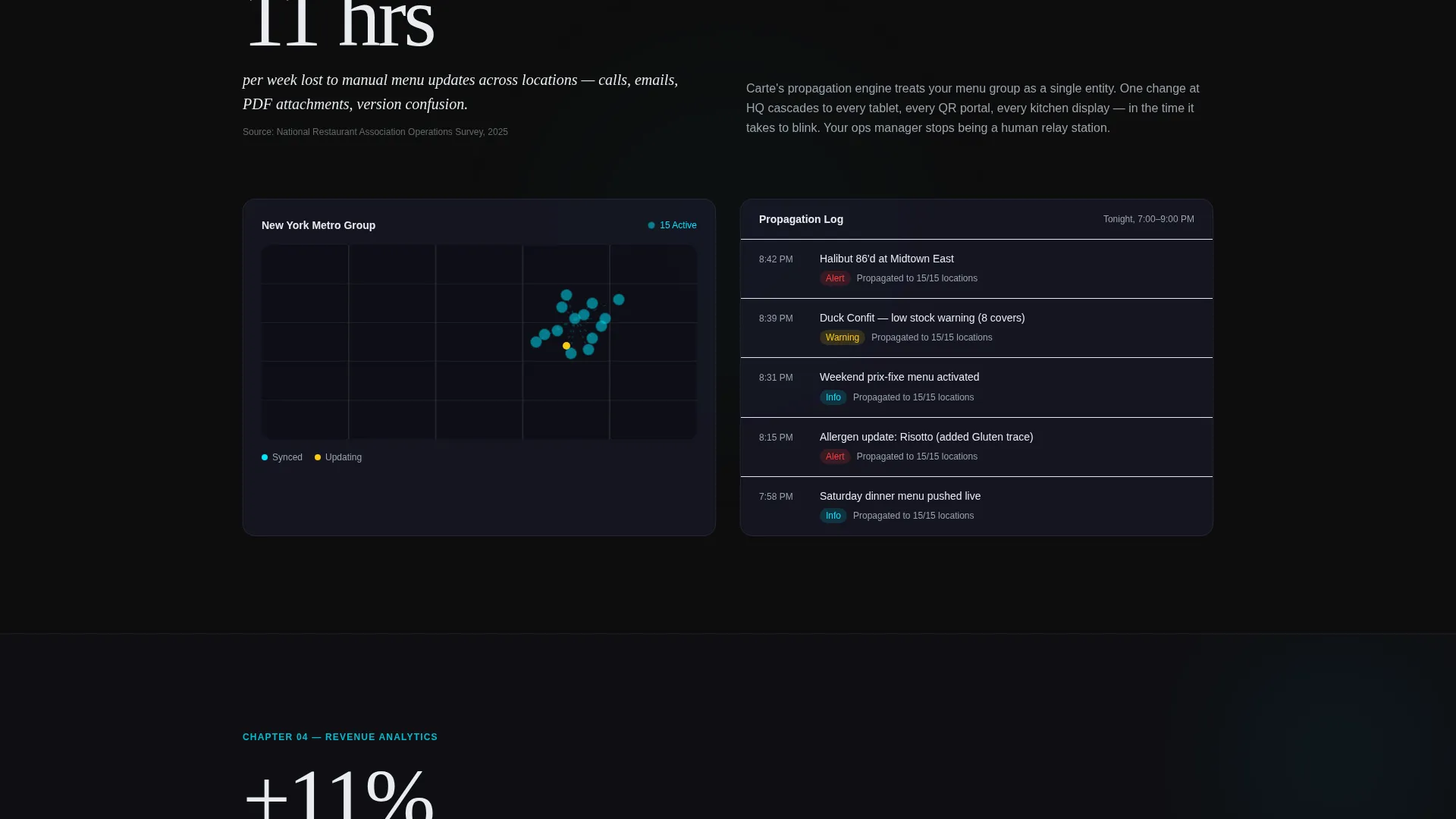
| Multi-Location Sync | Show how the platform serves restaurant groups managing fifteen or more locations |
| Revenue Analytics | Reveal the revenue-per-cover graph and Saturday dinner service data story |
| Demo Request Form | Capture restaurant name, location count, menu format, and work email |
| Benchmark Report Gate | Offer the 2025 Digital Menu Benchmark Report behind email-only capture |
Design & branding system
The template follows a Tech Glass theme built on a Carbon Fiber color palette. The overall feeling is a high-end espresso machine: matte dark engineering with thin ribbons of cool light catching the surface.
- Color tokens: deep cockpit black (#0D0D0D), woven graphite (#1A1A2E), frosted panel white (#E8ECF1), and electric cyan (#00E5FF) for interactive and active states only
- Typography and layout feel like a consulting deck that keeps interrupting itself with a working prototype
- Cyan is strictly reserved for call-to-action borders, active nav indicators, and interactive hover states
Mobile & speed optimization
The template is structured to remain readable and actionable on smaller screens. The anchor navigation and dual conversion paths are designed with touch-first contexts in mind.
- The sticky anchor nav collapses cleanly so chapter links remain reachable on a phone
- Form fields for demo capture are sized for easy tap input on mobile devices
- The isometric header render and dark background are optimized to look sharp without relying on heavy foreground text
How this template helps you convert
The conversion architecture is deliberate. Every structural decision pushes a visitor toward one of two actions without creating friction between them.
- The persistent "See Your Menu Digitized" button in the sticky nav ensures the primary call-to-action is visible at every scroll depth, reducing the distance between intent and action.
- The gated benchmark report captures researchers who are not yet ready for a demo, giving the platform a second list-building entry point from a single page visit.
- Chapter-endpoint call-to-action repetition catches mid-funnel visitors who read through a specific product chapter and reach a decision moment before finishing the full page.
Other information about this template
This template is built specifically for the hospitality digital menu niche, where purchasing decisions often involve multiple stakeholders and a longer research phase.
- The industry-report creative direction mirrors the tone of a consulting presentation, which builds trust with operations managers and directors evaluating vendor options
- The dual-path conversion model is well suited to platforms where some buyers need internal approval before booking a demo
- The template style is hub-and-spoke with anchor navigation, making it straightforward to expand or reorder chapters if the platform's product priorities shift
- The page structure supports the full buyer journey: awareness through the stat blocks, evaluation through the product chapters, and conversion through the form and gated download
Theme
Tech Glass
Creative direction
Industry Report
Color system
Carbon Fiber
Style
Hub & Spoke (Anchor Nav)
Direction
Lead Generation
Page Sections
Isometric Dashboard Hero Header
Persistent Anchor Navigation Bar
Industry-report Chapter Flow
Dual Conversion Entry Points
Carbon Fiber Visual Identity
Chapter Endpoint Call-to-action Blocks
Related questions
What types of hospitality businesses is this template designed for?
Can I update the industry statistics used in the chapter openers?
How does the dual conversion path work in practice?
Is the anchor navigation easy to customize for different product chapters?
What information does the demo request form collect?



