HubSpot Partner Agency Client Results Website Template
Automate is a horizontal scroll landing page built for HubSpot partner agencies. It guides visitors through a series of left-to-right panels, each pairing a real strategist with a specific client build. The Tech Glass visual theme, bold centered headline, and a persistent click-through call-to-action button make expertise feel tangible and move qualified visitors toward the portfolio page.
by Rocket studio
Quick summary
Automate is a single-page, horizontal scroll landing page designed for a HubSpot partner agency. It uses a Creator Spotlight approach to showcase real team members alongside the revenue systems they have built. The page ends every panel with one persistent call-to-action button, earning the click through stacked proof before asking for anything.
Who this template is for
This template is built for HubSpot partner agencies that want to turn website visitors into portfolio page clicks. It speaks directly to buyers who already know they have a pipeline problem and are looking for the team that can fix it.
- Series A SaaS founders dealing with demo request overload and no pipeline visibility
- Marketing directors whose patchwork email and contact tools have stopped working
- Revenue operations managers tasked with unifying sales, marketing, and support onto one platform
What problem this template solves
Most agency landing pages bury credibility under generic copy. Visitors leave before trust is built. This template solves that by leading with people and proof, not promises.
- No clear human face behind the work makes agencies feel interchangeable
- Scattered case study pages force visitors to hunt for evidence
- Vague calls-to-action fail to direct high-intent buyers toward next steps
What you get with this template
You get a fully structured horizontal scroll landing page with a clear visual identity and a defined panel-by-panel narrative. Every component is accounted for and purposeful.
- A Giant Headline Centered header panel with a glassmorphism background and bold geometric typography
- Creator Spotlight panels that pair individual team members with the specific client builds they delivered
- A persistent floating call-to-action button anchored bottom-right across every panel
Feature list
This template ships with a focused set of design and structural features drawn directly from the agency brief.
Giant Headline Centered Header
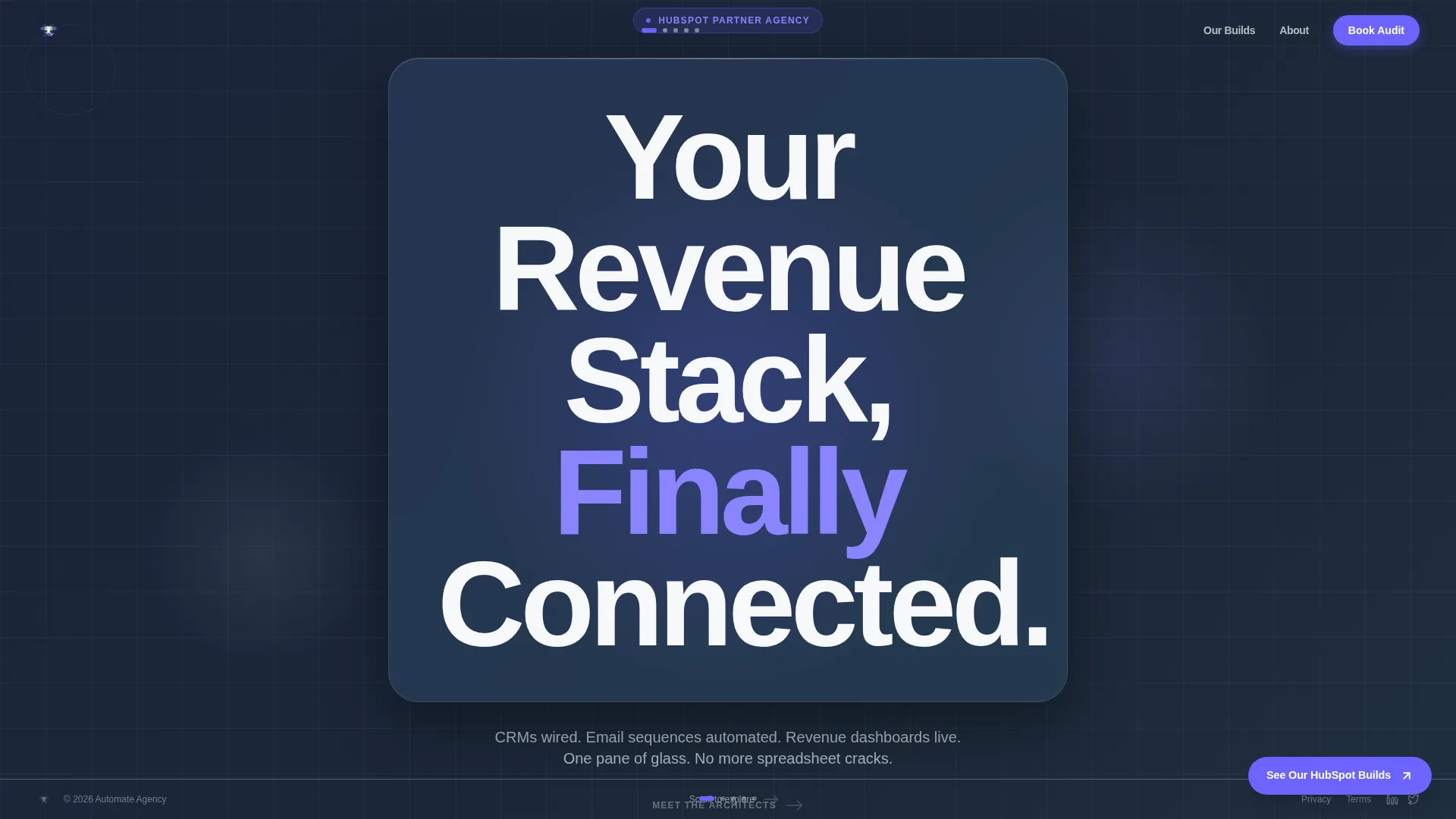
The header fills the full viewport with the phrase "Your Revenue Stack, Finally Connected" set at 12vw in a bold geometric sans-serif. It sits against a translucent white glassmorphism panel that refracts a slow periwinkle and vapor gray gradient. No image, no illustration. Typography alone holds the frame.
Horizontal Scroll Panel Layout
The page moves left to right, like swiping through case studies on a tablet. Each panel is a self-contained scene with its own story beat. The scroll rhythm gives visitors a sense of progress without sending them to a new page.
Creator Spotlight Panels
Each horizontal panel introduces a named strategist or architect from the agency alongside the specific build they shipped. Panel one features a RevOps lead next to an animated pipeline board. Panel two shows an integration architect beside a live data flow diagram. This format makes expertise personal and concrete.
Persistent Click-Through Call-to-Action
A floating button labeled "See Our HubSpot Builds" sits in the bottom-right corner of every panel. It never disappears. Clicking it routes visitors to a detailed portfolio and audit request page. There is no form on this landing page.
Tech Glass Visual Theme
The Cloud Canvas color system uses translucent white, soft vapor gray, deep slate, and electric periwinkle. The palette creates a frosted browser window effect. Periwinkle is reserved for calls-to-action, hover states, and active indicators so attention always lands in the right place.
No-Form Click-Through Flow
This landing page deliberately omits any embedded form. The horizontal journey builds enough trust through stacked human proof that visitors choose to click through on their own terms. This reduces friction for high-intent buyers who are not ready to fill out a form cold.
Page sections overview
| Section | Purpose |
|---|---|
| Header Headline Panel | Anchors the brand promise with full-viewport bold typography and a glassmorphism background |
| RevOps Creator Panel | Introduces a RevOps strategist alongside an animated pipeline board built for a fintech client |
| Integration Architect Panel | Shows an integration architect next to a live data flow diagram linking multiple platforms |
| Persistent call to action Button | Floats bottom-right on every panel, routing visitors to the portfolio and audit request page |
Design & branding system
The visual identity follows a Tech Glass theme with the Cloud Canvas color system. Every layer is intentional, from the frosted panel backgrounds to the precise use of periwinkle as an action color.
- Translucent white (#F7F8FA) and soft vapor gray (#E2E5EB) form the background layer, keeping the design airy and dimensional
- Deep slate (#1B2838) is used for primary text, grounding headlines against the light backgrounds
- Electric periwinkle (#6C63FF) is reserved strictly for calls-to-action, hover states, and active indicators
Mobile & speed optimization
The horizontal scroll layout is designed for a tablet-first swiping experience, and the panel structure keeps content modular and manageable. The template avoids heavy imagery and relies on typography and color instead.
- No photographs or illustrations means fewer large assets to load across panels
- Each panel is a contained layout unit, making it straightforward to adapt sizing for different viewports
- Typography-led design keeps the visual weight light while maintaining a premium feel
How this template helps you convert
This landing page is structured around one conversion goal: getting qualified visitors to click through to the portfolio page. Every design decision serves that goal.
- The horizontal scroll flow builds cumulative trust by stacking face after face and build after build before asking for the click, reducing the hesitation that kills cold page conversions
- The persistent floating call-to-action button stays visible at every stage of the scroll, so a visitor who is ready to act never has to hunt for the next step
- Removing the form entirely lowers the commitment threshold, making it easier for high-intent buyers to move forward on their own timeline
Other information about this template
This template was designed specifically for the HubSpot agency niche within the broader portfolio and digital marketing agency category. It sits at the intersection of technical credibility and human storytelling.
- The template is built as a single landing page, not a multi-page website
- The Creator Spotlight creative direction is well suited for agencies with named specialists who can be featured by role and build
- The click-through flow works best when paired with a strong portfolio or audit request destination page
- This template fits the HubSpot partner agency use case where the audience already understands the problem and needs to trust the team, not be educated from scratch



Theme
Tech Glass
Creative direction
Creator Spotlight
Color system
Cloud Canvas
Style
Horizontal Scroll
Direction
Click-Through
Page Sections
Giant Headline Centered Header
Horizontal Scroll Panel Layout
Creator Spotlight Panels
Persistent Floating Call-to-action
Tech Glass Visual Theme
No-form Click-through Structure
Related questions
Does this landing page include a contact form?
Who should be featured in the Creator Spotlight panels?
What does the persistent call-to-action button do?
Can this template work for a different type of digital marketing agency?
What is the purpose of the glassmorphism panel in the header?