Authority - Training Services Landing page Template
This landing page template is built for financial services training firms recruiting experienced advisors, paraplanners, and mortgage brokers into trainer roles. It features a multi-step qualification form, a side-by-side career comparison table, trainer case study testimonials, and a 90-day onboarding timeline, all wrapped in a warm, authoritative Navy Authority design system.
by Rocket studio
Quick summary
This is a single-page recruitment landing page for a financial services training provider. It targets senior practitioners holding qualifications such as CF30, Chartered Insurance Institute (CII) Chartered status, or Certificate in Mortgage Advice and Practice (CeMAP). The page guides visitors from a multi-step intake form through a compelling career comparison, then closes with social proof and a clear next step.
Who this template is for
This template suits organisations that recruit qualified financial professionals into training and education roles. It works best when the message needs to feel credible, warm, and profession-specific rather than generic.
- Financial services training firms hiring experienced advisors, paraplanners, or mortgage brokers as trainers or curriculum designers
- Regional mentorship programmes looking to attract CF30 or Chartered holders into structured educator roles
- HR and talent teams in regulated financial services who need a purpose-built recruitment page rather than a standard job board listing
What problem this template solves
Recruiting experienced financial professionals into trainer roles is a hard sell. Most senior practitioners assume a career pivot into training means a step down. This template addresses that directly and builds the case that the move is lateral, not downward.
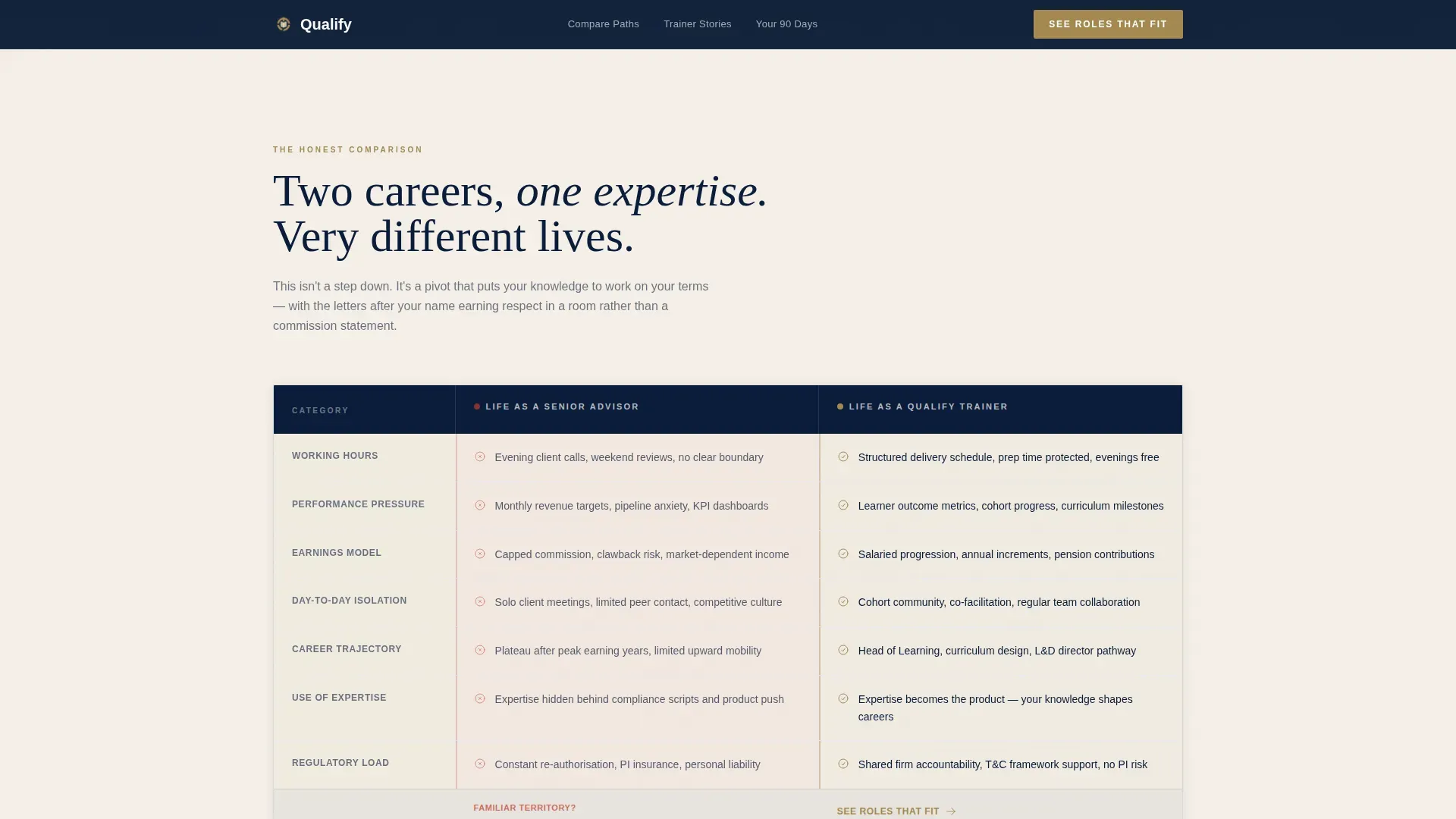
- The comparison table makes the contrast visible: sales targets and evening calls versus structured hours and learner outcomes
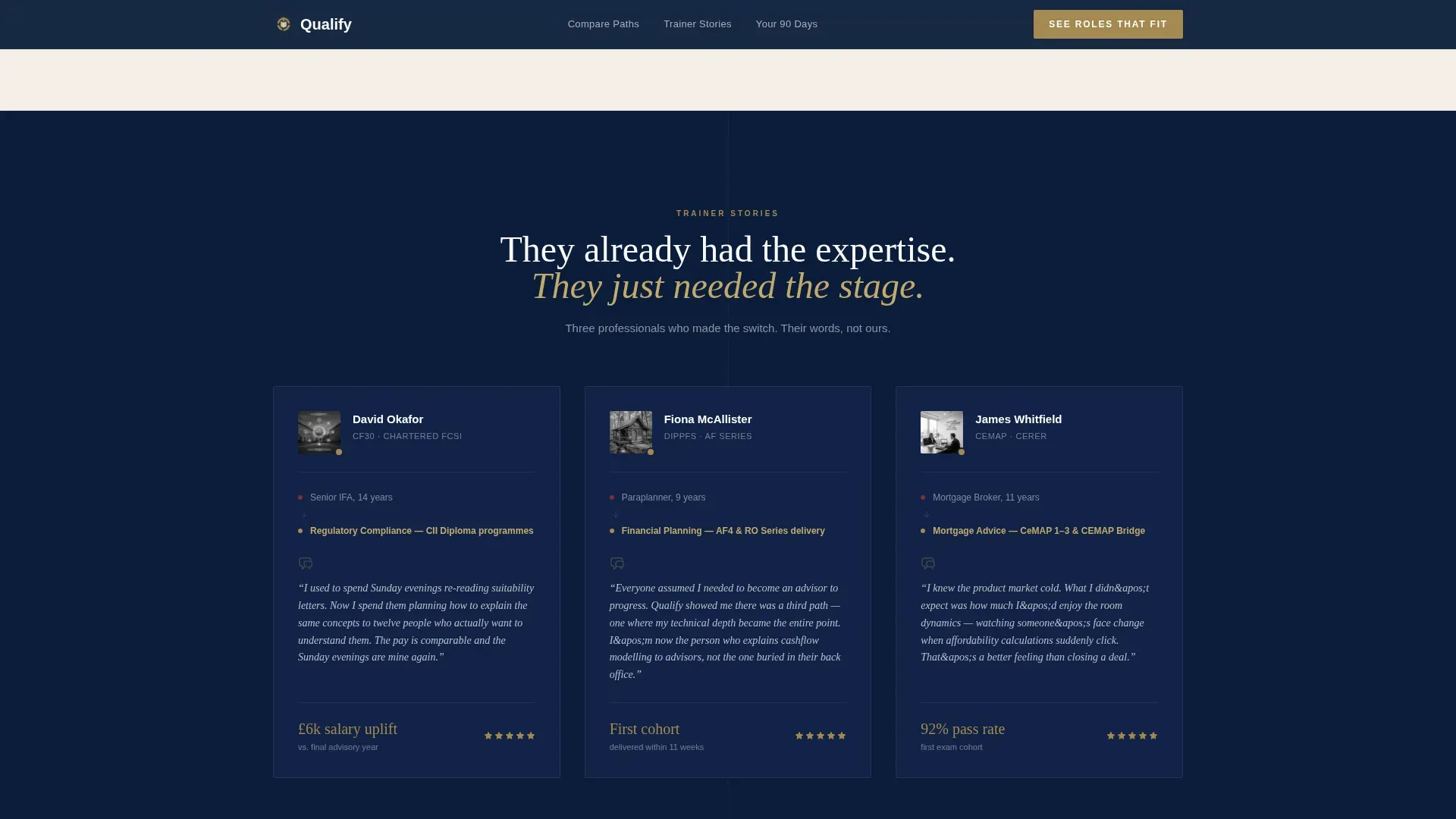
- The case study section shows real practitioners who made the switch, reducing scepticism with specific, named proof
- The multi-step form qualifies leads early, so only well-matched candidates reach the role-matching step
What you get with this template
The template delivers a fully structured, single-page layout with five distinct sections and high interactivity. Every component is designed around the recruitment conversion goal.
- A three-step qualification form with toggle selectors and a self-assessment step, sitting against a deep navy background with a real trainer photograph on the right
- A colour-coded comparison table contrasting senior advisor life against trainer life, with red highlights for pain points and brass warmth for solutions
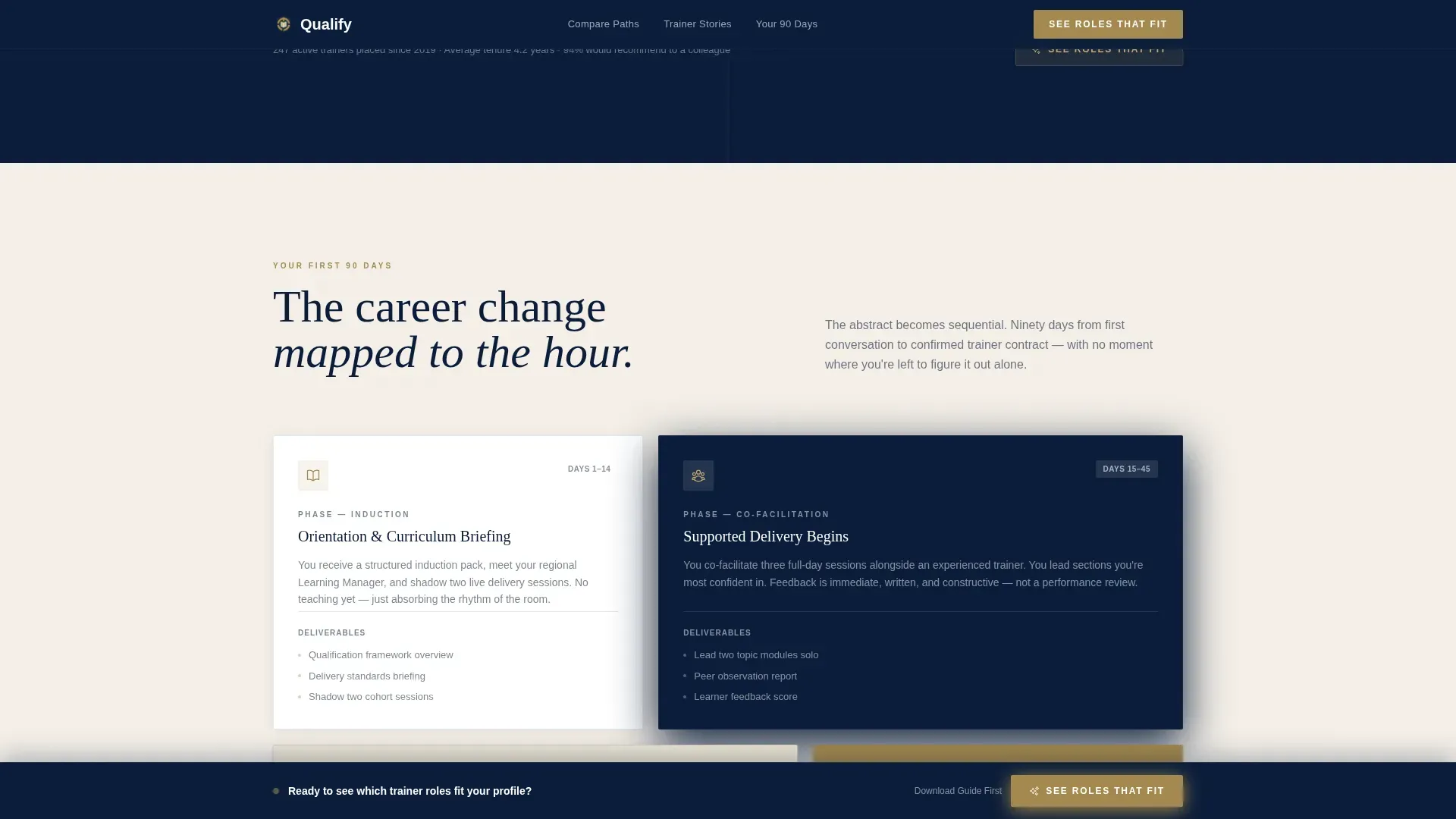
- A "Your First 90 Days" timeline section mapping onboarding, shadowing, and first solo delivery in a sequential bento layout
Feature list
This template is built around five core interactive and structural features drawn directly from the source brief.
Three-Step Qualification Form
The header form opens mid-conversation. Step one presents three subject toggles: regulatory compliance, financial planning, and mortgage advice. Step two surfaces a short self-assessment covering years of experience, qualifications held, and preferred delivery format. Step three collects name and email and surfaces the primary call to action, "See Roles That Fit."
Career Comparison Table
A structured two-column table places "Senior Advisor Life" against "Trainer Life" row by row. Pain points in the left column are highlighted in a muted red tone. Benefits in the right column carry a warm brass treatment. The table uses scroll-triggered row highlights and a sticky call-to-action bar that appears after the visitor scrolls past it.
Trainer Case Study Cards
Three testimonials are formatted as short case studies rather than pull quotes. Each card presents the trainer's name, former role, current training specialism, and a direct quote about why they made the switch. This format lends credibility without feeling promotional.
90-Day Onboarding Timeline
An asymmetric bento layout breaks the career transition into three clear phases: onboarding, shadowing, and first solo delivery. This section makes an abstract career change feel sequential and achievable for a visitor who is considering the move but needs a concrete roadmap.
Sticky Call-to-Action Bar and Secondary Lead Capture
After the comparison table, a sticky bottom bar keeps "See Roles That Fit" visible as the visitor continues reading. A secondary call to action, "Download the Trainer Career Guide," captures leads who want more information before committing to an application.
Page sections overview
| Section | Purpose |
|---|---|
| Hero with Form | Qualify visitors and capture intent through a three-step multi-step form alongside a trainer photograph |
| Career Comparison Table | Contrast advisor and trainer life side by side to reframe the career pivot as an upgrade |
| Trainer Case Studies | Provide named, role-specific social proof from practitioners who have already made the switch |
| 90-Day Timeline | Map the onboarding journey into three concrete phases to reduce uncertainty about the transition |
| Call to Action Section | Present the primary role-matching prompt and the secondary career guide download to capture both ready and near-ready leads |
Design & branding system
The visual identity follows a Community Hearth theme built on the Navy Authority colour system. The aesthetic references the leather-and-lamp warmth of a professional library, serious enough to frame a diploma, approachable enough for a Friday afternoon mentor session.
- Colours: deep boardroom navy (#0B1D3A) for primary backgrounds, warm parchment (#F5F0E8) for content panels, muted brass (#A3894F) for hover states and table highlights, chalk white (#FAFAFA) for typographic breathing room, and a muted red (#C0392B) reserved for comparison table pain-point rows
- Typography: Fraunces serif for headlines to carry editorial authority, DM Sans for body copy and interface elements to maintain readability at all sizes
- Animation and interaction: medium-intensity scroll reveals, staggered entrance effects, spotlight card hover states on case study cards, and comparison table row highlights on scroll
Mobile & speed optimization
The template is designed desktop-first to serve a professional audience working on work machines, but full mobile support is included throughout.
- Static sections such as the timeline and case study cards use server-rendered components to keep initial load fast; interactive sections such as the multi-step form use client-side rendering
- The sticky call-to-action bar and multi-step form state management are handled client-side for smooth, responsive interaction on all screen sizes
How this template helps you convert
Every section earns the next click by building cumulative evidence that the career move is credible, structured, and suited to someone with the visitor's existing credentials.
- The multi-step form qualifies visitors early and delivers a personalised role-match prompt at step three, making the primary conversion feel like a natural conclusion rather than a cold ask
- The comparison table and case study section work together to dismantle objections before they form, so visitors arrive at the call-to-action section already convinced the switch is worth exploring
Other information about this template
This template is built specifically for the UK financial services market. All qualification references use UK-standard terminology, and the copy is written in UK English throughout.
- Qualification references include CF30, CII Chartered status, and CeMAP, reflecting the regulated advice sector in the United Kingdom
- The footer follows a linear single-row pattern (Pattern 1) keeping the page clean and the focus on conversion
- The page direction is Recruitment and Hiring, meaning the entire layout is optimised for lead capture rather than general brand awareness
- The template style is a Comparison Table landing page, making it well suited to any financial services HR context where a side-by-side proof structure is the most persuasive format

Theme
Community Hearth
Creative direction
Problem→Solution Arc
Color system
Navy Authority
Style
Comparison Table
Direction
Recruitment/Hiring
Page Sections
Three-step Qualification Form
Colour-coded Comparison Table
Trainer Case Study Cards
Day Onboarding Timeline
Dual Call-to-action System
Related questions
Who is this landing page template designed for?
What sections come included in this template?
Does the template support leads who are not ready to apply right away?
What visual style does this template use?
Is this template written for the UK financial services market?



