Apex — Elite Fitness Coaching Landing Page Template
Pulse is a split-screen fitness landing page template built for membership-driven training apps. It pairs a cinematic dark header with live-style stat counters, a dashboard mockup, and a two-step app download flow. The Tech Glass aesthetic and Midnight Blue color system give it the focused, data-first energy that serious athletes expect from their tools.
by Rocket studio
Quick summary
Pulse is a single-page fitness membership landing page template that leads with data, not promises. It uses a 50/50 split-screen layout to pair dashboard visuals with human context throughout every section. Built on a Tech Glass aesthetic with a Midnight Blue color system, it drives visitors toward one clear action: downloading the app and starting to track their training.
Who this template is for
This template is designed for fitness app founders, gym tech startups, and digital training platforms that want a high-impact first impression. It speaks directly to users who take their training seriously and expect their tools to match that energy.
- Fitness app teams launching a membership platform or training tracker
- Independent coaches and training communities building a digital presence
- Competitive recreational athletes and performance-focused gym members who respond to data-driven design
What problem this template solves
Most fitness landing pages lead with stock photography and vague motivational copy. Pulse flips that entirely. It shows visitors what their future dashboard will look like before they ever sign up, making the value tangible and the decision easy.
- Generic fitness pages fail to communicate what the product actually does or how it feels to use it
- Visitors leave before converting because there is no proof, no momentum, and no clear next step
- App download flows are often buried, creating friction that kills signups at the final moment
What you get with this template
Pulse delivers a fully structured, single-page layout with every section purpose-built for conversion. You get a cinematic header, a scrolling split-screen journey, and a two-step app download flow that works for both mobile and desktop visitors.
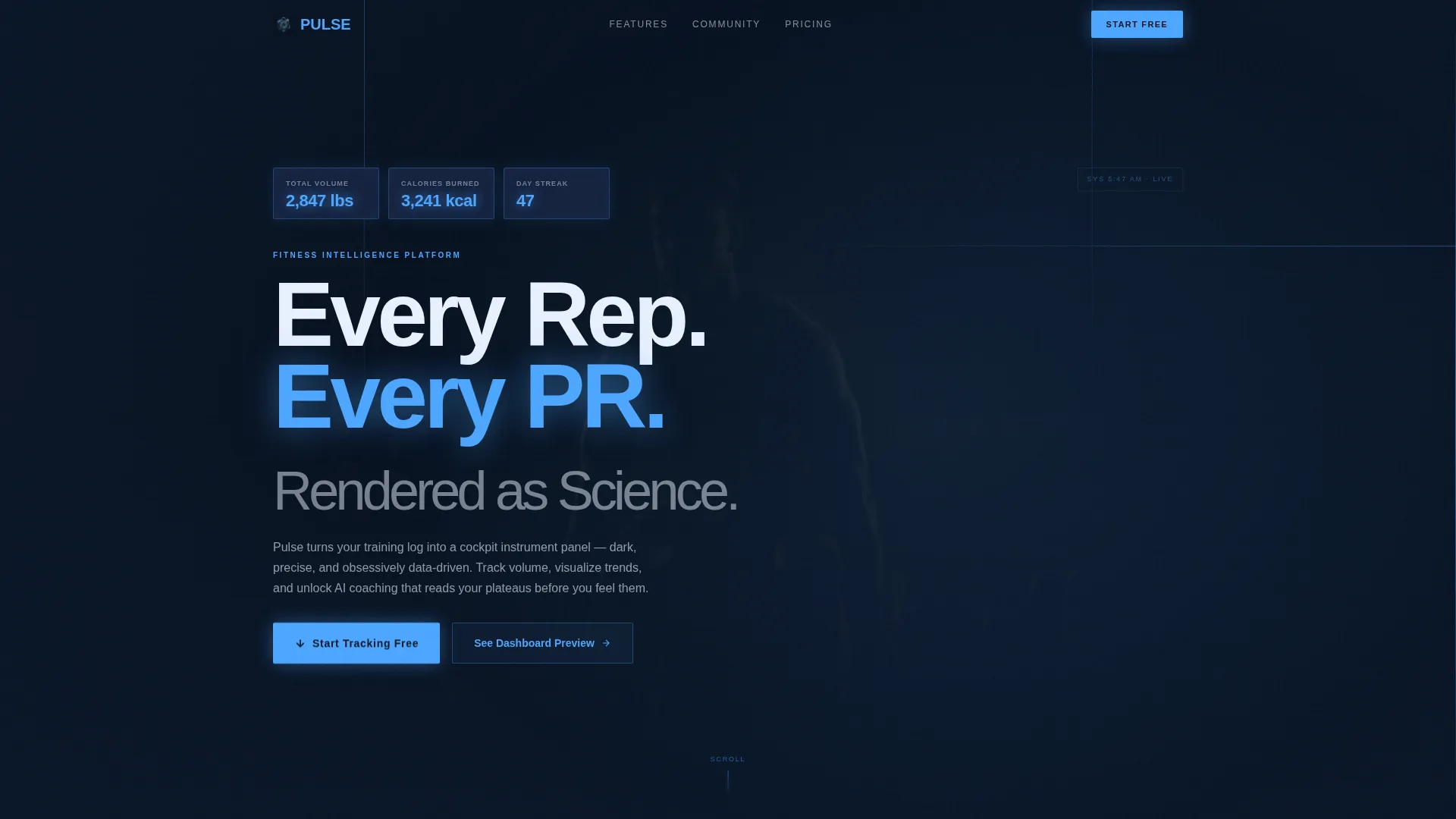
- A dark full-bleed header with a silhouetted athlete, rim lighting, and animated HUD-style stat counters
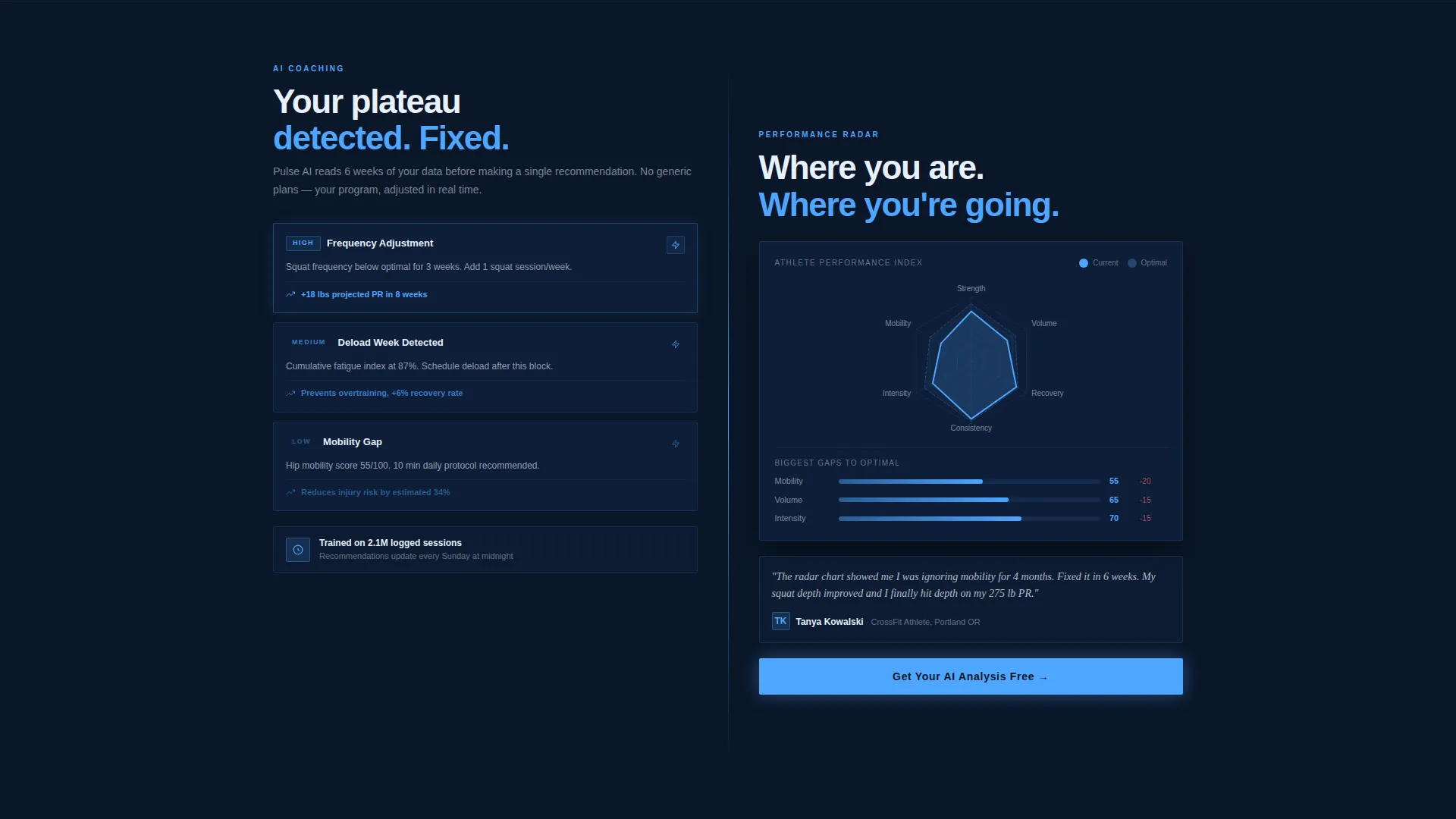
- Split-screen sections pairing a live-style dashboard mockup with testimonials, leaderboards, and training recommendation visuals
- A two-step app download flow with platform selection, phone number entry, and a QR code path for desktop users
Feature list
This section covers the core built-in capabilities that make Pulse distinct and ready to use.
Animated HUD-Style Header
The header opens on a near-black viewport with a silhouetted figure mid-lift, edge-lit by a cold plasma-blue rim. Overlaid stat counters animate upward, displaying total weight lifted, calories burned, and streak days inside glass-morphism containers with frosted edges.
50/50 Split-Screen Layout
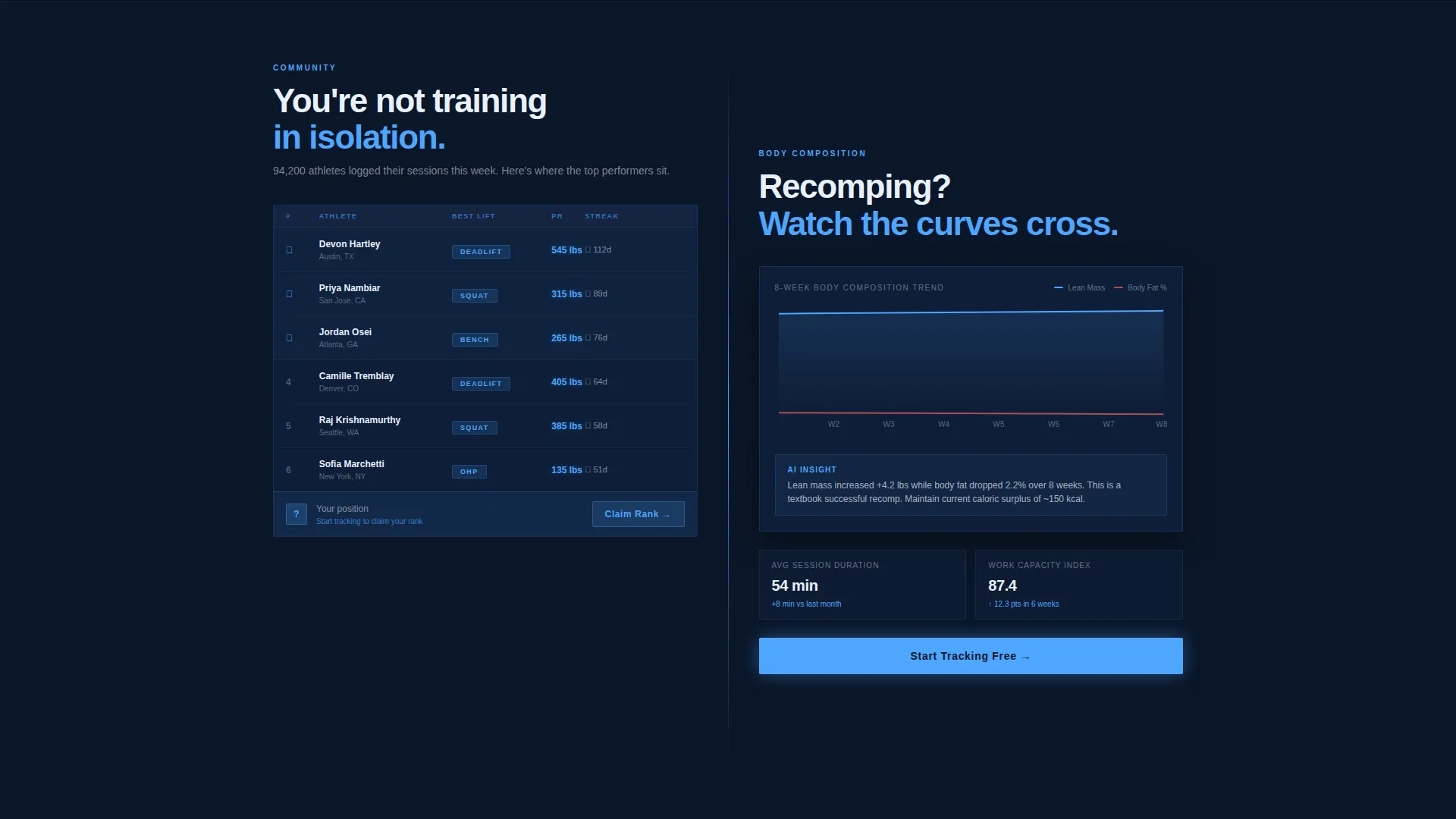
Every section of the page divides into two equal panels. Data visualization lives on the left; human context lives on the right. The structure escalates from individual metrics to community leaderboards to AI-generated training recommendation visuals as the user scrolls.
Live-Style Dashboard Mockup
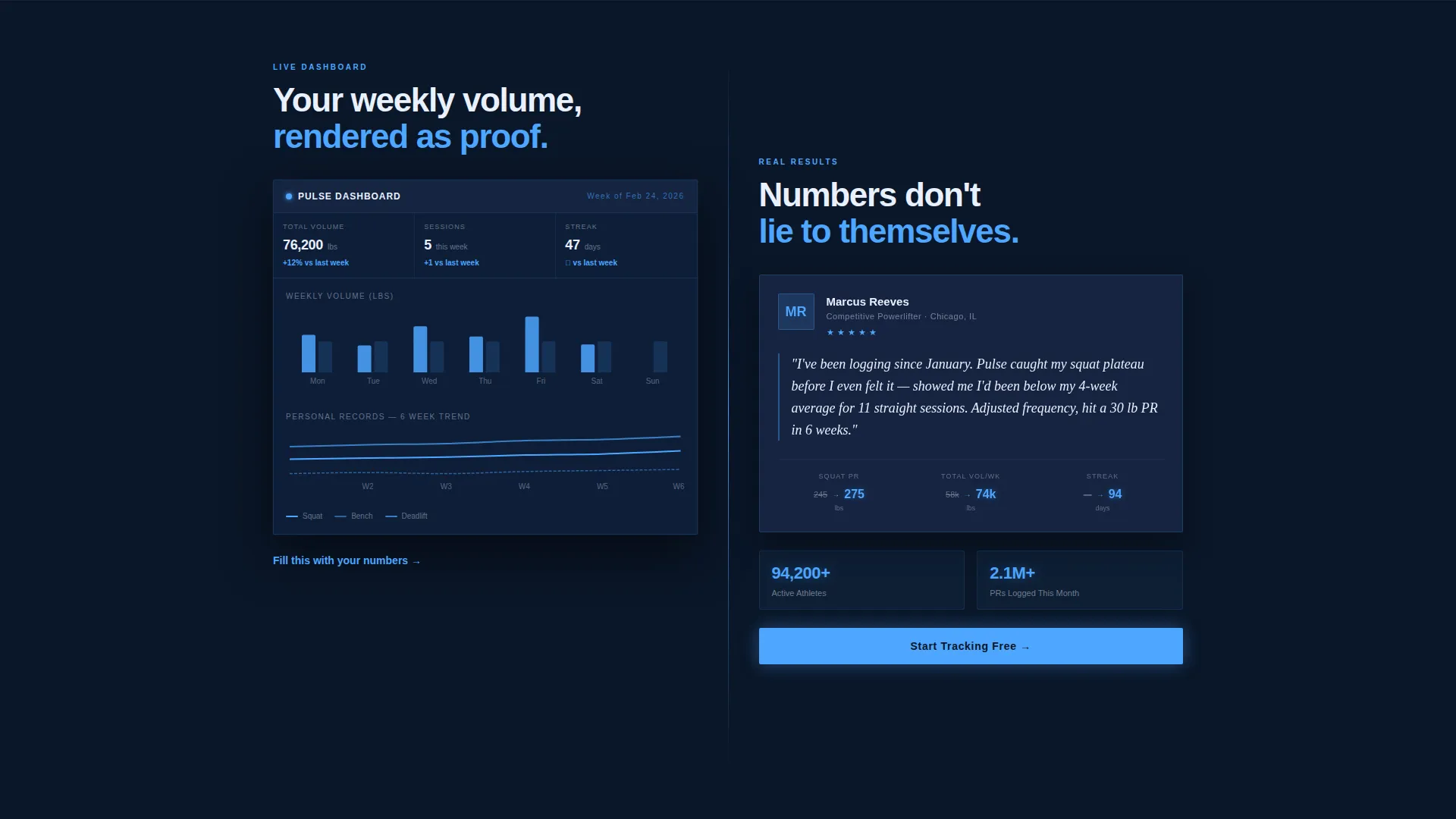
The left panel of the first scroll section shows a dashboard mockup displaying weekly volume, personal records, and body composition trends. It gives visitors a preview of their future data before they commit to signing up.
Two-Step App Download Flow
The primary call to action reads "Start Tracking Free." Tapping it opens a two-step flow: choose iOS or Android, then enter a phone number to receive a direct download link. Desktop visitors get an alternative QR code path.
Floating and Anchored call to action Placement
The "Start Tracking Free" button appears first as a floating element after the header loads. It then anchors at the bottom of every split section, keeping the conversion path visible without interrupting the reading experience.
Tech Glass Visual System
The entire template uses glass-morphism containers, frosted card surfaces, and glowing accent elements. Card backgrounds use tempered steel tones, while cold plasma-blue accents highlight data points and interactive elements throughout.
Page sections overview
| Section | Purpose |
|---|---|
| Dark header scene | Opens with animated stat counters and cinematic silhouette |
| Dashboard split section | Shows weekly volume, personal records, and composition trends |
| Testimonial split panel | Pairs real user data with visible performance numbers |
| Community leaderboard section | Scales context from personal metrics to group competition |
| AI training recommendations | Presents personalized training suggestions as a visual panel |
| App download section | Anchors the two-step download flow with platform and QR options |
Design & branding system
The Pulse template uses a Midnight Blue color system that feels closer to a cockpit instrument panel than a typical fitness page. Every color choice serves information clarity, not decoration.
- Background uses abyssal navy (#0A1628), with tempered steel (#1B2A4A) for card surfaces and section dividers
- Cold plasma blue (#4DA6FF) drives all glowing accents, data highlights, and interactive elements
- Sharp electric white (#E8F0FE) handles all typography and stat readouts, keeping numbers legible against dark surfaces
Mobile & speed optimization
The split-screen layout and floating call-to-action button are designed with mobile-first interaction in mind. The two-step download flow is especially suited to thumb-friendly tapping on small screens.
- The iOS and Android platform selector and phone number entry are built for one-handed mobile use
- The QR code path provides a clean fallback for desktop visitors who cannot tap a download link directly
- Glass-morphism card elements and dark backgrounds keep the visual hierarchy clear on any screen size
How this template helps you convert
Pulse earns the conversion by making the product tangible before asking for a commitment. Every design decision supports the single goal of getting a visitor to tap "Start Tracking Free."
- The animated stat counters in the header create immediate proof of activity, signaling that real data lives inside this app and making the promise feel credible from the first second.
- The dashboard mockup in the first split section shows visitors their future numbers in vivid detail, so the call to action feels like claiming something rather than risking something.
- The anchored call-to-action button at the bottom of every section ensures the download path is always one tap away, no matter how deep into the page a visitor has scrolled.
Other information about this template
Pulse fits within the broader fitness digital presence category and is specifically designed for the fitness membership site niche. It aligns well with the growing demand for tech-forward fitness tools that combine performance tracking with an engaging visual experience.
- The template style is Split Screen (50/50), making it easy to maintain visual balance when customizing content panels
- The creative direction follows a Stats-First Impact approach, which positions proof before persuasion across every section
- The header concept is Dark Full-Bleed with Glow, a design pattern suited to high-engagement fitness and health technology products
- The landing page direction targets App Download as the single primary conversion goal, keeping the funnel clean and focused
Theme
Tech Glass
Creative direction
Stats-First Impact
Color system
Midnight Blue
Style
Split Screen (50/50)
Direction
App Download
Page Sections
Animated Hud-style Stat Counters
50/50 Split-screen Layout
Live-style Dashboard Mockup
Two-step App Download Flow
Floating and Anchored Call to Action Button
Tech Glass Visual Components
Related questions
Who is this landing page template designed for?
Can I customize the colors and typography?
Does the template include actual dashboard or app functionality?
How does the two-step app download flow work?
Is this template suitable for a gym or personal training business?



