Social Worker Career Blog Landing Page Template
Advocate is a storybook-style social worker career blog landing page built for the paths nobody hands you a map for. It combines an animated ink illustration header, branching interactive career chapters, and an Ink & Paper color system to guide BSW students, burned-out practitioners, and mid-career social workers toward the right next door in their professional journey.
by Rocket studio
Quick summary
Advocate is a single-page, storybook-format career blog landing page designed for the social work profession. It uses a Tech Glass visual theme, an animated hand-drawn header illustration, and five branching career pathway chapters to turn passive scrolling into genuine exploration. The page earns visitor trust by leading with real salary data, licensure timelines, and honest burnout context before asking for the click.
Who this template is for
This template is built for social work educators, career bloggers, and content creators who serve a deeply specific professional audience. It speaks to people at real crossroads in the field, from students to seasoned practitioners.
- BSW and MSW students choosing a concentration or field placement track
- Burned-out child welfare and CPS workers searching for alternative social work roles
- Mid-career licensed clinical social workers (LCSWs) weighing a shift into macro practice or policy work
What problem this template solves
Most career resource pages for social workers feel institutional and cold. They list job titles without context, salary figures without honesty, and pathways without the emotional reality of what each role actually demands. Advocate is designed to fix that gap.
- Visitors leave without direction because generic career pages don't reflect the real texture of social work roles
- No single page maps Clinical, Child Welfare, School Social Work, Community Organizing, and Policy pathways side by side
- Readers who haven't chosen a pathway yet have nowhere to start, and no gentle on-ramp into the content
What you get with this template
You get a fully designed storybook landing page that functions as a career atlas for the social work field. Every section is crafted to hold attention and move visitors deeper into the content.
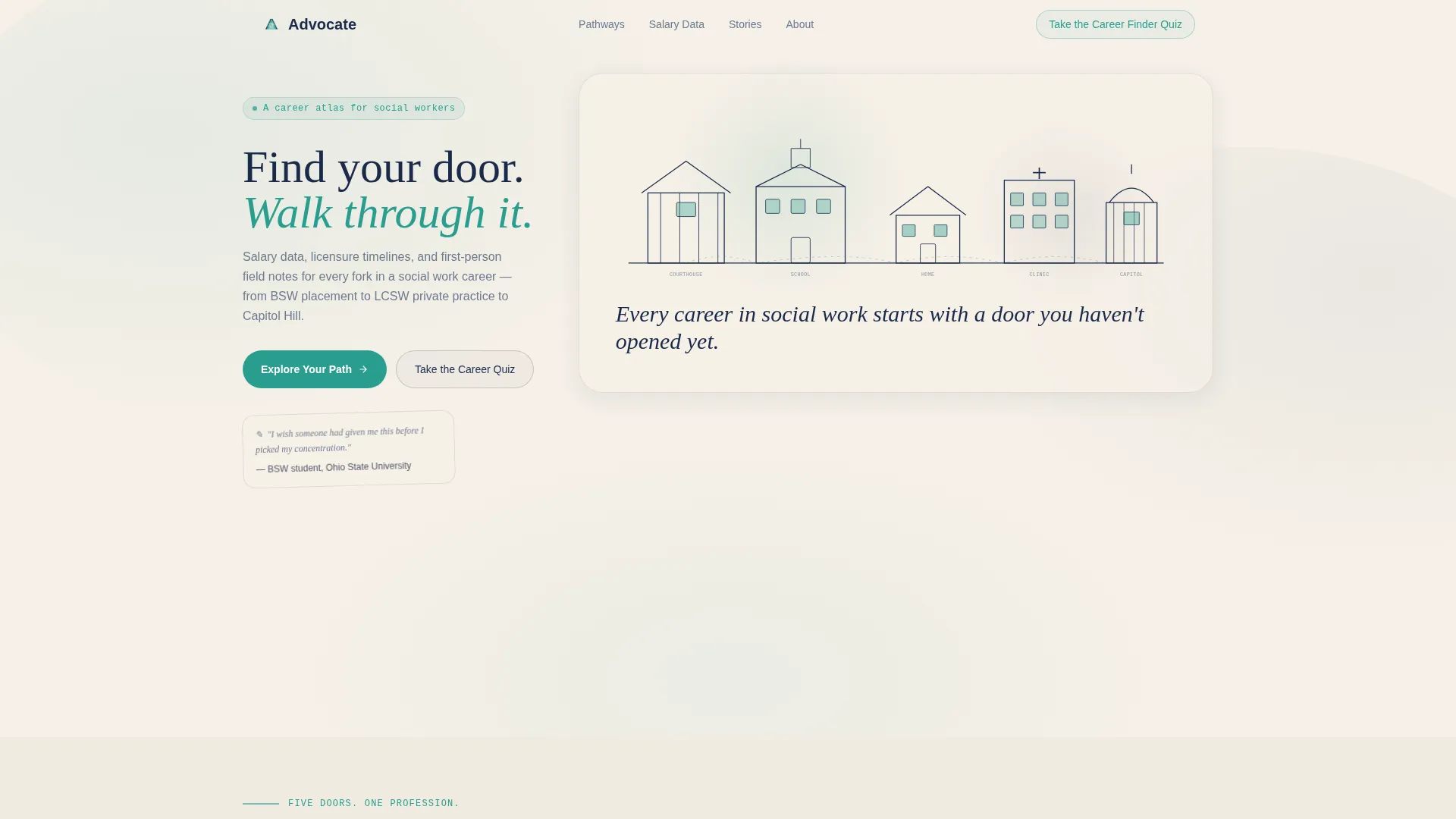
- An animated ink-sketch header illustration of a city skyline, courthouse, school, and home, each building representing a career pathway
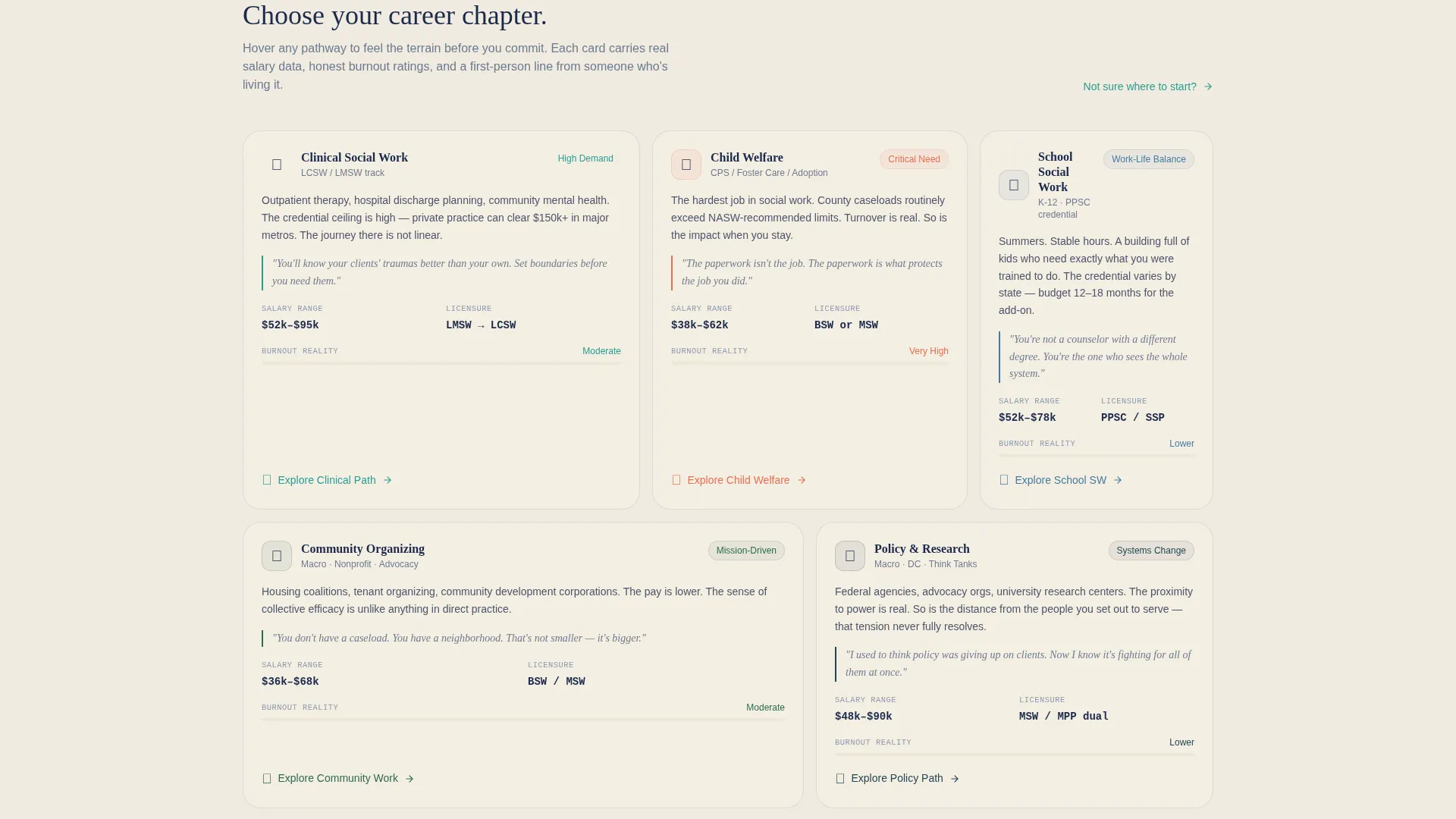
- Five interactive career chapter sections with day-in-the-life narratives, salary ranges, licensure timelines, and emotional-reality checks
- A persistent Career Finder Quiz call-to-action in the navigation and a teal-glowing door icon call to action at the base of each chapter
Feature list
This template includes a carefully constructed set of design and interaction features drawn directly from the Advocate brief.
Animated Ink Illustration Header
The header opens with a hand-drawn ink scene that sketches itself line by line. Buildings fill with a soft teal glow from within, windows light one by one, and the headline writes itself in a handwritten typeface. Subtle parallax movement as the cursor shifts gives the flat illustration a glassy, dimensional quality.
Branching Career Pathway Chapters
Each full-page chapter represents one career pathway: Clinical, Child Welfare, School Social Work, Community Organizing, and Policy & Research. Hovering on a building in the header expands it into its own storybook page. The scroll branches rather than simply descending, so visitors feel they are navigating a career atlas.
Honest Career Intelligence Blocks
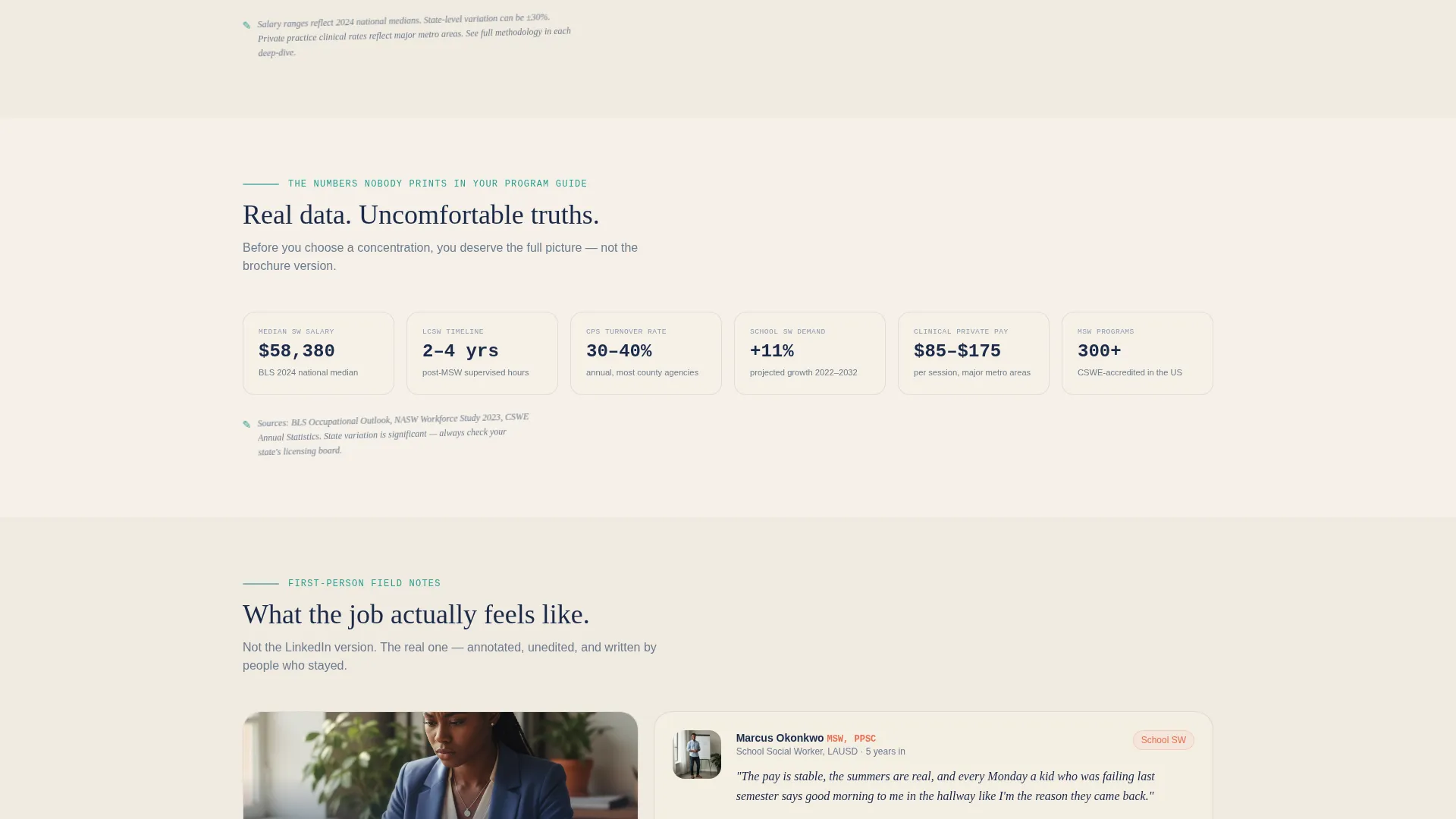
Each pathway chapter includes real salary ranges, state-by-state licensure timelines, day-in-the-life narratives, and candid burnout ratings. The content is written in first-person voice. This earned-trust approach makes the click-through call to action feel like a natural next step rather than a sales push.
Persistent Career Finder Quiz call to action
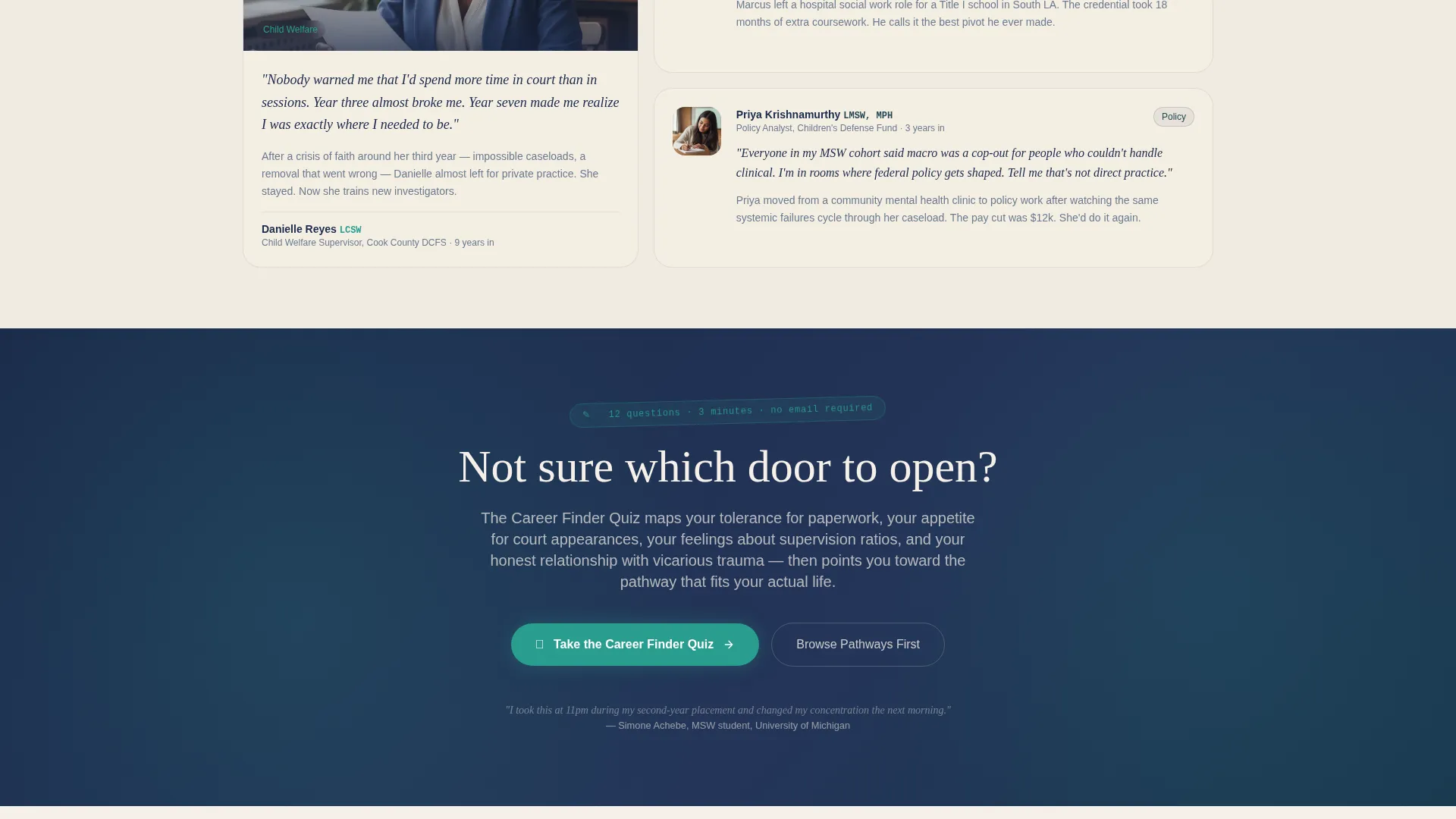
A secondary call-to-action reading "Take the Career Finder Quiz" sits unobtrusive but always visible in the navigation bar. It captures visitors who haven't landed on a specific pathway yet, giving undecided readers a structured entry point into the content.
Teal Door Icon Click-Through call to action
A glowing teal door icon appears at the bottom of every career chapter as the primary call-to-action labeled "Explore Your Path." The icon reinforces the template's door metaphor visually and connects the interactive design language to the conversion moment.
Ink & Paper Color System with Tech Glass Panels
The visual layer combines deep fountain-pen navy, warm parchment cream, margin-note graphite, and social-service teal across frosted-glass panels with a faint cotton bond paper texture. The palette gives every screen the weight of a government case file made luminous.
Page sections overview
| Section | Purpose |
|---|---|
| Animated Header Scene | Introduces the career atlas metaphor with the ink-sketch building illustration and animated headline |
| Navigation Bar | Holds the persistent Career Finder Quiz secondary call to action throughout the full page experience |
| Clinical Pathway Chapter | Delivers day-in-the-life content, salary data, and licensure details for clinical social work roles |
| Child Welfare Chapter | Covers foster care supervision, CPS realities, and honest burnout context for child welfare workers |
| School Social Work Chapter | Walks through school-based roles, credentialing steps, and daily practice realities |
| Community Organizing Chapter | Maps macro practice, coalition work, and grassroots career paths in community settings |
| Policy & Research Chapter | Explores policy advocacy, Capitol Hill pathways, and research-oriented social work careers |
| Chapter call to action Block | Places the teal door icon and "Explore Your Path" link at the close of each career chapter |
Design & branding system
The template follows the Ink & Paper color system rendered through a Tech Glass visual theme. Every surface carries intention, balancing institutional weight with luminous, frosted-glass warmth.
- Core palette: deep fountain-pen navy (#1B2A4A) for backgrounds and headings, warm parchment cream (#F5F0E8) for text surfaces, margin-note graphite (#6B7B8D) for secondary text, and social-service teal (#2A9D8F) reserved exclusively for interactive elements and hyperlinks
- Typography uses a handwritten typeface for the animated headline and a clean readable body face throughout chapter content
- Frosted-glass panel styling with a faint cotton bond paper texture gives every content block the feel of a reimagined government case file
Mobile & speed optimization
The template is designed with a storybook flow that adapts naturally to smaller screens. The branching chapter structure and animation-forward header are built to perform consistently across device sizes.
- The parallax cursor-tracking illustration header degrades gracefully on touch devices, preserving visual impact without requiring pointer input
- Career chapter sections stack cleanly in a single-column layout on mobile, keeping salary data, licensure timelines, and narrative blocks readable at any screen width
- The persistent navigation call to action and teal door icon calls to action remain accessible and clearly visible on both mobile and desktop viewports
How this template helps you convert
The Advocate template earns clicks by giving real value before asking for anything in return. Every design and content decision builds the kind of trust that turns a curious visitor into an engaged reader.
- The animated header illustration and branching chapter structure create a sense of genuine exploration rather than passive reading, which keeps visitors on the page longer and builds confidence in the content behind each call to action.
- Honest career intelligence, including real salary ranges, licensure timelines, and candid burnout ratings, signals that the blog behind the template is a trustworthy resource, making the "Explore Your Path" click feel earned rather than pressured.
- The dual-call to action architecture catches two distinct visitor types: the Career Finder Quiz captures undecided readers at the top, while the teal door icon at each chapter close converts visitors who have already identified their pathway.
Other information about this template
Advocate was designed specifically for the social worker career blog niche, where the audience is sophisticated, skeptical of generic advice, and emotionally invested in making the right professional choice. A few additional details are worth noting for anyone considering this template.
- The template style is classified as Storybook / Full-Page, meaning it is built as a single immersive landing page rather than a multi-page site
- The creative direction is Interactive Explorer, so the page rewards curiosity with branching content layers rather than a linear scroll
- The header concept is an Animated Illustration, which means the visual centerpiece requires no third-party plugin and is self-contained within the template design
- The landing page direction is Click-Through, designed to move engaged visitors to deeper blog articles rather than to collect form submissions
- This template fits within the Personal & Resume category under the Social Worker Profile subcategory, making it suitable for individual practitioners, career coaches in the social work space, and niche blog publishers alike
Theme
Tech Glass
Creative direction
Interactive Explorer
Color system
Ink & Paper
Style
Storybook/Full-Page
Direction
Click-Through
Page Sections
Animated Ink Illustration Header
Branching Career Pathway Chapters
Honest Career Intelligence Blocks
Persistent Career Finder Quiz Call to Action
Teal Door Icon Click-through Call to Action
Ink & Paper Color System with Tech Glass Panels
Related questions
Who is the Advocate template built for?
Can I customize the five career pathway chapters?
What makes this landing page different from a standard blog homepage?
Does the page include a way to capture undecided visitors?
What color system and visual theme does Advocate use?