Specialist Fitness & Gym Software Comparison Website Template
Adjuster is a dark-themed, data-dense comparison landing page built for fitness and gym claims management platforms. It uses structured comparison tables, a stat-driven header, and a tight conversion flow to show multi-location gym operators exactly why their current process is failing them and what a purpose-built claims platform delivers instead.
by Rocket studio
Quick summary
Adjuster is a single-page comparison template designed for fitness and gym claims management software. It opens with a credibility-first logo bar and a hard-hitting statistic, then walks visitors through dense, scannable comparison tables that build an undeniable case row by row. The result is a high-pressure, evidence-led conversion page that earns every click it gets.
Who this template is for
This template is built for companies selling claims management platforms to the fitness industry. It speaks directly to operators who are drowning in open claims and need a better system fast.
- Multi-location fitness franchise owners managing many open claims across several insurers at once
- Risk managers at boutique studio brands facing their first litigated incident
- Regional gym operators whose current process relies on shared spreadsheets with no real oversight
What problem this template solves
Gym chains and fitness operators often manage member-injury claims, slip-and-fall reports, and equipment-malfunction filings with tools that were never built for the job. The result is slow response times, missed filings, and unnecessary payout losses that hurt the bottom line.
- No single view of all open claims across multiple locations and carriers
- No structured process for cross-referencing regulatory requirements or filing deadlines
- No clear path for visitors to understand why their current method is putting them at financial risk
What you get with this template
This template delivers a full-length, argument-driven comparison landing page. Every section is purposefully sequenced to increase the visitor's sense of urgency and reduce friction toward the primary call to action.
- A stat-driven logo bar header that establishes credibility and stakes in under two seconds
- Multiple structured comparison tables, each targeting a specific dimension of claims management performance
- Two distinct conversion paths: a three-field audit form and a downloadable comparison guide for email capture
Feature list
This template is built around a focused set of components that work together to build trust and drive action.
Stat-Driven Logo Bar Header
A horizontal strip of monochrome fitness brand logos scrolls slowly against the void-black background. Above it, a single bold statistic sets the stakes before the visitor reads a single row of comparison data.
Multi-Dimension Comparison Tables
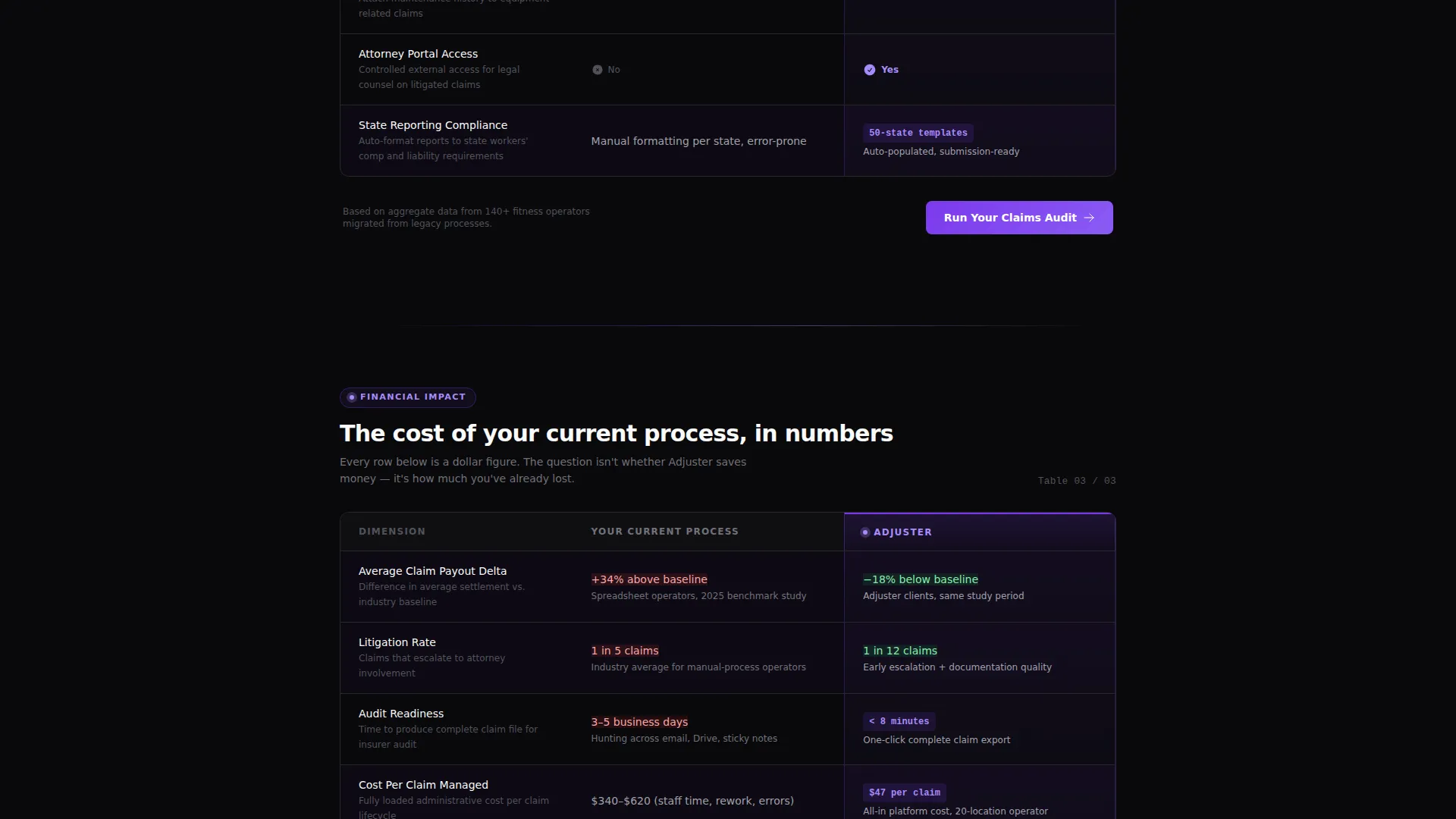
Each table targets one specific area of claims performance: response time, platform integrations, regulatory cross-referencing, multi-carrier filing, and location dashboards. The left column represents the visitor's current process; the right column shows the platform's advantage with checkmarks and specific metrics.
Floating Conversion Bar
After the second scroll, a slim floating bar pins the primary call to action to the viewport. It keeps the "Run Your Claims Audit" prompt visible without interrupting the reading flow.
Three-Field Audit Form
The primary call to action opens a focused, low-friction form. Visitors enter their number of locations, average claims per month, and current management method from a dropdown, giving the platform an instant lead-qualification signal.
Comparison PDF Download Path
A secondary conversion path captures email addresses from visitors who are not yet ready to commit. They receive a downloadable comparison guide, giving them a reason to share contact information without pressure.
Violet Hover and Highlight System
The ultraviolet highlight color activates on hover states and winning-column indicators throughout every table. This creates a visual pulse that directs attention precisely where the platform outperforms the competition.
Page sections overview
| Section | Purpose |
|---|---|
| Logo Bar Header | Establishes credibility with fitness brand logos and a hard-hitting loss statistic |
| First Comparison Table | Anchors the page with an immediate side-by-side performance breakdown |
| Response Time Table | Compares claim response speed between current processes and the platform |
| Integration Row Table | Shows gym management platform compatibility and automation depth |
| Regulatory Cross-Reference Table | Highlights automated cross-referencing capability versus manual alternatives |
| Multi-Carrier Filing Table | Demonstrates filing breadth across multiple insurers simultaneously |
| Location Dashboard Table | Visualizes real-time claim visibility across all gym locations |
| Floating call to action Bar | Keeps the audit form prompt pinned after the second scroll threshold |
| Audit Form Section | Collects three qualifying fields to initiate a claims audit conversation |
| PDF Download Section | Captures emails from visitors who prefer a lower-commitment first step |
Design & branding system
The visual identity follows a Data Command theme built entirely around darkness and precision. Every design choice reinforces the feeling of a mission-control interface where the data is the only light source.
- Color palette: absolute void black (#09090B) as the base, deep phantom violet (#7C3AED) as the primary accent, muted steel (#A1A1AA) for secondary text and table borders, and sharp ultraviolet (#A78BFA) firing on hover states and winning indicators
- Typography and layout lean into a Spec Sheet creative direction, using dense table rows as the primary content unit rather than lifestyle imagery or narrative storytelling
- The "Your Current Process" column is always rendered in muted steel; the platform column is always lit in violet with checkmarks and specific performance metrics
Mobile & speed optimization
The template is structured to remain scannable and navigable at any screen size. Comparison tables are the primary content unit, so their layout adapts to avoid horizontal scrolling on smaller viewports.
- Floating conversion bar remains accessible on mobile without overlapping critical table content
- Table columns stack or compress gracefully so the left-versus-right comparison logic stays clear on narrow screens
- Form fields in the audit section are sized for easy touch input on mobile devices
How this template helps you convert
This template is engineered around a single goal: making the visitor's current claims process look increasingly untenable the further they scroll.
- The header statistic delivers a financial shock immediately, before the visitor has read a single table row, framing everything that follows as evidence rather than sales copy.
- Each comparison table adds another layer of evidence, covering a new dimension of performance and making the cumulative case stronger with every scroll.
- The dual conversion path captures both high-intent visitors ready to run an audit and lower-intent visitors who prefer a PDF, ensuring no traffic leaves without a touchpoint.
Other information about this template
This template fits naturally within the fitness and gym software category and was designed with the specific risk profile of multi-location gym operations in mind.
- The template references integration compatibility with gym management platforms as a comparison dimension within the table rows, reflecting the operational reality of fitness operators
- The comparison table structure can accommodate any claims management platform positioning against legacy software, third-party administrators, or spreadsheet-based workflows
- The downloadable comparison guide path is a proven secondary capture mechanic for software-as-a-service landing pages targeting risk-averse buyers in regulated industries



Theme
Data Command
Creative direction
Spec Sheet
Color system
Void & Violet
Style
Comparison Table
Direction
Comparison/Versus
Page Sections
Stat-driven Logo Bar Header
Multi-dimension Comparison Tables
Floating Conversion Bar
Three-field Claims Audit Form
Comparison PDF Download Path
Violet Hover and Highlight System
Related questions
Who is this template designed for?
Can I customize the comparison table rows?
What are the two conversion paths included in this template?
Does the template include the floating call-to-action bar?
Is this template suitable for a boutique studio brand with fewer locations?



