Hunting & Recreational Land Brokerage Landing Page
Acreage is a full-width immersive landing page built for hunting and recreational land brokerages. It leads with a Photo Grid Mosaic header and an interactive Land Match Assessment tool that pre-qualifies buyers by acreage range, price per acre, and drive-time radius. Educational content sections guide visitors through real land-buying concepts before a gated "See Your Matches" form captures every lead.
by Rocket studio
Quick summary
Acreage is a single-page land brokerage template designed to match buyers with raw land listings. A nine-frame mosaic header sets the mood, and a live Land Match Assessment tool sits immediately below it. Educational sections on timber, CRP income, and deer habitat build trust section by section. Every block loops visitors back to refine their search before a three-field form closes the lead.
Who this template is for
This template is built for brokerages and agents that specialize in rural, recreational, and agricultural land sales. It works best when your buyers arrive with specific goals rather than casual curiosity.
- Hunting and recreational land brokerages matching buyers to raw acreage
- Land specialists working with timber investors, CRP landowners, and rural property buyers
- Boutique real estate teams focused on whitetail habitat, cabin sites, and upland bird properties
What problem this template solves
Most land brokerage pages show a grid of listings and a phone number. That approach loses the buyer who needs context before they commit. Acreage solves the education gap and the qualification gap at the same time.
- Buyers arrive with vague budgets and undefined use cases, wasting agent time on unqualified calls
- Generic listing pages cannot communicate land value concepts like CRP contract income or deer carrying capacity
- No clear path exists between initial interest and a booked consultation, so leads drop off before contact
What you get with this template
You get a complete, single-page layout built around a tool-first conversion flow. Every section has a defined job, from the opening mosaic to the fixed bottom-rail contact button.
- A nine-frame Photo Grid Mosaic header filling the viewport edge to edge with varied land textures
- An interactive Land Match Assessment tool with three sliders, use-type toggle chips, and a live county map shading results in amber
- A series of educational content blocks covering timber appraisals, CRP income, deer habitat capacity, and landlocked-parcel risk, each ending with a contextual prompt back to the tool
Feature list
A paragraph introduces the feature set: every feature in this template is built directly from the brief, focused on lead qualification and buyer education within a single immersive page layout.
Photo Grid Mosaic Header
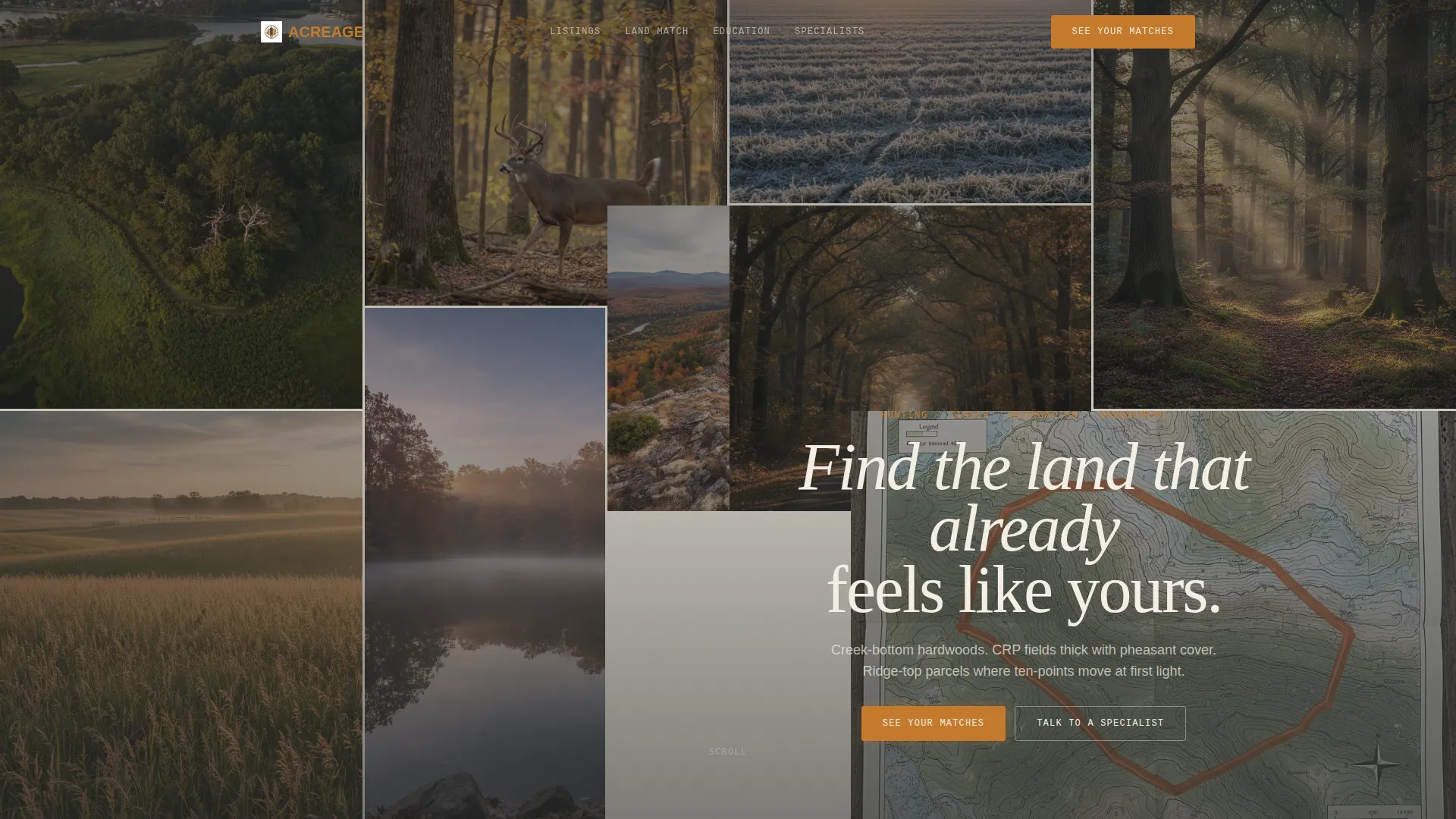
Nine irregularly sized image frames fill the viewport edge to edge. Each frame captures a distinct texture of land ownership, from aerial creek shots to topo maps with amber-outlined parcels. A single serif headline floats centered over the grid.
Land Match Assessment Tool
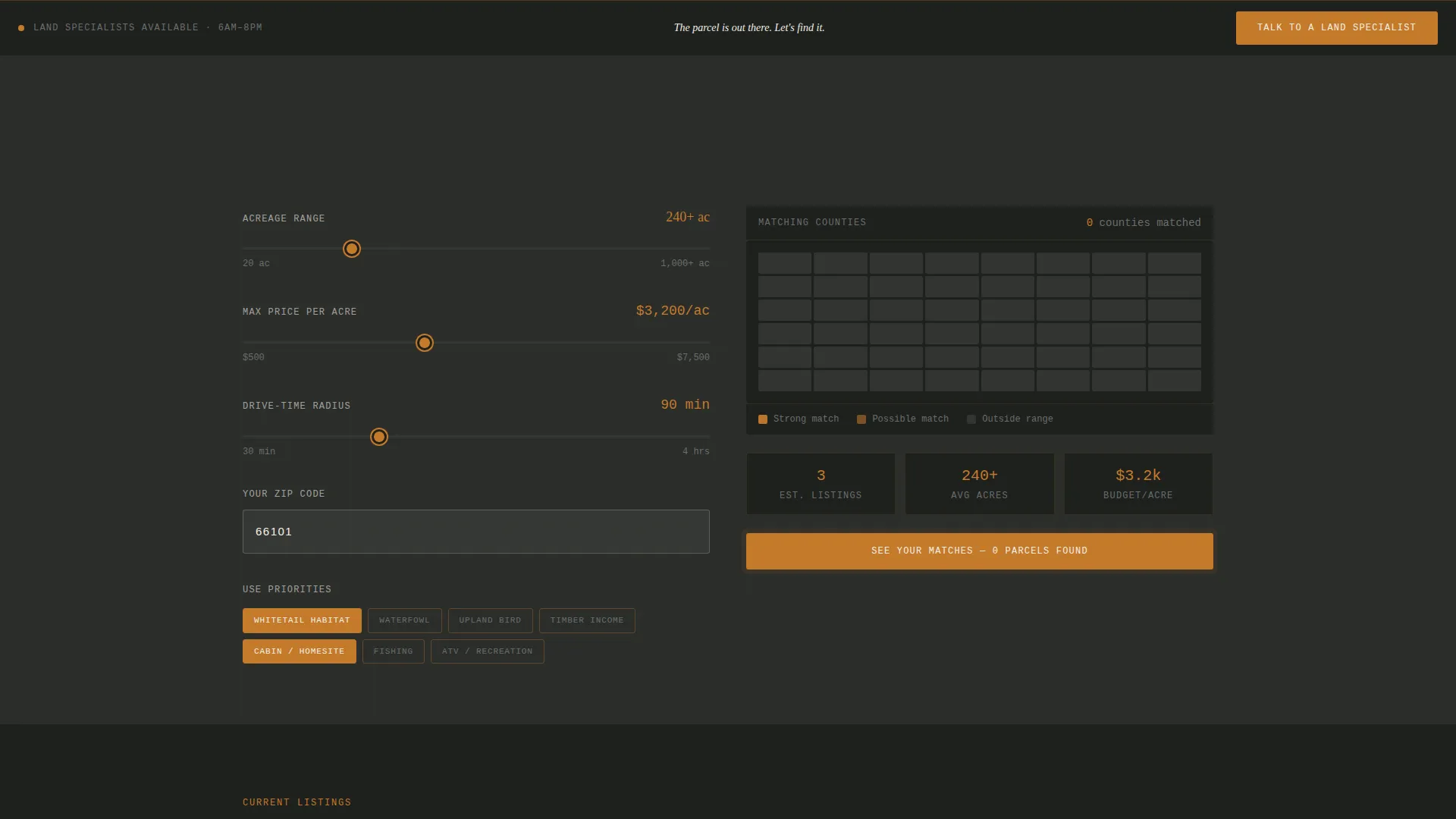
Three interactive sliders let visitors set acreage range, maximum price per acre, and drive-time radius from a zip code input. Toggle chips below the sliders filter results by use-type priorities including whitetail habitat, waterfowl, upland bird, timber income, cabin or homesite, fishing, and ATV recreation.
Live County Map Display
As visitors adjust the sliders and toggle chips, a map updates in real time and shades matching counties in heartwood amber. The visual feedback makes the tool feel responsive and rewarding before any form is shown.
Educational Land-Buying Sections
Each scroll section teaches one land-buying concept in depth. Topics include reading timber appraisals, understanding CRP contract income, evaluating deer carrying capacity per acre, and recognizing landlocked-parcel risk. Every block ends with a contextual prompt to return to the assessment tool.
Gated "See Your Matches" Form
The primary conversion point sits after the tool delivers perceived value. A three-field form collects name, email, and phone number. The assessment data pre-qualifies each lead by budget, geography, and use case before an agent follows up.
Fixed Bottom-Rail Contact Button
A persistent "Talk to a Land Specialist" button lives in the bottom rail throughout the entire page. It serves visitors who already know what they want and do not need the full assessment flow to make contact.
Page sections overview
| Section | Purpose |
|---|---|
| Mosaic Header Grid | Immersive nine-frame visual introduction with centered editorial headline |
| Land Match Tool | Interactive sliders and toggle chips to filter land by buyer criteria |
| Live County Map | Real-time amber shading of counties matching current tool inputs |
| Timber Appraisal Block | Educational section explaining how to read timber value assessments |
| CRP Income Block | Educational section on understanding Conservation Reserve Program contract income |
| Deer Habitat Block | Educational section on evaluating deer carrying capacity per acre |
| Landlocked Parcel Block | Educational section on recognizing and avoiding landlocked-parcel risk |
| See Your Matches Form | Gated three-field lead capture form that closes the assessment flow |
| Fixed Contact Rail | Persistent bottom-bar button for direct specialist contact |
Design & branding system
The visual identity follows an Atelier Studio approach built around a Charcoal and Amber palette. The overall mood is a taxidermy studio in November: oiled walnut, tanned leather, and lamplight falling on topo maps pinned to dark walls.
- Core palette: deep timber charcoal (#2B2D2B) for full-bleed sections, heartwood amber (#C47A2B) for calls to action and interactive hotspots, weathered fence-wire gray (#6B6E6B) for supporting text, and parchment cream (#F4EFE4) for map panels and data cards
- Typography uses editorial serif type for headlines floating over the mosaic, keeping a print-quality, plat-book feel throughout
- Amber functions as the single accent color, lighting up slider handles, county map shading, toggle chip selections, and the primary call-to-action button like embers in a fire ring
Mobile & speed optimization
The full-width immersive layout is designed to translate across screen sizes. The mosaic grid, sliders, and toggle chips each adapt to narrower viewports so the tool remains usable on a phone in a truck cab or a field with intermittent signal.
- The mosaic header reflows so no single frame becomes too small to read on mobile screens
- Sliders and toggle chips are sized for thumb interaction, keeping the assessment tool fully functional on touch devices
- Parchment cream card panels and charcoal section backgrounds keep visual contrast high across different screen brightness settings
How this template helps you convert
This template is structured around a learn-then-act rhythm. Each visitor gets smarter as they scroll, and each section funnels that growing confidence toward the lead form.
- The Land Match Assessment tool delivers immediate, personalized value before any form appears, so the gate on "See Your Matches" feels earned rather than intrusive
- Educational blocks on CRP income, timber appraisals, and habitat quality build the kind of buyer trust that turns a casual visitor into a qualified, phone-ready lead
- The fixed bottom-rail specialist button captures high-intent visitors at any scroll depth, ensuring no ready buyer has to scroll back up to make contact
Other information about this template
This template is designed specifically for the land and agricultural real estate category, where buyer intent ranges from recreational use to investment. A few additional details worth knowing before you build with it.
- The template is suited to niches such as agricultural land appraisal, rural investment property, hunting lease conversion, and cabin or homesite development
- The Charcoal and Amber color system and Atelier Studio visual theme are pre-configured in the design layer, so brand customization starts from a finished-looking baseline rather than a blank canvas
- The assessment tool layout can support multiple use-type chip categories beyond those listed in the brief, making it adaptable as your brokerage's listing inventory grows or shifts in focus
Theme
Pastoral Calm
Creative direction
Gallery Walk
Color system
Dark Emerald
Style
Full-Width Immersive
Direction
Lead Generation
Page Sections
Photo Grid Mosaic Header
Interactive Land Match Assessment
Live County Map Shading
Educational Land-buying Sections
Gated Matches Lead Form
Fixed Specialist Contact Rail
Related questions
Can I customize the use-type toggle chips in the Land Match tool?
Does the template include county map data or just the map display component?
How does the gated form connect to the assessment tool?
Is this template suitable for brokerages selling both hunting land and agricultural investment parcels?
Can the fixed bottom-rail button label be changed?



