Certified Beauty & Salon Software & SaaS Professional Website Template
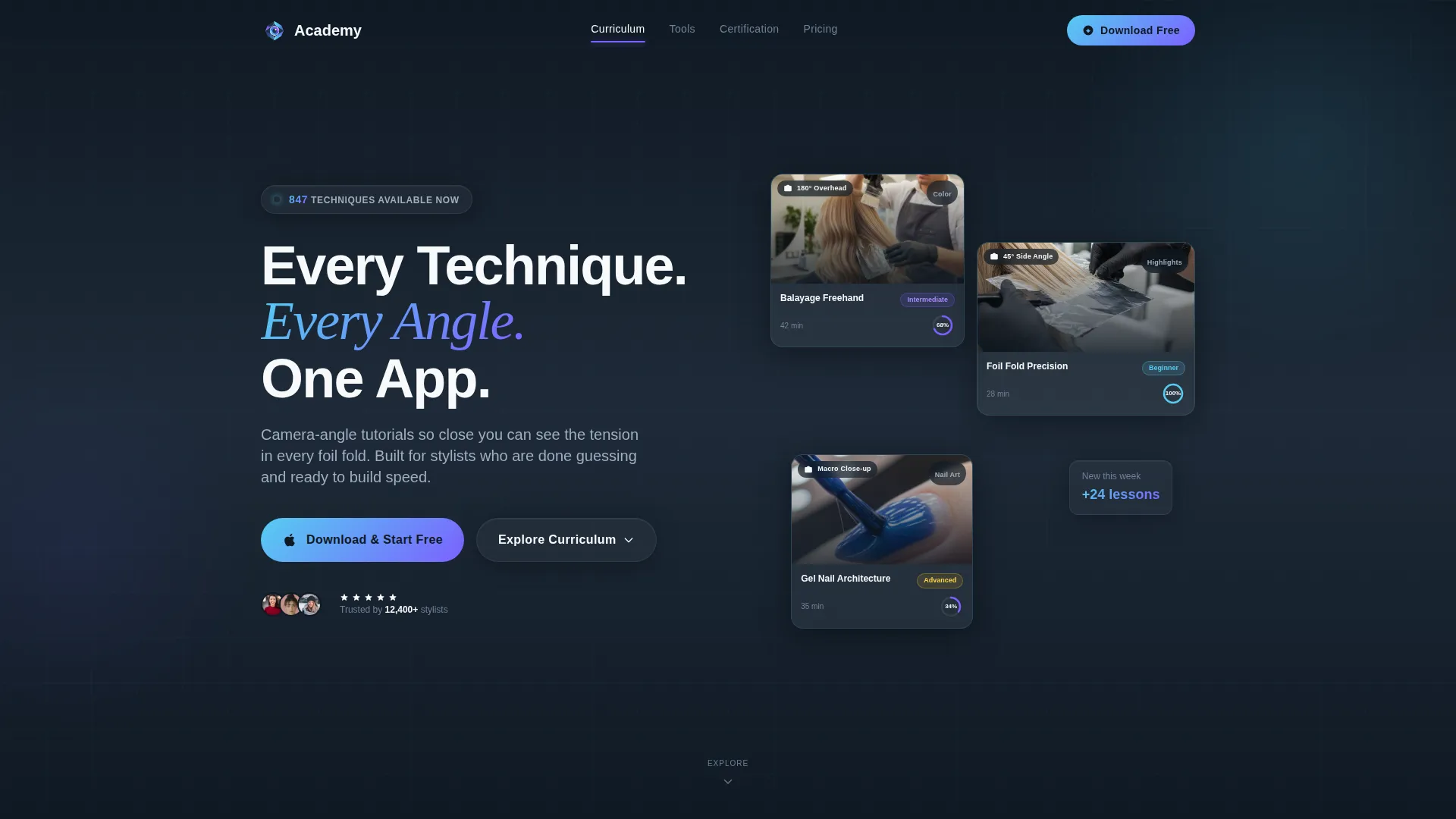
Academy is a hub-and-spoke landing page template built for beauty and salon training platforms. It pairs a Tech Glass visual identity with a Spec Sheet content cadence, guiding visitors from trust-building logo headers through curriculum grids, device compatibility specs, and certification sections, down to a single, friction-free app download call to action.
by Rocket studio
Quick summary
Academy is a single-page, anchor-nav landing page template designed for cosmetology and salon training platforms. It opens with an institutional logo bar, moves through structured curriculum and tools sections, and closes with a direct app download prompt. The layout feels like a polished product data sheet: every number earns trust, every section moves the visitor one step closer to tapping "download."
Who this template is for
This template is built for anyone launching or promoting a digital training platform in the beauty and salon space. It speaks directly to the people building those platforms and to the learners they serve.
- Beauty school owners and salon software founders who need a credible, conversion-focused landing page for their training app
- Established stylists or educators launching online courses in techniques like balayage, microblading, or lash extensions
- Salon owners who want a polished page to introduce onboarding tools to new hires without heavy development work
What problem this template solves
Training platforms in the beauty industry often struggle to communicate credibility fast. Visitors land on a page and cannot quickly tell whether the platform is professional, complete, or worth their time. Academy solves that by front-loading trust signals and organizing every capability into scannable, spec-driven sections.
- Visitors see partnership logos and certification seals before reading a single line of copy, establishing authority instantly
- Curriculum cards with module counts, completion times, and skill-level badges remove guesswork about course depth
- A friction-free app download flow with no form fields reduces the barrier between curiosity and first use
What you get with this template
You get a fully structured, single-page layout built around an anchor navigation system. Each nav spoke links directly to a dedicated content section, so visitors can jump to exactly what matters to them without scrolling past irrelevant content.
- A sticky anchor nav with labels like "Curriculum," "Tools," "Certification," and "Pricing" that pins to the top on scroll
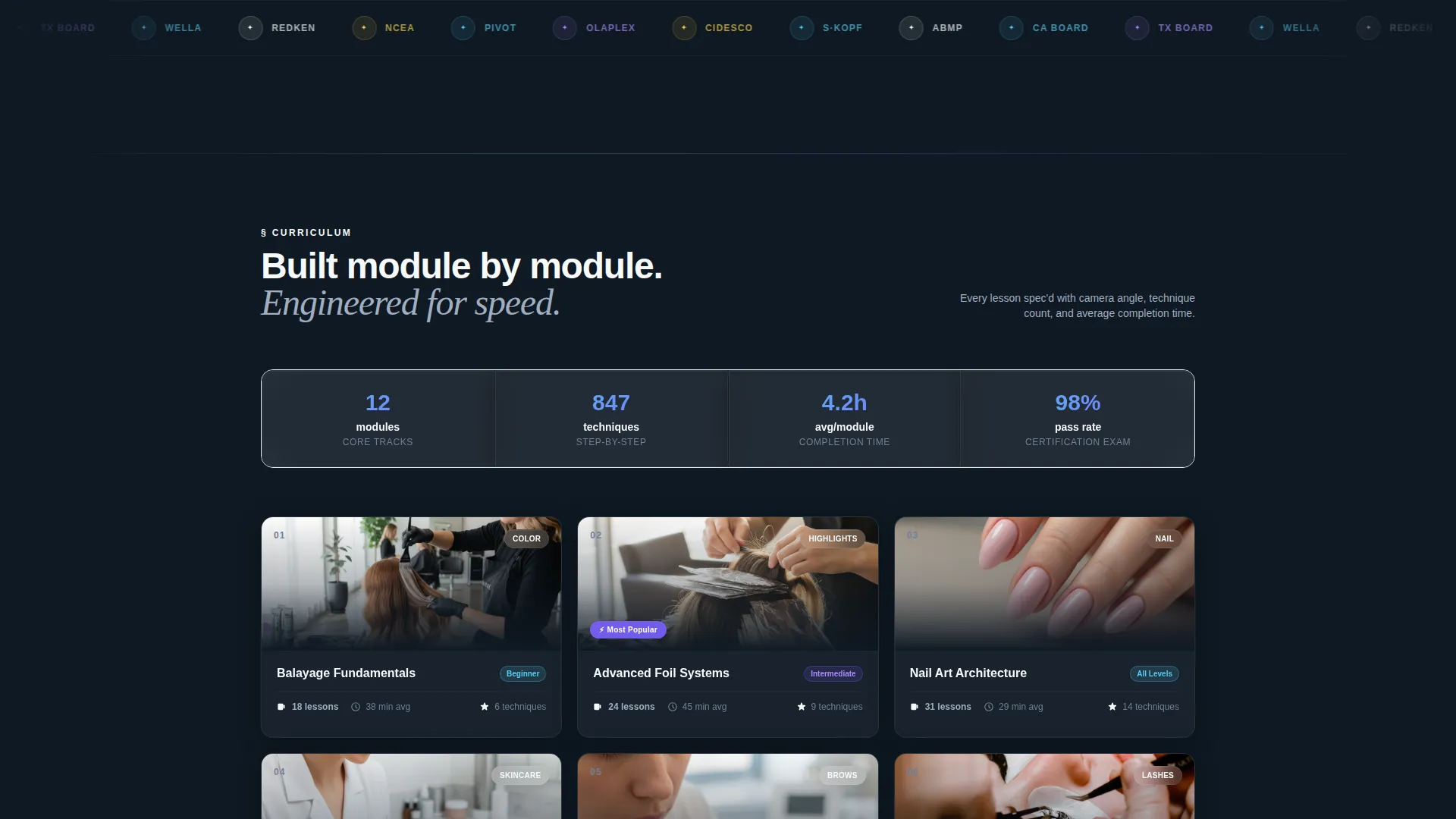
- A header logo bar on frosted glass with parallax scrolling, displaying brand and certification partner logos beneath a bold headline
- A sticky mobile bottom bar carrying the primary call to action alongside App Store and Google Play badges
Feature list
This template is built around a deliberate set of components, each serving a specific role in the visitor journey from first impression to final tap.
Anchor Navigation System
A sticky top nav pins in place as visitors scroll. Each label, such as "Curriculum," "Tools," "Certification," and "Pricing," links to its corresponding section. This gives the page a product-catalog feel while keeping orientation effortless.
Parallax Logo Bar Header
The header ribbon displays recognizable beauty brand and certification logos on a frosted glass surface with a subtle parallax scroll effect. A single bold headline sits above the logos. The combination establishes institutional credibility before the visitor reads any descriptive copy.
Curriculum Grid Cards
The Curriculum section presents course modules in a clean grid. Each card displays module count, average completion time, and a skill-level badge. The format mirrors a product spec sheet, making it easy to assess depth and scope at a glance.
Tools and Device Compatibility Section
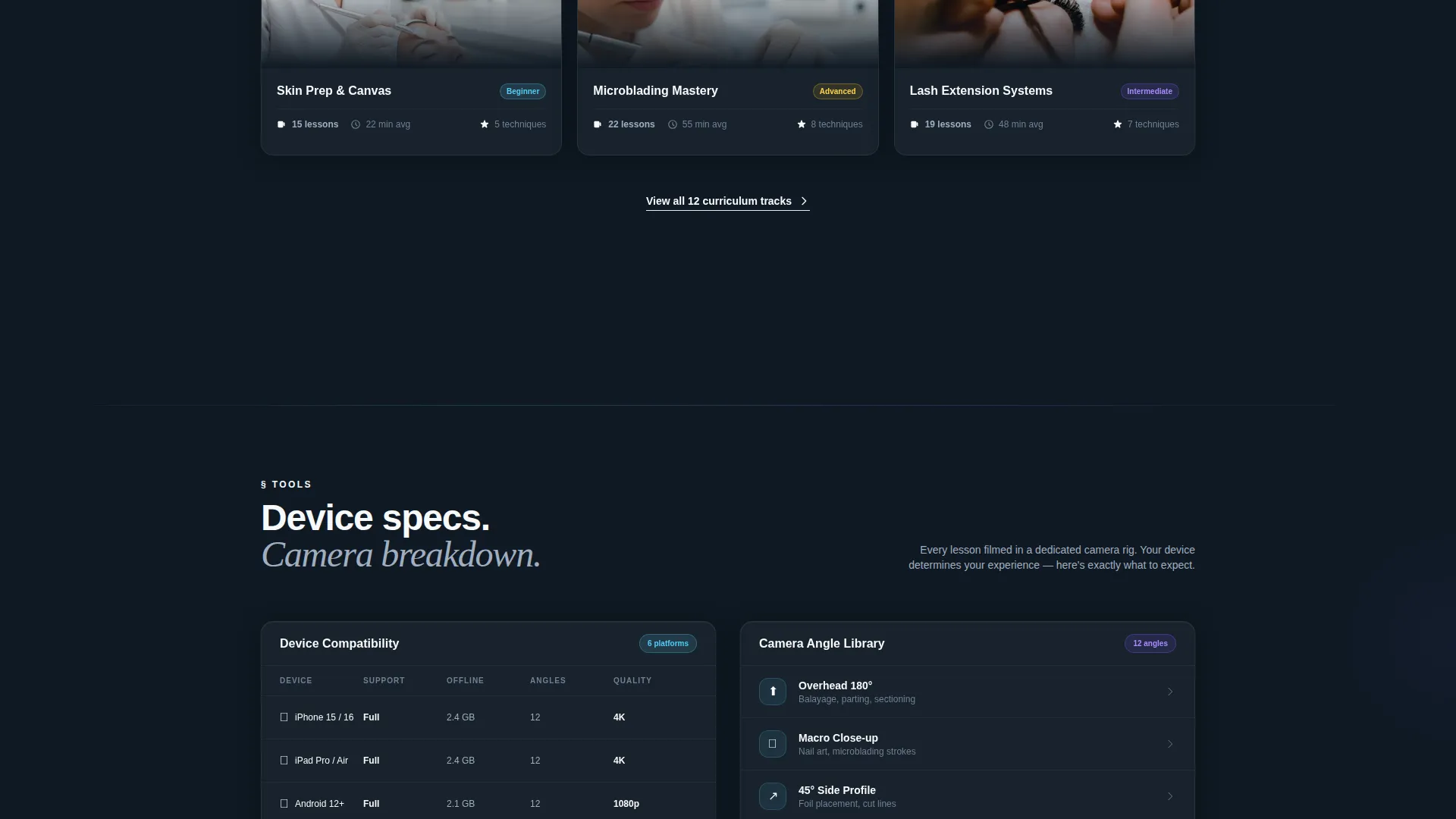
The Tools spoke surfaces device compatibility details, offline download sizes, and camera-angle breakdowns per lesson. This section answers practical technical questions and builds confidence that the platform is engineered rather than improvised.
App Download Call to Action with Mobile Sticky Bar
The primary call to action, "Download and Start Your First Lesson Free," appears in both the header and a sticky bottom bar on mobile. App Store and Google Play badges sit alongside it. A secondary desktop path offers a single phone-number input to send the download link to a mobile device.
Live Technique Counter and Free-Lesson Guarantee
A live counter displays the total number of techniques available on the platform. Combined with the free-lesson guarantee, it reduces commitment anxiety and gives visitors a concrete reason to tap before they leave the page.
Page sections overview
| Section | Purpose |
|---|---|
| Logo Bar Header | Establish trust via certification and brand logos before copy |
| Anchor Nav Bar | Let visitors jump to any spoke section instantly |
| Curriculum Grid | Show module counts, completion times, and skill-level badges |
| Tools Specs | Display device compatibility, offline sizes, and lesson camera angles |
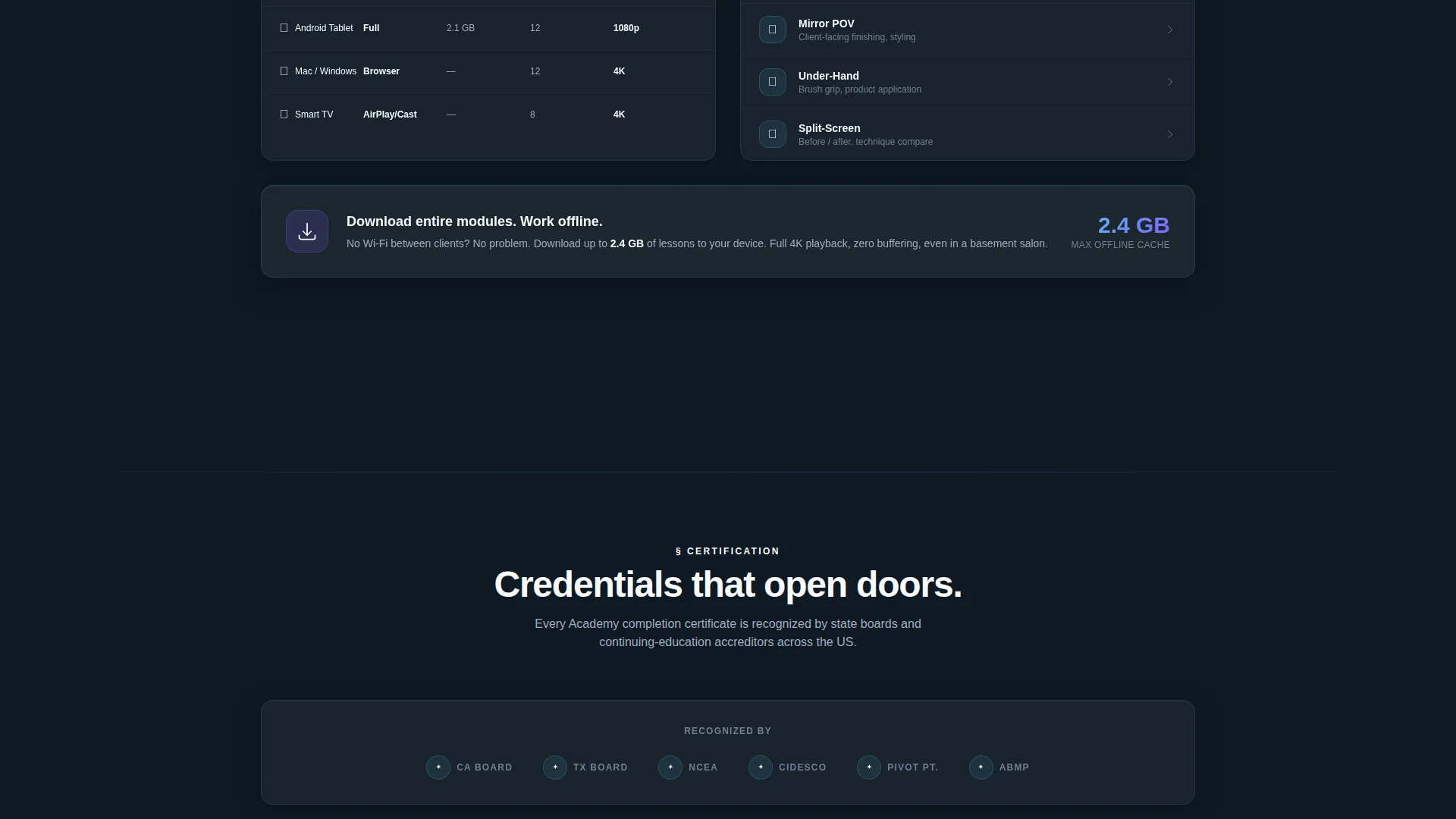
| Certification Section | Highlight accreditation pathways and continuing-education value |
| Pricing Spoke | Present plan tiers or pricing details in a scannable format |
| App Download call to action | Drive primary conversion with store badges and free-lesson hook |
| Mobile Sticky Bar | Keep the download call to action visible throughout the scroll on mobile |
| Desktop Send Link | Offer a single phone-number field for desktop visitors to get the app |
Design & branding system
The visual identity uses a Tech Glass theme paired with a Slate and Sky color system. Every surface feels cool, backlit, and precisely arranged, like a high-end tablet sitting on a minimalist salon counter.
- Core palette: deep charcoal slate (#1E2A38) for backgrounds, polished chrome gray (#A0AEC0) for secondary text and borders, open-sky blue (#56CCF2) for highlights, and frosted white (#F7FAFC) for card surfaces
- Accent interactions including hover states, progress rings, and active nav indicators glow in electric periwinkle (#7B61FF), giving the interface a distinctly high-tech, studio-quality feel
- The overall aesthetic mirrors reading the back of a prestige product box: every element has a purpose, nothing competes for attention, and every surface reflects light like glass
Mobile & speed optimization
The template is built with mobile-first conversion in mind. The sticky bottom bar ensures the primary call to action is never more than a thumb's reach away, even deep in the page.
- The sticky bottom bar on mobile keeps "Download and Start Your First Lesson Free" visible at all times, flanked by App Store and Google Play badges
- Platform detection allows the page to route visitors directly to the correct app store without requiring manual selection
- Offline download sizes are surfaced in the Tools section, reassuring mobile users that the platform works in low-connectivity environments
How this template helps you convert
Academy is structured to reduce every possible barrier between a first visit and a completed app download. The layout sequences trust, then clarity, then action.
- The logo bar and live technique counter front-load authority and scale, so visitors arrive at the call to action already confident rather than skeptical
- The anchor nav lets motivated visitors skip directly to pricing or certification without losing momentum, shortening the path for high-intent users
- The no-form-field download flow, combined with the free-lesson guarantee, removes the last hesitation point and makes the first tap feel completely low-risk
Other information about this template
This template is categorized under Technology, specifically within the Beauty and Salon Software and SaaS subcategory. It is purpose-built for the beauty and salon training platform niche and carries a high intersection match for that use case.
- The Spec Sheet creative direction means every section reads like a product data sheet, which suits software and app landing pages across the beauty tech space
- The Hub and Spoke anchor nav structure makes this template adaptable for platforms offering multiple distinct course categories or service tiers
- The template is designed as a single landing page, not a multi-page website, so all content lives in one scrollable, section-linked flow
- The free-lesson hook and technique counter are layout placeholders that the platform owner populates with real data, keeping the page both honest and compelling
Theme
Tech Glass
Creative direction
Spec Sheet
Color system
Slate & Sky
Style
Hub & Spoke (Anchor Nav)
Direction
App Download
Page Sections
Sticky Anchor Navigation Bar
Parallax Logo Bar with Bold Headline
Curriculum Module Grid
Tools and Device Specs Section
App Download Call to Action with Mobile Sticky Bar
Live Technique Counter
Related questions
Is this template designed for a single page or multiple pages?
Can I use this template if my platform focuses on one technique, like microblading or lash extensions?
Does the template include App Store and Google Play badge placements?
What makes this template different from a generic course landing page?
How does the desktop Send Link to My Phone feature work in this template?



