Academy — Elite Learning Landing Page Template
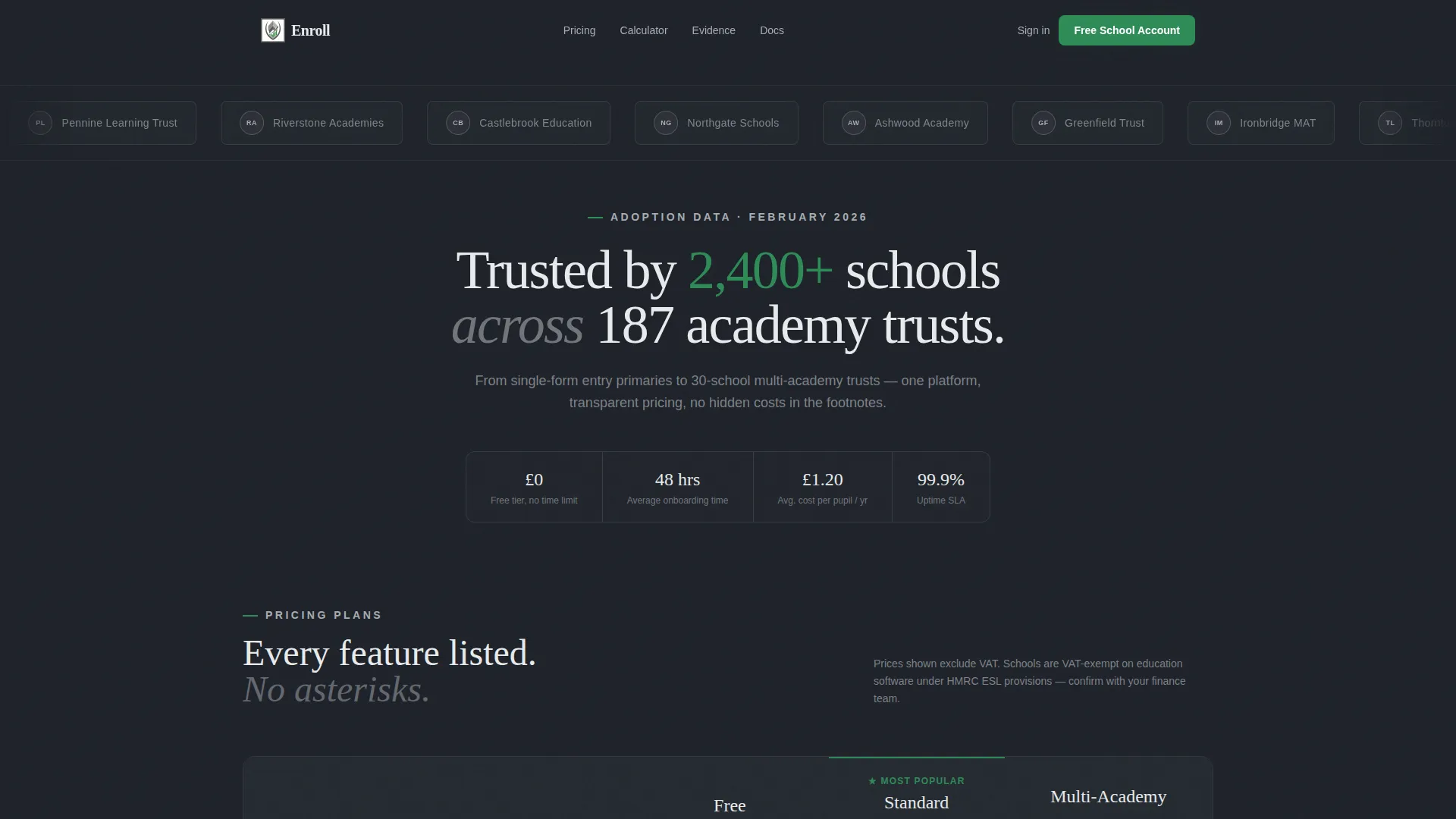
Enroll is a single-page school and academy pricing landing page built on a Dashboard/Data Grid layout. It presents three subscription tiers in a structured grid, includes a live cost-per-pupil calculator, and surfaces anonymized adoption data as evidence. The Dynamic Motion theme and Monochrome Steel palette give it the authority of an industry report, not a sales brochure.
by Rocket studio
Quick summary
Enroll is a pricing landing page designed for the education sector. It lays out Free, Standard, and Multi-Academy subscription tiers in a clear data grid, then backs every claim with live cost calculations and anonymized usage statistics. The page is built to help headteachers, academy trust finance leads, and admissions staff make a confident decision, not a leap of faith.
Who this template is for
This template serves education professionals who need hard evidence before committing to a platform subscription. It speaks directly to the people who carry the financial and operational weight of that decision.
- Headteachers comparing SaaS (Software as a Service) platforms during limited planning time
- Academy trust Chief Financial Officers building next-year budgets and needing a document to circulate internally
- Admissions coordinators justifying a subscription to a governing board that demands clear, printed evidence
What problem this template solves
Most pricing pages ask education buyers to trust marketing language. School decision-makers need structured evidence, not promises. This template replaces vague benefit lists with data-driven proof.
- Pricing grids are often unclear, hiding costs in footnotes or requiring a sales call to understand tier differences
- Finance leads need a shareable document before approval, and most pages offer no offline path
- Anonymized benchmarking data is rarely surfaced on a pricing page, yet it is exactly what convinces a cautious board
What you get with this template
The template delivers a fully structured, single-page pricing layout with three distinct content sections and two conversion paths. Every component is sourced from the brief and built around a specific buyer moment.
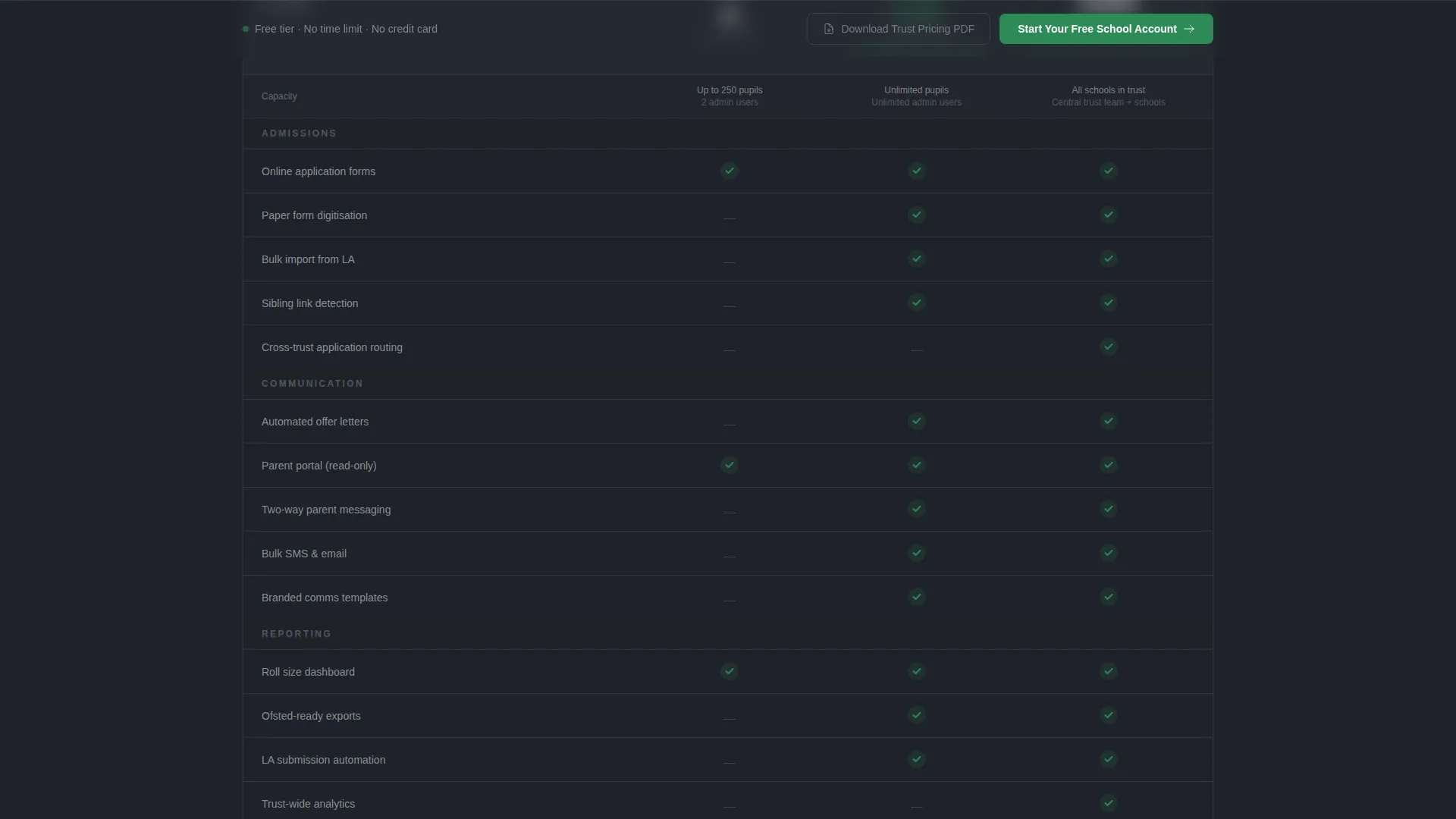
- A three-tier data grid with animated checkmarks that stagger in as each row enters the viewport
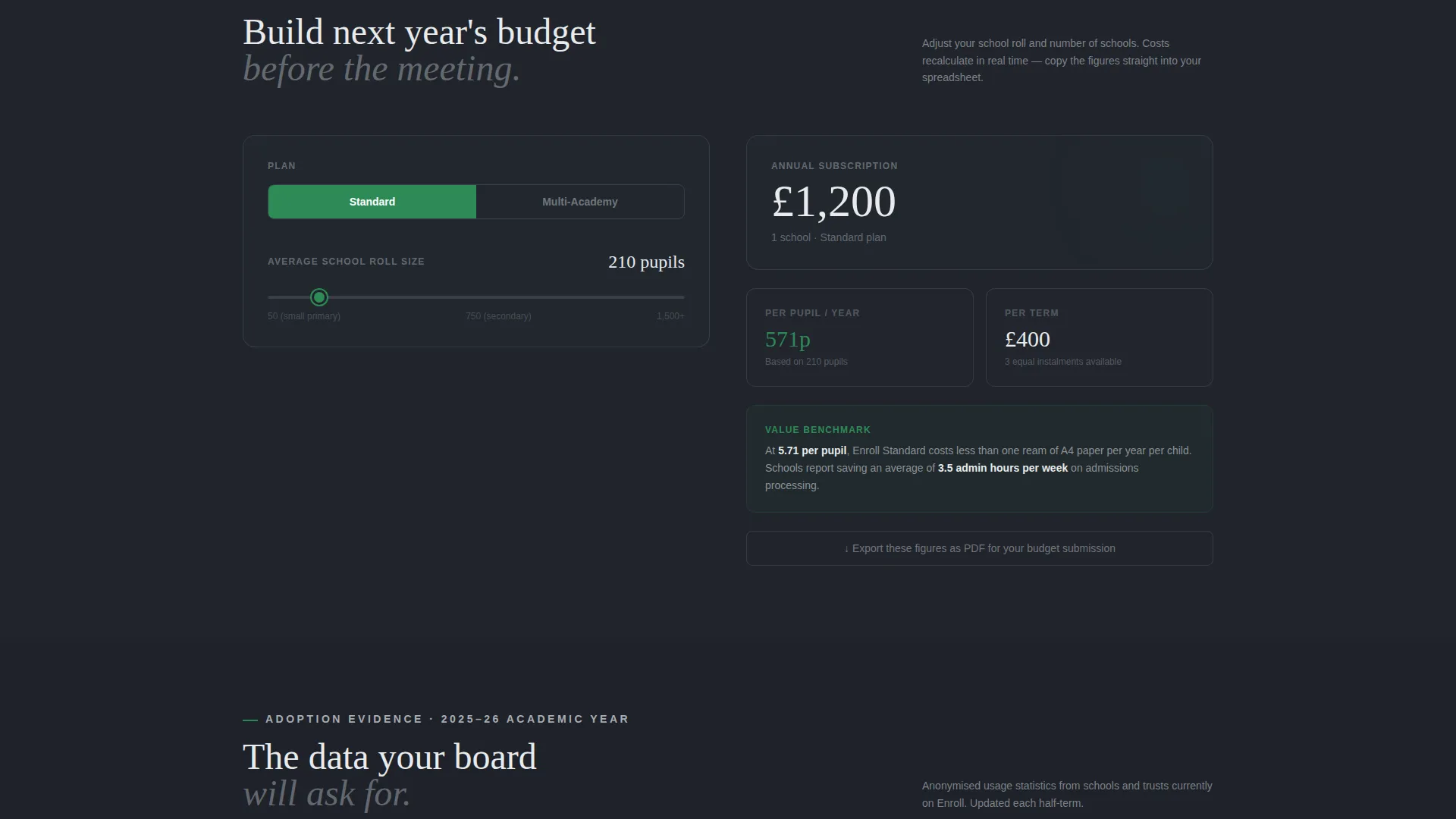
- A live cost-per-pupil calculator with roll-size sliders and a live-updating annual price display
- A sticky bottom bar with the primary call-to-action button and a secondary PDF download path for CFOs
Feature list
This template is built from purpose-specific components. Each one maps to a real moment in the school buyer's decision journey.
Animated Tier Comparison Grid
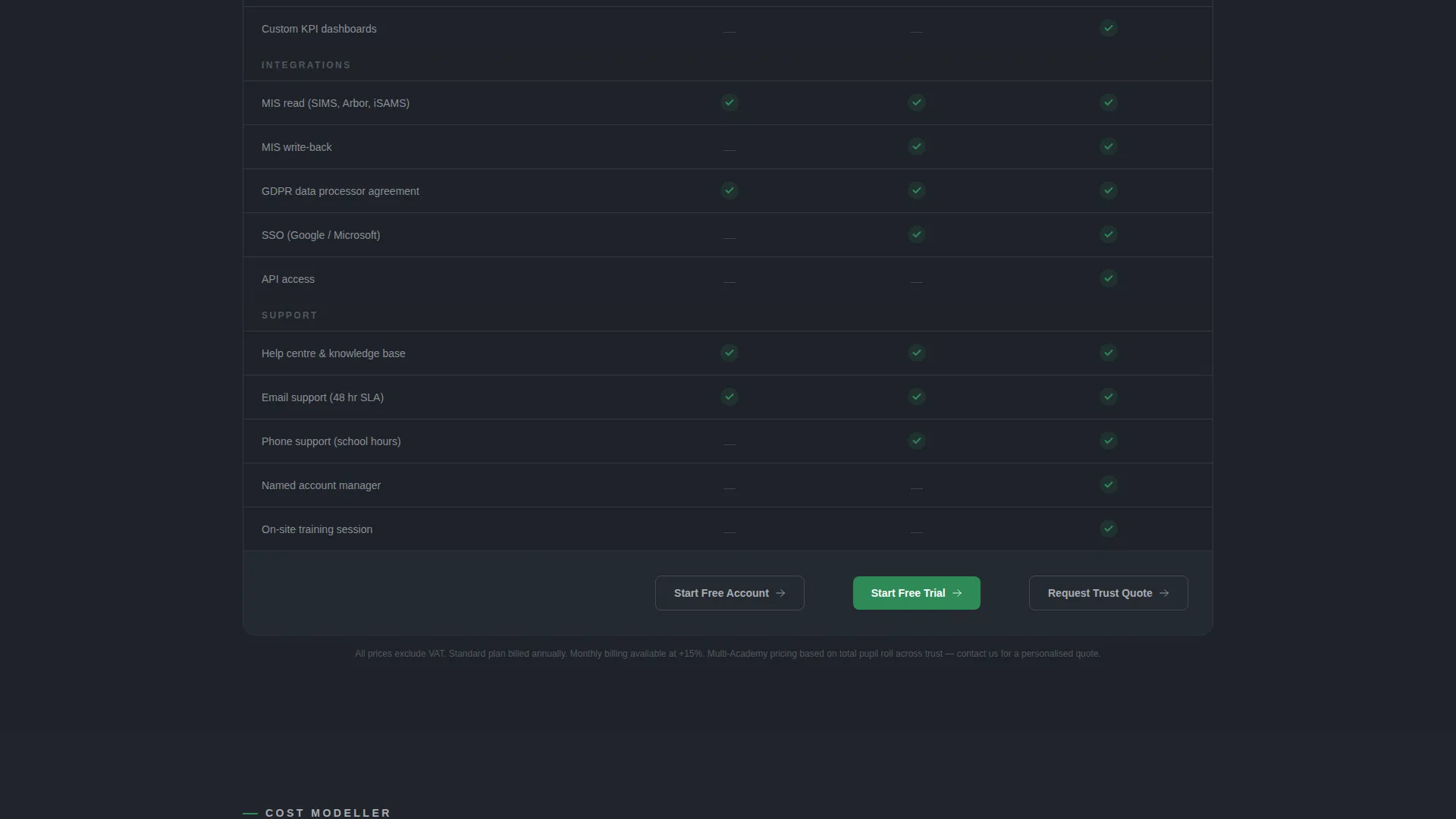
Three columns cover Free, Standard, and Multi-Academy plans. Feature rows use checkmarks that animate in sequence as the visitor scrolls, drawing attention row by row in the way a graph draws itself on screen.
Live Cost-Per-Pupil Calculator
Sliders let the visitor adjust school roll size and the annual subscription cost recalculates in real time. Numbers tick like a departures board, making the financial case tangible before the visitor reaches the call-to-action.
Anonymized Adoption Statistics Panel
Bar charts show feature usage broken down by school type. Pie charts display trust size distributions. The data is presented as a benchmarking study, giving the visitor evidence that peers have already made this decision.
Scrolling Logo Bar Header
A horizontal ribbon of school crests, academy trust logos, and local authority badges scrolls with subtle kinetic drift. Every logo is rendered in monochrome steel so no single institution dominates. A single data line reads: "Trusted by 2,400+ schools across 187 academy trusts."
Sticky Freemium Conversion Bar
After the visitor scrolls past the pricing grid, a sticky bottom bar appears. It pins the primary call-to-action ("Start Your Free School Account") and a secondary link to download the Trust Pricing PDF, keeping both conversion paths visible without interrupting reading flow.
School-First Sign-Up Form
The sign-up form opens with a school name field that autocompletes from a national database. It then asks for a work email and a role dropdown covering Head, Business Manager, IT Lead, and Other, so every lead is qualified at the point of capture.
Page sections overview
| Section | Purpose |
|---|---|
| Logo Bar Header | Establishes trust with scrolling institutional logos and a single social-proof data line |
| Tier Comparison Grid | Presents Free, Standard, and Multi-Academy plans with animated feature checkmarks |
| Cost-Per-Pupil Calculator | Lets visitors model real annual costs using roll-size sliders with live price updates |
| Adoption Statistics Panel | Surfaces anonymized bar and pie charts framed as a benchmarking report |
| Sticky Conversion Bar | Keeps the primary call to action and PDF download path visible after the grid is passed |
Design & branding system
The visual identity follows a Dynamic Motion theme built on a Monochrome Steel color system. The palette feels like a well-maintained school corridor: steel locker doors catching fluorescent light, dark notice boards behind glass, and one accent pulling the eye to the right action.
- Base colors: gunmetal (#3B3F45) for surfaces, brushed aluminum (#A8ADB3) for secondary text and borders, and chalkboard slate (#1E2229) for deep background panels
- Institutional green (#2E8B57) is used exclusively for active toggles, selected plan borders, and call-to-action buttons, ensuring immediate visual hierarchy
- Section transitions use subtle parallax shifts with data panels sliding into frame like cabinet drawers, consistent with the Industry Report creative direction
Mobile & speed optimization
The layout is structured so that the data grid, calculator, and statistics panels reflow cleanly on smaller screens. The sticky conversion bar remains functional across device sizes, keeping both conversion paths reachable without scrolling back to the top.
- The tier comparison grid stacks vertically on mobile so each plan column reads as a self-contained card
- Slider-based calculator inputs are sized for touch interaction, keeping the cost modelling experience usable on phones and tablets
How this template helps you convert
The page is engineered around a Freemium/Trial conversion model. Every structural decision reduces friction for the most cautious buyer in education procurement.
- The cost-per-pupil calculator makes the upgrade case financial and specific, showing return within one half-term before the visitor reaches the sign-up form
- The sticky bottom bar ensures the primary call-to-action and the PDF download path are always one tap away, covering both the ready-to-sign-up visitor and the CFO who needs a document first
Other information about this template
This template is part of the School and Academy Website Templates subcategory within the Technology category. It is built specifically for the school and academy pricing page niche, where the buying decision involves multiple stakeholders and extended approval cycles.
- The free tier described in the template is fully functional with no time limit, which the page communicates directly to reduce sign-up hesitation
- The PDF download path ("Download the Trust Pricing PDF") is designed for multi-stakeholder procurement workflows common in academy trusts
- The Industry Report creative direction positions the page closer to a published study than a conventional marketing page, which is intentional for an audience trained to evaluate evidence
- The template style is Dashboard/Data Grid, making it well-suited for technology product pricing in education contexts where structured comparison is expected
Theme
Dynamic Motion
Creative direction
Industry Report
Color system
Monochrome Steel
Style
Dashboard/Data Grid
Direction
Freemium/Trial
Page Sections
Animated Tier Comparison Grid
Live Cost-per-pupil Calculator
Anonymized Adoption Statistics Panel
Scrolling Institutional Logo Bar
Sticky Freemium Conversion Bar
School-first Qualification Form
Related questions
Who is this pricing page template designed for?
Does the template include a calculator section?
What are the two conversion paths on this page?
How many pricing tiers does the template cover?
Can this template be used for a multi-academy trust procurement process?



