
Most ads fail at the landing, not the click. This quick landing page setup blog covers audience strategy, copywriting, step-by-step build, and tracking. Everything you need to go live with a page that converts.
What separates a landing page that converts from one that just exists?
A landing page is a standalone web page built for one purpose. It gets one type of visitor to take one specific action. There is no navigation, no competing messages, and no distractions. Just a clear offer and a single path forward.
That focus is exactly why landing pages outperform general pages. A polished landing page can meaningfully improve conversion rates. In fact, pages with video can push that number up by 86%.
This quick landing page setup blog covers the full path for both first-time builders and experienced campaign managers.
What is a Landing Page (and What Makes One Actually Convert)
A landing page strips everything away except the one action you want the visitor to take. That action could be signing up, buying, booking, or downloading. Unlike a homepage, which serves multiple audiences and links to dozens of destinations, a landing page has one job.
To help you get started, here is a quick breakdown of what each page type does:
| Page Type | Purpose | Navigation | Links Out |
|---|---|---|---|
| Landing page | One conversion goal | None | One CTA only |
| Homepage | Brand overview, multiple audiences | Full nav | Many |
| Product page | Product detail and purchase | Full nav | Multiple CTAs |
| Microsite | Campaign or event hub | Minimal | A few |
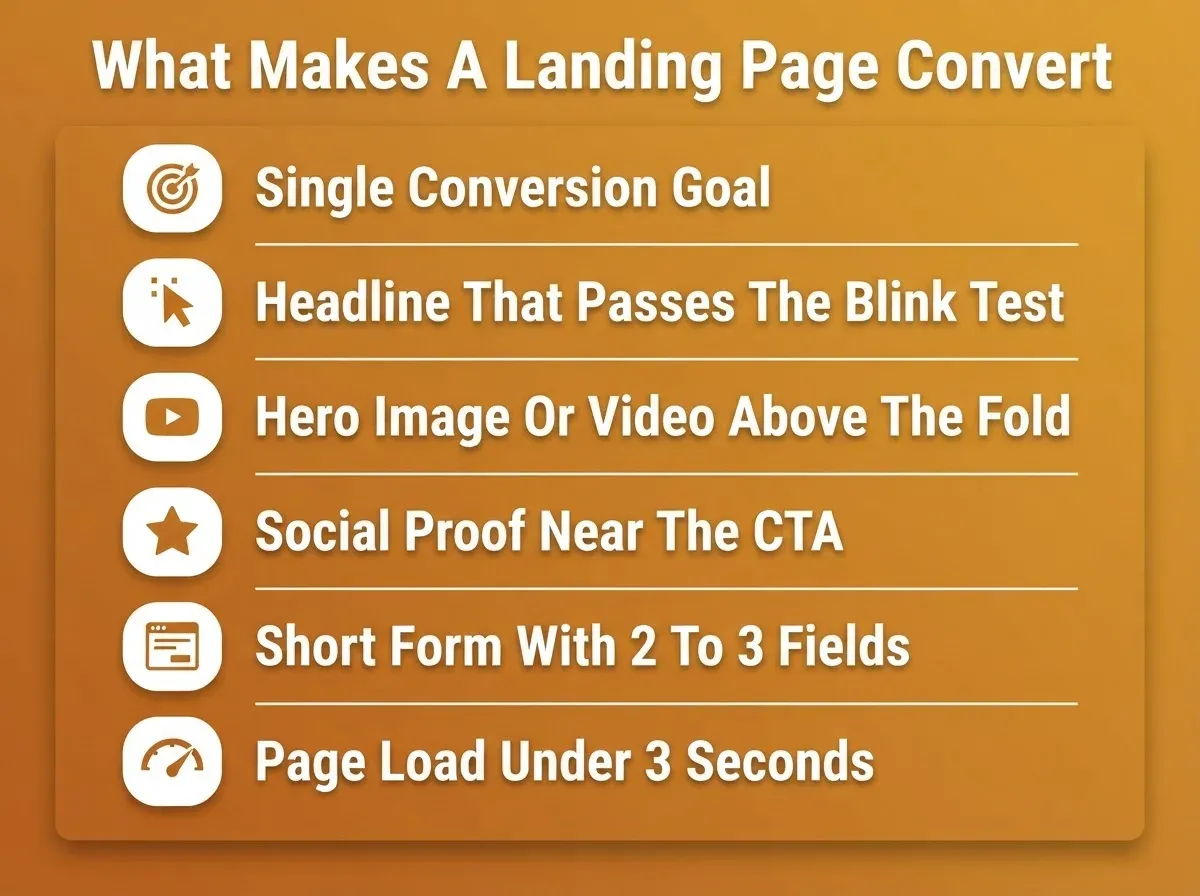
Every high-converting landing page includes:
- A headline that matches the ad or email that brought the visitor there
- A hero image or short video that supports the offer
- A clear value proposition stated within 3 to 5 seconds of arrival
- Social proof such as testimonials, reviews, logos, or usage numbers
- A single call-to-action button or lead capture form
- Short, benefits-driven copy with bullet points
Common types of landing pages:
- Lead capture pages (collect name and email)
- Product or sales pages (drive purchases)
- Event registration pages
- Free trial or demo request pages
- Webinar sign-up pages
- Click-through pages (warm visitors before a purchase)
 Design mobile-first. More than 50% of web traffic comes from mobile devices. If your landing page does not load fast on a phone, you lose more than half your audience before they read a single word. Google also uses mobile-responsiveness as a ranking factor. So mobile-first is both a conversion and an SEO decision.
One more thing to keep in mind: a landing page converts traffic that already exists. It does not generate traffic on its own. You still need a source such as paid ads, email, organic search, or social to send visitors to the page. Build the page and the traffic source in parallel, not sequentially.
Know Your Audience Before You Write a Word of Copy
The biggest mistake in landing page setup is jumping straight to tools. Before you pick a template or write a headline, you need to know exactly who you are talking to. You also need to understand what they feel when they arrive.
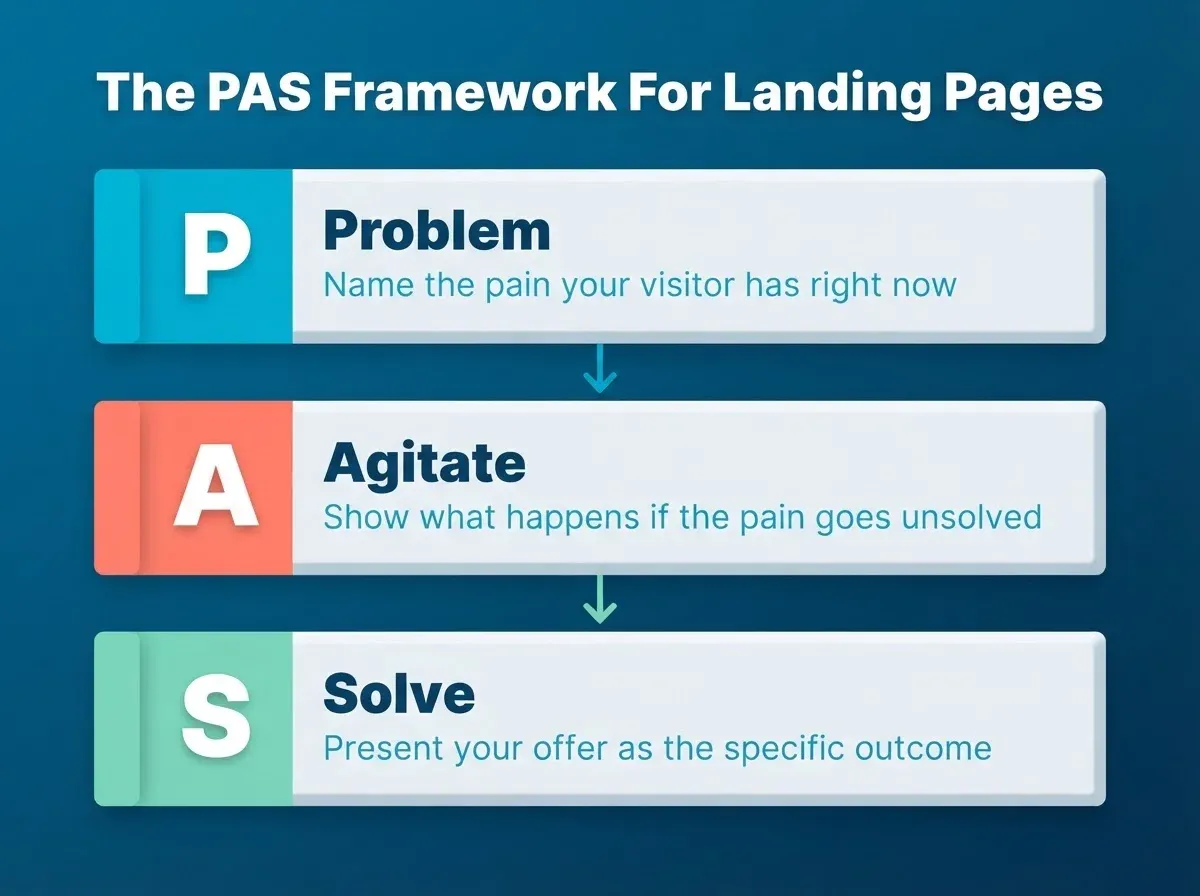
The PAS framework (Problem, Agitate, Solve) is the fastest way to structure your thinking. Here is how it works in practice:
Problem: What specific pain does your visitor have right now? "I need a landing page for my ad campaign but I don't have a developer or a week to spare."
Agitate: What makes that pain worse if left unsolved? "Every day without a live page means ad spend going to a dead link. Leads are leaking."
Solve: How does your offer fix it, specifically and fast? "Describe what you want. Rocket generates a full landing page from a single prompt. Pick a template, customize with chat, and publish in under two hours."
Once you have your PAS mapped, every element of your page should answer one of these three layers. That includes your headline, subheadline, CTA copy, and social proof.
 Quick audience worksheet. Fill this in before you open any builder:
| Question | Your Answer |
|---|---|
| Who is this page for? (role, stage, pain) | |
| What do they want to do when they land here? | |
| What objection will stop them from clicking? | |
| What one proof point kills that objection? | |
| What is the single action I want them to take? |
Message-match is non-negotiable. If your ad says "Free 14-day trial," your landing page headline must say the same. Mismatched messaging is the most common reason high-CTR ads produce low-conversion pages. Every word the visitor sees after the click should feel like a continuation of the promise that made them click.
To see how this strategy translates into a live page, Rocket's landing page builder shows the full workflow from prompt to published.
How Landing Pages Drive Conversions
Landing pages increase conversions by removing distractions. They give visitors one clear path forward. Here is what a well-built landing page typically includes:
- A punchy headline that aligns with the ad that brought the visitor there
- A hero section with a strong image or a short video
- A lead capture form asking only for essential information like name and email
- Customer testimonials or social proof that builds trust
- A prominent, high-contrast call to action button
Who benefits most from building landing pages:
- Startup founders running paid ads who need a fast way to generate leads
- Freelancers promoting a service or side hustle
- Small business owners running a marketing campaign for a seasonal offer
- Digital marketers managing campaigns across multiple clients
- E-commerce store owners promoting best-selling products or a sale
- Coaches and consultants offering a free consultation or product demo
- SaaS teams launching a new feature or product tier
Landing pages work well for nurturing new customers and driving conversions at every stage of the funnel. Understanding why visitors arrive at your page helps you tailor your messaging to their motivations.
Choosing the Right Landing Page Builder
Choosing a landing page builder depends on your goal, your technical skill level, and your budget. Use the table below to match your situation to the right tool. That way, you invest your time in the right place from the start.
Goal-to-Builder Mapping
| Goal | Best Builder Option | Why It Works |
|---|---|---|
| AI-generated landing page from a single prompt | Rocket | Describe your idea and get a full page with hero, CTA, and social proof blocks instantly |
| Generate leads fast | Leadpages | Built for rapid lead generation with simple designs |
| No-code design flexibility | Canva landing page builder | Drag-and-drop, no coding required |
| Free landing page for beginners | Google Sites or Mailchimp | Both are free and easy to use |
| Advanced A/B testing | Unbounce | Known for high-performance templates and split testing |
| Full funnel and sales | ClickFunnels | Designed end-to-end for lead and sales funnels |
| Pre-built templates by goal | Instapage | Offers over 200 categorized templates |
| Figma design to live page | Rocket | Import a Figma file and convert it directly to production code |
Steps to pick the right builder:
- Define your single conversion goal first
- Check if the builder offers a free tier or trial
- Look for mobile-friendly, responsive templates
- Confirm it supports your domain or allows publishing without one
- Check whether you can access and edit the underlying code if needed
If you are starting without code, how to build a landing page without coding walks through every option available today.
Full Builder Comparison
| Builder | Key Feature | Best For | Free Tier | Code Access |
|---|---|---|---|---|
| Rocket | AI generation + 25,000+ templates + Figma import + full code access | Developers and non-developers who want speed, flexibility, and one tool | Yes | Full |
| Leadpages | Simple drag-and-drop | Fast campaign launches | No | None |
| Canva | Visual design freedom | Creatives and non-developers | Yes | None |
| Google Sites | Free, no-code | Digital marketing beginners | Yes | None |
| Unbounce | A/B testing built in | Marketing teams and developers | No | Limited |
| Mailchimp | Free builder with email tools | Small businesses | Yes | None |
| Instapage | 200+ templates by goal | Agencies and marketers | No | None |
| ClickFunnels | Sales funnel builder | E-commerce and coaches | No | None |
| HubSpot | CRM-integrated templates | B2B marketers | Yes | None |
| Wix | Drag-and-drop site builder | General small business | Yes | Limited |
| Carrd | Minimal single-page sites | Solo creators and simple offers | Yes | None |
Step-by-Step: Build Your Landing Page with Rocket
Rocket's Build capability generates production-ready Next.js web pages from plain language. This includes landing pages, marketing sites, and full web apps. You can start from a text prompt, a Figma design, an uploaded screenshot, a Notion doc, or a Supabase schema. Every path leads to the same editor: chat, visual edit, code view, and one-click publish.
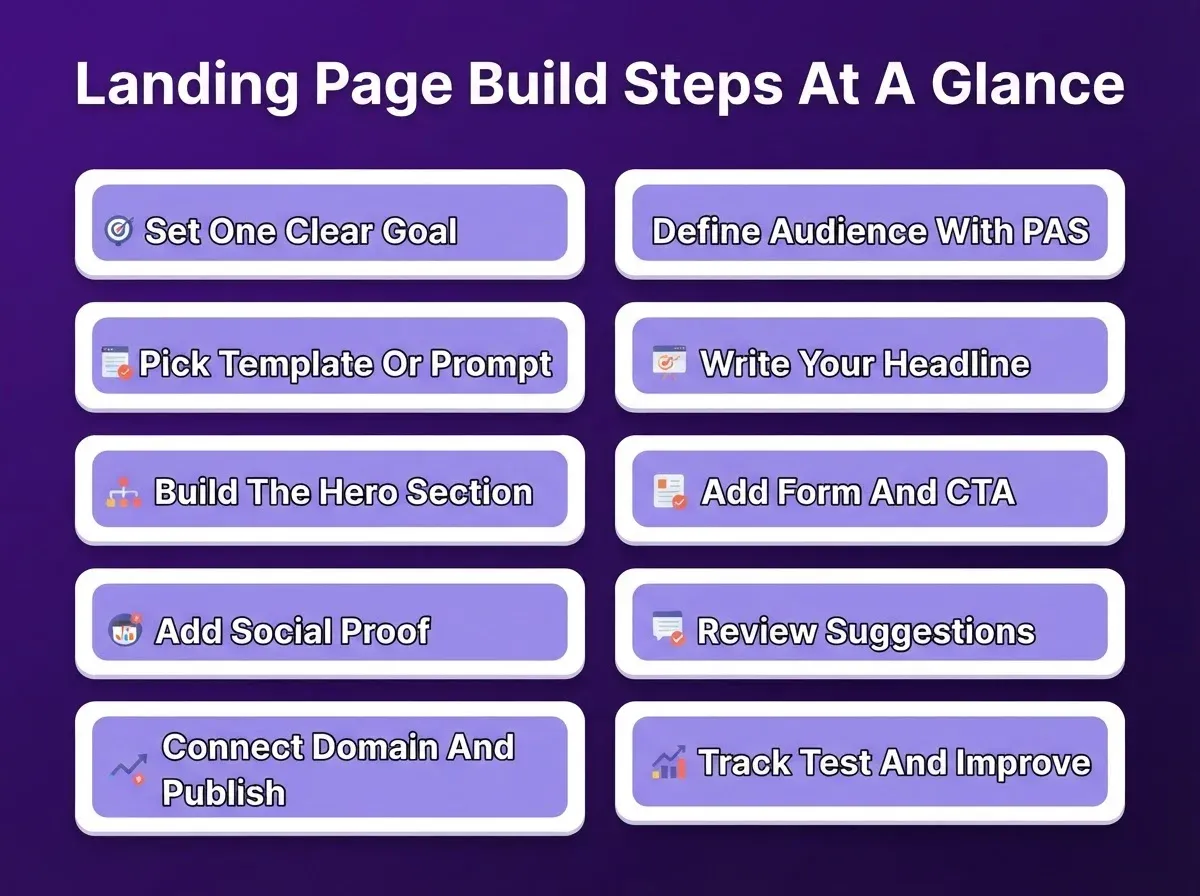
Step 1: Set One Clear Goal
Before you open Rocket, write your goal in one sentence. "I want visitors to sign up for my free trial." That is a goal. "I want people to learn about my brand" is not.
Identify exactly what you want the visitor to do: sign up, buy, download, or book. Everything on your landing page, from the headline to the button color, should serve that one goal. If you are unclear on your goal, no builder will fix that for you.
- Non-coders: Write your goal down before logging in. Keep it visible while you build. This one sentence guides every decision you make inside Rocket.
- Developers: Define your conversion event before you set up any form logic or tracking. It makes Step 10 significantly faster and cleaner.
Step 2: Define Your Audience and Message (PAS)
Pull out the PAS worksheet you filled in earlier. Compress it into three lines. The problem line becomes your subheadline. The agitate line becomes your urgency layer near the CTA. The solve line becomes your headline.
If you skipped the worksheet, do it now. A page built without a clear audience message will underperform, no matter how good the design looks.
- Non-coders: In Rocket's chat, type: "My audience is [role]. Their problem is [pain]. My solution is [outcome]. Write a headline, subheadline, and CTA button label for a landing page." Rocket generates copy you can drop directly into the template.
- Developers: Use the same prompt in Rocket chat to generate copy. Then inject it via code view or a direct text replacement command.
Step 3: Pick a Template or Write a Prompt
Sign in to Rocket and open the menu in the top right. Select Templates. Templates are grouped by category: Landing Pages and Websites. You can browse by type or use the search bar to find something specific.
Rocket has 25,000+ templates across 40+ industry categories. A few worth noting for landing pages:
- Technology – 4,060 templates for SaaS, developer tools, and consumer apps
- Professional Services – 2,086 templates for consultants, coaches, and agencies
- Retail and E-Commerce – 1,038 templates for product pages and online stores
- Startup and Launch – 262 templates for early-stage businesses ready to move fast
- Health and Medical – 1,049 templates for clinics, wellness brands, and health services
Templates do not consume tokens. They are the fastest way to go from zero to a working page.
If you prefer to start from a prompt instead of browsing, use this structure:
"Build a landing page for [product/service] targeting [audience]. Include a hero section with headline and CTA, a three-point benefits section, a testimonials block, and a lead capture form with name and email fields."
Other starting points available in Rocket:
- From a Figma design: Import your Figma file URL. Rocket converts it to production-ready Next.js code and preserves every spacing decision and component.
- From a screenshot: Upload an image of any design. Rocket builds a working page from it.
- From a Notion doc: Turn your specs and databases directly into a working app.
- Redesign an existing page: Paste any live URL. Rocket transforms the existing site into a new design.
- Non-coders: View details, included pages, and layout screenshots before committing. Then select and customize the template. Rocket opens the project with code and preview ready. No setup required.
- Developers: If your prompt matches a known use case, Rocket suggests a relevant template right inside the conversation. You will see recommended template cards next to the chat interface. You can also go to the template library, pick your base, and start customizing via code view or chat.
Step 4: Write Your Headline
Most people open a builder and start moving things around. That is the wrong order. Write your main headline first.
A clear, punchy headline is the highest-leverage element on any landing page. Your page needs to pass the "Blink Test." A visitor should understand your offer within 3 to 5 seconds of arriving. The headline carries most of that weight.
A simple formula that works: [What you offer] + [Who it is for] + [Main benefit].
For example: "Free Project Management Tool for Remote Teams. Get Organized in 10 Minutes."
Test your headline against your PAS solve line. If they say the same thing in different words, you are on track. If they contradict each other, your copy is misaligned.
| Headline Pattern | Example |
|---|---|
| Outcome plus timeframe | "Launch Your Landing Page in Under 2 Hours" |
| Problem plus solution | "Stop Losing Leads. Build a Page That Captures Them." |
| Who plus what plus benefit | "For Founders: AI-Built Pages That Convert From Day One" |
| Question | "What If Your Landing Page Actually Converted?" |
- Non-coders: Once your template loads in Rocket, use the Visual Edit feature to click directly on any text element and update it. You see the change live as you type.
- Developers: Use the Rocket Chat interface to update the headline copy across the page in a single prompt. Rocket applies the changes without you having to edit the HTML manually.
Step 5: Build Out the Hero Section
The hero section is the top half of your landing page. It is the part visitors see before they scroll, so it needs to do a lot of work fast.
Add a hero image or a short video to visually support your offer. Compress all images and use modern formats like WebP to keep file sizes under 800 KB. A slow page costs you conversions. Aiming for a load speed of 1 to 3 seconds can help reduce conversion loss by up to 7% per additional second of delay.
Your hero section should include:
- Main headline (your PAS solve line, refined)
- Short subheadline that adds one layer of context
- Hero image or video showing the product, outcome, or offer
- CTA button visible above the fold, with no scrolling required
- Optional: a trust signal directly under the CTA such as "No credit card required" or "Join 10,000+ teams"
- Non-coders: Use Visual Edit in Rocket to click the hero image and swap it out directly. You can also type a prompt in chat such as "Replace the hero image with a clean product shot on a white background." Rocket handles the layout adjustments for you.
- Developers: Access the full code view in Rocket to update image sources, add WebP formats, and apply lazy loading for below-the-fold assets. You can also run performance checks using Rocket's built-in performance tools.
Step 6: Add Your Form and Call to Action
Your call to action is the whole point of the page. Do not bury it. Place your headline, subheadline, CTA button, and form where visitors can see them without scrolling.
Forms with 2 to 3 fields consistently outperform forms with 7 or more fields. Only ask for what you actually need, usually just a name and email. Every extra field you add reduces the chance that someone will complete it.
CTA copy that converts: avoid generic labels like "Submit" or "Click Here." Use outcome-oriented copy such as "Get My Free Trial," "Start Building Now," or "Send Me the Guide." The button should complete the sentence: "I want to ___."
Recommended form integrations for landing pages:
- Typeform or Tally for conversational lead capture with a generous free tier
- Mailchimp or Brevo to connect form submissions directly to an email nurture sequence
- Airtable as a lightweight CRM to store and manage every lead
- HubSpot for a full CRM pipeline with deal tracking and marketing automation
- Non-coders: In Rocket, type a prompt like "Add a lead capture form with name and email fields above the fold, with a high-contrast CTA button that says Get Started Free." Then use Visual Edit to fine-tune the button color, text, and spacing by clicking directly on the element.
- Developers: Use the chat interface to connect your form to an integration. Type a prompt like "Connect this form to Mailchimp and show a confirmation message on submit." Rocket supports 25+ connectors natively. It generates the UI, backend logic, API calls, and error handling automatically.
Step 7: Add Social Proof
People trust other people more than they trust brands. Social proof closes that gap. Place social proof close to your call to action, not just at the bottom of the page where fewer visitors scroll.
Make testimonials benefit-driven, not just complimentary. "Great product!" is weak. "We cut our onboarding time by 40% in the first week" is strong. Lead with the outcome, then the person.
Social proof hierarchy from strongest to weakest:
- Specific outcome testimonials with a name, photo, and role
- Star ratings with a review count
- Logo walls of recognizable clients or publications
- Usage numbers such as "Trusted by 50,000+ marketers"
- Generic quotes without attribution (avoid these, as readers discount them)
- Non-coders: Most Rocket landing page templates already include a testimonial section. Use Visual Edit to click into each quote block and replace the placeholder text with real customer quotes.
- Developers: Use Rocket Chat to prompt: "Add a social proof section with three testimonial cards below the hero section. Include name, role, company, and a short quote for each."
Step 8: Review Rocket's Suggested Additions
After you build the core sections, Rocket's Advisor Agent automatically surfaces suggestions based on your page type and goal. These may include FAQ blocks, integration prompts, SEO meta tags, structured data (JSON-LD), and dark mode variants.
Adding FAQ schema (JSON-LD) improves visibility in Google's featured snippets and AI search results. Rocket can generate Organization, Product, or FAQ schema for your page in a single prompt.
You can also run /Generate SEO Report to get a full audit of meta tags, schema, sitemap status, and page structure. For AI search readiness, run /Generate GEO And AEO Report. This audits your page for citation signals in AI engines like ChatGPT and Perplexity.
- Non-coders: Suggestions appear as cards in the Rocket chat panel. Click "Add to page" on any suggestion you want to include. Rocket places and styles the block automatically.
- Developers: Trigger suggestions manually by typing "What sections am I missing for a [goal] landing page?" in chat. Rocket audits your current structure and recommends additions with one-click implementation.
For a deeper look at what a high-performing campaign page includes from the start, the Rocket landing page playbook covers advanced tactics for structure, copy, and conversion.
Step 9: Connect Your Domain and Publish
Your page is ready. Now get it live. Rocket lets you publish with one click. Go live on a Rocket subdomain instantly for testing. Then connect your own custom domain when you are ready to run a real marketing campaign.
Every Rocket site ships with these SEO basics out of the box: clean semantic HTML structure, page titles based on your content, basic meta descriptions, and mobile-responsive layouts. To compete for rankings, add optimized meta tags and structured data. Rocket can generate both on request.
- Non-coders: Inside your Rocket project, go to the publish settings and hit publish. When you are ready for a custom domain, follow the "Connect a custom domain" flow in Rocket. It walks you through the DNS steps without requiring any technical knowledge.
- Developers: Rocket supports connecting a custom domain directly from the project settings. Update your domain registrar's DNS records as instructed, and your page goes live on your own URL. You can also control project visibility settings to keep the page private during development and switch it to public on launch day.
Step 10: Track, Test, and Improve
Do not launch without tracking in place. You need data from the very first visitor. Connect Google Analytics to your landing page as soon as it goes live. It tracks traffic sources, time on page, bounce rate, and goal completions.
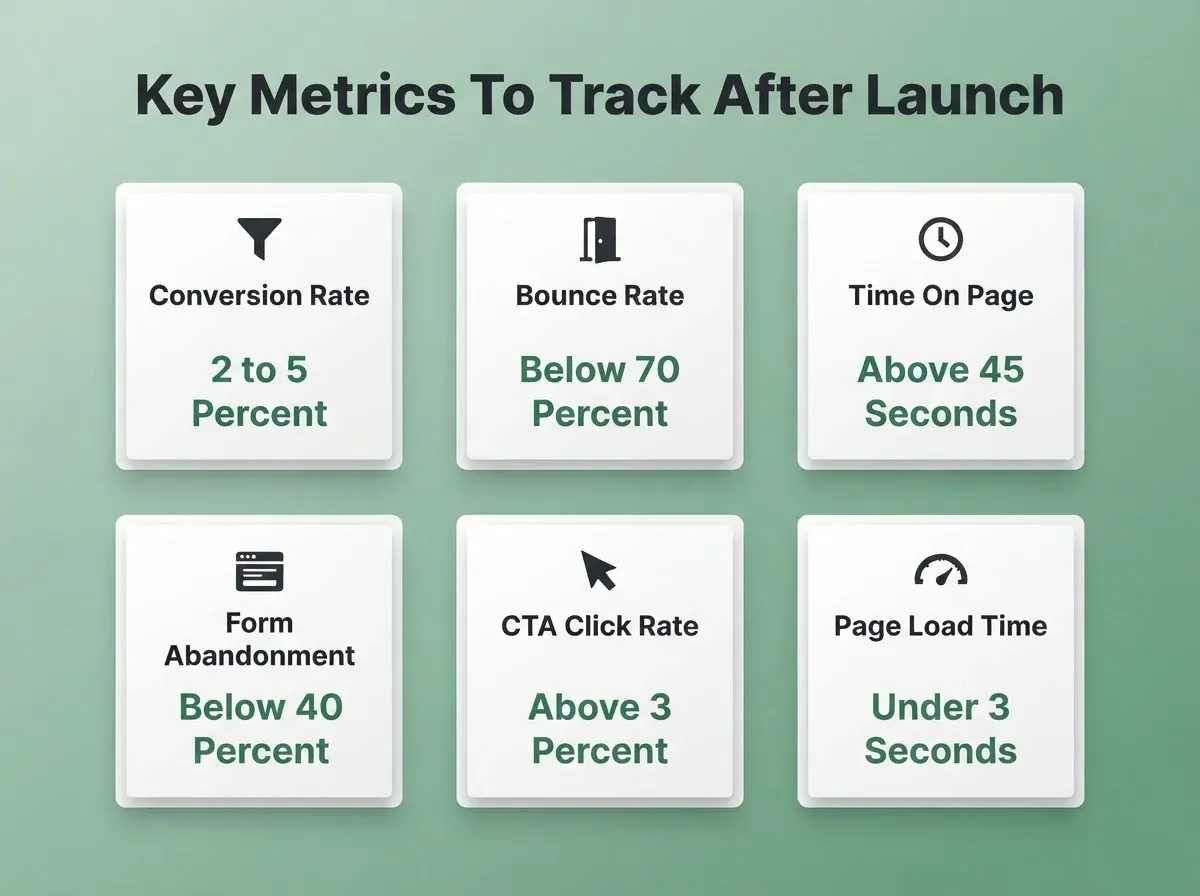
Key metrics to watch after launch:
| Metric | What It Tells You | Target Benchmark |
|---|---|---|
| Conversion rate | Percentage of visitors who complete your goal | 2 to 5% (paid traffic), 5 to 15% (warm traffic) |
| Bounce rate | Percentage who leave without interacting | Below 70% |
| Time on page | How long visitors engage | Above 45 seconds |
| Form abandonment rate | Percentage who start the form but don't finish | Below 40% |
| CTA click-through rate | Percentage who click your primary button | Above 3% |
| Page load time | Core Web Vitals score | Under 3 seconds |
A/B testing guidance: test one variable at a time. That means headline vs. headline or CTA copy vs. CTA copy. Never change two things at once, or you will not know what moved the needle. Run each test until you have at least 100 conversions per variant before concluding.
- Non-coders: In Rocket, type a prompt in chat like "Add Google Analytics tracking with this ID: G-XXXXXXXXXX." Rocket's analytics integration handles this without you needing to touch any code.
- Developers: Use Rocket's inject custom code feature to add your Google Analytics 4 gtag script or drop in Google Tag Manager. Set up a custom conversion event tied to your form submission or CTA button click. Then run a test conversion before sending any live traffic.
This full flow, from setting your goal to tracking your first conversion, takes under two hours inside Rocket. The steps are the same whether you write code or not.
Who Uses Landing Pages? Real Examples by User Type
| User Type | What They Want to Build | How Landing Pages Help |
|---|---|---|
| Startup Founder | A lead gen page for a new SaaS product | Captures emails before the product launches and builds an early audience |
| Freelancer and Creative | A portfolio or service page for a side hustle | Gives potential customers a single focused place to book or contact |
| Small Business Owner | A seasonal promo page to increase sales | Keeps visitors focused on one offer and reduces bounce rate |
| Coach or Consultant | A free strategy session sign-up page | Builds trust with social proof and drives one clear action |
| Nonprofit and Community Org | A donation or volunteer sign-up page | Makes it easy to convert visitors without overwhelming them |
| Digital Marketer | A campaign-specific page for each ad group | Improves Quality Score, lowers CPC, and increases ROAS |
| SaaS Team | A feature launch or pricing tier page | Captures intent at the moment of highest interest |
Landing Page Checklist Before You Hit Publish
Run through this before you send a single visitor to your page.
Strategy
- Goal is defined in one sentence and every section serves it
- PAS worksheet is complete with problem, agitate, and solve mapped
- Message matches the ad or email that will send traffic here
Copy
- Headline passes the Blink Test (clear offer within 3 seconds)
- CTA button uses outcome-oriented copy (not "Submit")
- Form has 3 fields or fewer
Design and Performance
- Hero section is visible above the fold on mobile
- All images are compressed and in WebP format
- Page loads in under 3 seconds
Trust and SEO
- At least one piece of social proof is placed near the CTA
- Meta title and meta description are set (not left as defaults)
- Open Graph tags are set for social sharing previews
- FAQ schema (JSON-LD) added if the page includes a FAQ section
Technical
- Tracking is live (Google Analytics or Meta Pixel confirmed firing)
- Custom domain is connected (or subdomain is acceptable for this campaign)
- Confirmation page or thank-you message is live after form submit
- You know which metric you are optimizing for in week one
For a step-by-step breakdown of what drives traffic to a live page after launch, how to create landing pages with Rocket that drive traffic covers the post-publish growth side.
What Real Users Say About Building Landing Pages
People across industries use landing pages to grow faster. Some are launching products. Others are running local businesses. Here is what a few of them say:
"We used Unbounce for A/B testing our landing page copy. One headline change lifted our conversion rates by 22%." — Digital Marketer at a Mid-Size Agency
For more real-world discussions on what works, join the Rocket Discord community. Founders, freelancers, and developers share landing page feedback, tips, and wins there every day.
How Rocket Helps You Launch Landing Pages Faster
You describe what you want. Rocket generates a full landing page structure from a single prompt. That includes a hero section, call to action, social proof blocks, and a mobile-friendly layout. Pick from 25,000+ templates organized by industry and goal. Customize through chat or visual edit. Then publish to your own domain without switching tools.
Organic search drives roughly 53% of all website traffic. Every Rocket site ships with clean semantic HTML, mobile-responsive layouts, and basic meta tags out of the box. Add optimized meta tags, structured data, and a sitemap in one prompt. From there, your page is ready to compete for rankings from day one.
No separate design tool. No separate developer. No waiting.
Build Your Landing Page Today
Landing pages remain one of the highest-ROI assets in any marketing strategy. As AI-assisted building becomes the default, the gap between a live page and an optimized one will only widen. The quick landing page setup guide you just read covers every layer: strategy, copy, build, and tracking. Teams that act on this framework today will have conversion data, iteration history, and a compounding SEO advantage over those who wait.
You typed the problem. Now build the solution. Start with Rocket and go live today.
Table of contents
- -What is a Landing Page (and What Makes One Actually Convert)
- -Know Your Audience Before You Write a Word of Copy
- -How Landing Pages Drive Conversions
- -Choosing the Right Landing Page Builder
- -Goal-to-Builder Mapping
- -Full Builder Comparison
- -Step-by-Step: Build Your Landing Page with Rocket
- -Step 1: Set One Clear Goal
- -
- -Step 3: Pick a Template or Write a Prompt
- -Step 4: Write Your Headline
- -Step 5: Build Out the Hero Section
- -Step 6: Add Your Form and Call to Action
- -Step 7: Add Social Proof
- -Step 8: Review Rocket's Suggested Additions
- -Step 9: Connect Your Domain and Publish
- -Step 10: Track, Test, and Improve
- -Who Uses Landing Pages? Real Examples by User Type
- -Landing Page Checklist Before You Hit Publish
- -What Real Users Say About Building Landing Pages
- -How Rocket Helps You Launch Landing Pages Faster
- -Build Your Landing Page Today